












While some companies run Moodle with the default feature set, others expand it into a full learning and training infrastructure with Moodle plugins.
The Moodle learning platform is capable of many things, but in order not to limit its capabilities to only delivering courses, it uses a plugin system. Do you need to add reporting tools with support for compliance tracking to your instance? You can install the appropriate plugin. Do you want to reach more students? You can install a plugin that adds gamification to your LMS.
And although some plugins strengthen the platform in terms of functionality, a large number of randomly installed plugins will inevitably create operational risk.
We prepared this guide with one goal: to explain how to evaluate Moodle plugins through a business capability lens. All the insights in this article are based on real implementation work from LMS specialists, including teams such as Raccoon Gang, who build and maintain Moodle ecosystems and also develop custom plugins.
Looking ahead, we can say that the selection of plugins determines whether your Moodle platform will only provide access to courses or actually support real business processes. Now let’s look at everything step by step.
TL;DR
- Moodle plugins extend LMS functionality without rebuilding the platform
- Most organizations rely on plugins for integrations, reporting, and automation
- Plugin ecosystems require governance to avoid compatibility and upgrade issues
- Excessive plugin usage may create maintenance complexity
- The right approach balances flexibility with platform stability
What Is Moodle and Why Its Plugin Ecosystem Matters
The most accurate answer to the question “What is Moodle?” comes from universities, training providers, and corporate L&D teams. After all, these sectors are among the most common users of Moodle LMS for online learning programs.
In simple terms, Moodle LMS is an open-source learning management system. It manages courses, users, assessments, and learning progress within one environment.
Since the system is open source, teams often choose Moodle because they retain control over the platform without becoming dependent on a vendor or SaaS costs.
Moodle LMS has a feature that tips the scales in its favor. This feature is extensibility. Your organization can expand the platform through a large ecosystem of available plugins. Without involving developers in custom development, your instance can get new activities, integrations, reporting tools, and even automation capabilities.
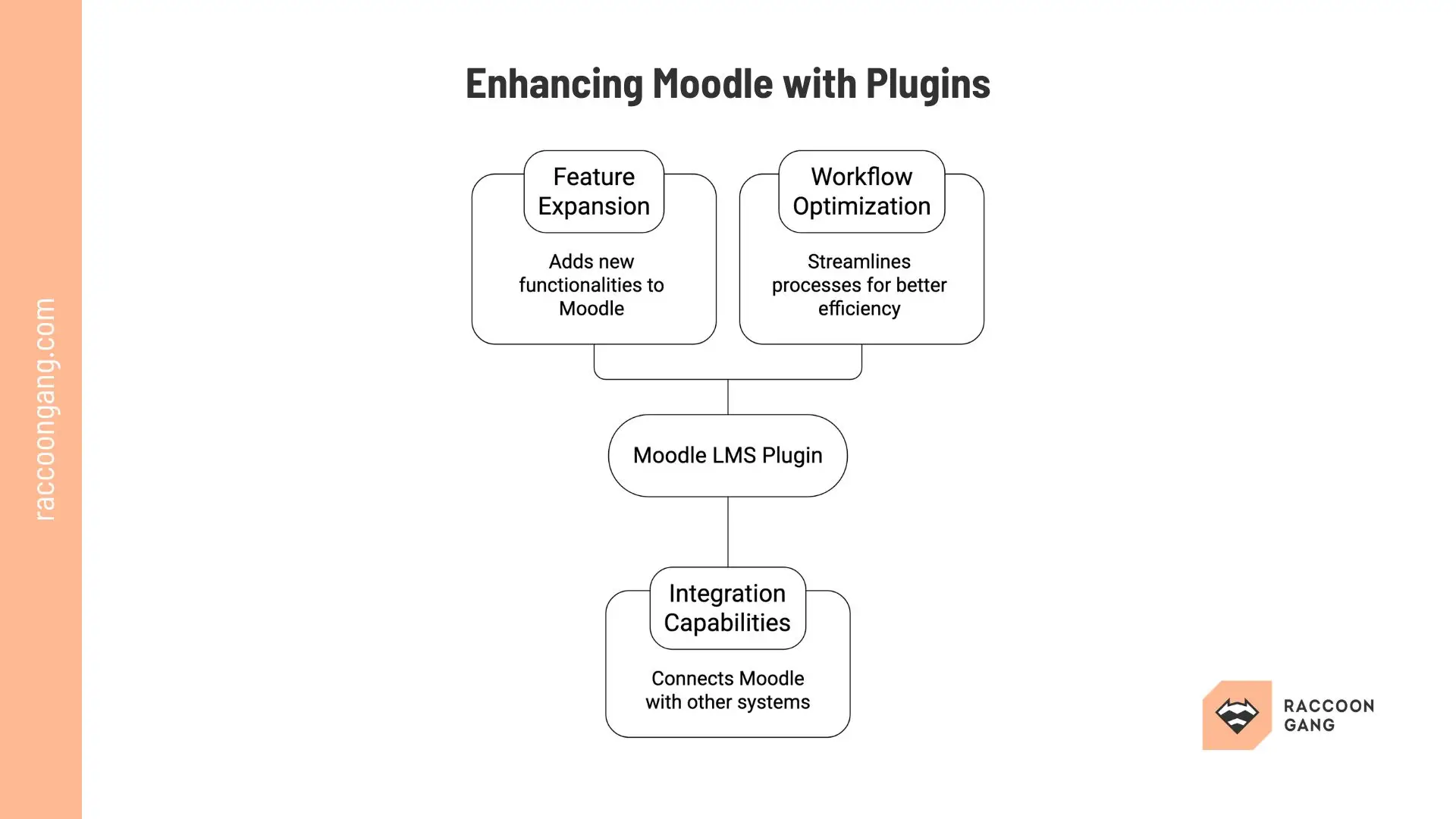
What Is a Moodle Plugin and How Does It Extend the LMS
A Moodle plugin is a software module for the core learning management system. You can install a selected Moodle plugin to extend your LMS functionality.
Most plugins for Moodle fall into several common categories:
- Activities
- Blocks
- Reports
- Integrations
- Authentication plugins
More over 2,700 Moodle extensions are available for download and installation now in the official Moodle Plugins directory.
Most Moodle plugins you can install in just a few steps. Download the extension from the Moodle Plugins directory, upload the ZIP through Site Administration → Plugins → Install, and enable it.
It also helps to understand how Moodle LMS is structured. The platform typically operates across three layers:
- Core features provide the standard learning framework.
- Plugins extend functionality with new capabilities.
- Themes control the visual layer and branding of the LMS.
Now let’s examine which plugins truly expand your LMS capabilities — and which ones only increase system complexity.
Best Moodle Plugins by Category
If your goal is not simply to experiment with extensions for Moodle LMS, below we provide plugin categories widely used in real Moodle environments.
Engagement & Gamification Plugins
| Plugin | Key Features | Installs/Downloads |
| Level Up! XP | XP points, levels, leaderboards for actions like quizzes | 10k+ sites |
| H5P | Interactive videos, quizzes, collages | 27k+ sites |
| Game | Quizzes as crosswords, hangman | 8k+ sites |
| Stash | Item collection, treasure hunts | 1k+ sites |
Level Up! XP
Level Up! XP adds experience points to Moodle courses. Learners earn XP when they complete activities or interact with course materials. The plugin visualizes progress through levels and motivates learners to stay active in the course.
- Best for: Corporate onboarding programs and long learning paths.
- Complexity level: Medium — requires configuration of scoring rules and progress logic.
- Operational impact: Encourages continuous learner activity and can increase course completion rates.
* When training is strictly compliance-based, game mechanics may distract from formal assessment, so this plugin will not benefit you.
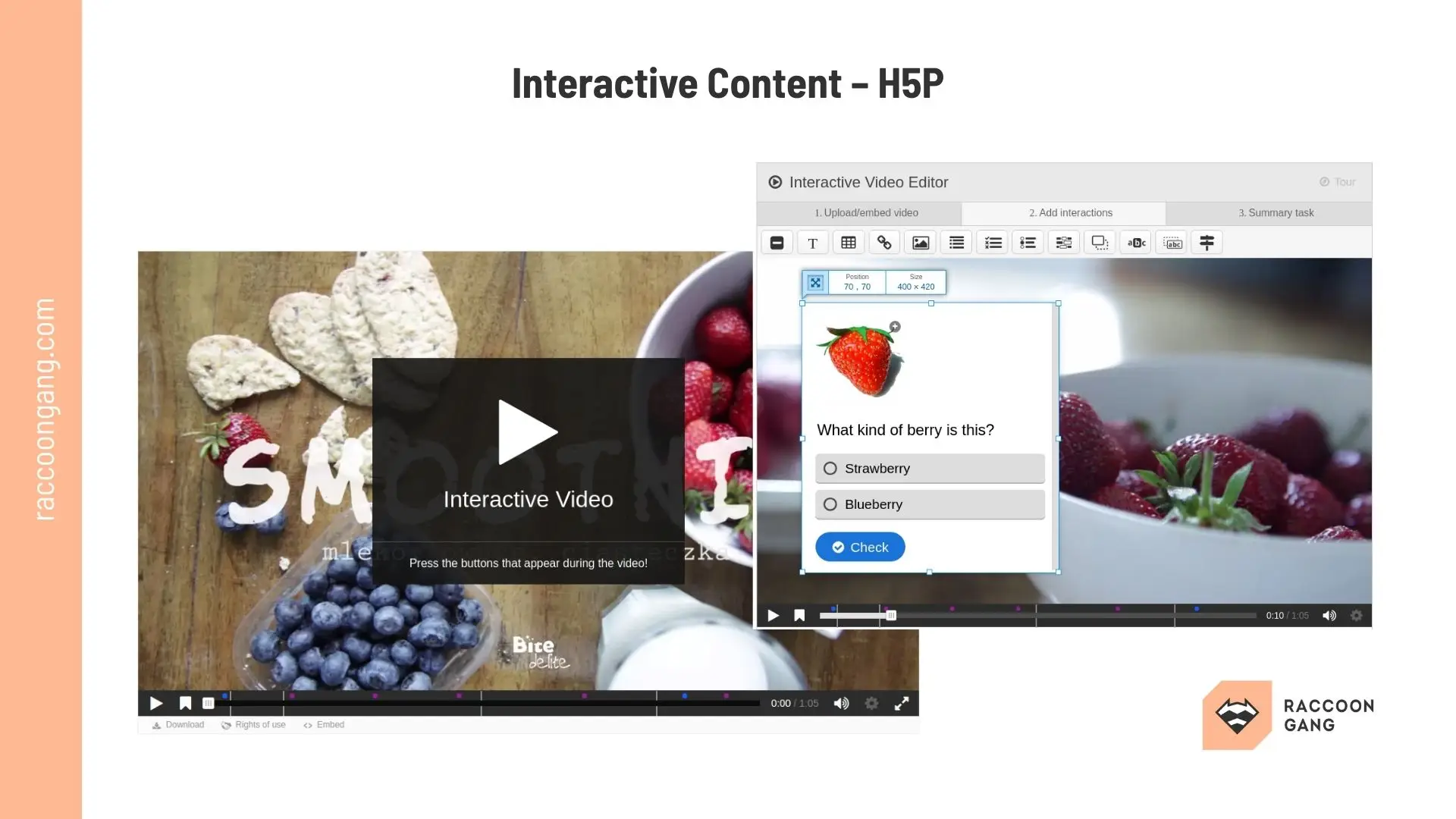
Instructional designers can create interactive learning experiences in Moodle, including quizzes and interactive videos.
H5P
H5P makes course materials more engaging and interactive. Instructors can create interactive learning content directly in Moodle. The plugin opens up for your quizzes, interactive videos, presentations, and simulations directly inside the platform.
- Best for: Teams that want to create interactive course elements instead of static learning materials.
- Complexity level: Medium — content creation requires instructional design effort.
- Operational impact: Improves learner engagement and enables richer learning activities inside Moodle.
* When your course teams lack time or resources to produce interactive content, function the plugin provides may overwhelm them.
Game
The Game plugin turns quiz questions into simple learning games. Moodle question banks can generate crosswords, hangman games, and quiz challenges. This approach helps reinforce knowledge through repetition.
- Best for: Knowledge reinforcement and microlearning activities.
- Complexity level: Low — configuration is straightforward.
- Operational impact: Adds variety to course activities and supports memorization-based learning.
* When training programs require strictly formal instructional formats, game activities would be inappropriate.
Stash
Stash introduces collectible items into Moodle courses. Instructors hide digital objects across course pages. Learners collect these items while progressing through activities and lessons.
- Best for: Scenario-based learning and exploratory training environments.
- Complexity level: Low — basic configuration is simple.
- Operational impact: Encourages course exploration and repeated learner interaction.
* When course design follows a strict linear progression, this feature is not necessary.
Reporting & Analytics Plugins
| Plugin | Key Features | Pricing |
| IntelliBoard | 50+ dashboards, real-time data | Subscription |
| Configurable Reports | Custom reports without SQL | Free/Premium |
| Zoola Analytics | User-friendly insights, wide reports | Subscription |
| LearnerScript | 80+ templates, responsive | One-time fee |
Configurable Reports
Configurable Reports allows administrators to build custom reports inside Moodle. The plugin supports flexible queries and data exports. Organizations may use it instead of standard Moodle reports.
- Best for: Organizations that require flexible reporting beyond standard Moodle analytics.
- Complexity level: Medium to high — advanced reports often require SQL knowledge.
- Operational impact: Expands the ability to generate tailored learning analytics and compliance reports.
* If internal teams lack technical capacity to maintain custom reports, it is better to skip this plugin for now.
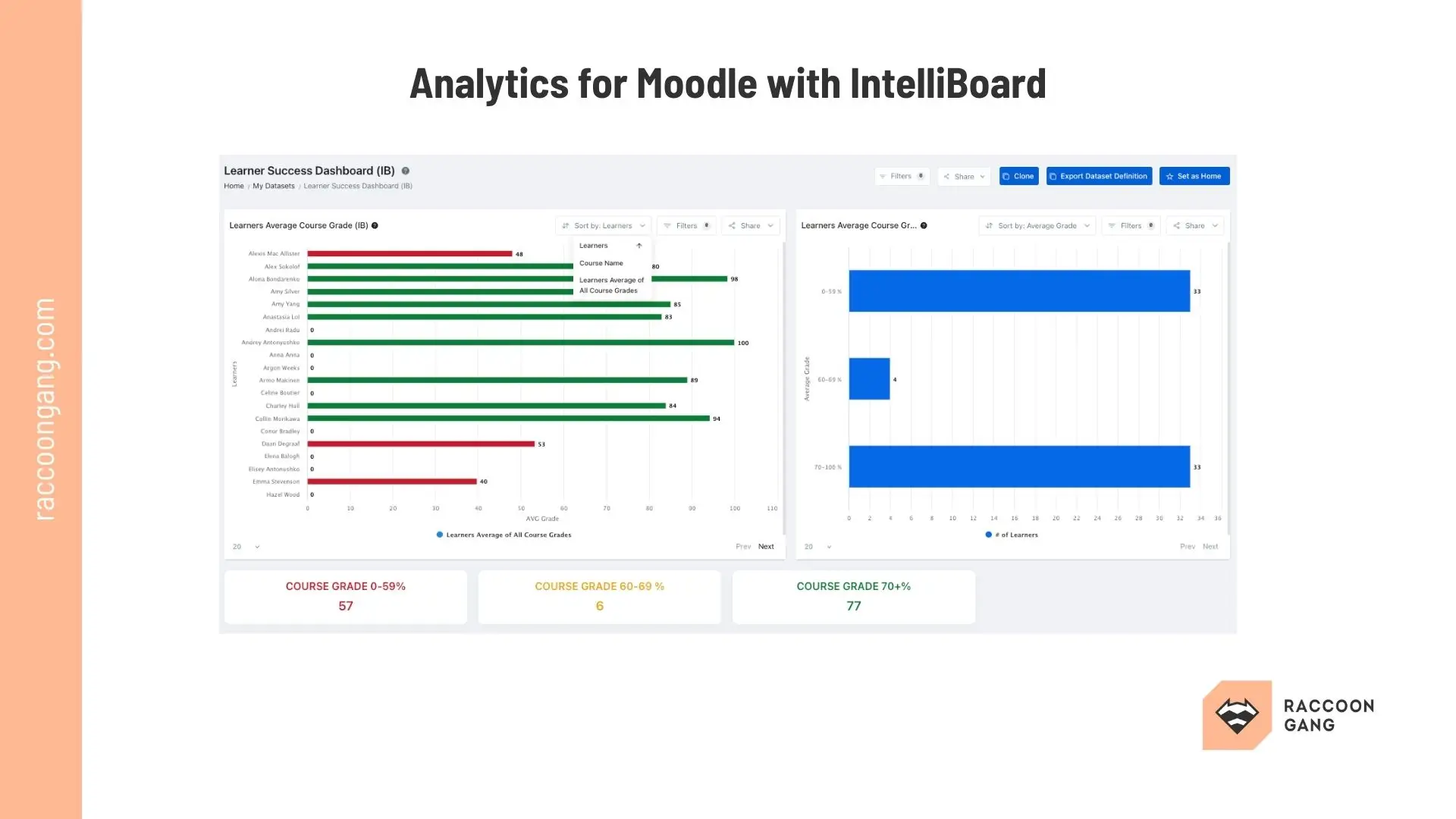
IntelliBoard
IntelliBoard plugin expands standard Moodle reporting and analytics. With the plugin, you can visualize learner progress and different course activities. Administrators can use it to monitor learning data and compliance indicators.
- Best for: Enterprises that require structured reporting and executive-level learning dashboards.
- Complexity level: Medium — requires configuration and reporting setup.
- Operational impact: Improves visibility into learning performance and compliance status.
* When standard Moodle reporting already covers your organization’s needs, the plugin can be skipped.
Zoola Analytics
Zoola Analytics adds advanced learning analytics to Moodle. The plugin generates dashboards that show engagement patterns and learner progress. These insights help training teams analyze program performance.
- Best for: Organizations seeking deeper insight into learner engagement and performance trends.
- Complexity level: Medium — requires configuration and data interpretation.
- Operational impact: Supports strategic decisions based on learner activity patterns.
* When reporting needs remain simple or operational teams lack analytics expertise, this plugin may not be necessary.
LearnerScript
LearnerScript provides customizable dashboards and reporting tools for Moodle. Administrators can generate reports for courses, departments, or entire learning programs. The plugin helps organizations monitor training activity at scale.
- Best for: Large Moodle installations with structured reporting requirements.
- Complexity level: Medium — configuration requires administrative setup.
- Operational impact: Improves access to training data for managers and administrators.
* When organizations only require basic learning statistics, you can safely ignore this plugin.
Integration Plugins (LTI, Zoom, CRM)
| Plugin | Key Features | Notes |
| BigBlueButton | Live classes, breakout rooms | Free, built-in alternative |
| Zoom Meeting | Scheduling, attendance via LMS | Embed in courses |
| LTI Pro | Connects Zoom/LTI tools to Moodle | Admin config needed |
| Custom CRM (e.g., Accipio) | Grade/assignment syncing | For quality assurance |
BigBlueButton
BigBlueButton integrates a virtual classroom into Moodle. Instructors can run live training sessions, share presentations, and interact with learners in real time. Sessions are scheduled and managed directly within course pages.
- Best for: Instructor-led online training programs and live workshops.
- Complexity level: Medium — requires server configuration or hosted service.
- Operational impact: Allows synchronous training sessions to run within the LMS environment.
* When another conferencing platform is already standardized across the organization, the plugin is unlikely to add value.
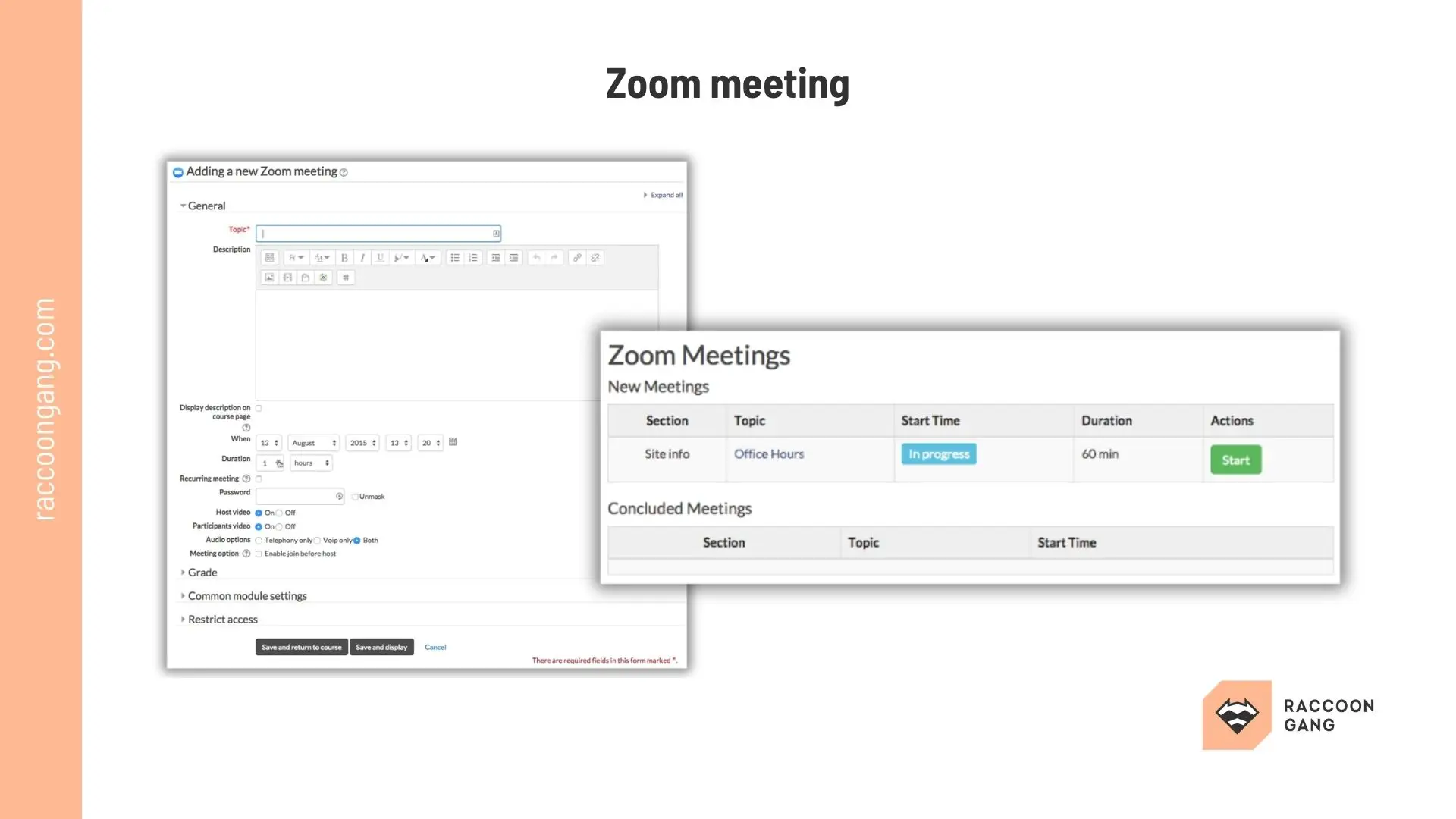
Zoom Meeting
Zoom Meeting connects Zoom sessions with Moodle courses. Instructors can schedule meetings and manage attendance directly from the LMS. Recordings and session links appear inside course activities.
- Best for: Blended learning programs and scheduled training sessions.
- Complexity level: Low to medium — setup mainly involves API configuration.
- Operational impact: Simplifies management of live sessions inside course workflows.
* When the organization uses alternative webinar tools, the plugin may not justify installation.
LTI Pro
LTI Pro connects Moodle with external learning tools using the LTI integration standard. Training teams can embed third-party learning platforms and tools directly into Moodle courses. This allows multiple systems to operate within one learning environment.
- Best for: Organizations running multiple learning platforms or external course providers.
- Complexity level: Medium — requires integration configuration.
- Operational impact: Allows external learning tools to function as part of the Moodle environment.
* When external learning services are not part of the training infrastructure his plugin can be skipped.
Custom CRM Integration (e.g., Accipio)
CRM integration plugins connect Moodle with customer management systems. Learner enrollments and training activity synchronize with CRM records. Training providers often use this integration to align learning programs with customer data.
- Best for: Training providers that manage customers and learning in separate systems.
- Complexity level: High — usually requires custom integration development.
- Operational impact: Aligns learning activity with customer lifecycle data.
* When training operations do not require CRM synchronization, this plugin may not be necessary.
Assessment & Certification Plugins
| Plugin | Key Features | Notes |
| Custom Certificate | Automated PDF certificates | Customizable templates |
| Edwiser Rapid Grader | Bulk grading, aggregation | Effortless feedback |
| Grade Me | Unmarked submissions list | Multi-course view |
| Accipio Grade | IQA/EQA, plagiarism checks | End-to-end QA |
Custom Certificate
Custom Certificate generates certificates automatically when learners complete a course. Administrators design certificate templates and define completion rules. The plugin simplifies certification workflows.
- Best for: Certification programs and professional training.
- Complexity level: Low — configuration is straightforward.
- Operational impact: Automates credential delivery and reduces manual administration.
* When certification is not part of your training model, it would be better to avoid this extension.
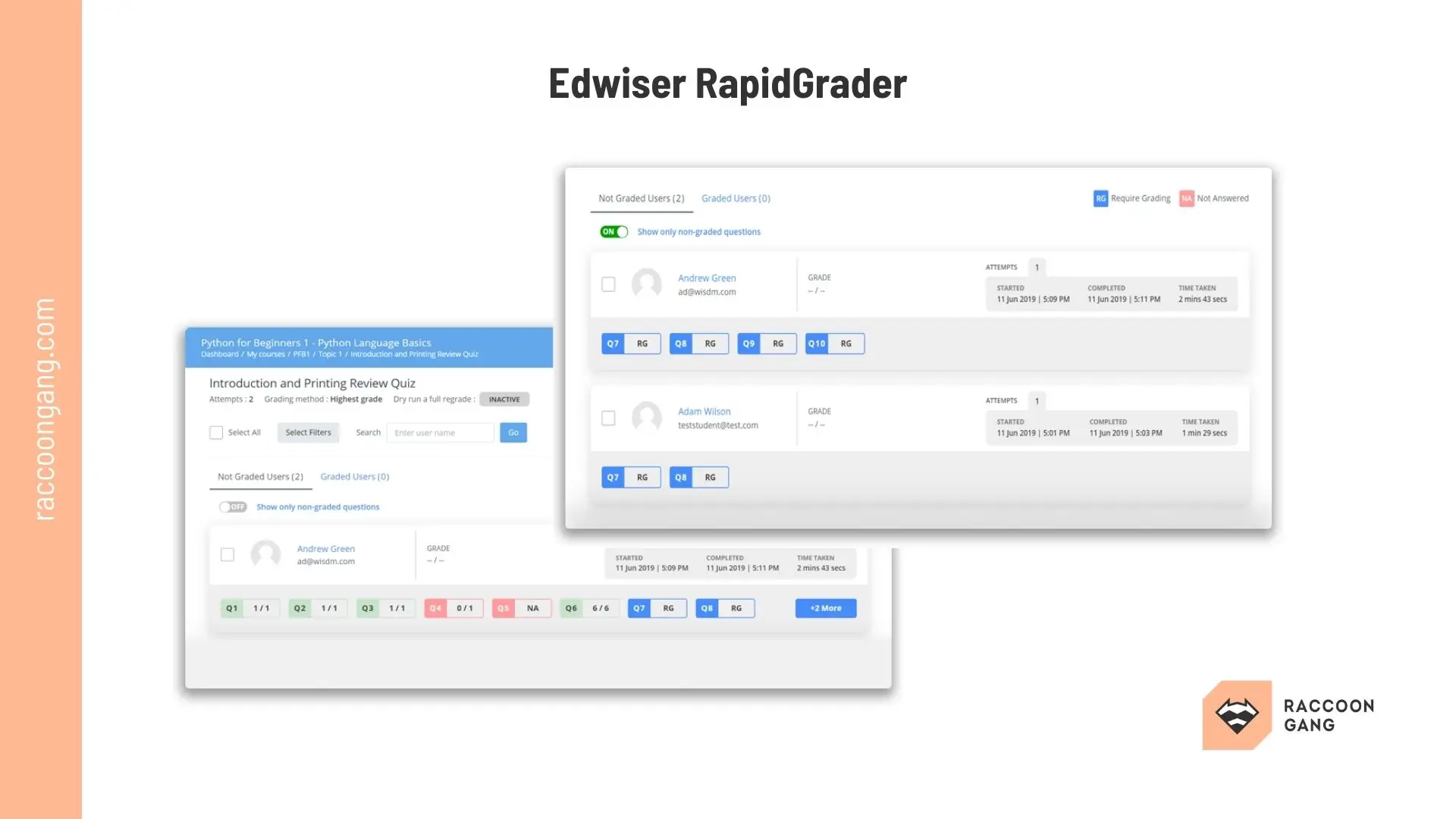
Edwiser Rapid Grader
Edwiser Rapid Grader plugin is designed to simplify the grading process inside Moodle. The plugin reduces the time required to evaluate large numbers of submissions.
- Best for: Courses with large volumes of manual grading.
- Complexity level: Low — integrates directly into Moodle grading workflows.
- Operational impact: Reduces grading time for instructors.
* Avoid when most assessments use automated grading.
Grade Me
Grade Me helps instructors identify submissions that require grading. The plugin highlights assignments waiting for evaluation across courses. This improves grading workflow visibility.
- Best for: Courses with multiple assignments requiring manual review.
- Complexity level: Low — minimal setup required.
- Operational impact: Helps instructors quickly identify pending grading tasks.
* Avoid when grading workloads are small.
Accipio Grade
Accipio Grade extends Moodle grading workflows. It supports structured assessment processes and detailed grading management. Organizations often use it in certification and regulated training programs.
- Best for: Professional certification and regulated training environments.
- Complexity level: Medium — requires configuration of grading structures.
- Operational impact: Improves consistency and control in certification programs.
* Avoid when standard Moodle grading tools already fulfill your requirements.
UX & Navigation Plugins
| Plugin | Key Features | Notes |
| Edwiser RemUI | Modern themes, progress bars | Responsive dashboards |
| Moove | Clean, mobile-friendly theme | High downloads |
| Adaptable | Customizable blocks, navigation | Flexible layouts |
Edwiser RemUI
Edwiser RemUI redesigns the Moodle interface with modern dashboards and navigation. Administrators can configure the interface without building a custom design.
- Best for: Organizations that want to improve user experience without building a custom interface.
- Complexity level: Medium — configuration required to match organizational structure.
- Operational impact: Improves navigation clarity and learner experience.
* If a custom UI or theme has already been deployed, you can safely ignore this plugin.
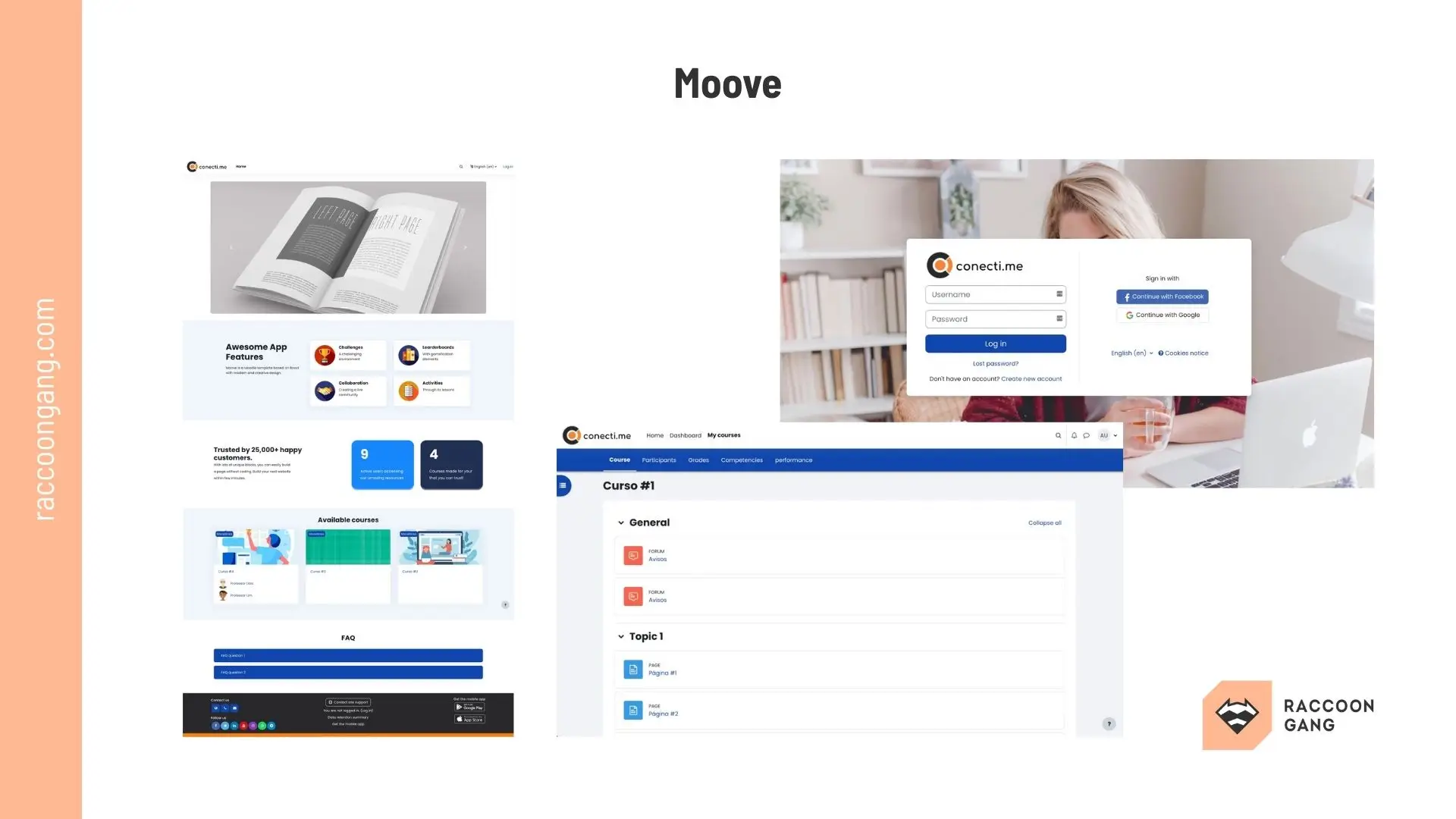
Moove
Moove provides a clean and responsive theme for Moodle. The interface simplifies navigation and improves course page organization.
- Best for: Organizations that want a cleaner learner interface without investing in full UI customization.
- Complexity level: Low — installation and configuration typically require minimal development work.
- Operational impact: Improves learner navigation and visual consistency across courses, which can increase usability for large course catalogs.
* Avoid when the LMS already runs a heavily customized theme or when deep branding customization is required.
Adaptable
Adaptable is an add-on for a highly configurable Moodle theme. Administrators would adjust layout and colors through built-in settings.
- Best for: Organizations that want strong visual customization without building a theme from scratch.
- Complexity level: Medium — requires configuration to match platform structure.
- Operational impact: Improves navigation flexibility and supports different course presentation models.
* Avoid this plugin for Moodle when the LMS requires a fully customized UI.
How to Choose the Right Moodle Plugin for Your LMS Architecture
To keep plugin integration safe for your Moodle LMS, avoid installing too many extensions. More plugins do not automatically mean a better LMS.
Use the list of plugins from the previous block to identify the areas where your platform may actually need expansion.
“Remember that each plugin adds code, configuration, and upgrade responsibility. Over time, a large plugin stack can complicate maintenance and reduce platform stability.”
— Volodymyr Chekyrta, Engineering Manager at Raccoon Gang
Before installing a new extension, ask yourself a few practical questions. These will help you decide whether the plugin truly belongs in your Moodle instance.
Does it solve my core training problem?
Don’t focus on the more than 2,500 plugins available for the Moodle platform. Evaluate each one through the operational need filter. If the plugin does not support a clear training workflow, it may only add unnecessary complexity.
Is the plugin actively maintained?
The Moodle Plugins directory clearly shows how often each plugin is downloaded and installed. Use these indicators as additional signals when making your decision. Also check update frequency and developer activity to avoid relying on abandoned software.
Will it affect upgrade compatibility?
Every Moodle upgrade requires plugin validation. The logic here is simple. The more extensions installed, the higher the chance that some will require additional development effort during upgrades.
Would custom development be a better option?
In some scenarios, a custom feature — or even a custom LMS — may be a better choice than assembling functionality from multiple plugins that partially duplicate each other.
In practice, a well-managed Moodle environment runs on a small set of carefully selected plugins. Each one supports a specific capability. Each one justifies its place in the platform.
4 Main Risks of Overusing Moodle Extensions
It’s a fallacy that plugins live independently from your LMS. Every extension also becomes part of the platform architecture. To make sure your extensions don’t fly in the face of common sense, it’s important not to overdo it. Here are the potential risks that await you if there are too many extensions on your platform.
| Risk | What Causes It | Operational Impact |
| Plugin conflicts | Multiple plugins modify the same Moodle components | Features may behave unpredictably and require developer troubleshooting |
| Performance degradation | Plugins introduce additional database queries and scripts | Course pages may load slower and server resource usage increases |
| Upgrade complications | Plugins may not support the latest Moodle versions | LMS upgrades may be delayed or require emergency fixes |
| Security exposure | Poorly maintained or abandoned plugins | Vulnerabilities may remain unresolved and expose learner data |
- Risk one is plugin conflicts. When different plugins modify the same Moodle components, this leads to unpredictability. Each extension may pull functionality toward itself and override the behavior of another. Without developer investigation and testing, resolving these conflicts is practically impossible.
- Risk two is performance degradation. As each plugin introduces additional database queries and scripts, server resource usage inevitably increases.
- Risk three is upgrade complications. Moodle releases frequent updates, which means every upgrade requires verification of installed plugins for compatibility with the new version. The larger the plugin stack, the higher the risk that something will go wrong.
- The fourth risk is security exposure. On one side of the scale is new functionality. On the other is third-party code added to your LMS environment through plugins. If your database contains confidential data—and it most likely does—use the advice provided in the “How to Choose the Right Moodle Plugin” block and select add-ons that are actively maintained, regularly updated, and widely used.
There is only one thing left to add here: a smaller, well-managed plugin ecosystem is easier to maintain.
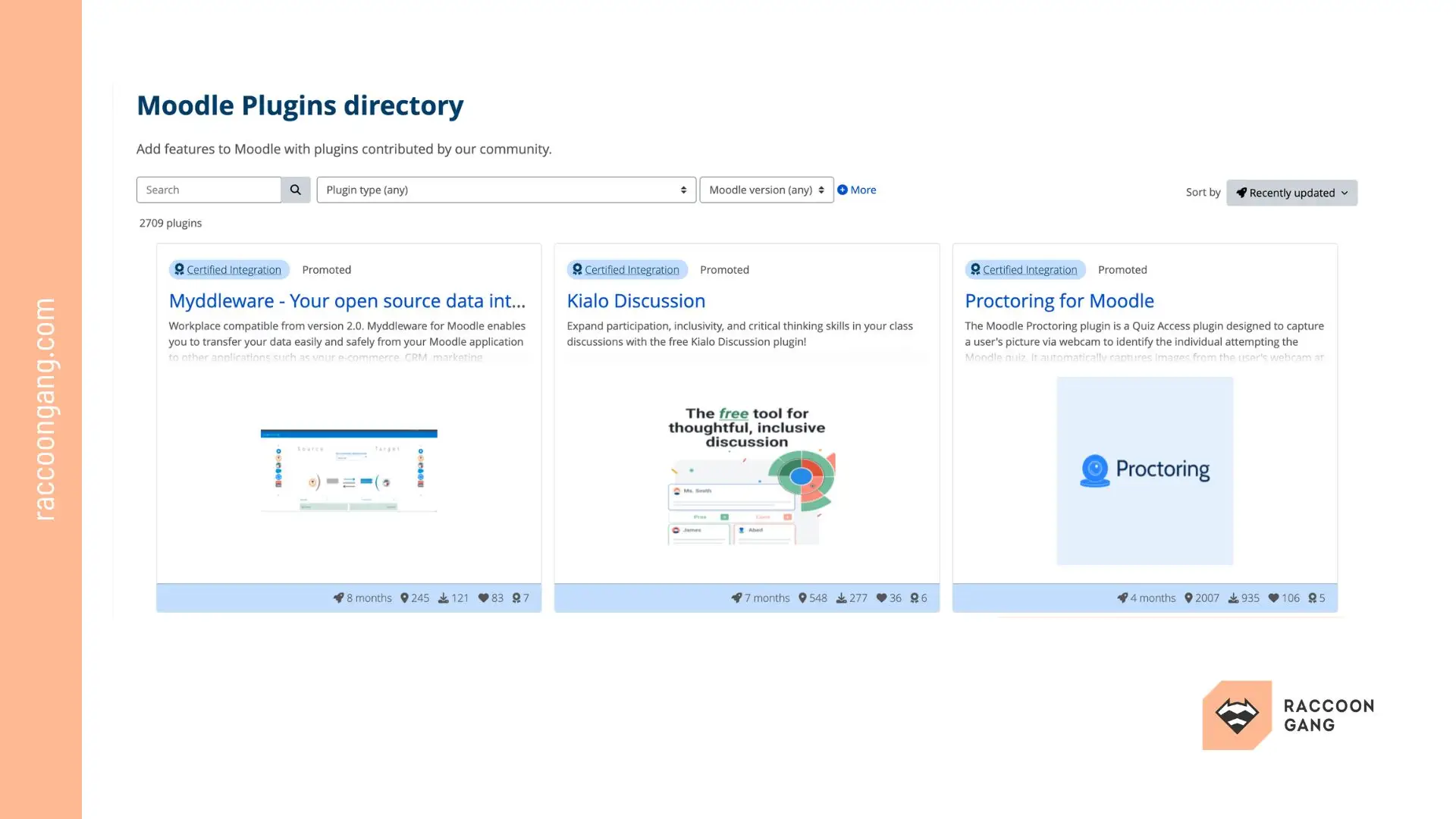
The main Moodle Plugins Directory displays available extensions for the platform. Each plugin page provides key details such as its description, number of downloads, user ratings, reviews, and compatibility with Moodle versions.
Moodle Plugins and LMS Scalability Considerations
Moodle scalability can be impressive if your scale is still small (for example, up to several thousand users). A large number of plugins can help your platform gain missing functionality. Moodle is very adaptable in this regard.
However, at enterprise scale, plugin governance directly affects performance and maintenance.
Performance considerations
Organizations that operate large course catalogs or support thousands of learners should think twice before adding something to the platform core. The impact on system performance is inevitable.
Maintenance complexity
When dozens of plugins run simultaneously inside the platform, compatibility and configuration management become necessary. All this requires hours of work from administrators or becomes part of a vendor maintenance package.
Upgrade cycle management
In mid- to large-scale organizations, a large number of plugins can make upgrades significantly harder. In many cases, organizations launch a separate upgrade project with external expertise.
Architectural governance
At a small scale, plugins provide fast functional expansion. At enterprise scale, the platform should run on a controlled plugin stack where each extension supports a clearly defined capability.
Multi-tenant environments
Multi-tenant Moodle platforms usually follow stricter plugin policies. Administrators often limit installations to a small set of approved extensions that support common capabilities across tenants.
Conclusion
Moodle gives organizations rare freedom. The platform does not lock you into a fixed feature set. Instead, it allows you to build the LMS around your training model.
That freedom comes with architectural responsibility.
“Plugins make it possible to expand Moodle quickly. Yet long-term success rarely comes from installing extensions one by one as new requests appear. Sustainable platforms grow through deliberate planning.”
— Sergiy Tytenko, Chief Product Office at Raccoon Gang
Treat your plugin stack as part of the system design. Define the capabilities your training program requires. Then choose extensions that support those capabilities without introducing unnecessary complexity.
Organizations that approach Moodle this way build a platform that evolves with their learning strategy, not one that constantly requires repair.
FAQ
What are Moodle plugins?
Extensions for Moodle LMS. Installed inside the platform. Add new capabilities. Interface elements. Activities. Integrations. Reports. Authentication methods.
How do I install a plugin in Moodle?
Download from the Moodle Plugins directory. Upload ZIP via Site Administration → Plugins → Install. Moodle checks compatibility. Activate. Configure.
Are Moodle plugins free?
Many plugins are free. Published by community developers. Available in the official directory. Some vendors may also provide paid extensions, and you receive a check for extra features or support.
Can too many Moodle plugins affect performance?
Yes. More plugins ≠ better LMS. Conflicts possible. Duplicate functionality. Higher maintenance load. Potential performance impact.
What is the difference between Moodle modules and plugins?
Plugins = extension system. Modules = plugin type. Used for learning activities. Example: quizzes. Assignments.




- TL;DR
- What Is Moodle and Why Its Plugin Ecosystem Matters
- What Is a Moodle Plugin and How Does It Extend the LMS
- Best Moodle Plugins by Category
- How to Choose the Right Moodle Plugin for Your LMS Architecture
- 4 Main Risks of Overusing Moodle Extensions
- Moodle Plugins and LMS Scalability Considerations
- Conclusion
