







What SCORM is a question most eLearning professionals have answered at least once, usually with something like “it’s the standard that makes courses work in an LMS.” That is not wrong. It is also not the whole picture — and the parts that get left out are exactly the ones that matter when something breaks. This article covers all of it.
TL;DR
- SCORM — Sharable Content Object Reference Model — is the technical specification that lets eLearning content run on any compatible LMS.
- It is not an LMS and not an authoring tool. It is the agreement between them
- 92% of course launches tracked in SCORM Cloud are still SCORM (Rustici Software, 2025).
- SCORM is used in corporate training, compliance programs, and course marketplaces worldwide.
- SCORM 1.2 and SCORM 2004 are both still in active use.
Before SCORM existed, training content built for one platform would not run on another — every LMS spoke its own language. Switching vendors meant rebuilding your course library. For anyone managing a large catalog, that was not a theoretical concern. SCORM gave everyone a common language to work from, and once that language got embedded deeply enough, replacing it became harder than just continuing to use it.
What Is SCORM?
The SCORM definition sounds dry on paper: a collection of technical specifications governing how eLearning content is packaged and how it communicates with an LMS. But the practical meaning is simpler. If a course is SCORM-compliant and an LMS is SCORM-compliant, they will work together — with no custom integration, no platform-specific rebuilds, no calls to the vendor.
The scorm meaning traces back to a specific frustration. In the late 1990s, the U.S. Department of Defense was spending money building training content that could not move between systems. The Advanced Distributed Learning initiative was tasked with fixing that. They did not invent new technology, but looked at what already existed, identified what was missing, and wrote a reference model that pulled it together. That reference model became SCORM. Twenty-five years later, it is still the default.
What Does SCORM Stand For?
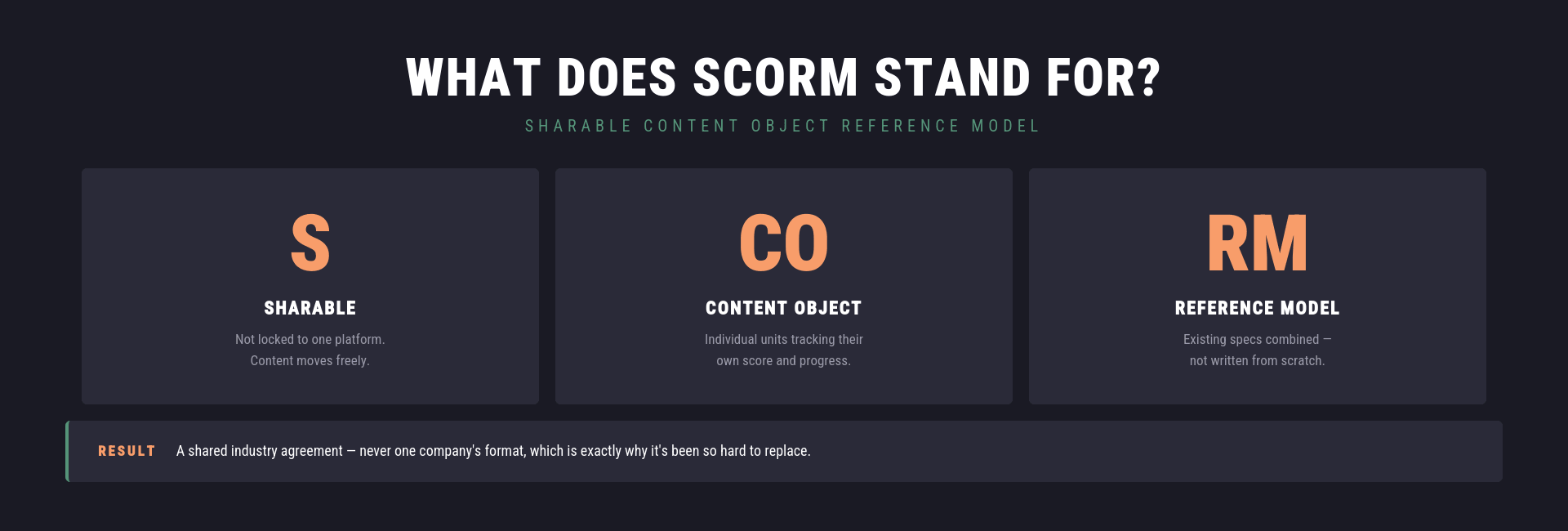
SCORM stands for Sharable Content Object Reference Model. Worth unpacking each piece, because the name actually describes how it works:
- Sharable — content built to SCORM spec is not locked to one platform; it moves.
- Content Object — the individual learning units inside a SCORM package. Those who communicate with the LMS can track their own completion status, score, and progress; others are simply delivered without reporting anything back.
- Reference Model — ADL did not write SCORM from scratch. They referenced existing specifications and defined how to combine them. That is why it is a reference model, not a standard.
That last point is why SCORM has survived so long without a major rewrite. It was never one company’s proprietary format. It was a shared agreement — and shared agreements are hard to replace.
How Does SCORM Work?
A SCORM course is not a single file — it is a package. A ZIP file containing everything an LMS needs to import, launch, and track the content. That distinction matters more than it sounds, because understanding what is inside the package is what makes the rest of SCORM make sense.
The package contains the course media, the interaction logic, and a file called imsmanifest.xml. That manifest is what the LMS goes to first — describing the course structure, identifying every asset the platform needs, and specifying which SCORM version the content uses. A corrupted or missing manifest means the LMS has nothing to work from. The rest of the package is irrelevant without it.
Once the package is imported and a learner launches the course, run-time communication starts. At that point, the content and the LMS are talking to each other through a standardized set of API calls — passing learner name, module progress, quiz scores, time spent, completion status back and forth using a shared vocabulary that SCORM defines on both sides. That data lands in the LMS and shows up in reports.
SCORM files, SCORM packages, SCORM modules — different labels, same thing: the ZIP, the manifest inside it, and everything else the LMS needs to run the course.
Benefits and Limitations of SCORM

Benefits
- Interoperability. A course built to SCORM spec runs on any SCORM-compliant LMS. Switch platforms, keep your content library intact. For organizations managing large catalogs or distributing courses to multiple clients, that portability is worth a lot — it means content is an asset that travels with the organization, not a sunk cost tied to a specific vendor.
- Tracking standardization. The data SCORM sends from content to LMS follows a defined spec — completion status, scores, time spent, pass/fail. That standardization is what compliance teams actually rely on when they need consistent audit trails across platforms. The caveat is that “SCORM-compliant” covers a range: different LMS implementations interpret the specification with their own edge case handling, which is why testing against your specific platform before rollout matters.
- Vendor independence. Because SCORM content is not tied to any specific platform, organizations are not locked in. That changes the negotiating position when LMS contracts come up for renewal.
- Ecosystem maturity. 92% of course launches tracked through SCORM Cloud are still SCORM courses. Every major authoring tool exports it, and every serious LMS supports it. That reduces integration friction in ways that newer standards simply cannot yet match.
Limitations
- Narrow analytics. SCORM tracks more than people assume — lesson status, raw scores, session time, bookmarks, suspend data, and interaction-level detail through cmi.interactions. SCORM 2004 adds progress measure, separate completion and success statuses, and objectives tracking. The gap is behavioral data outside the LMS: what learners do in other tools, how they navigate between sessions, and learning that happens off-platform. That is the territory xAPI was built for.
- Packaging overhead. Every update requires a full re-export and re-upload. There is no way to push incremental changes to live content. For courses that change frequently — quarterly compliance updates, product training that tracks a release cycle — that maintenance burden accumulates.
- LMS dependency. SCORM is tightly coupled to the browser-based LMS environment. Offline learning and mobile experiences outside the browser are genuinely difficult to support without workarounds.
SCORM vs. Other eLearning Standards
Nobody picks SCORM in a vacuum. It gets chosen — or rejected — in comparison to something else, usually xAPI, and occasionally AICC, cmi5, or H5P, depending on the context. Here is what those comparisons actually come down to.
- SCORM vs xAPI. xAPI came out of frustration with SCORM’s tracking limits, and it shows. SCORM knows what happens inside an LMS-based course. xAPI can capture learning that happens anywhere — a mobile app, a simulation, a conversation logged in a third-party tool, or offline activity. The data vocabulary is orders of magnitude richer. The tradeoff is that xAPI requires a Learning Record Store on top of the LMS, and the implementation is more involved. Organizations that need reliable compliance tracking and broad platform support tend to stay on SCORM 1.2 — it is the simpler path. Teams that have the infrastructure and genuinely use learning analytics data are moving to xAPI.
- SCORM vs AICC. AICC came before SCORM — an earlier standardization attempt built originally for aviation training. It communicated over HTTP rather than JavaScript, which made it workable in certain enterprise setups, but the organization behind it dissolved and handed CMI5 stewardship to ADL. New AICC content is essentially nonexistent at this point. Organizations still sitting on legacy AICC libraries are working on migration plans.
- SCORM vs CMI5. CMI5 sits on top of xAPI and adds the kind of structure SCORM users are used to — defined packaging rules, required tracking data points, predictable completion behavior. It keeps the richer data xAPI enables while making compliance reporting more consistent. If SCORM feels too rigid and raw, xAPI feels too open-ended, and CMI5 is the middle ground. Adoption is picking up in 2026, particularly in regulated industries where audit trails are non-negotiable.
- SCORM vs H5P. H5P is a framework for building interactive HTML5 content. The comparison comes up because H5P embeds in LMS platforms and can report via xAPI or SCORM, depending on configuration. But they are solving different problems. H5P is about how content is built and looks. SCORM is about how it is packaged and how data moves. Using both together is common; treating them as alternatives to each other is a category error.
How to Create SCORM-Compliant Courses: A Step-by-Step Guide
There is a distinction worth making before getting into the steps. A SCORM course is not just any online course that happens to live in an LMS. It is a course built and exported according to SCORM specifications — packaged in a way that any SCORM-compliant platform can import, launch, and track without custom work on either end. A video uploaded directly to an LMS is not a SCORM course. A module exported from Articulate with a manifest file and built-in run-time communication.
The difference matters because it affects how you approach the build from the start.
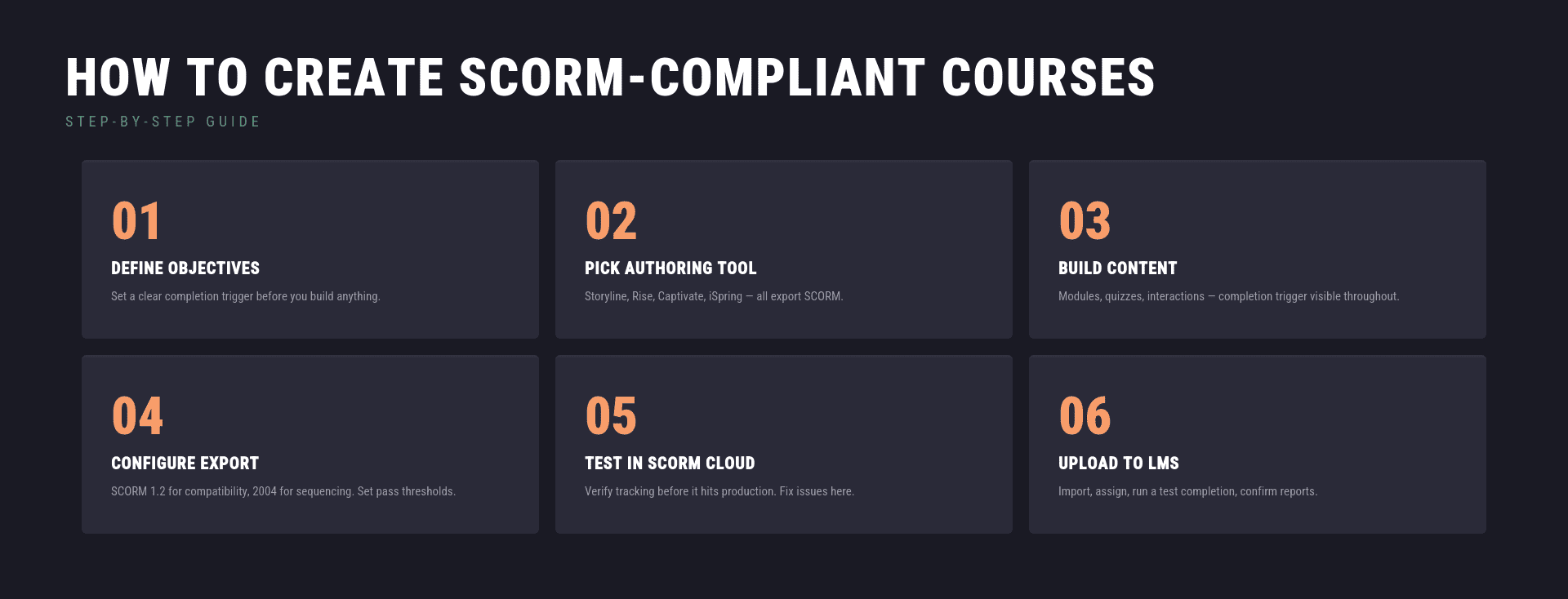
- Define learning objectives and completion criteria. Before opening an authoring tool, map out what the course needs to do. What should learners know or be able to do by the end? How are modules sequenced? What will count as completion: a quiz score, viewing all slides, or passing a specific activity? SCORM needs a clear completion trigger. Leaving it undefined at this stage creates tracking problems that are annoying to fix after the course is live.
- Choose an authoring tool. Articulate Storyline, Rise 360, Adobe Captivate, iSpring Suite — all export SCORM 1.2 and 2004. The choice depends on the content type, the team’s familiarity, and what the LMS handles well. Slide-heavy compliance courses and scenario-driven training have different requirements.
- Build the course content. Develop modules, quizzes, and interactions inside the authoring tool. Keep the completion trigger in mind throughout — it should be obvious to the learner when they have finished, and obvious to the LMS too.
- Configure SCORM export settings. Most authoring tools surface a SCORM settings dialog before export. Pick the version: SCORM 1.2 for broad compatibility, SCORM 2004 if the LMS supports it, and sequencing is a requirement. Set completion criteria and pass/fail thresholds here.
- Test in SCORM Cloud before going live. Export the package as a .zip, then upload it to SCORM Cloud — the industry-standard testing environment — before it touches the production LMS. Check that completion status, scores, and time tracking all report correctly. Problems caught at this stage cost an afternoon. Problems caught after a cohort of 500 learners has gone through the course cost considerably more.
- Upload to the LMS and verify. Import the package, assign it to the relevant learner groups, run a test completion, and confirm the data is showing up in reports as expected.
SCORM training holds up across corporate onboarding, compliance programs, certification courses, and product training — anywhere content needs to move between systems and track progress without custom integration work each time.
How Raccoon Gang Works with SCORM
SCORM integration questions come up in almost every LMS project our team handles. Whether an organization is migrating to Open edX, building a custom training environment, or troubleshooting a content library that is not reporting correctly, SCORM is usually part of the conversation.
- SCORM integration in LMS platforms. Open edX supports SCORM content through a dedicated XBlock — the Open edX SCORM XBlock — which handles SCORM 1.2 and SCORM 2004 packages. Raccoon Gang implements and configures SCORM support within Open edX deployments, ensuring packages import cleanly, the run-time communication works correctly, and tracking data flows through to the reporting layer. For clients with large SCORM course libraries, we also handle bulk migration and validation.
- Custom SCORM module development. Some content requirements fall outside what off-the-shelf authoring tools can produce. Our team builds custom SCORM-compliant modules for clients who need specific interactions, accessibility features, or content structures that standard tools do not support well.
- SCORM troubleshooting and optimization. SCORM packages can break silently — a course launches but does not report completion, scores do not transfer, and the manifest references missing files. Our team diagnoses and resolves these issues, including cross-browser compatibility problems and version conflicts between SCORM 1.2 and SCORM 2004 content.
- SCORM 1.2 and 2004 compatibility. Different organizations have different content libraries and different LMS configurations. We work with both versions and can advise on version strategy — when SCORM 1.2 is the right choice for compatibility, and when SCORM 2004 features justify the added complexity.
Conclusion
SCORM is not going away. In 2026, it still accounts for 92% of course launches in SCORM Cloud, and virtually every LMS in active use supports it. For organizations running compliance training, managing course libraries, or distributing content across multiple platforms, it remains the most practical standard available.
Its limitations are real — the tracking vocabulary is narrow, updates require full package re-exports, and modern analytics demand more than SCORM was built to provide. But for the core use cases it was designed for, it still does the job better than anything else with equivalent platform support.
FAQ
What does it mean to be ‘SCORM compliant’?
The term is often used loosely. For an LMS, it means the platform can import SCORM packages, launch content, and track key data such as completion status, scores, and time spent. For content, it means the course is exported with a valid manifest and supports proper run-time communication with the LMS. It’s important to note that compliance isn’t binary—two SCORM-compliant systems may still differ in how many data points they support.
Do I need to use SCORM?
It depends on your goals. If you need broad LMS compatibility, standardized tracking, and reusable content, SCORM is a reliable choice. However, if you’re looking for more advanced analytics, offline learning, or detailed behavioral tracking, xAPI or cmi5 may be a better fit. Many organizations use a combination of these standards.
Do I need another tool to produce SCORM?
Yes, you’ll need a dedicated authoring tool. Solutions like Articulate Storyline, Rise 360, Adobe Captivate, and iSpring Suite allow you to export courses in SCORM 1.2 or SCORM 2004 formats. These tools handle packaging and technical requirements, while you focus on creating the course content.