












Most articles list Moodle LMS features as a catalog. In this article, we take a different approach and present these features in a way that helps you see what actually matters — when they translate into operational control, governance, scalability, and long-term ownership.
The question is not what Moodle can do. As a leading open-source learning platform, Moodle can do a lot. The real question is which Moodle LMS features will still be relevant when your organization grows or faces compliance pressure.
Moodle holds around 36% of the higher education market and about 25% in the enterprise segment. These numbers are driven, in part, by the features Moodle offers and how they help organizations:
- define how learning is structured
- enforce rules around access, assessment, and reporting
- determine how well the platform integrates into existing architecture
Let’s take a closer look at Moodle LMS software features that function as operational mechanisms — and identify which of them actually matter when the LMS becomes infrastructure.
TL;DR
- Moodle LMS features show their value under growth, compliance, and system complexity.
- Core Moodle features support course delivery, assessments, role management, reporting, and mobile access.
- Advanced Moodle features support plugins, integrations, automation, and custom workflows.
- The platform works best when features operate as one connected system.
- Moodle fits organizations that need flexibility, data control, governance, and long-term alignment.
- The key question is which Moodle LMS features will still matter in three years.
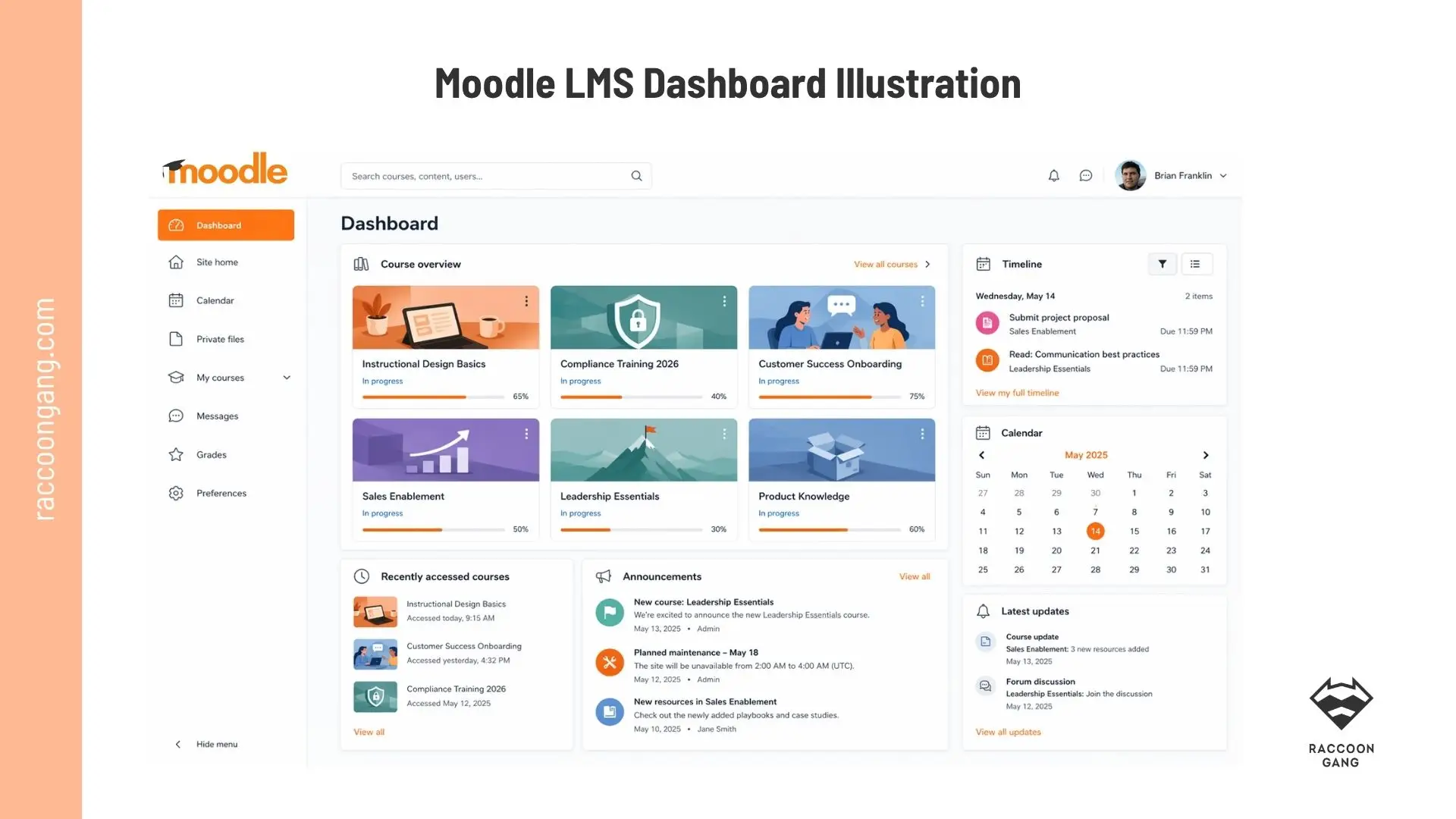
A Moodle dashboard brings courses, deadlines, updates, and learner progress into one clear workspace.
Moodle LMS at a Glance
A Moodle learning management system is an open-source software solution. It gives organizations the tools to structure, deliver, manage, and control learning processes. All from a single control point.
Moodle is one of the most widely used LMS platforms globally, with over 400 million users across more than 100,000 sites worldwide (according to Moodle.org statistics).
After 10 years in e-learning and more than 200 projects delivered for mid-sized and large organizations, we know from practice — not theory — what Moodle LMS is in learning and training environments.
Organizations use Moodle in several core ways. They assign training, control access, and run assessments. They also track progress and generate reports that support compliance and decision-making.
Here are just a few common examples of what Moodle is used for in practice:
- Universities run curricula and blended academic programs
- Enterprises manage onboarding, compliance, and certifications
- Associations deliver member education and paid training
“In real Moodle implementations, the platform sits between users and enterprise systems. It connects learning workflows with HR, reporting, and content tools — and enforces the rules that define who learns what and how outcomes are measured,”
— Natalia Boikiv, Product Manager at Raccoon Gang.
In other words, Moodle LMS is not just used to deliver content. That part comes by default. It is used to run learning as a structured, controlled process.
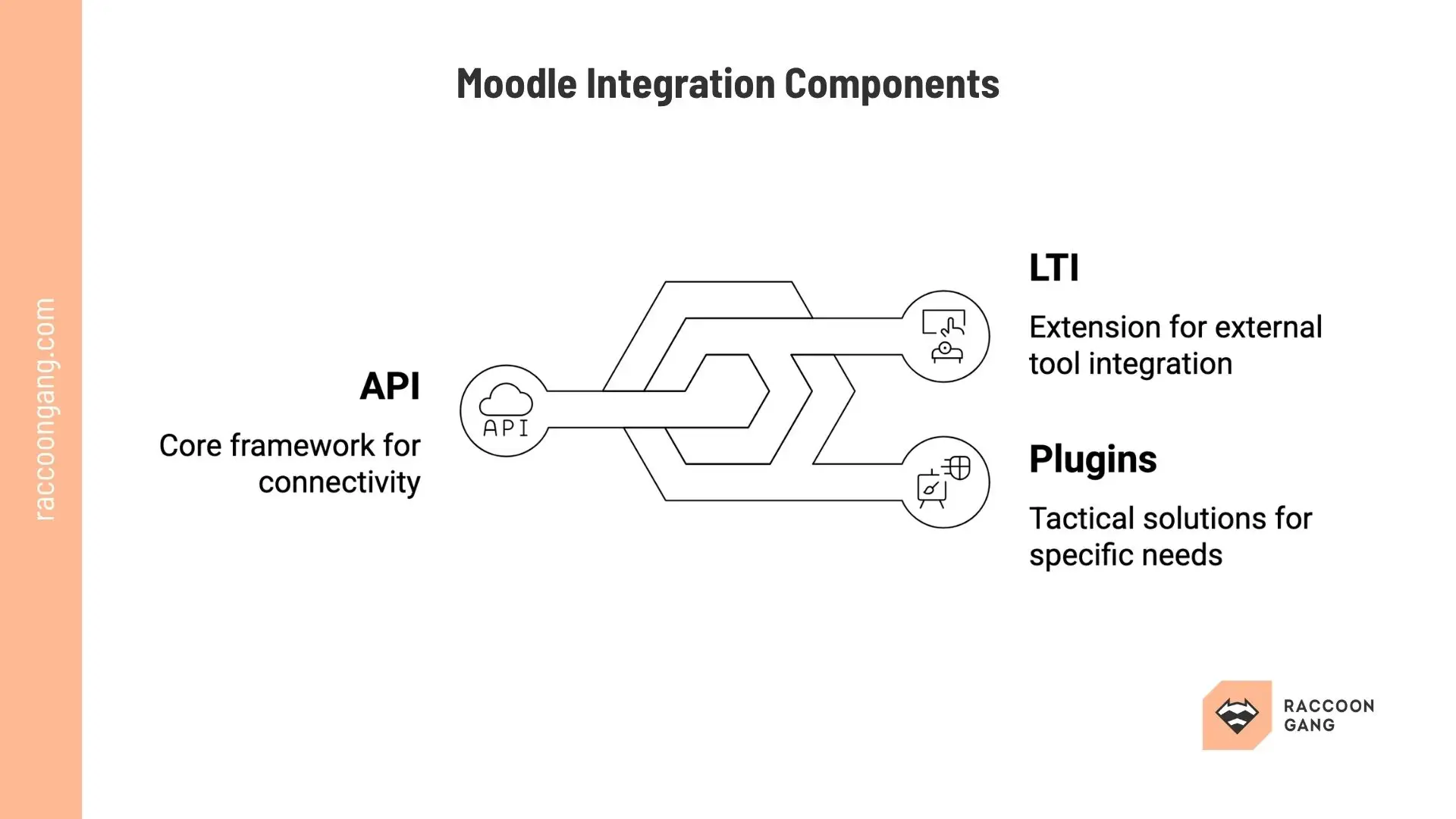
Moodle integrations usually rely on three core components: API for connectivity, LTI for external tools, and plugins for targeted platform extensions.
Moodle LMS Features Overview: What Actually Matters
Before we move on to the main overview of Moodle LMS features, let’s pause for a moment. We will structure them by functional categories a little bit later. But first, let’s take a quick look at what they are.
| Feature | What It Does | Why It Matters |
| Course Management | Structures courses, learning paths, and enrollments | Keeps programs consistent across teams and departments |
| Activities & Assessments | Supports quizzes, assignments, and learning interactions | Enables validation of knowledge and skills |
| Grading & Feedback | Automates grading and provides feedback workflows | Reduces manual work and standardizes evaluation |
| User Roles & Permissions | Controls access based on roles and hierarchies | Protects data and aligns with governance rules |
| Reporting & Analytics | Tracks progress, completion, and performance | Supports decision-making and compliance reporting |
| Plugins & Integrations | Extends functionality and connects external systems | Prevents silos and supports long-term scalability |
* Each feature plays a role in how learning processes are enforced, managed, measured, and adapted over time.
Core Moodle LMS Features That Shape Daily Operations
So here it is — the most important part of the article. As one of our developers puts it, “I like Moodle features because I can configure them, extend them, and connect them to almost any system.” We have a separate guide on Moodle integrations, so don’t miss it. For now, let’s look at the features by functional category.
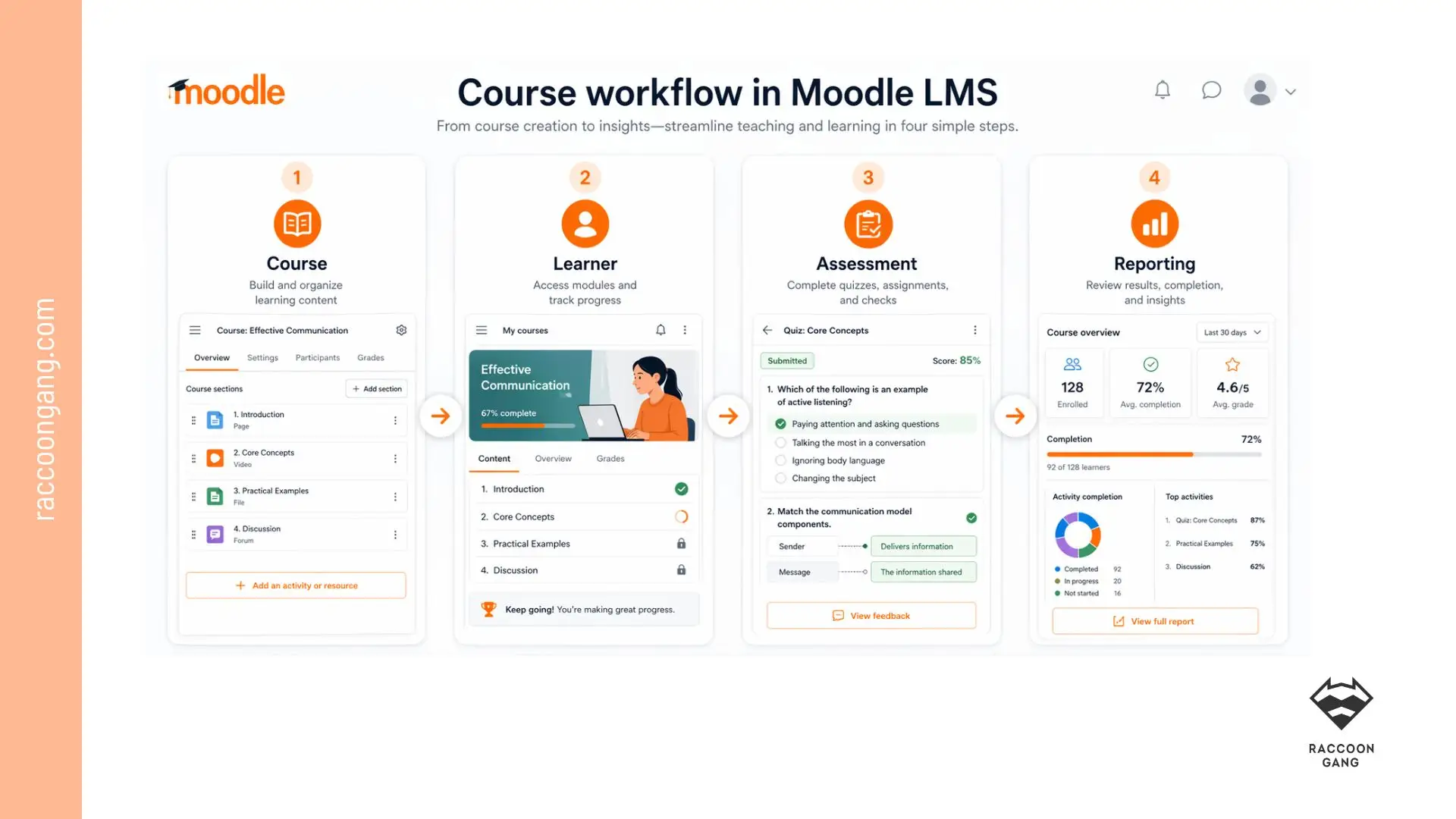
Moodle turns course delivery into a clear workflow, from content setup to learner activity, assessment, and reporting.
Course Management
- Flexible formats: Topics, Weekly, Single-activity
- Activities overview (Moodle 5.0+): filters, due dates, role-based actions
- Rich content: video, H5P, SCORM/xAPI, drag-and-drop, rich editor
- Categories for multi-department structure
These features give you control over course structure. The platform does not force a fixed framework — you decide how the course is organized. They also make navigation faster and the course structure more consistent for both administrators and learners.
Learning Activities and Assessments
- Quiz engine with question banks and randomization
- Assignments with multiple submission types
- Conditional release and completion rules
- Gradebook with aggregation and competency mapping
- Badges and progress tracking
Conventional wisdom says that assessments in Moodle are rule-based. That is true. You can define prerequisites and pass criteria.
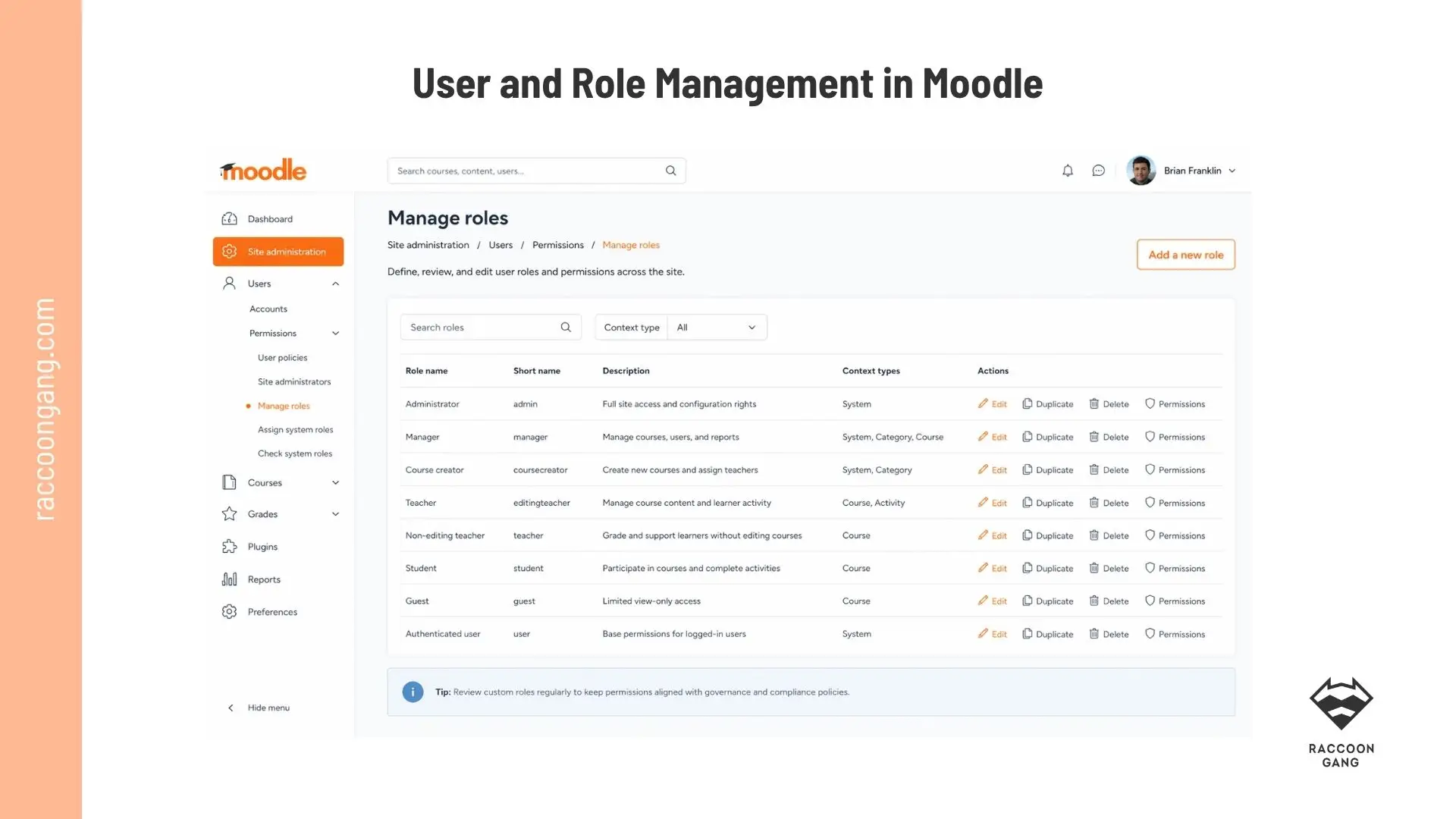
Moodle role management helps administrators keep access rights clear, controlled, and aligned with platform governance.
User and Role Management
- Custom roles with granular permissions
- Enrollment methods: cohorts, self, manual, integrations (HRIS/SIS)
- Group and cohort segmentation
- Competencies and learning plans
- Personalized dashboards (progress, calendar, notifications)
Moodle can be adjusted to match your organizational structure. Users get controlled access. Your organization gets clear ownership. That is governance in practice.
Communication and Engagement
- Forums, wikis, workshops (peer review), blogs
- Messaging, announcements, calendar, notifications (email/SMS)
- Web conferencing (e.g., BigBlueButton)
- AI integrations for admin/content (via plugins)
Because these engagement tools are built in, teams rely less on external tools.
Reporting and Analytics
- Activity completion tracking
- Gradebook reports and exports
- Engagement and dropout signals (via analytics)
- Custom reports via plugins
You can configure Moodle LMS so the platform tracks activity-level actions and aggregates results based on your rules.
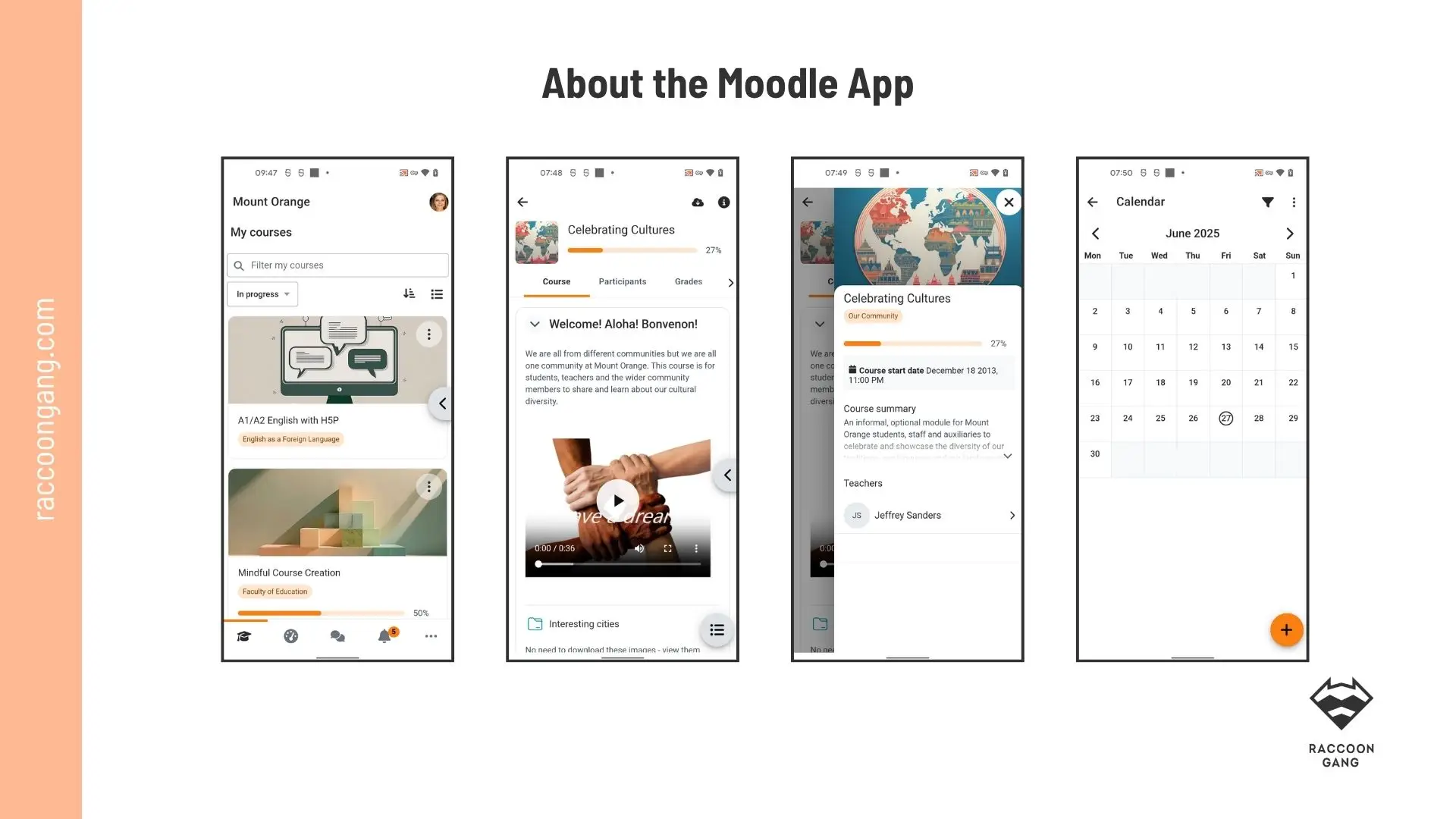
The Moodle app extends learning beyond the desktop, giving learners mobile access to courses, content, and schedules in one place.
Mobile and Platform Operations
- Plugin ecosystem (2000+): reporting, gamification, integrations
- Security and deployment: GDPR alignment, cloud/on-prem, update control
- Official mobile app (iOS/Android), offline sync
Otherwise, if you need a custom mobile app, Raccoon Gang has already developed one. You can view our demo now.
Advanced Moodle Features That Support Scale and Control
The core features we explored in the previous block showed how Moodle keeps learning running day by day. The features in this next section determine whether the LMS is truly ready to scale.
Plugin Ecosystem
- Large, mature plugin library
- Replace or extend functionality without touching the core
We already mentioned Moodle plugins earlier in the article, but here we want to stress a different point. Plugins are not just a way to add something the platform does not include out of the box. Moodle releases updates on its own schedule, and some new features take six months or more to arrive. We see this regularly in the support projects we run for our customers. Moodle plugins make it possible to extend platform functionality much faster, either independently or with minimal vendor involvement.
Integrations (CRM, HRIS, LTI Tools)
- HRIS/SIS/CRM sync
- LTI tools for external content and assessment
- SSO and automated provisioning
Integrations directly affect reporting accuracy and admin workload. When Moodle is integrated professionally into your ecosystem, it creates cleaner data flows, fewer manual operations, and more stable reporting.
“We’ve integrated external LMS data, Microsoft 365 for SSO, and even built custom plugins where needed. Out of the box, reporting is solid, but with extensions, we aligned it to both internal standards and strict federal requirements. At this point, Moodle does exactly what we need — because we’ve made it ours,”
— Moodle Administrator & Instructional Designer.
Automation
- Rule-based enrollments
- Notifications and reminders
- Certification and recertification cycles
The burden of manual work has never helped any organization. Moodle can replace repetitive actions with rules. Administrators work more efficiently. Errors caused by manual steps become less frequent.
Custom Workflows
- Conditional learning paths
- Multi-step approvals
- Role-based actions
Moodle allows you to adapt the learning process to your business logic.
What Moodle Features Mean for Your Organization
Features only matter when they change how your team works. Here is what the core Moodle capabilities translate into:
- Roles and permissions → clear governance. Granular access control defines who can create, grade, and manage content.
- Plugins and APIs → custom functionality. You extend Moodle without rebuilding the platform.
- Integrations → cleaner data flows. SSO, HRIS, and CRM connections reduce duplicate records and manual work.
- Reporting → audit-ready tracking. Configurable reports support compliance and progress reviews.
- AI subsystem → less routine work. Moodle supports AI integrations with providers such as OpenAI and Azure AI to speed up content and admin tasks.
For the strategic case beyond individual features, see our breakdown of the 10 benefits of Moodle LMS.
Moodle Features for Enterprise Learning Environments
| Feature | Benefit for Enterprises | Evidence |
| Scalable Multi-Tenant Architecture | Supports thousands of concurrent users across departments without performance degradation | Enterprise deployments handle 100k+ users; cloud/on-premise scaling |
| Advanced Role & Permission System | Granular access control for complex org structures (managers, regional admins, compliance teams) | Custom roles eliminate permission conflicts across hierarchies |
| Competency Framework Integration | Aligns learning with corporate skills matrices and performance management systems | Tracks certifications, leadership competencies enterprise-wide |
| Robust SCORM/xAPI Compliance | Seamless import of vendor content while maintaining analytics control | Supports 3rd-party compliance/sales training packages |
| Deep HR/ERP System Integration | Single-sign-on and data sync with SAP, Workday, Active Directory | Reduces admin overhead; automated employee onboarding |
| Custom Reporting & Analytics | Executive dashboards with ROI metrics, completion rates, skill gap analysis | Configurable reports meet audit/compliance requirements |
| White-Label Branding & Theming | Consistent corporate identity across all training portals | Multiple sites/domains with enterprise-grade customization |
| Automated Workflows & Enrollments | Dynamic cohort management, prerequisite chains, certification renewals | Scales training delivery without manual intervention |
| Mobile-First Responsive Design | Learning accessible across devices for field sales, remote workers | Native iOS/Android app + PWA support |
| GDPR/CCPA Data Sovereignty | Full control over data residency and processing | Self-hosted eliminates vendor lock-in and compliance risks |
* These enterprise-grade features enable Moodle to power Fortune 500 learning ecosystems.
Moodle Features for Course Creation and Program Delivery
| LMS functionality | Benefit for Course Creators | Evidence |
| Flexible Course Formats | Topics, weekly, or single-activity structures adapt to any curriculum design | Organize content chronologically or thematically without constraints |
| Drag-and-Drop Content Builder | Intuitive interface for rapid course assembly with multimedia, H5P, and SCORM | Non-technical authors build professional courses in hours |
| Rich Media Integration | Embed videos, interactive content, and external tools seamlessly | YouTube, Zoom, Panopto integration without leaving authoring environment |
| Activity Completion Tracking | Automatic progress monitoring with customizable completion criteria | Clear learner roadmap with visual progress bars and checkpoints |
| Quiz & Assessment Engine | Advanced question types, adaptive testing, and proctoring integration | Comprehensive evaluation from simple MCQs to scenario-based assessments |
| Collaborative Learning Tools | Built-in forums, wikis, workshops for peer learning and group projects | Fosters social learning without third-party apps |
| Template & Duplication System | Course templates and backup/restore for rapid program replication | Scale curriculum across departments or academic years efficiently |
| Conditional Activities | Prerequisites, grade restrictions create adaptive learning paths | Personalized learning journeys based on performance |
| Lesson Module | Branching scenarios and adaptive content delivery | Create complex decision-tree learning experiences |
| Accessibility & WCAG Compliance | Built-in alt-text generation, screen reader optimization | Legal compliance plus broader audience reach |
From our experience at Raccoon Gang, these features of an LMS give instructional designers real control. They can build engaging and compliant learning programs without technical friction. We have seen the same setup support a single course launch. And we have seen it scale to complex, multi-program learning environments such as NASA or the EBRD.
Moodle LMS Features Compared with Other LMS Platforms
| Dimension | Moodle Advantages | SaaS Platforms (TalentLMS, Docebo) Limitations |
| Flexibility | Complete control over course formats, workflows, and progression rules via open architecture | Rigid templates and workflows; customization limited to vendor-approved options |
| Customization | 2,000+ plugins, themes, APIs, and full code access for enterprise-specific needs | Point-and-click only; deep changes require expensive vendor development |
| Open-Source | No licensing fees, community-driven innovation, no vendor roadmap dependency | Subscription lock-in with annual price increases and feature paywalls |
| Data Ownership | Self-hosted = full data sovereignty and compliance control | Vendor controls data residency; export limitations and migration costs |
| Scalability Path | Architecture scales from 100 to 100k+ users without replatforming | User/seat limits trigger expensive enterprise upgrades |
| Total Cost (5 years) | ~$50k-200k (hosting + dev) for unlimited users | $100k-500k+ (subscriptions scale with users/features) |
From our experience with Moodle projects, we would like to add that Moodle requires more effort at the start. In return, it gives you long-term control and cost efficiency. This trade-off is intentional. It works best for organizations that prioritize strategy over plug-and-play convenience.
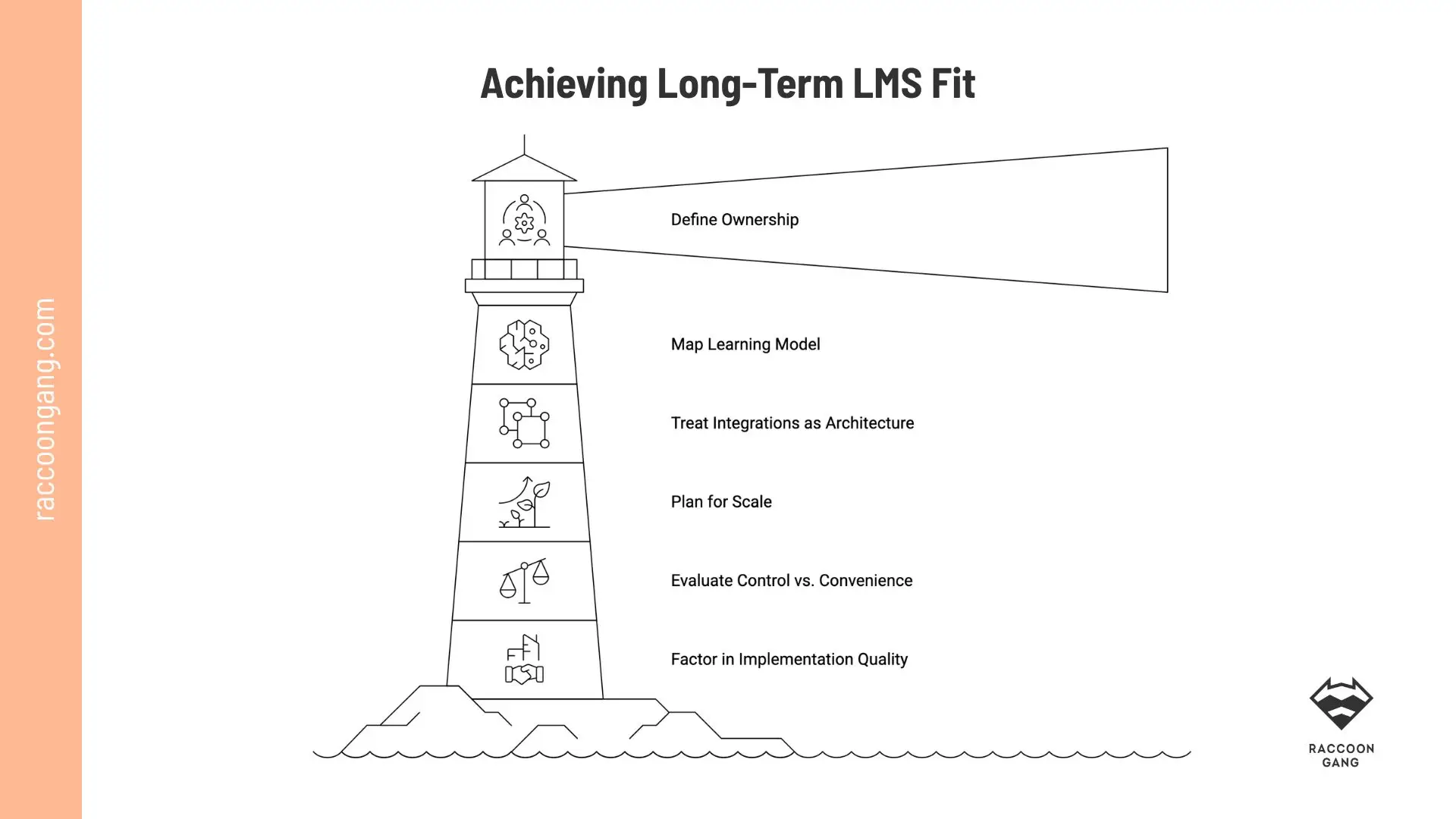
Long-term LMS success starts with the right foundation: ownership, architecture, scale, and implementation quality.
How to Choose the Best LMS for Long-Term Fit
It’s time to build a system that still works when complexity increases, courses multiply, old features expire, or a new version is released.
Most platforms and LMS functions look similar at the start. The difference appears later. Here is how to approach the decision:
- Define ownership early
- Map your learning model
- Treat integrations as architecture
- Plan for scale from day one
- Evaluate control vs convenience
- Factor in implementation quality
Conclusion
When do Moodle LMS features create real operational value — and when do they turn just into a LMS feature list of nice-to-have functions?
The main difference shows up over time.
- As programs expand.
- As integrations deepen.
- As reporting requirements become stricter.
At that point, individual features stop mattering on their own. What matters is how they work together — course structure, roles, assessments, reporting, and integrations forming a single operational layer.
Moodle stands out not because it has more features, but because those features can be configured, extended, and aligned with your organization’s actual operating model.
FAQ
What are the key features of Moodle LMS?
Moodle LMS comes with the features most organizations expect from a serious learning platform. You can manage courses, run assessments, control user roles, track progress, build reports, and connect the platform to other systems. Over time, these features do more than support delivery—they help teams keep learning structured and manageable.
What is Moodle used for?
Organizations use Moodle for different kinds of learning. Universities run academic programs and blended delivery. Enterprises use it for onboarding, compliance training, and certifications. Associations often build member education and paid training around it.
Is Moodle a good LMS for enterprises?
Yes, especially when the enterprise needs more than a basic training portal. Moodle works well in environments where integrations, governance, and scalability matter. If your learning platform has to fit into a larger operational setup, Moodle usually holds up well.
What are the benefits of Moodle LMS?
The benefits of Moodle LMS become more visible as complexity grows. It gives teams more control over integrations, governance, and platform structure. That matters even more when programs expand, reporting gets stricter, or the organization wants less dependence on vendor limits.
How customizable is Moodle LMS?
Moodle is highly customizable. Your team can extend the platform with plugins and integrate it via APIs. If you need companies like Raccoon Gang, they can also help you build custom functionality. You can adapt it to your workflows instead of forcing your workflows to adapt to the platform.




- TL;DR
- Moodle LMS at a Glance
- Moodle LMS Features Overview: What Actually Matters
- Core Moodle LMS Features That Shape Daily Operations
- Advanced Moodle Features That Support Scale and Control
- What Moodle Features Mean for Your Organization
- Moodle Features for Enterprise Learning Environments
- Moodle Features for Course Creation and Program Delivery
- Moodle LMS Features Compared with Other LMS Platforms
- How to Choose the Best LMS for Long-Term Fit
- Conclusion
