










Companies have always needed a way to teach and train people. As technology has moved forward, learning has become more digital too. Today, it is hard to imagine a course, module, curriculum, or training program without a Learning Management System, or LMS.
A simple LMS definition is: it is a platform or digital solution that helps organizations deliver, manage, track, and organize learning. The LMS’s meaning is built into its name. It is a system designed to manage learning.
There is no magic behind it. An LMS assigns courses, shares materials, tracks progress, and keeps learning materials in the right order. That is also the simplest way to explain what LMS stands for in practice.
What types of LMS platforms exist, how they differ, and how to choose the right LMS in 2026 — we cover all of that in this article.
TL;DR
- Learning management systems keep growing because more organizations need structured online learning.
- An LMS brings courses, users, progress tracking, assessments, and integrations into one system.
- Companies, schools, universities, and nonprofits use learning management systems for different training goals.
- Cloud-based LMS platforms give teams more flexibility, easier access, and simpler maintenance.
- AI tools and microlearning help teams reduce admin work and support faster learning.
- Modern learning management technology supports mobile access, branding, and scale across audiences.
What is a Learning Management System?
A Learning Management System, or LMS, is a software platform for organizing, delivering, managing, and tracking learning. Instead of keeping courses, learner records, assessments, deadlines, and reports across separate tools, an LMS brings them into one system.
An average company can choose an LMS to support onboarding, compliance training, customer education, and partner training. In universities and institutions, a learning platform helps teams deliver courses, share materials, collect assignments, and track progress. That is one reason LMS in education has become part of everyday digital teaching.
The LMS’s meaning is fairly direct. If you ask what LMS means, the short answer is simple: it means a system for managing learning. Some people search “what is LMS mean” when they want the plain-English version. Usually, they are asking what the platform actually does once learning starts to involve more people, more content, tighter timelines, and more moving parts.
“At Raccoon Gang, we’ve seen that an LMS becomes critical when learning starts to scale. Once an organization needs to manage access, deadlines, completion tracking, and reporting across different audiences, manual processes stop working. A good LMS gives teams a clear structure for delivery, administration, and oversight.”
— Sergiy Movchan, Member of the Board, Raccoon Gang
And that is really the point. Learning is the content itself — courses, modules, assessments, certificates, and resources. Management is the work around it: assigning training, grouping learners, setting deadlines, checking completion, and pulling reports. The system part sits underneath and keeps everything connected, from access and permissions to notifications and data.
An LMS gives teams control over how learning is delivered. It standardizes enrollment, deadlines, completion rules, and access rights. Managers can see who has finished required training and who still needs attention. That matters when learning affects compliance, partner readiness, or academic oversight.
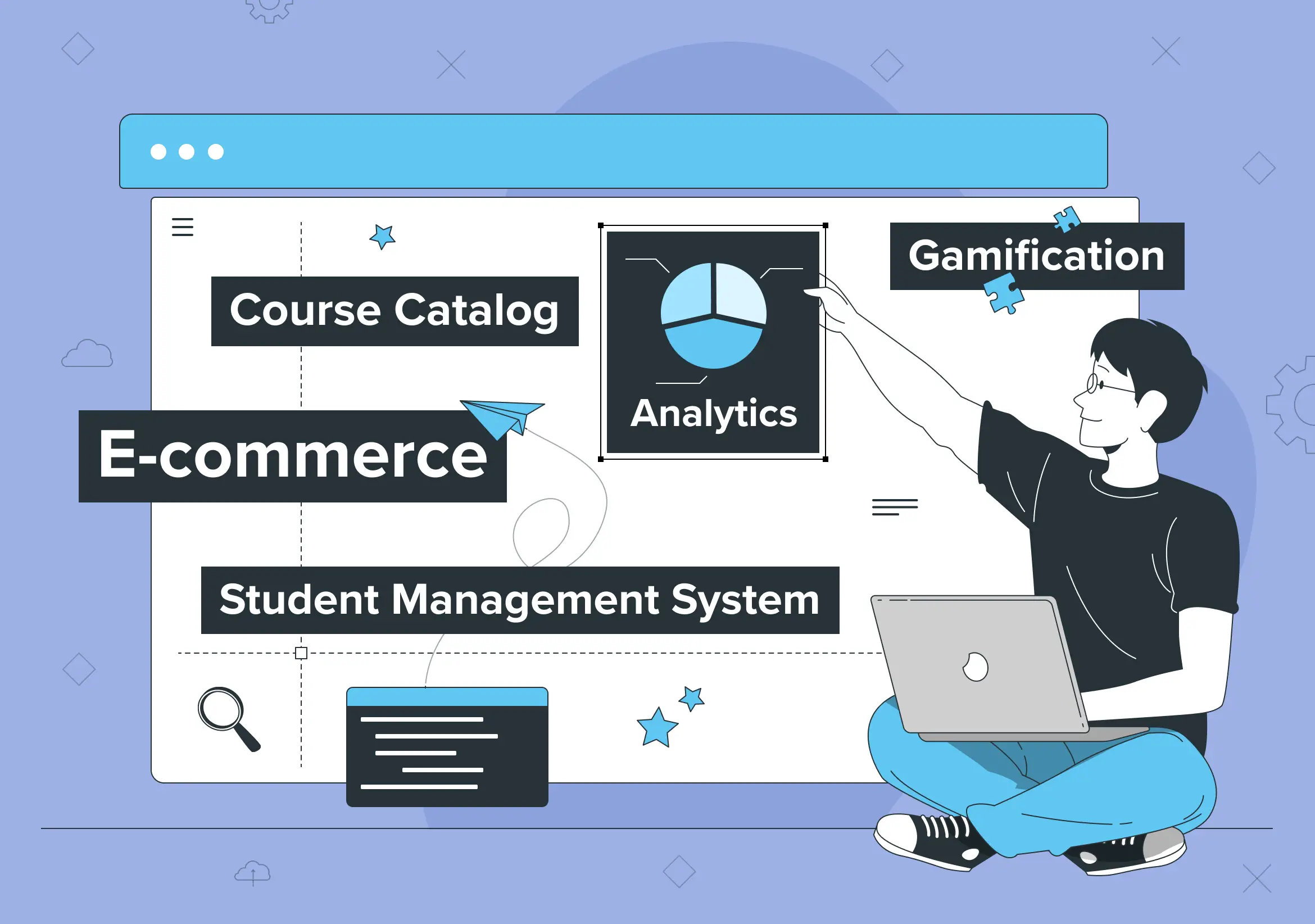
A learning management system helps organizations manage courses, learner data, analytics, gamification, and online training delivery.
How Does an LMS Work?
An LMS connects learning content, users, administration, and data in one environment. The exact workflow varies between platforms, but most learning management systems follow the same basic process.
1. Administrators create or import learning content. Teams can build courses inside the LMS or add videos, documents, quizzes, SCORM packages, interactive activities, and other resources.
2. Learners receive access. Administrators enroll users manually or automate enrollment through groups, roles, integrations, or rules. Learners may also self-enroll where the program allows it.
3. The LMS delivers the learning experience. Learners access assigned courses, follow learning paths, complete activities, submit assignments, and take assessments from a browser or mobile device.
4. The system records learning activity. The LMS tracks data such as course progress, assessment results, completions, certificates, and, depending on the platform, engagement or activity patterns.
5. Administrators use the data. Dashboards and reports help L&D teams, instructors, managers, and administrators identify incomplete training, measure results, document compliance, and improve learning programs.
Integrations can extend this workflow further. For example, an LMS may exchange user data with an HRIS, authenticate users through SSO, connect to a CRM or SIS, or send learning data to external analytics tools.
What Are Learning Management Systems Used For?
LMS learning systems are incredibly versatile. They help different groups teach and learn in their way. Schools, businesses, and nonprofits all use LMS for training and sharing knowledge. Each group has unique needs, but the LMS technology adapts perfectly.
Educational places teach students. Companies train workers. Nonprofits help volunteers learn—one tool with many uses. In addition, LMS doesn’t force everyone into the same box. Instead, they fit what each group needs.
The table below shows how different groups use LMS features. It breaks down who needs what and how they make learning work.
| User Type | Use Cases | Key Features | Benefits |
| Educational Institutions | Schools: Curriculum delivery, student assessments, parent-teacher communication, and extracurricular learning tools. | Progress tracking, course management, parental access, student analytics. | Centralized data management, enhanced eLearning accessibility, and improved knowledge retention. |
| Colleges and Universities: Online courses, distance learning, faculty training, research collaboration platforms. | Virtual classrooms, discussion forums, grading systems, content repositories. | Supports multiple learning groups, personalized learning experiences, and resource reusability. | |
| Online Learning Platforms: Hosting large-scale MOOCs, certification pathways, and skill-specific tutorials. | Scalability, multi-device compatibility, certification issuance, gamification. | Cost efficiency, content adaptability, and measurable learning impact. | |
| Corporate Organizations | Employee Training: Onboarding, compliance, and role-specific skill development. | SCORM/xAPI compliance, single sign-on (SSO), progress dashboards, and integration with HR tools. | Streamlined resource allocation, compliance tracking, and performance improvement. |
| Professional Development: Leadership training, career growth initiatives, and personalized learning paths. | Interactive modules, AI-driven learning recommendations, and progress tracking. | Improved skill development, reliable progress monitoring, and measurable learning impact. | |
| Remote Workforce Training: Equipping distributed teams with uniform training. | Mobile compatibility, on-demand content, and collaboration tools like Slack or MS Teams integrations. | Enhanced accessibility, centralized training management, and cost efficiency. | |
| Non-Profit Organizations | Volunteer Training: Skill-building for specific roles, safety compliance. | Mobile-friendly access, multilingual support, and microlearning tools. | Personalized learning, content adaptation, and efficient training delivery. |
| Community Education: Public-facing educational resources, workshops, and training sessions. | Open course access, live session capabilities, and surveys for feedback. | Streamlined resource allocation and measurable learning outcomes. | |
| Government Agencies | Compliance and Regulatory Training: Ensuring staff are up-to-date with legal and policy requirements. | Certification tracking, mandatory training alerts, and secure content storage. | Ensures compliance, improves knowledge retention, and supports large-scale public sector training. |
| Public Sector Training: Training for large-scale employee bases across various sectors. | Bulk user management, real-time analytics, and multilingual support. | Centralized training management and measurable learning impact. | |
| Healthcare Sector | Medical Training: Specialized medical procedures, staff certifications, and patient care best practices | AR/VR support, video-based modules, skill assessments, and certification tracking. | Improved skill development and compliance. |
| Continuing Medical Education (CME): Keeping professionals updated with industry advancements. | Mobile compatibility, webinar integration, and real-time progress tracking. | Enhanced eLearning accessibility and knowledge retention. | |
| Professional Associations | Certification Programs: Offering credentials to members through structured courses. | Exam creation tools, certification issuance, and result tracking. | Reliable progress monitoring and skill development. |
| Continuous Learning: Ongoing professional development for association members. | On-demand content, networking forums, and adaptive learning pathways. | Improved knowledge retention and tailored learning paths. | |
| Customer and Partner Training | SaaS Companies: Helping users understand software through training materials and use-case examples. | Interactive guides, analytics on user progress, and multilingual content. | Performance improvement and measurable learning impact. |
| Channel Partner Training: Training external vendors and partners on processes and products. | Co-branding options, API integration, and user performance tracking. | Centralized management and scalable training. | |
| Freelancers and Entrepreneurs | Client Training: Educating clients on service usage or process improvement. | Branded learning portals, feedback surveys, and progress reporting. | Cost-efficient and tailored learning experiences. |
Key Features of an LMS
Most LMS platforms combine five core capabilities: content and course management, learner administration, assessments, tracking and reporting, and integrations. More advanced systems add certification, collaboration, mobile learning, branding, gamification, and support for large or segmented audiences.
Course creation and management
This is where the learning experience takes shape. Instructors build courses, upload materials, add quizzes, and arrange modules in the order learners should follow. A few years ago, many teams still kept that structure across folders and disconnected tools. In an LMS, it lives in one place.
Platforms like Open edX, Moodle, and Canvas offer built-in tools for creating interactive courses.
Content delivery
Learners need access that fits real life. Someone will open a lesson between meetings, someone else will return to it late in the evening, and a student may review materials from a phone on the way to class. In remote work settings, employees can complete compliance, sales, or leadership development training modules whenever it suits their schedule. The platform has to support that without friction.
Learner enrollment and management
Who gets access, when they get it, and what they see first — that work usually sits here. Teams assign courses, create groups, manage permissions, and set learning paths for different audiences. If this part breaks, the rest of the learning flow usually follows. For example, SAP Litmos provides a platform for managing learner groups by default.
Tracking and reporting
Sooner or later, every team asks the same question: Who completed the training? The LMS answers it with progress data, activity records, assessment results, and completion reports. Managers have used that visibility to prepare for audits, while instructors have used it to catch stalled learners early.
For instance, Docebo provides reporting tools; Open edX LMS also does it with built-in or extended Analytics tools from Raccoon Gang for detailed learning metrics.
Assessments and quizzes
Some learning only needs a quick knowledge check. Other programs require graded assignments, scored exams, practical tasks, and written responses. A strong LMS has supported both for years, especially in academic and compliance-heavy settings.
Certification and badging
Completion often has to lead to proof. Certificates and badges give learners something formal to show, and they give organizations a record they can verify later. This feature will matter even more when training feeds into role readiness, partner requirements, or regulated learning.
As you may know, Coursera provides certificates for course completion in professional fields such as data science and business management.
Collaboration tools
Learning does not always happen alone. In some courses, the real value appears when people discuss a case, respond to a prompt, challenge each other’s answers, or work through a group task. That is why forums, messaging, and shared activities still matter.
Integration with other systems
An LMS, as usual, is a part of the whole ecosystem in companies. It may already be pulling user data from an HR platform, sending records into a CRM, syncing enrollments with a student information system, or connecting to a content library. All these things can be realized by LMS integration. Without those links, admin work tends to multiply fast.
Mobile learning
This used to be a nice extra. Now it is often expected. Frontline staff, field teams, and busy students have made mobile access far more important than it was a few years ago. Retail sales associates can use their phones to finish product training. A smartphone can be an extra LMS branch.
Customization and branding
Some organizations want more than a functional platform. They want a learning environment that looks familiar, reflects their structure, and feels like part of the wider experience. That has been especially important in customer education, institutional delivery, and external training programs.
Gamification
Done badly, this feels decorative. Done well, gamification gives learners a reason to keep moving through routine material. Points, badges, leaderboards, and progress markers can support momentum when the course itself is mandatory or repetitive.
Scalability
A platform may begin with one team and later serve a full company, a university department, or several external audiences at once. When that moment comes, the LMS should still perform well, keep reporting stable, and handle growth without forcing a rebuild.
Put together, these features show what an LMS is really for. It gives organizations a way to run learning with structure, oversight, and fewer manual gaps.
Types of Learning Management Systems
There is no single way to classify an LMS. Platforms differ by where they run, who controls the software, which audiences they serve, and how much scale they support. Separating these criteria makes LMS options easier to compare.
LMS Types by Deployment
Cloud-Based LMS
A cloud-based LMS runs online, launches faster, and usually removes most of the infrastructure burden from internal IT. Over the past few years, this model has become the default choice for organizations that need easier scaling and predictable operating costs.
On-Premise LMS
Some organizations still keep the platform on their own servers, and for good reason. When security rules, hosting policies, or internal control matter more than deployment speed, an on-premise LMS often makes more sense. Years ago, this setup was far more common; today, it is usually chosen with a very specific requirement in mind.
LMS Types by Licensing and Ownership
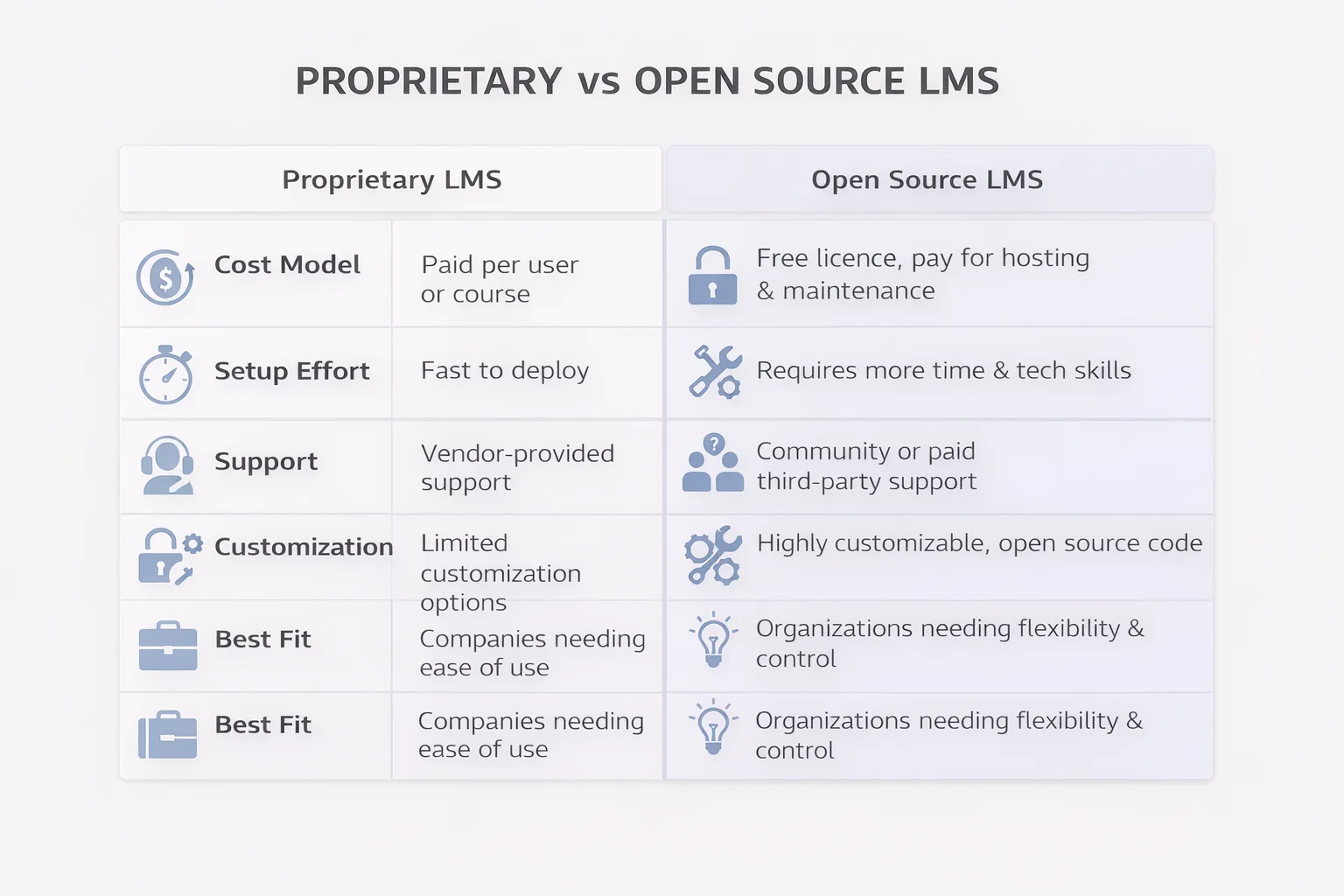
Open-Source LMS
Here, flexibility comes first. The code is open, so teams can adapt the platform to their own workflows, build custom features, and avoid being boxed into a vendor roadmap. If the organization already has technical capacity, this open-source type of LMS can grow in a very different way from a standard packaged product.
Open source does not mean zero cost. Organizations still need to account for hosting, implementation, maintenance, upgrades, development, and support. Platforms such as Open edX and Moodle can offer extensive flexibility when an organization has the technical resources or an implementation partner to manage them.
Proprietary LMS
A proprietary LMS is developed and controlled by a vendor. Organizations pay for access through a subscription, license, or another commercial pricing model rather than managing the source code themselves.
The vendor typically handles product updates and core maintenance. This can reduce the internal technical workload, although customization, data control, integration options, and vendor dependency vary considerably between products.
LMS Types by Use Case
Employee LMS
This type focuses on internal workforce training. Companies use it to onboard new hires, manage compliance requirements, support role-based learning, and track development over time. In many cases, what used to live across spreadsheets, slide decks, and email chains has now moved into one structured system.
Corporate LMS Platforms
Corporate LMS platforms support workforce learning such as onboarding, compliance, professional development, role-based training, and leadership programs. Some companies also use the same platform for external learning, including customer education and partner enablement.
Extended Enterprise LMS
This is what companies use when training goes beyond the internal team. Partners, distributors, resellers, suppliers, and customers may all need access, yet not to the same content or under the same rules. An extended enterprise LMS keeps that external learning structured without turning it into manual admin work.
Academic LMS
In education, the LMS sits much closer to the daily teaching process. It supports course delivery, assignment workflows, grading, communication, and student progress tracking. For many institutions, it has already become part of the standard academic setup rather than an optional digital layer.
Customer Training LMS
After the sale, training often becomes part of the product experience. A customer training LMS helps organizations onboard users, improve adoption, reduce support load, and deliver certification where needed. If the product is complex, this type of platform will often pay for itself through fewer support issues and better usage.
Nonprofit LMS
Nonprofits usually need structure without heavy overhead. One platform may support volunteer onboarding, staff training, community education, and program delivery at the same time. Budget pressure has always shaped this segment, so ease of use and cost control tend to matter as much as feature depth.
LMS Types by Scale
SMB LMS
Small and midsize organizations often need straightforward administration, predictable costs, standard integrations, and enough flexibility to grow without maintaining complex infrastructure.
Enterprise LMS
Scale changes the requirements. Enterprise LMS platforms support higher learner volumes, more complex governance, multiple audiences, deeper integrations, and tighter control over permissions, reporting, and regional delivery.
The important point is that these categories can overlap. An enterprise LMS can also be cloud-based, proprietary, and designed for corporate training. Start with your operating requirements rather than trying to fit a platform into one label.
What Are the Benefits of an LMS?
An LMS gives organizations one system for managing learning processes that otherwise tend to spread across email, spreadsheets, file storage, video tools, and disconnected databases.
The main benefits include:
- Centralized learning. Courses, learner records, assessments, and completion data stay within one managed environment.
- Less manual administration. Enrollment rules, notifications, deadlines, certificates, and reports can reduce repetitive work.
- Consistent delivery. Teams can apply the same training requirements across departments, campuses, regions, or partner networks.
- Measurable progress. LMS reporting gives administrators visibility into participation, completion, assessment results, and other learning data.
- Scalable access. A platform can support new courses, users, audiences, and locations without rebuilding the learning process each time.
- Better governance. Roles, permissions, records, and reporting rules give organizations more control over how learning operates.
These benefits become more important as learning grows. A small team can manage several courses manually. The same approach becomes difficult when hundreds or thousands of learners, multiple audiences, compliance requirements, and integrations enter the picture.
How to Choose the Right LMS Platform
Choosing the right LMS starts with the way your organization actually runs learning. A company focused on employee training will look at the platform one way. An educational institution will look at it another way. The same learning management system will not solve both sets of problems equally well.
Before comparing vendors, document the requirements the LMS must support from day one and those it may need to support later. Then evaluate each option against the same criteria:
- Which features are essential for your team from day one?
- What does your organization need now, and what will it likely need next?
- How much technical capacity do you have in-house to manage the platform?
- Where is your current tech stack falling short?
- What budget can you realistically allocate to LMS software?
- Which integrations matter most to your workflows and reporting?
- What security and compliance requirements must the LMS meet?
- Which interoperability standards do you need, such as SCORM, xAPI, LTI, SSO, or APIs?
- Does the platform meet your accessibility requirements, including the relevant WCAG criteria?
- What will the total cost of ownership look like after licensing, hosting, implementation, customization, maintenance, and support?
By the way, feature count is rarely a useful selection metric on its own. A platform with fewer features can be a better fit if it integrates cleanly, supports your governance model, and requires less manual work.
That is why LMS software should be assessed against your operating model, not just a feature list.
2026 Trends in LMS Tech
LMS technology continues to develop around several practical priorities: easier access, stronger integrations, less administrative work, and learning formats that fit into work and study schedules. Four trends matter most when evaluating how well a platform can support the next few years.
- Cloud-first delivery keeps gaining ground. More organizations want course access without local infrastructure, heavy maintenance, or location-based limits. Cloud platforms make global rollout much easier.
- Integration with talent systems is getting tighter. LMS software is increasingly connected to HR platforms, performance tools, and workforce planning systems, which makes learning easier to track in context.
- AI is taking on more operational work. Teams now use it to automate routine admin tasks, support content recommendations, and improve progress monitoring.
- Microlearning keeps growing. Short, focused learning units are easier to fit into the workday, and LMS platforms are making this format easier to deliver at scale.
This is where the market is heading. As business needs keep changing, LMS technology will keep adapting with them.
An LMS Works Best When It Fits the Way You Operate
An LMS is never just a place to store courses. It becomes part of how learning works across the organization, from access and delivery to tracking, reporting, and oversight.
That is why LMS selection should start with operating requirements rather than a feature comparison. The platform needs to fit your learning model, existing technology, governance requirements, internal technical capacity, and expected scale.
We see this repeatedly in LMS projects. Features that look important during a demo can become secondary once teams start working through integrations, permissions, reporting, user management, accessibility, upgrades, and long-term administration.
Raccoon Gang has worked on 200+ LMS and learning platform projects across corporate, higher education, nonprofit, and public-sector environments. That implementation experience helps us assess an LMS beyond its feature list: how it will fit the systems and processes that already exist around it.
FAQ
What is an LMS?
What does LMS stand for?
What is the main purpose of an LMS?
How does an LMS work?
What are the main types of learning management systems?
What should you look for when choosing an LMS?




- TL;DR
- What is a Learning Management System?
- How Does an LMS Work?
- What Are Learning Management Systems Used For?
- Key Features of an LMS
- Types of Learning Management Systems
- What Are the Benefits of an LMS?
- How to Choose the Right LMS Platform
- 2026 Trends in LMS Tech
- An LMS Works Best When It Fits the Way You Operate
