
If you look around any campus, office, or bus stop, you’ll see the same thing: people glued to their phones. But does this show the importance of mobile learning? We actually think so. And the question is not that already, 6.925 billion people worldwide use smartphones. And it’s not even that only 3 out of 100 Gen Z representatives don’t have smartphones today. The question is ‘how to adapt training and learning initiatives to today’s mobile habits of learners.’
In simple terms, m-learning makes studying possible at the right time and in the right place, without forcing people to sit in front of a laptop. We found research that people worldwide spend around 4–5 hours per day on smartphones. Maybe someone would read this article from the black mirror of their smartphone. Who knows 📲
If your courses only work on a laptop at a desk, you’re fighting against how people actually learn and consume content. And which content would it be? Mobile technology in education is no longer a nice add-on – it’s where a big chunk of learning hours quietly happens.
In this article, you’ll find:
- What mobile learning (m-learning) actually is.
- The importance of mobile learning in modern education.
- Key benefits of mobile learning for educational and training programs.
- How m-learning works in higher education and corporate training.
- Upcoming trends of mLearning.
We promise — there are many insights ahead. Let’s start digging them up one by one.

What Is Mobile Learning (M-Learning)?
Picture this: Maria, standing in a grocery line, takes out her smartphone to finish a quiz before reaching the cashier. This is mobile learning, or m-learning, in action. It is digital learning on the devices people actually use, such as phones and tablets. The usual features of this type of learning include short modules, quizzes, and notifications landing right in the pockets.
In practice, m-learning means your learners can open a course, watch a quick explainer, or finish a quiz from the same device they use for chats and email.
M-learning typically shows up through a few main channels:
- Mobile apps
- Responsive LMS platforms
- Microlearning via smartphones
Mobile learning turns long, desk-bound study sessions (the traditional e-learning way) into many short, on-the-go moments that, together, noticeably boost learners’ overall progress and completion rates.
Importance of Mobile Learning in Modern Education
Mobile technology in education changes how often and how deeply people touch your content. Not once a week. Not only during a scheduled webinar. Learners can check a concept again right before they use it, not two days later when half of it has faded. That’s the real importance of mobile learning: people receive knowledge at the right time and place that they choose.
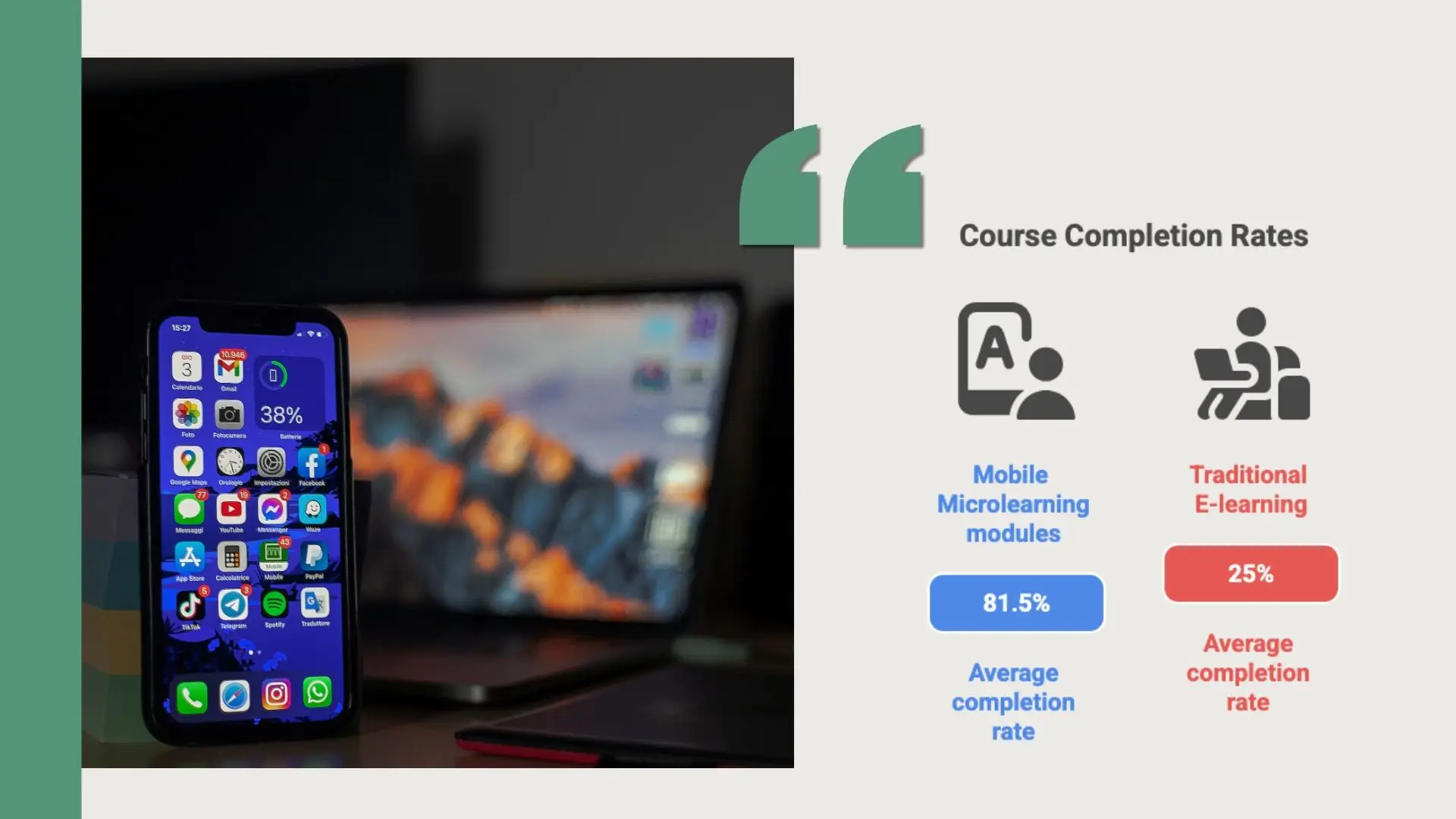
Research shows us metrics that evidence that mobile learning has 45% higher retention rates compared with traditional learning. How is it possible?
For example, the mobile learning app can:
- Nudge a learner who missed a quiz.
- Suggest a short recap for someone who struggled with a topic.
- Offer optional paths or extra materials for advanced users.
- Support formats like a quick checklist, a short video, or a scenario.
What dividends come from this, you may ask. Thanks to mobile, learning programs stop being a one-off event and start to look more like an ongoing habit.
“When we work with customers at Raccoon Gang, we often see that a large share of logins now comes from smartphones, not desktops. Up to 80% of mobile users can sometimes be spotted on our customers’ platforms. That’s why mobile learning is no longer a side project; it’s part of the core stack.”
— Senior Mobile Developer at Raccoon Gang.
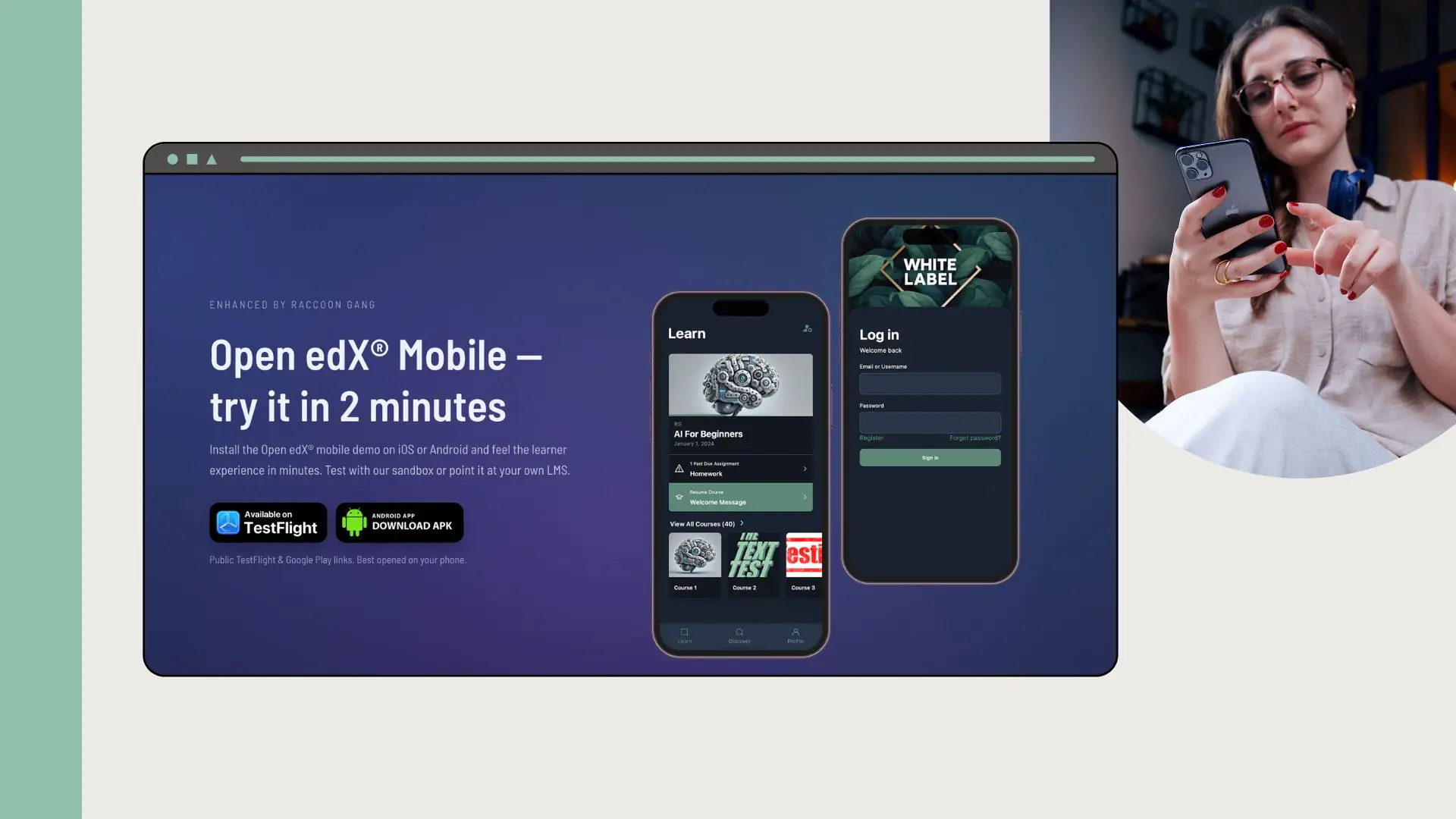
Continuous learning becomes possible when content is always available on a learner’s phone. Instead of launching one big course each year, you can send small updates, new examples, and quick tips to keep skills fresh. A mobile learning management system like Open edX® supports mobile access by default. Raccoon Gang also builds branded apps based on Open edX, with offline access, push notifications, and synced progress. This way, learners can start on a laptop and finish a quiz on their phone later.
Key 7 Benefits of Mobile Learning
Well, now that we’ve seen that mobile technology does have an impact on learning outcomes, let’s take a look at the main benefits of mobile learning one by one.
Taken together, these benefits of mobile learning don’t replace your existing e-learning. They make it more reachable, more humane, and much closer to the way people already live with their phones.
1. Accessibility (your learning materials are accessible to everyone)
Mobile learning helps break down barriers for people with disabilities, adds personalization to standardized learning paths, improves engagement, and all under the banner of optimized budgets. Sounds too good to be true? So here’s some proof.
On smartphones and tablets, your learners can:
- Use screen readers, zoom in, resize text — for learners with vision impairments, it is so important.
- Adjust color contrast and use dark mode — supports learners who struggle with low contrast or glare.
- Add captions and transcripts, use visual cues — you help learners with hearing impairments.
- Make buttons bigger, cut extra gestures, offer keyboard options — you support learners with motor impairments.
- Keep layouts clean, break content into chunks, stick to predictable flows — helps learners with cognitive impairments.
2. Flexibility of schedules, lessons, activities
Flexibility is one of the headline benefits of mobile learning. Learners are no longer stuck with “desktop time or nothing.”
Mobile learning lets people:
- Study in short blocks between tasks instead of waiting for long sessions.
- Get push notifications on the lock screen that nudge learners back to a short lesson at the right moment.
- Blend formal learning with informal references, like quick refreshers.
- Add an offline mode so that, as a learner, you can learn even without an internet connection.
“With mobile apps for education and a mobile-friendly LMS, you move from ‘we have courses’ to ‘people can actually use them in real life’.”
— Head of E-Learning Development at Raccoon Gang.
3. Real-time learning and feedback
Because mobile devices are always at your students’ fingertips, you can provide and support their learning 24/7.
When you implement mobile learning, you gain:
- Faster time-to-answer.
- Immediate feedback loops.
- In-app quizzes with instant scoring (and even vibration alerts) show results right after each attempt.
4. Personalized experience
Phones are personal devices. Mobile learning can mirror that and quietly adjust to each learner’s patterns.
With mobile personalization, you get:
- Targeted support – struggling learners receive specific micro-lessons instead of generic reminders.
- Optional depth – advanced users see extra cases or scenarios without slowing everyone else down.
- Smarter recommendations – the system suggests “next best” items based on past activity, not only the syllabus.
5. Higher engagement through multimedia
Phones are built to handle media. Short video, audio clips, images, simple simulations — this is normal phone behavior, not a special feature.
On mobile, you can use multimedia for education:
- How about swapping long lectures for 2–3 minute clips? In this way, you would directly help busy learners with tight schedules.
- Audio versions and simple visuals are must-have features for learners who prefer listening or visual cues over text.
- Quick scenarios, polls, and mini-simulations have nothing but pros for the teams who need practice, not just reading.
6. Cost-effectiveness (invest less but receive more)
Mobile learning can shift your budget away from logistics and toward content quality.
When mobile becomes part of your learning ecosystem, you see:
- Less travel and venue spend – fewer in-person sessions are needed for basic training.
- Reusable micro-content – short units plug into multiple programs instead of creating full courses from scratch each time.
- Scalable delivery – once you have solid mobile apps for education, adding more learners mostly costs content hours, not new infrastructure.
These cost-focused benefits of mobile learning are especially noticeable in large, distributed organizations.
7. Social and collaborative learning opportunities
Phones are social machines. People already chat, comment, and share all day. Mobile learning can use that instinct in a structured way. It’s time to challenge TikTok 😉
With social features in your mobile learning stack, you can:
- Let people comment, react, and ask questions in the app — helps learners who think better together.
- Run forums and group chats on phones — helps remote or distributed teams stay connected.
- Pin useful answers and highlight top posts — helps new learners find trusted guidance fast.
- Let learners reply with short audio notes or quick photos from the camera when text is not enough.
Advantages of Mobile Learning for Students and Teachers
How true can the statement be that the main benefits of mobile learning really resemble a one-size-fits-all option for both sides of the learning process — for those who learn and those who teach? Let’s skip the guesswork and look at what really happens in practice.
| Aspect / Benefits of Mobile Learning (device-native) | For Students (Learners) | For Teachers / Educators |
| Push-based, anytime learning | Push notifications and lock-screen reminders nudge learners to open short lessons when they have a spare minute. | Scheduled and targeted notifications keep cohorts on track without manual chasing. |
| Inclusive access on personal devices | Learners can use the built-in accessibility features they already know from other apps. | You rely on OS-level accessibility features without extra installs. |
| Micro-learning in app-sized chunks | Home-screen access and app shortcuts make it easy to drop into a 3–5 minute unit instead of a long desktop session. | Short, app-ready units are reused across courses, making content design more modular and easier to iterate. |
| On-the-spot support and feedback | In-app quizzes, instant scoring, and haptic feedback show “how I’m doing” right after each tap, not days later. | See which activities actually keep learners active and where they drop off. |
| Personalization driven by device data | The app remembers progress, preferred format (video, audio, text), and last opened module, and suggests the next step. | You see patterns of usage (time of day, device type, module popularity) and adjust design based on real behavior. |
| Rich media in a native environment | Phones handle short videos, audio clips, screenshots, and simple interactions smoothly, just like social apps. | You can record or upload short clips, images, or screen captures from mobile, speeding up content creation and updates. |
| Offline and low-connectivity learning | Download-to-device and offline mode let learners keep going on planes, subways, or in low-signal areas. | You avoid “I couldn’t access the course” complaints and support field teams or remote regions more reliably. |
| Camera- and photo-based tasks | Snap photos, scan QR codes, or upload proof of work directly from the camera. | Collect visual evidence (labs, workplace checks, site visits) without extra tools. |
| Fast, app-driven communication | In-app messaging, push alerts, and mobile-friendly forums keep questions and answers flowing in one spot. | You respond to questions from your phone, pin important threads, and answer questions in forums. |
| Automatic updates and sync | App and content updates arrive silently in the background, so learners always see the latest version. | You publish new units once; the system syncs them to all devices without asking users to “download the new file.” |
So when we talk about “advantages of mobile learning,” the honest angle is:
- Not: “Only mobile gives you X.”
- But: “Mobile makes X usable in more contexts, by more people, more often.”
M-Learning in Higher Education and Corporate Training
Obviously, mobile learning looks different on campus and in the office, but the idea remains constant: if people already spend most of their daily time on their phones, wouldn’t it be right to lead teaching and training in the same vein?
Mobile learning apps in universities
Imagine a student crossing campus with their phone in hand. That device wasn’t always part of learning, but with m-learning it has become a “mini campus.” The most fascinating thing about our example (drum roll) is that it’s about a real-world application. The University of Central Florida has launched its own app — UCF Mobile. Every student at the university can now pull up their schedule, check grades, jump into the LMS, and find campus services without digging through websites.
An additional example would be the case of King Khalid Online University, for which our mobile team developed a Custom Mobile App, which, as a result, received recognition from the Ministry of Education of Saudi Arabia.
M-learning in corporate training
Mobile learning sits closer to the job. A rep checks a product micro-lesson before a call; a field employee fills out a safety checklist on site; a manager glances at coaching tips between meetings.
Raccoon Gang has created custom Open edX®–based mobile apps exactly for this use case, with branded interfaces, offline access, and mobile-first features that stay in sync with the main LMS — all set up to support blended learning where classroom, on-the-job, and mobile training operate as one system.
Challenges of Mobile Learning and How to Overcome Them
Mobile has a lot going for it in education. We’ve already seen the benefits, how it works for students and teachers, and where it fits in higher ed and corporate training. But mobile learning isn’t magic. Phones bring their own set of headaches, and if you ignore them, your shiny app quickly turns into “that thing nobody opens.”
Mobile isn’t a silver bullet. Phones bring their own quirks, and if you ignore them, learning suffers. Here are common problems — and simple ways to deal with them.
- Screen size and layout limits — Keep layouts responsive and mobile-first. Show only what matters on each screen, break content into short chunks, and use clear buttons instead of long, desktop-style pages.
- Constant distractions and notifications — Assume attention will be cut. Build short, focused micro-units, keep the path through each activity simple, use push notifications sparingly, and watch where people drop off so you can trim the noise.
- Unstable or no internet access — Even the best app fails without a connection. Add offline access for key modules and resources, keep files small, and let progress sync quietly when the device comes back online.
- Data security and privacy risks — As much as we would like to make life easier for ourselves and our learners, in the 21st century, it is simply impossible to do without enforcing device policies for corporate or institutional phones. Secure logins (SSO, MFA), encrypted connections, and role-based access inside your LMS and mobile app are a must-have.
- Device and OS fragmentation — Your learners won’t be on the same phone. Test your LMS and app on a realistic mix of devices and systems, and stick to one clear design style so things look and behave consistently.
- Lack of visibility into mobile behavior — Without data, you’re guessing. Turn on mobile-specific analytics, see which units people open, when they quit, and where errors appear, then adjust content and UX based on those patterns.
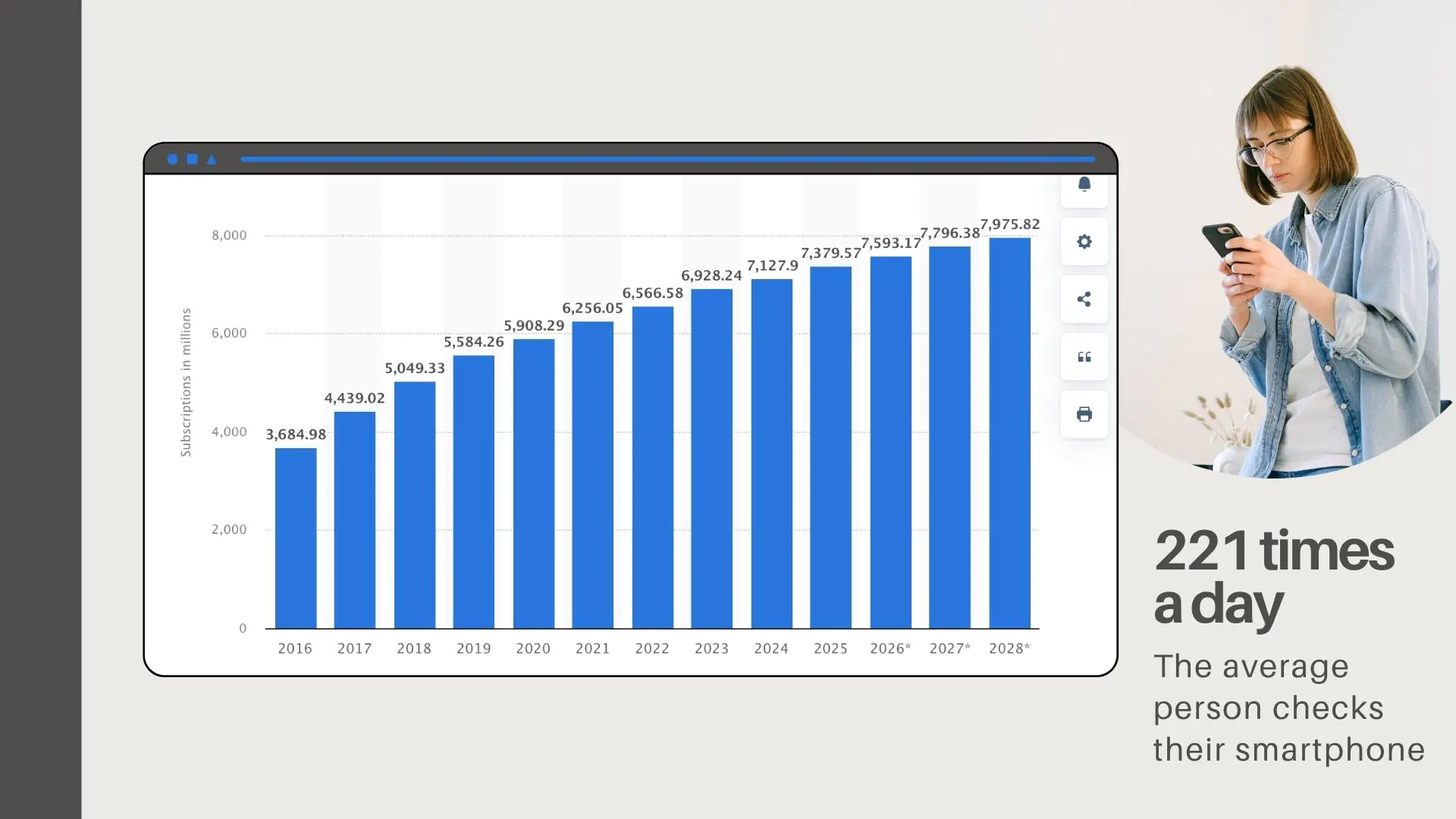
Global smartphone usage keeps climbing: mobile network subscriptions are expected to reach nearly 8 billion by 2028.
The Future of M-Learning
Let’s be honest: what we’ve described so far is “mobile learning 2025.” Useful, but not the final form. Phones keep getting smarter, and learning tools are catching up. So let’s treat this like a quick brainstorm — where could m-learning realistically go in the next five years?
- AI tutors in your pocket will guide learners through courses with context-aware help on their phones.
- Micro-learning paths tied to micro-certifications will let learners earn small, stackable credentials directly from mobile courses.
- AR overlays on the real world will show step-by-step guidance on a phone screen right on top of physical objects and places.
- Phone-first VR moments will deliver short, focused simulations through simple headsets powered by smartphones.
- Context-aware analytics will treat device, time, and location as signals to improve mobile course design and support.
- Smarter push notifications will send fewer, better-timed nudges that respect learner preferences and behavior.
- Mobile-first blended learning will be designed around phones from the start, with desktops used only where they add real value.
Conclusion
A few years ago, one of our clients came to us with a familiar headache: “Our people say the LMS is useful, but they never have time to sit down and use it.” Classic. Desktop-only, long courses, zero chance they’d open it after hours.
Mobile technologies are ready to help you reach every student or employee. As we’ve seen, people are already inseparable from their devices; you just have to connect to their devices. Nothing fancy at first glance: branded interface, offline mode, push reminders, short units cut out of their existing courses.
But all these features together bring great outcomes:
- Higher course completion rates
- More frequent logins
- Faster feedback loops
- Better accessibility
- Clearer learning data for your team
- Smoother blended learning across online and on-site activities
Unfortunately, beyond the use of email and the calendar function, mobile applications lie largely dormant, their vast resources untapped. It’s time to change that.
If you’re planning your learning roadmap for the next three to five years, m-learning is the place where AI, micro-certifications, and AR/VR will most likely land first — in the same device your learners are already checking dozens of times a day.
FAQ
What is mobile learning (m-learning)?
Mobile learning (m-learning) is studying through short, digital lessons on phones and tablets, using apps or a mobile-friendly LMS whenever and wherever it fits into a learner’s day.
What are the main benefits of mobile learning?
People learn in gaps of the day. You can propose to them a better level of accessibility, faster feedback, and even higher engagement.
Why is mobile learning important in education?
New daily habits of your learners demand new approaches to learn. Every gadget in the learner’s hands may be a bridge between new knowledge and the learner’s mind.
What are the benefits of mobile learning for teachers?
For teaching teams, this changes the day-to-day workflow. They post updates once and reach students immediately through push notifications. Micro-quizzes, polls, and short videos sit right next to core course materials, which works well in blended learning setups.
How can organizations adopt mobile learning successfully?
Pick a responsive LMS or app. Add offline mode and push alerts. Run a small pilot, then adjust based on real numbers, not hunches.



- What Is Mobile Learning (M-Learning)?
- Importance of Mobile Learning in Modern Education
-
Key 7 Benefits of Mobile Learning
- 1. Accessibility (your learning materials are accessible to everyone)
- 2. Flexibility of schedules, lessons, activities
- 3. Real-time learning and feedback
- 4. Personalized experience
- 5. Higher engagement through multimedia
- 6. Cost-effectiveness (invest less but receive more)
- 7. Social and collaborative learning opportunities
- Advantages of Mobile Learning for Students and Teachers
- M-Learning in Higher Education and Corporate Training
- Challenges of Mobile Learning and How to Overcome Them
- The Future of M-Learning
- Conclusion
