







TL;DR
LMS integrations for corporate L&D matter most when they remove repetitive administration, connect training to employee data, and make access easier to control. HRIS and SSO usually come first. CRM, LTI tools, BI, Zoom, and Teams follow when the business case is clear.
Quick Answer
- HRIS: Syncs employee data, such as roles, departments, hire dates, and termination status, to automate enrollment and keep training assignments current.
- SSO: Enables secure LMS access through existing company credentials, reducing login friction and support tickets.
- CRM: Connects learning activities to sales, partner, or customer education workflows so that training impact can be traced beyond the LMS.
- LTI: Adds third-party learning tools and content inside the LMS, so learners do not have to jump between disconnected platforms.
According to the 2025 Salesforce MuleSoft Connectivity Benchmark Report, the average enterprise now manages 897 applications, yet only 29% are integrated. The same report found that 90% of IT leaders say data silos are creating business challenges in their organization. In corporate learning, those gaps become manual enrollment, delayed onboarding, login tickets, missing reports, and lost certification data.
A corporate LMS is part of the enterprise technology stack. This corporate LMS integration guide explains which connections matter first, how to plan them, and where implementation typically breaks down.
What Is an LMS Integration?
What is LMS integration? An LMS integration connects a learning platform with other systems in the company’s technology stack, such as HRIS, CRM, identity providers, content tools, virtual classrooms, and analytics platforms.
The goal is simple: reduce manual data entry, automate learning workflows, and connect learning data to business outcomes. Enterprise LMS integration usually uses pre-built connectors for standard systems or custom API development for workflows that do not fit a default connector.
The better question is not whether two systems can connect. The better question is what should happen after they connect.
Why LMS Integrations Get Deprioritized, and Why That Is a Mistake
Integrations get pushed aside because launch pressure is visible and data flow is not. The training team wants content live. HR wants onboarding running. IT already has a queue. Procurement compares platform features, while the cross-system workflow sits somewhere between teams.
So integrations move to phase two, and phase two becomes manual work.
Every month without LMS HRIS integration means manual users, outdated assignments, and slow offboarding. Every month without LMS SSO integration means password resets and access tickets. Every month without LMS CRM integration means training outcomes stay invisible to revenue, partner, or customer education teams.
There is also an IT cost. The same 2025 MuleSoft benchmark found that IT teams spend 39% of their time designing, building, and testing custom integrations between systems. That is one reason LMS integration planning should start before vendor selection, not after the first launch date is already promised.
For corporate L&D, the first planning question should be direct: which connection removes the most operational friction first?
The Four LMS Integrations That Matter Most for Corporate L&D
A content library connector can help. BI dashboards can become useful later. Collaboration tools matter when live sessions are part of the learning model. But for most enterprise learning teams, four integration families shape the first roadmap: HRIS, SSO, CRM, and LTI.
1. HRIS Integration
An HRIS integration keeps the LMS fed with employee records: who the person is, what they do, who they report to, when they arrived, and when they left. In most projects, that means an LMS Workday integration, an LMS BambooHR integration for mid-size teams, or an LMS SAP SuccessFactors integration in larger enterprises — whatever HR already runs. One record, but almost everything hangs off it. Onboarding starts from the hire date. Compliance paths follow the department. A product certification follows the role.
Employee data controls onboarding, leadership programs, compliance paths, and product certifications. Without HRIS sync, L&D teams manage people data by hand.
What actually makes or breaks the integration is lifecycle logic.
“Hire, promotion, transfer, new manager, offboarding — every one of those events should move a training assignment somewhere. The connector is the easy part. The hard part is deciding what each status change means for learning, because a spreadsheet sync will not answer that question for you, and in a compliance-heavy company, nobody wants to find that out at audit time.” — Volodymyr Chekyrta, Engineering Manager, Raccoon Gang.
What to verify before implementation:
- Which HRIS is the system of record?
- Should the LMS receive updates instantly or through scheduled batch sync?
- What fields must map to LMS user profiles?
- What triggers enrollment: hire date, department, job title, role change, manager assignment, or location?
- What happens when an employee is terminated?
A good HRIS integration does more than automate employee enrollment in the LMS. It keeps training aligned with people, roles, reporting lines, compliance records, and workforce planning.
2. SSO Integration
SSO integration lets employees access the LMS through existing company credentials. That usually means LMS SSO integration with Okta, Microsoft Entra ID (formerly Azure AD), Google Workspace, or another identity provider.
Employees do not need another password. IT can apply existing access policies. L&D receives fewer login tickets before mandatory training deadlines.
SSO often pairs with provisioning and deprovisioning, which is where LMS SAML SCIM provisioning comes in. SAML handles authentication. SCIM supports user creation, profile attributes, and access changes.
What to verify before implementation:
- Does the LMS support SAML, OAuth, or OpenID Connect?
- Is SCIM available for provisioning and deprovisioning?
- What user attributes should flow into the LMS?
- What happens to enrollments when access is removed?
- Do partners, contractors, or external learners use the same login path?
SSO should be planned with L&D because access logic shapes groups, enrollment rules, reporting, and support.
3. CRM Integration
CRM integration earns its place where training touches money.
“When customers come to us for Salesforce integration, the conversation quickly shifts from simple data syncing to business logic. The goal is usually enforcing policy, like ensuring a sales rep is certified before they can access a pipeline, or automatically adjusting partner tiers based on training activity. Our role is to automate those business rules so the systems manage the policy for you.” — Natalia Boikiv, Delivery Director, Raccoon Gang.
Sales enablement leads the list; partner training, customer education, and certification programs are not far behind.
For partner education, LMS CRM integration can show whether a reseller or customer admin completed training before receiving access. For customer education, completion data can support adoption tracking, customer health review, or renewal conversations.
What to verify before implementation:
- Which CRM objects matter?
- Should learning data move one way or both ways?
- Which fields should update after completion?
- Does CRM data need to trigger LMS enrollment?
- Who uses the CRM-side training data after it appears there?
CRM should not be the first for every company. It matters when training connects to revenue, partner readiness, or customer adoption.
4. LTI Integration
LTI integration connects external learning tools to the LMS in a standard way. These tools may include assessments, virtual labs, content libraries, simulations, proctoring tools, or virtual classrooms.
Check the version early. LTI 1.3 is the current standard, and security is the reason it replaced 1.1 — OAuth 2.0 and signed JWT messages instead of the old shared-secret setup. For a corporate LMS, LTI 1.3 support belongs on the checklist for every tool vendor conversation. What learners get out of it is simpler: an assessment or a virtual lab opens inside the course, not in yet another tab with yet another login.
What to verify before implementation:
- Does the tool support LTI 1.1 or LTI 1.3?
- Does the LMS support the required version?
- Is grade passback needed?
- Do SCORM, xAPI, and LTI compliance requirements apply to your content model?
- Will the tool store learner data outside the LMS?
Canvas is a good reference point here. It implements the IMS LTI standard, and a tool can surface in a module, on an assignment, or at the course level — and that placement decision changes how learners meet it. Decide placements before the tool list grows past three or four. Our LMS integration services page describes the approach we use to keep tool sprawl from turning into workflow sprawl.
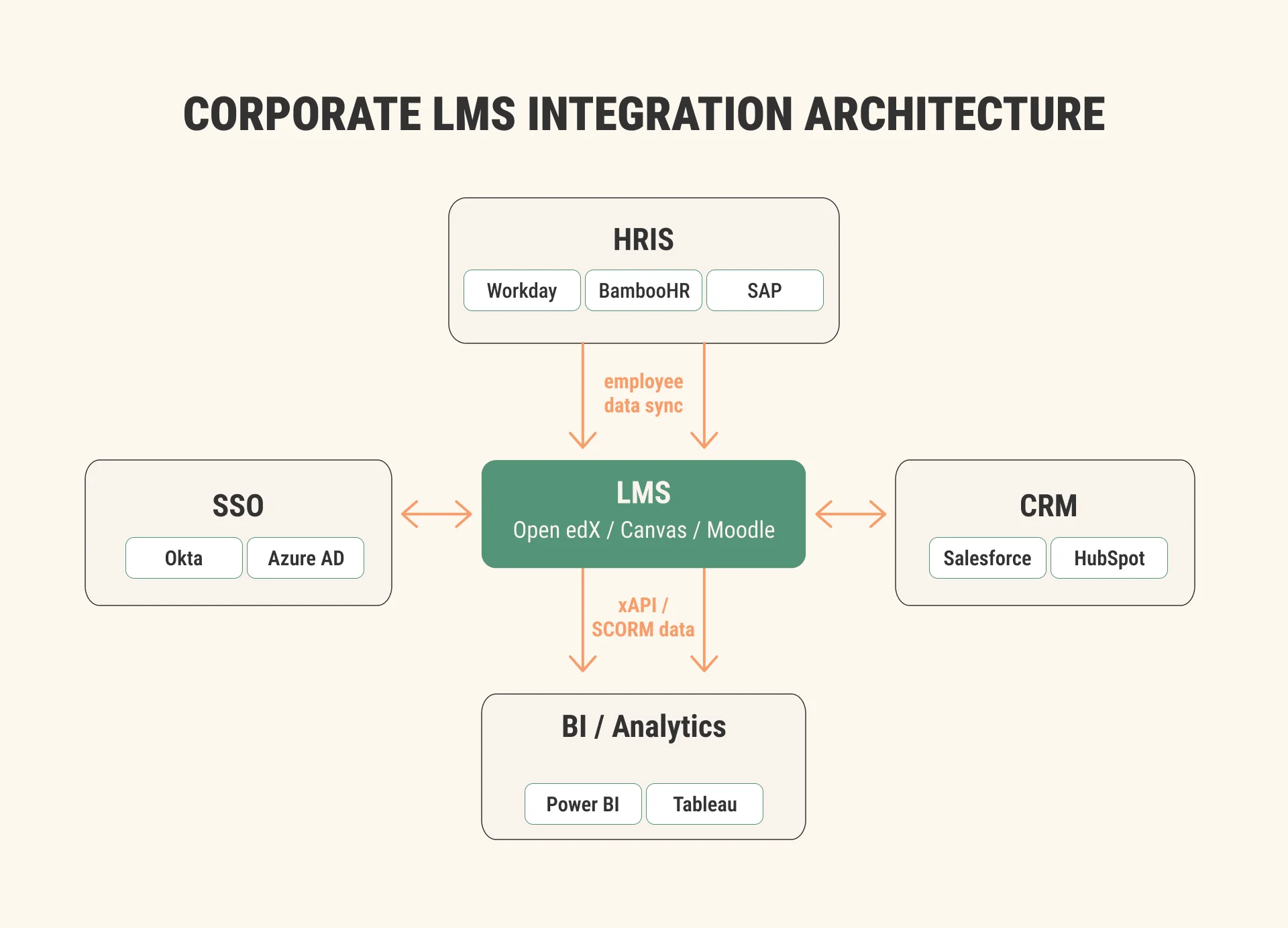
The corporate LMS sits between employee data, identity access, business systems, learning tools, and reporting.
LMS Integration Requirements Checklist
Before evaluating vendors or starting implementation, confirm these points.
- Which systems must connect on day one?
- Which systems can wait for phase two?
- Do you need near-instant sync or scheduled batch sync?
- Is the data flow one-way or bi-directional?
- Who owns each integration: IT, L&D, HR, sales operations, or the implementation partner?
- Which system is the source of truth for user data?
- Which fields must map between systems?
- What security and compliance rules apply: GDPR, HIPAA, internal access controls, data residency?
- Are API rate limits relevant for your user volume?
- Do you need middleware between systems?
- What happens during sync errors, API downtime, or expired credentials?
- Who reviews integration logs after launch?
- What regression testing happens after HRIS, CRM, identity, or LMS updates?
For enterprise LMS API integration projects, do not stop at “the LMS has an API.” Ask what the API can actually do for your workflow. User creation is different from enrollment. Enrollment is different from progress sync. Progress sync is different from certification renewal logic.
If your team is still comparing platforms, our enterprise LMS evaluation checklist can help structure the decision before implementation details start pulling the project in different directions.
How to Prioritize LMS Integrations
Integration work should follow a roadmap. Trying to connect every system during initial implementation often creates more risk than value.
A useful prioritization model looks at four things:
- Operational impact.
- Governance and security requirements.
- Learner adoption.
- Reporting visibility.
That keeps the roadmap grounded. The question is not “Can we connect it?” The question is “What breaks if we do not connect it?”
Step 1: Identify the systems creating the most operational friction today
Start with pain, not with the integration menu. If L&D spends hours updating user groups, HRIS moves up. If learners fail to access courses, SSO moves up. If the partner certification status is missing from Salesforce, CRM moves up.
Across our HRIS integration projects, data mapping consistently takes longer than teams expect. The connector may be ready, but department names, job titles, manager fields, inactive records, and duplicate emails still need decisions.
Step 2: Prioritize HRIS and SSO first
For internal employee learning, HRIS and SSO usually create the highest early return. HRIS reduces manual enrollment. SSO reduces login friction and supports access control.
Together, they answer two basic LMS questions: who is the learner, and what should they see?
Step 3: Add CRM integration when training ties to revenue
CRM should move earlier when learning affects sales enablement, partner programs, customer onboarding, or certification-led adoption.
A sales academy, partner portal, or customer education program needs different integration logic from internal compliance training. The user records may live in the CRM. Completion data may need to appear on an account or contact record. Certification status may affect access to partner benefits or product enablement materials.
Step 4: Expand into LTI tools, collaboration platforms, and BI
Once the core data layer holds, the rest of the ecosystem can start earning its keep — LTI tools first, LMS Zoom and Teams integration for live sessions, then content libraries, virtual classrooms, and BI dashboards. The order matters less than the stability underneath. The NASA Open Science 101 project shows the pattern: Raccoon Gang authored five modules in Rise 360, then wired them into Open edX through SCORM.
That made content packaging, launch behavior, progress tracking, analytics, and badge support part of implementation testing, not just content delivery.
| Integration | Build first when… | Can be postponed when… |
| HRIS | Employee onboarding, compliance, role-based training, or frequent org changes depend on it. | Learners are external only, or the user volume is small. |
| SSO | Employees use company identity tools and access control matters. | The pilot has a small closed user group. |
| CRM | Training affects sales, partners, customers, certification, or revenue workflows. | Training is internal-only, and CRM users do not need completion data. |
| LTI | Third-party learning tools must run inside the LMS. | Tools are optional or used by a small audience. |
| BI and analytics | Leadership needs cross-system reporting. | LMS-native reporting is enough for the first launch. |
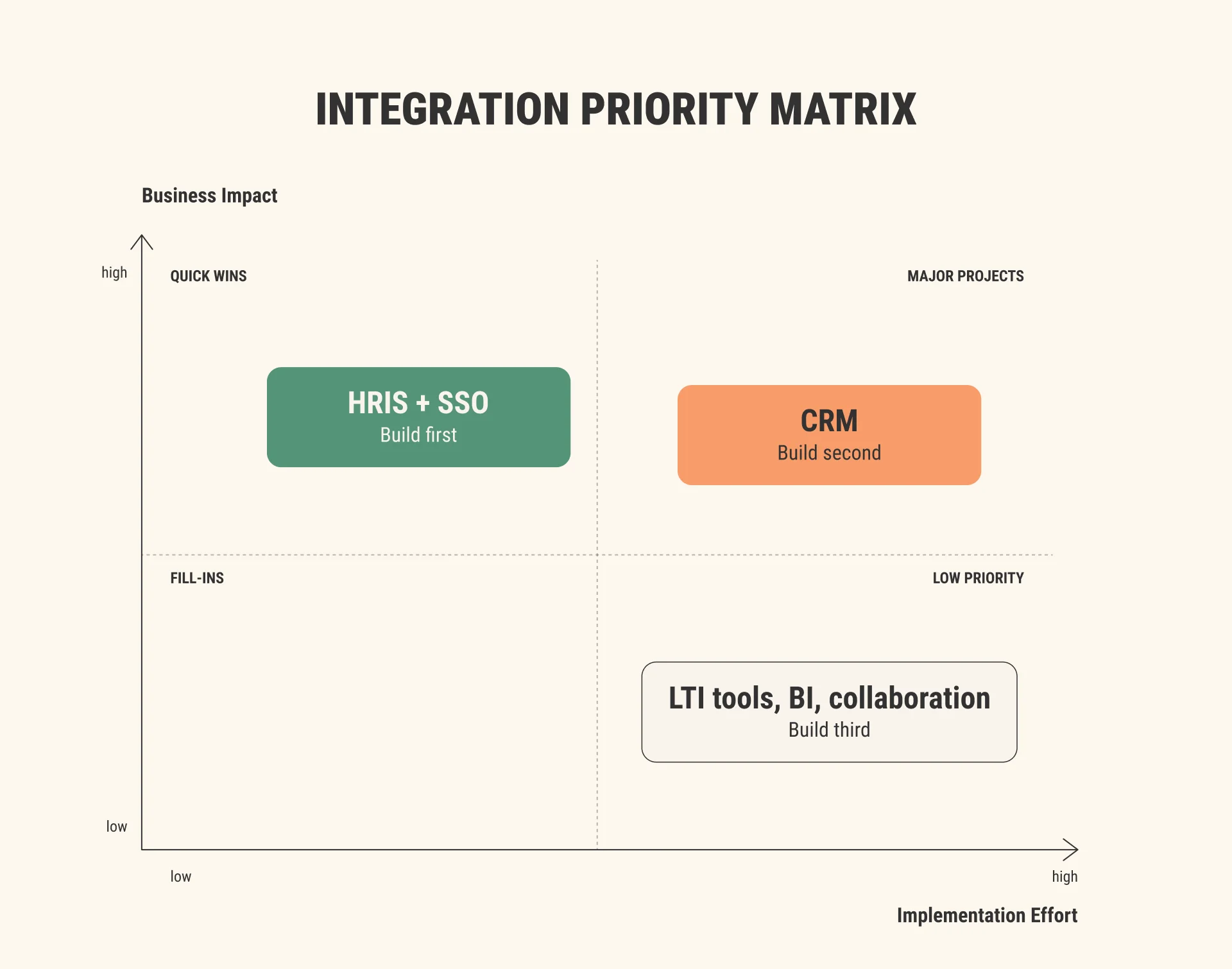
HRIS and SSO usually belong in the first implementation wave. CRM, LTI tools, BI, Zoom, and Teams follow based on business need.
Common LMS Integration Failures and How to Avoid Them
Most integration failures are planning failures with technical symptoms.
Treating integration as a post-launch task
The LMS launches, courses work, and onboarding still depend on spreadsheets. Avoid it by mapping required integrations before vendor selection.
In our implementation practice, standard cloud-based deployments usually take around 4-12 weeks, while larger enterprise projects with data migration, multiple integrations, and custom configurations can run 3-6 months. That range matters because integrations need their own testing window.
Underestimating data mapping
A field called “department” in the HRIS may not match the LMS category structure, and a manager relationship may be stored differently across systems. Avoid it by creating a field-level mapping document before development starts.
In the EBRD Policy Academy project, Raccoon Gang helped move policy knowledge into accessible Open edX modules hosted in Azure, with content migration, platform management, hosting, cybersecurity, and maintenance. Integration work has the same lesson: migration is structure plus ownership.
No integration testing before go-live
A connector can work in a demo and fail under production data. Avoid it by testing with realistic records, not clean samples.
A good pilot should include real users across roles, not only admins. One practical benchmark is a 50-100 user pilot over 2-4 weeks, with feedback from surveys, focus groups, and support ticket analysis.
Choosing a platform before checking the exact system fit
A platform may support HRIS integration in general, but not your HRIS version, field model, or approval workflow. Test the specific scenario, not the generic feature claim.
No process for sync errors
APIs fail, credentials expire, and field names change. Define ownership, alerting, logs, retry logic, and escalation before launch.
LMS Integrations Across Open edX, Canvas, and Moodle
Open edX, Canvas, and Moodle all support corporate LMS integration work. The right choice depends on your tech stack, team capacity, learning model, and ownership preferences.
Open edX
Open edX HRIS integration works well when the company needs control over user provisioning, enrollment rules, cohort logic, reporting, and data exchange. Open edX REST APIs support JWT-based interaction, and Open edX can send selected xAPI statements to a Learning Record Store when the event-routing-backends plugin is configured, according to the Open edX REST API documentation. Raccoon Gang’s Open edX API integration services support API-based connections and custom modules as part of wider Open edX services.
Canvas
Canvas LMS HRIS integration usually centers on user data, SIS or HRIS feed structure, role mapping, identity access, and reporting exports. Canvas supports external tools through the IMS LTI standard and allows tools to appear at course or account level, according to the Canvas external tools documentation. Raccoon Gang’s Canvas services support teams connecting Canvas to learning, identity, and reporting setup.
Moodle
Moodle SSO CRM integration often depends on plugin choices, hosting model, security needs, and CRM workflow. Moodle documentation explains that its Web Services API allows external systems to perform operations normally available inside Moodle, including role assignment through external service calls. Raccoon Gang’s Moodle services cover Moodle development, configuration, and support.
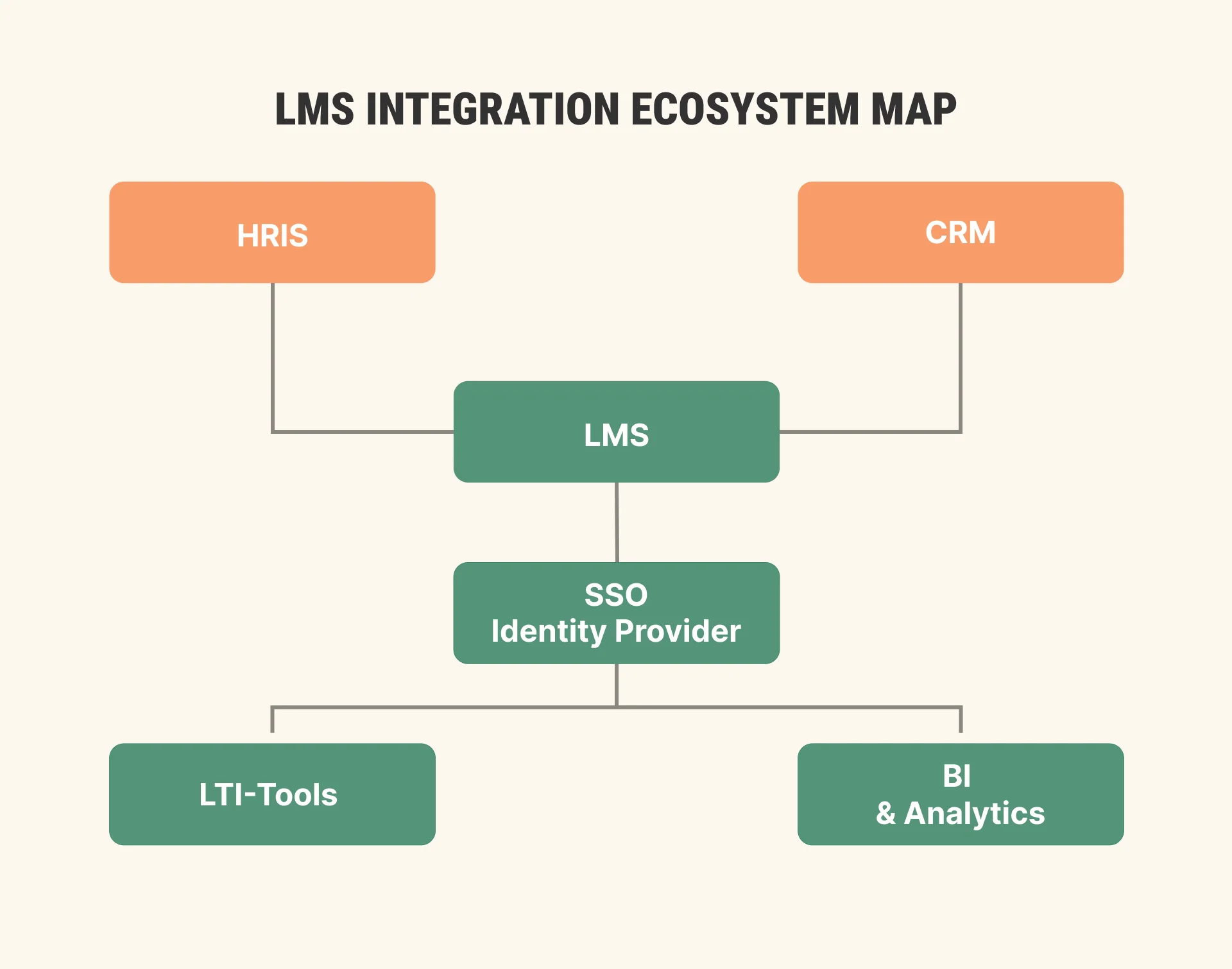
A corporate LMS integration architecture should show source systems, sync direction, identity access, and analytics outputs before development starts.
When to Work with LMS Integration Specialists
Some integrations are simple. A standard LTI tool with clean documentation may require little coordination. A basic SSO setup may follow a familiar IT path.
Other cases need LMS integration services: custom HRIS fields, shared user records, CRM-triggered enrollment, compliance restrictions, or custom LMS API development for workflows the default platform does not support.
Custom LMS API development is usually less about writing code from scratch and more about protecting the workflow from hidden assumptions: record ownership, sync failure, conflicting data, and support handoff.
Our custom LMS vs SaaS LMS comparison can help separate platform choice from integration planning. If the connection changes product logic, it may belong inside custom LMS development services rather than a small connector task.
How Raccoon Gang Supports LMS Integration Projects
Our professionals map the business need first: onboarding, compliance, sales enablement, partner certification, customer education, internal academies, or reporting. Work may include HRIS and CRM mapping, identity setup, platform planning, custom API connections, testing, and maintenance.
Raccoon Gang has worked with Open edX since 2015 and has developed and launched 100+ Open edX-based projects, according to our Open edX services page. Review Raccoon Gang case studies to see how our company approaches learning platform projects.
Talk to our integration specialists before connecting your next system to your LMS.
Conclusion
LMS integrations are not a phase two feature. They decide whether the LMS reduces administrative work or adds another system for L&D to babysit.
For most corporate learning teams, HRIS and SSO should come first. They solve user data, access, enrollment, and offboarding problems. CRM follows when training connects to revenue, partners, or customer education. LTI tools, collaboration platforms, and BI become stronger once the core data flow works.
Integration planning should happen alongside LMS selection, not after. Start with the business need, define the integration type, then plan implementation details, ownership, and support.
FAQ
What is LMS integration?
Which LMS integrations matter most for enterprise L&D?
How does HRIS integration work with an LMS?
What is the difference between SSO and SAML?
Can Open edX integrate with Salesforce?
How long does LMS integration implementation take?
Should we use pre-built connectors or custom API development?

- TL;DR LMS integrations for corporate L&D matter most when they remove repetitive administration, connect training to employee data, and make access easier to control. HRIS and SSO usually come first. CRM, LTI tools, BI, Zoom, and Teams follow when the business case is clear. Quick Answer HRIS: Syncs employee data, such as roles, departments, hire dates, and termination status, to automate enrollment and keep training assignments current. SSO: Enables secure LMS access through existing company credentials, reducing login friction and support tickets. CRM: Connects learning activities to sales, partner, or customer education workflows so that training impact can be traced beyond the LMS. LTI: Adds third-party learning tools and content inside the LMS, so learners do not have to jump between disconnected platforms. According to the 2025 Salesforce MuleSoft Connectivity Benchmark Report, the average enterprise now manages 897 applications, yet only 29% are integrated. The same report found that 90% of IT leaders say data silos are creating business challenges in their organization. In corporate learning, those gaps become manual enrollment, delayed onboarding, login tickets, missing reports, and lost certification data. A corporate LMS is part of the enterprise technology stack. This corporate LMS integration guide explains which connections matter first, how to plan them, and where implementation typically breaks down. What Is an LMS Integration? What is LMS integration? An LMS integration connects a learning platform with other systems in the company’s technology stack, such as HRIS, CRM, identity providers, content tools, virtual classrooms, and analytics platforms. The goal is simple: reduce manual data entry, automate learning workflows, and connect learning data to business outcomes. Enterprise LMS integration usually uses pre-built connectors for standard systems or custom API development for workflows that do not fit a default connector. The better question is not whether two systems can connect. The better question is what should happen after they connect. Why LMS Integrations Get Deprioritized, and Why That Is a Mistake Integrations get pushed aside because launch pressure is visible and data flow is not. The training team wants content live. HR wants onboarding running. IT already has a queue. Procurement compares platform features, while the cross-system workflow sits somewhere between teams. So integrations move to phase two, and phase two becomes manual work. Every month without LMS HRIS integration means manual users, outdated assignments, and slow offboarding. Every month without LMS SSO integration means password resets and access tickets. Every month without LMS CRM integration means training outcomes stay invisible to revenue, partner, or customer education teams. There is also an IT cost. The same 2025 MuleSoft benchmark found that IT teams spend 39% of their time designing, building, and testing custom integrations between systems. That is one reason LMS integration planning should start before vendor selection, not after the first launch date is already promised. For corporate L&D, the first planning question should be direct: which connection removes the most operational friction first? The Four LMS Integrations That Matter Most for Corporate L&D A content library connector can help. BI dashboards can become useful later. Collaboration tools matter when live sessions are part of the learning model. But for most enterprise learning teams, four integration families shape the first roadmap: HRIS, SSO, CRM, and LTI. 1. HRIS Integration An HRIS integration keeps the LMS fed with employee records: who the person is, what they do, who they report to, when they arrived, and when they left. In most projects, that means an LMS Workday integration, an LMS BambooHR integration for mid-size teams, or an LMS SAP SuccessFactors integration in larger enterprises — whatever HR already runs. One record, but almost everything hangs off it. Onboarding starts from the hire date. Compliance paths follow the department. A product certification follows the role. Employee data controls onboarding, leadership programs, compliance paths, and product certifications. Without HRIS sync, L&D teams manage people data by hand. What actually makes or breaks the integration is lifecycle logic. "Hire, promotion, transfer, new manager, offboarding — every one of those events should move a training assignment somewhere. The connector is the easy part. The hard part is deciding what each status change means for learning, because a spreadsheet sync will not answer that question for you, and in a compliance-heavy company, nobody wants to find that out at audit time." — Volodymyr Chekyrta, Engineering Manager, Raccoon Gang. What to verify before implementation: Which HRIS is the system of record? Should the LMS receive updates instantly or through scheduled batch sync? What fields must map to LMS user profiles? What triggers enrollment: hire date, department, job title, role change, manager assignment, or location? What happens when an employee is terminated? A good HRIS integration does more than automate employee enrollment in the LMS. It keeps training aligned with people, roles, reporting lines, compliance records, and workforce planning. 2. SSO Integration SSO integration lets employees access the LMS through existing company credentials. That usually means LMS SSO integration with Okta, Microsoft Entra ID (formerly Azure AD), Google Workspace, or another identity provider. Employees do not need another password. IT can apply existing access policies. L&D receives fewer login tickets before mandatory training deadlines. SSO often pairs with provisioning and deprovisioning, which is where LMS SAML SCIM provisioning comes in. SAML handles authentication. SCIM supports user creation, profile attributes, and access changes. What to verify before implementation: Does the LMS support SAML, OAuth, or OpenID Connect? Is SCIM available for provisioning and deprovisioning? What user attributes should flow into the LMS? What happens to enrollments when access is removed? Do partners, contractors, or external learners use the same login path? SSO should be planned with L&D because access logic shapes groups, enrollment rules, reporting, and support. 3. CRM Integration CRM integration earns its place where training touches money. "When customers come to us for Salesforce integration, the conversation quickly shifts from simple data syncing to business logic. The goal is usually enforcing policy, like ensuring a sales rep is certified before they can access a pipeline, or automatically adjusting partner tiers based on training activity. Our role is to automate those business rules so the systems manage the policy for you." — Natalia Boikiv, Delivery Director, Raccoon Gang. Sales enablement leads the list; partner training, customer education, and certification programs are not far behind. For partner education, LMS CRM integration can show whether a reseller or customer admin completed training before receiving access. For customer education, completion data can support adoption tracking, customer health review, or renewal conversations. What to verify before implementation: Which CRM objects matter? Should learning data move one way or both ways? Which fields should update after completion? Does CRM data need to trigger LMS enrollment? Who uses the CRM-side training data after it appears there? CRM should not be the first for every company. It matters when training connects to revenue, partner readiness, or customer adoption. 4. LTI Integration LTI integration connects external learning tools to the LMS in a standard way. These tools may include assessments, virtual labs, content libraries, simulations, proctoring tools, or virtual classrooms. Check the version early. LTI 1.3 is the current standard, and security is the reason it replaced 1.1 — OAuth 2.0 and signed JWT messages instead of the old shared-secret setup. For a corporate LMS, LTI 1.3 support belongs on the checklist for every tool vendor conversation. What learners get out of it is simpler: an assessment or a virtual lab opens inside the course, not in yet another tab with yet another login. What to verify before implementation: Does the tool support LTI 1.1 or LTI 1.3? Does the LMS support the required version? Is grade passback needed? Do SCORM, xAPI, and LTI compliance requirements apply to your content model? Will the tool store learner data outside the LMS? Canvas is a good reference point here. It implements the IMS LTI standard, and a tool can surface in a module, on an assignment, or at the course level — and that placement decision changes how learners meet it. Decide placements before the tool list grows past three or four. Our LMS integration services page describes the approach we use to keep tool sprawl from turning into workflow sprawl. [caption id="attachment_16848" align="aligncenter" width="1920"] The corporate LMS sits between employee data, identity access, business systems, learning tools, and reporting.[/caption] LMS Integration Requirements Checklist Before evaluating vendors or starting implementation, confirm these points. Which systems must connect on day one? Which systems can wait for phase two? Do you need near-instant sync or scheduled batch sync? Is the data flow one-way or bi-directional? Who owns each integration: IT, L&D, HR, sales operations, or the implementation partner? Which system is the source of truth for user data? Which fields must map between systems? What security and compliance rules apply: GDPR, HIPAA, internal access controls, data residency? Are API rate limits relevant for your user volume? Do you need middleware between systems? What happens during sync errors, API downtime, or expired credentials? Who reviews integration logs after launch? What regression testing happens after HRIS, CRM, identity, or LMS updates? For enterprise LMS API integration projects, do not stop at “the LMS has an API.” Ask what the API can actually do for your workflow. User creation is different from enrollment. Enrollment is different from progress sync. Progress sync is different from certification renewal logic. If your team is still comparing platforms, our enterprise LMS evaluation checklist can help structure the decision before implementation details start pulling the project in different directions. How to Prioritize LMS Integrations Integration work should follow a roadmap. Trying to connect every system during initial implementation often creates more risk than value. A useful prioritization model looks at four things: Operational impact. Governance and security requirements. Learner adoption. Reporting visibility. That keeps the roadmap grounded. The question is not “Can we connect it?” The question is “What breaks if we do not connect it?” Step 1: Identify the systems creating the most operational friction today Start with pain, not with the integration menu. If L&D spends hours updating user groups, HRIS moves up. If learners fail to access courses, SSO moves up. If the partner certification status is missing from Salesforce, CRM moves up. Across our HRIS integration projects, data mapping consistently takes longer than teams expect. The connector may be ready, but department names, job titles, manager fields, inactive records, and duplicate emails still need decisions. Step 2: Prioritize HRIS and SSO first For internal employee learning, HRIS and SSO usually create the highest early return. HRIS reduces manual enrollment. SSO reduces login friction and supports access control. Together, they answer two basic LMS questions: who is the learner, and what should they see? Step 3: Add CRM integration when training ties to revenue CRM should move earlier when learning affects sales enablement, partner programs, customer onboarding, or certification-led adoption. A sales academy, partner portal, or customer education program needs different integration logic from internal compliance training. The user records may live in the CRM. Completion data may need to appear on an account or contact record. Certification status may affect access to partner benefits or product enablement materials. Step 4: Expand into LTI tools, collaboration platforms, and BI Once the core data layer holds, the rest of the ecosystem can start earning its keep — LTI tools first, LMS Zoom and Teams integration for live sessions, then content libraries, virtual classrooms, and BI dashboards. The order matters less than the stability underneath. The NASA Open Science 101 project shows the pattern: Raccoon Gang authored five modules in Rise 360, then wired them into Open edX through SCORM. That made content packaging, launch behavior, progress tracking, analytics, and badge support part of implementation testing, not just content delivery. Integration Build first when… Can be postponed when… HRIS Employee onboarding, compliance, role-based training, or frequent org changes depend on it. Learners are external only, or the user volume is small. SSO Employees use company identity tools and access control matters. The pilot has a small closed user group. CRM Training affects sales, partners, customers, certification, or revenue workflows. Training is internal-only, and CRM users do not need completion data. LTI Third-party learning tools must run inside the LMS. Tools are optional or used by a small audience. BI and analytics Leadership needs cross-system reporting. LMS-native reporting is enough for the first launch. [caption id="attachment_16835" align="aligncenter" width="1920"] HRIS and SSO usually belong in the first implementation wave. CRM, LTI tools, BI, Zoom, and Teams follow based on business need.[/caption] Common LMS Integration Failures and How to Avoid ThemMost integration failures are planning failures with technical symptoms.Treating integration as a post-launch taskThe LMS launches, courses work, and onboarding still depend on spreadsheets. Avoid it by mapping required integrations before vendor selection.In our implementation practice, standard cloud-based deployments usually take around 4-12 weeks, while larger enterprise projects with data migration, multiple integrations, and custom configurations can run 3-6 months. That range matters because integrations need their own testing window.Underestimating data mappingA field called “department” in the HRIS may not match the LMS category structure, and a manager relationship may be stored differently across systems. Avoid it by creating a field-level mapping document before development starts.In the EBRD Policy Academy project, Raccoon Gang helped move policy knowledge into accessible Open edX modules hosted in Azure, with content migration, platform management, hosting, cybersecurity, and maintenance. Integration work has the same lesson: migration is structure plus ownership.No integration testing before go-liveA connector can work in a demo and fail under production data. Avoid it by testing with realistic records, not clean samples.A good pilot should include real users across roles, not only admins. One practical benchmark is a 50-100 user pilot over 2-4 weeks, with feedback from surveys, focus groups, and support ticket analysis. Choosing a platform before checking the exact system fitA platform may support HRIS integration in general, but not your HRIS version, field model, or approval workflow. Test the specific scenario, not the generic feature claim.No process for sync errorsAPIs fail, credentials expire, and field names change. Define ownership, alerting, logs, retry logic, and escalation before launch. [cta-orange t="Avoid Integration Mistakes Before Launch" d="Talk to our integration specialists before connecting your LMS to HRIS, SSO, CRM, or third-party learning tools."] LMS Integrations Across Open edX, Canvas, and MoodleOpen edX, Canvas, and Moodle all support corporate LMS integration work. The right choice depends on your tech stack, team capacity, learning model, and ownership preferences.Open edXOpen edX HRIS integration works well when the company needs control over user provisioning, enrollment rules, cohort logic, reporting, and data exchange. Open edX REST APIs support JWT-based interaction, and Open edX can send selected xAPI statements to a Learning Record Store when the event-routing-backends plugin is configured, according to the Open edX REST API documentation. Raccoon Gang’s Open edX API integration services support API-based connections and custom modules as part of wider Open edX services.CanvasCanvas LMS HRIS integration usually centers on user data, SIS or HRIS feed structure, role mapping, identity access, and reporting exports. Canvas supports external tools through the IMS LTI standard and allows tools to appear at course or account level, according to the Canvas external tools documentation. Raccoon Gang’s Canvas services support teams connecting Canvas to learning, identity, and reporting setup.MoodleMoodle SSO CRM integration often depends on plugin choices, hosting model, security needs, and CRM workflow. Moodle documentation explains that its Web Services API allows external systems to perform operations normally available inside Moodle, including role assignment through external service calls. Raccoon Gang’s Moodle services cover Moodle development, configuration, and support. [caption id="attachment_16836" align="aligncenter" width="1920"] A corporate LMS integration architecture should show source systems, sync direction, identity access, and analytics outputs before development starts.[/caption] When to Work with LMS Integration Specialists Some integrations are simple. A standard LTI tool with clean documentation may require little coordination. A basic SSO setup may follow a familiar IT path. Other cases need LMS integration services: custom HRIS fields, shared user records, CRM-triggered enrollment, compliance restrictions, or custom LMS API development for workflows the default platform does not support. Custom LMS API development is usually less about writing code from scratch and more about protecting the workflow from hidden assumptions: record ownership, sync failure, conflicting data, and support handoff. Our custom LMS vs SaaS LMS comparison can help separate platform choice from integration planning. If the connection changes product logic, it may belong inside custom LMS development services rather than a small connector task. How Raccoon Gang Supports LMS Integration Projects Our professionals map the business need first: onboarding, compliance, sales enablement, partner certification, customer education, internal academies, or reporting. Work may include HRIS and CRM mapping, identity setup, platform planning, custom API connections, testing, and maintenance. Raccoon Gang has worked with Open edX since 2015 and has developed and launched 100+ Open edX-based projects, according to our Open edX services page. Review Raccoon Gang case studies to see how our company approaches learning platform projects. Talk to our integration specialists before connecting your next system to your LMS. [cta-green t="Talk to our integration specialists before connecting your next system to your LMS." d=""] Conclusion LMS integrations are not a phase two feature. They decide whether the LMS reduces administrative work or adds another system for L&D to babysit. For most corporate learning teams, HRIS and SSO should come first. They solve user data, access, enrollment, and offboarding problems. CRM follows when training connects to revenue, partners, or customer education. LTI tools, collaboration platforms, and BI become stronger once the core data flow works. Integration planning should happen alongside LMS selection, not after. Start with the business need, define the integration type, then plan implementation details, ownership, and support. [faq title="FAQ"] [faq-item question="What is LMS integration?"] LMS integration is the process of connecting a learning management system with other business systems, such as HRIS, CRM, SSO identity providers, content tools, virtual classrooms, or analytics platforms. The goal is to reduce manual work, automate workflows, and make learning data useful outside the LMS. [/faq-item] [faq-item question="Which LMS integrations matter most for enterprise L&D?"] The most important integrations are usually HRIS, SSO, CRM, and LTI. HRIS manages employee data and enrollment rules. SSO manages secure access. CRM connects learning to revenue, partner, or customer education workflows. LTI connects external learning tools inside the LMS.[/faq-item] [faq-item question="How does HRIS integration work with an LMS?"] An HRIS integration sends employee data from systems like Workday, BambooHR, or SAP SuccessFactors into the LMS. The LMS can then assign training based on hire date, department, role, location, manager, or employment status. This reduces manual enrollment and keeps training assignments current. [/faq-item] [faq-item question="What is the difference between SSO and SAML?"] SSO is the user experience: one login gives access to multiple systems. SAML is one of the technical standards that can support the login process. In LMS projects, SAML is often used to connect the LMS with identity providers such as Okta or Microsoft Entra ID (formerly Azure AD). [/faq-item] [faq-item question="Can Open edX integrate with Salesforce?"] Yes. Open edX can integrate with Salesforce through APIs, middleware, or custom development. The exact setup depends on what should sync: learner profiles, enrollments, completions, certificates, scores, partner records, customer records, or custom CRM objects. [/faq-item] [faq-item question="How long does LMS integration implementation take?"] Simple integrations may take a few weeks. Standard cloud-based LMS deployments are often planned in the 4-12 week range, while larger enterprise implementations with data migration, several integrations, and custom configurations can run 3-6 months. The timeline depends less on the connector name and more on data mapping, access rules, and testing depth. [/faq-item] [faq-item question="Should we use pre-built connectors or custom API development?"] Use pre-built connectors when your workflow matches a standard pattern, and the connector supports the exact systems, fields, and sync logic you need. Use custom API development when your business process is non-standard, multiple systems are involved, or the LMS must support rules that a default connector cannot handle. [/faq-item] [/faq]
- Quick Answer
- What Is an LMS Integration?
- Why LMS Integrations Get Deprioritized, and Why That Is a Mistake
- The Four LMS Integrations That Matter Most for Corporate L&D
- LMS Integration Requirements Checklist
- How to Prioritize LMS Integrations
- Common LMS Integration Failures and How to Avoid Them
- LMS Integrations Across Open edX, Canvas, and Moodle
- When to Work with LMS Integration Specialists
- How Raccoon Gang Supports LMS Integration Projects
- Conclusion