







Enterprise LMS selection has grown far more complex than it was even five years ago. AI features now sit inside almost every platform, but they vary widely in what they actually automate and what data they require. Compliance expectations have tightened, with GDPR, SOC 2, and industry-specific mandates turning security from a checkbox into a formal audit trail. Integrations have multiplied as the LMS has become a hub connecting HRIS, CRM, and business intelligence tools rather than a standalone course library. And workforce transformation — the constant reshaping of skills and roles — means the platform must support skills mapping and learning paths, not just deliver static content. If you want to make sure your organization chooses the right solution, using an enterprise LMS evaluation checklist is essential. Together, these forces make a rigorous LMS evaluation the difference between a platform that lasts and one your team is replacing in two years.
TL;DR
Successful enterprise LMS selection starts with documented business requirements, not feature lists. Using an Enterprise LMS Evaluation Checklist can help you ensure you cover all essential criteria. Score vendors against weighted criteria, validate the finalists with a structured pilot, and plan implementation before you sign.
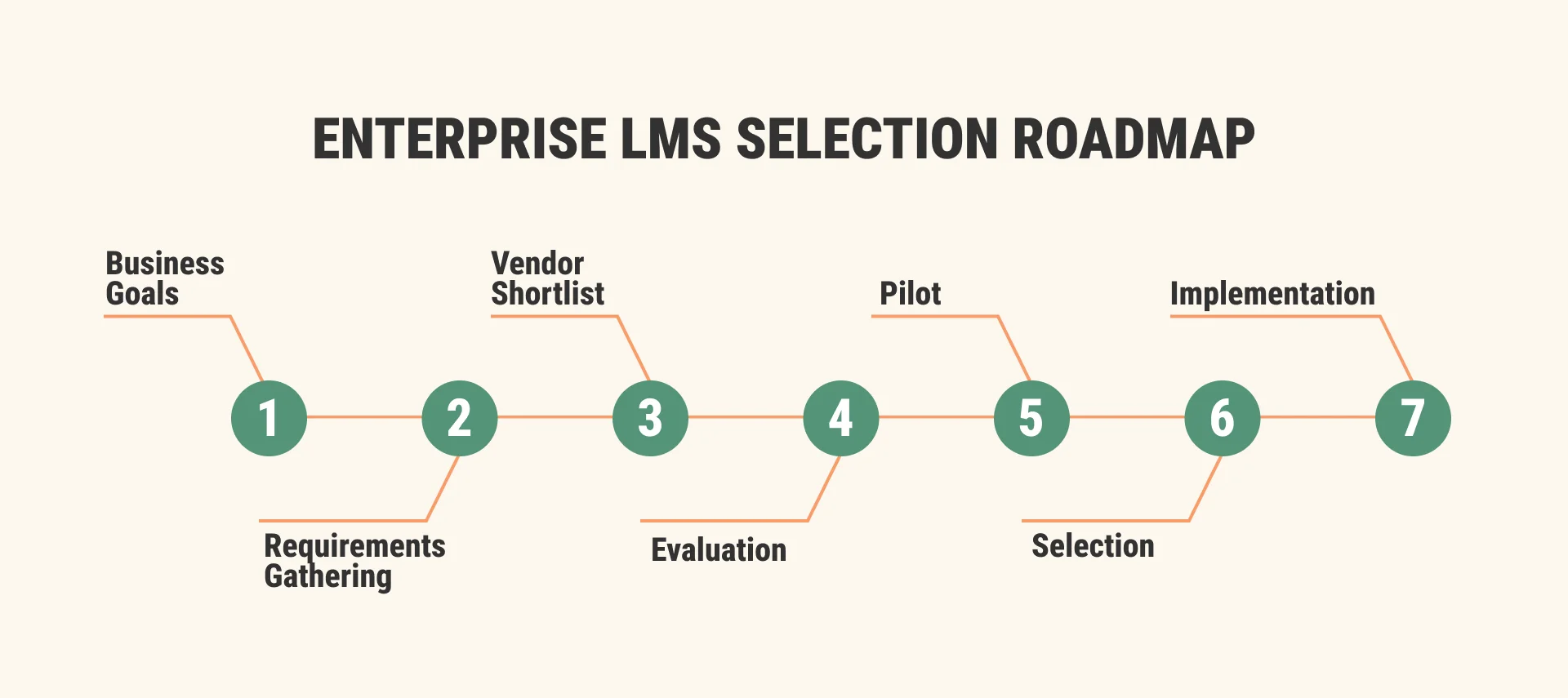
How to choose an enterprise LMS comes down to a disciplined sequence:
- Define business, functional, technical, security, and scalability requirements first; shortlist three to five platforms
- Issue an RFP
- Run scripted demos
- Pilot the finalists
- Review commercial terms; and pick the platform that scores best on your weighted criteria
A decade ago, choosing a corporate learning platform mostly meant comparing course catalogs and gradebooks. Today, an enterprise LMS sits at the center of AI-assisted learning, compliance reporting, HRIS and CRM data flows, and workforce transformation programs. The cost of getting LMS evaluation wrong has grown with them.
Workforce data makes the shift concrete: the World Economic Forum’s Future of Jobs Report 2025 expects 39% of workers’ current skill sets to change or become outdated by 2030. An LMS can no longer be a passive course library — it has to support skills mapping, learning paths, analytics, and workforce planning.
Meanwhile, Fosway Group found fewer than four in ten L&D teams consider their learning platforms fit for the modern workforce, and Brandon Hall Group reported 44% of organizations were looking to replace their learning technology within two years. Each of those platforms once passed a selection process — the process failed them.
This guide is a practical procurement playbook: business requirements → evaluation → vendor selection → implementation, drawing on a decade of Raccoon Gang’s consulting and implementation work with customers from NASA to multinational school networks.
What Is an Enterprise LMS?
An enterprise learning management system (LMS) is a platform built to deliver, manage, and measure training across a large, distributed organization. Unlike small-business tools, an enterprise LMS platform supports thousands of concurrent users, multiple learning audiences, deep integrations with HRIS and business systems, granular roles and permissions, and enterprise-grade security, scalability, and reporting.
Corporate LMS is often used interchangeably, but “enterprise” signals specific demands — here is how enterprise learning management systems differ from SMB platforms:
| Dimension | SMB LMS | Enterprise LMS |
| Scale | Hundreds of users | Thousands to hundreds of thousands, high concurrency |
| Audiences | One audience, one brand | Employees, partners, customers; multi-tenant, multi-brand |
| Integrations | Standalone or light connectors | HRIS, CRM, ERP, SSO, BI, and content standards (SCORM, xAPI, LTI) |
| Compliance | Basic data protection | GDPR, SOC 2, ISO 27001, audit trails, data residency |
| Ownership | Managed by one admin | Governed by L&D, IT, security, and procurement together |
A platform is “enterprise” not because of the vendor’s logo wall, but because it can run under your governance, security, and integration requirements for years.
Why Enterprise LMS Selection Often Fails
Brandon Hall Group found the top reason organizations replace their LMS is poor user experience, cited by 87% of those looking to switch. But UX complaints are usually a symptom: when our team audits a struggling implementation, the root cause almost always sits in the selection phase, not the software. Five patterns repeat:
- Poor requirements. Teams start with vendor demos instead of documented needs. The WEF Future of Jobs Report 2025 found 63% of employers see skill gaps as the biggest barrier to business transformation — yet most requirements documents never mention capability gaps or target roles.
- Feature-first decisions. Long feature matrices reward whoever ticks the most boxes, not whoever fits your workflows — and unused features still add cost and complexity.
- Ignored integrations. The platform is evaluated in isolation, then struggles to sync with the HRIS, SSO, and reporting stack it must live inside.
- No governance. Nobody owns the decision criteria, so the loudest stakeholder or the slickest demo wins.
- Stakeholder misalignment. L&D optimizes for learning experience, IT for security, and procurement for price. Without a shared scoring model, those priorities collide after signing.
Enterprise LMS Evaluation Checklist
This enterprise LMS evaluation checklist breaks the work into five requirement categories. Score every candidate against all five — a platform that excels in functionality but fails security or scalability is not an enterprise option.
Business Requirements
Before any technology conversation, document what the platform must achieve:
- Business goals. Tie the LMS to measurable outcomes: faster onboarding, reduced training delivery costs, or better training ROI.
- Learning audiences. Employees only, or also partners and customers? Extended enterprise use changes licensing, tenancy, and eCommerce.
- Growth plans. Headcount projections, new markets, acquisitions, and new training lines over three to five years.
- KPIs. Define success metrics: completion, time to competence, skill attainment, internal mobility, and compliance risk. LinkedIn’s 2025 Workplace Learning Report found 88% of organizations are concerned about employee retention, with learning opportunities ranked the No. 1 retention strategy — workforce outcomes are legitimate LMS success metrics, not soft extras.
Functional Requirements
Evaluate capabilities against your learning model, not the market’s longest feature list:
- Learning paths and skills. Can the platform hold your competency frameworks, map them to roles, and build structured paths toward measurable skill targets? Fosway’s research shows upskilling and reskilling now top the L&D agenda — treat skills architecture as core, not optional. A platform built for upskilling and reskilling programs needs skill taxonomies, gap analysis, and path automation that feed results into workforce planning.
- Assessments and certifications. Question banks, proctoring options, recertification cycles, and digital credentials. When Raccoon Gang built NASA’s Open Science 101 curriculum, Credly digital badges were part of the architecture from day one — credentialing works best when designed in, not bolted on.
- AI capabilities. Look past the label and ask which LMS workflows the AI actually supports: recommendations, skills inference, content search, learner support, reporting, or admin automation — then what data it uses and which controls administrators keep.
- Reporting and analytics. Executive dashboards, cohort comparisons, exportable raw data, and BI connectivity — verify you can answer your KPI questions without paying for vendor services.
- Learner experience. Mobile access, notifications, and the engagement mechanics that keep completion rates healthy.
- Content workflows. Support for your training design process, authoring integrations, versioning, and multilingual content management.
Technical Requirements
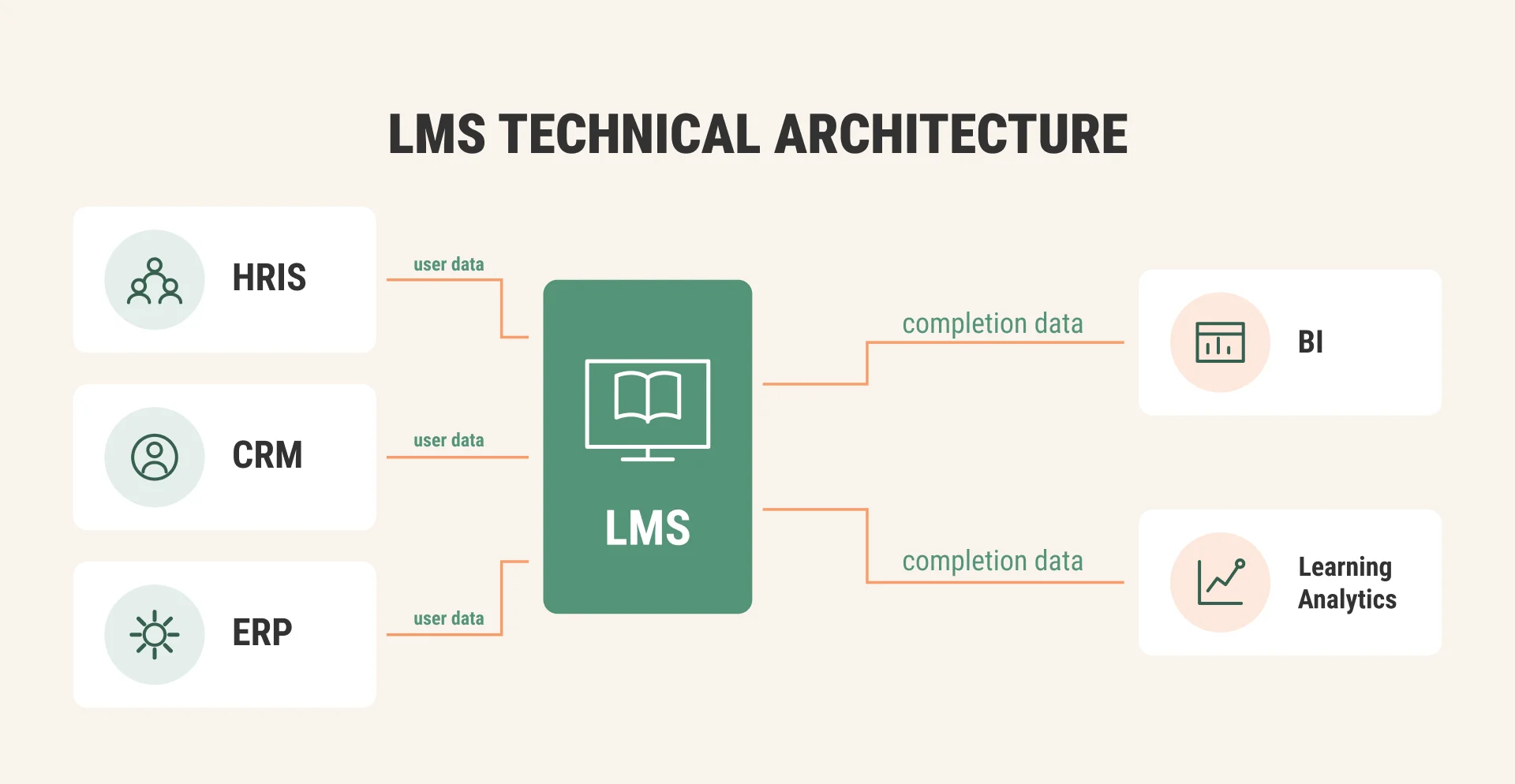
Your LMS integration requirements should start with HRIS connectivity, because user provisioning, org structures, and completion data all flow through it, then work outward:
- APIs. Documented REST APIs with real rate limits, not “integration available on request.”
- SSO. SAML 2.0 or OpenID Connect, with role mapping from your identity provider.
- HRIS sync. Automated user creation, deactivation, and org hierarchy updates.
- CRM and ERP. Needed for customer education, partner training, and commercial reporting.
- Standards. SCORM and xAPI (with cmi5 where modern tracking matters), plus LTI for connecting external tools. For the AISL Harrow school network, our team integrated a custom Open edX platform with SSO, Microsoft Teams, and Tencent services — the integration layer carried most of the project’s complexity — typical at enterprise scale.
Security Requirements
Treat this as your LMS security compliance checklist and ask for evidence, not marketing claims:
- GDPR compliance, including data subject rights and processing agreements.
- SOC 2 reports or ISO 27001 certification for the vendor’s operations. Raccoon Gang holds ISO/IEC 27001:2022 certification and recommends requiring an audited standard from any platform or partner.
- FERPA where student records are involved.
- Data residency options that match your regulatory geography.
- Audit logs covering admin actions, grade changes, and data exports.
- Encryption in transit and at rest, plus a documented incident response process.
Scalability Requirements
LMS scalability requirements should be written as numbers, not adjectives:
- Concurrent users. Specify peak load, not average — enrollment windows and compliance deadlines create spikes.
- Multi-tenancy. Separate branding, catalogs, and admin domains per business unit or customer.
- Global delivery. CDN coverage and acceptable latency for every region you operate in.
- Localization. Interface languages, right-to-left support, and localized content workflows.
Real projects show why numbers matter: the EBRD Policy Academy platform Raccoon Gang built supports 600+ concurrent sessions, and a media institute platform our team delivered was designed for 20,000 concurrent users at over 98% uptime. Ask vendors for comparable, verifiable figures.
LMS Requirements Checklist
An LMS requirements checklist is a structured list of the business, functional, technical, security, and scalability criteria a new learning platform must meet. The ten points below double as your LMS procurement checklist and RFP backbone:
- Documented business goals with target KPIs
- Defined learning audiences and projected user volumes
- Learning paths, skills frameworks, and certification needs
- AI capability requirements and admin controls
- Reporting, analytics, and BI export requirements
- Integration list: HRIS, SSO, CRM, ERP, content tools
- Content standards: SCORM, xAPI, cmi5, LTI
- Security and compliance evidence: GDPR, SOC 2, ISO 27001, FERPA
- Scalability targets: peak concurrency, tenancy, regions, languages
- Ownership model: hosting, support, admin roles, 3–5-year total cost
Give every item an owner, a must-have or nice-to-have priority, and a verification method for demos and the pilot. As our specialists advise in Raccoon Gang’s feature-by-feature LMS requirements checklist for 2026:
“When selecting an LMS platform, clarify which modules are essential and which you can skip. Corporate training teams often lean on mobile learning support, streamlined interfaces, rapid SCORM/xAPI support, and direct integration with HR or CRM systems to roll out skill-based modules at scale.”
— Volodymyr Chekyrta, Engineering Manager, Raccoon Gang
Corporate LMS Selection Process
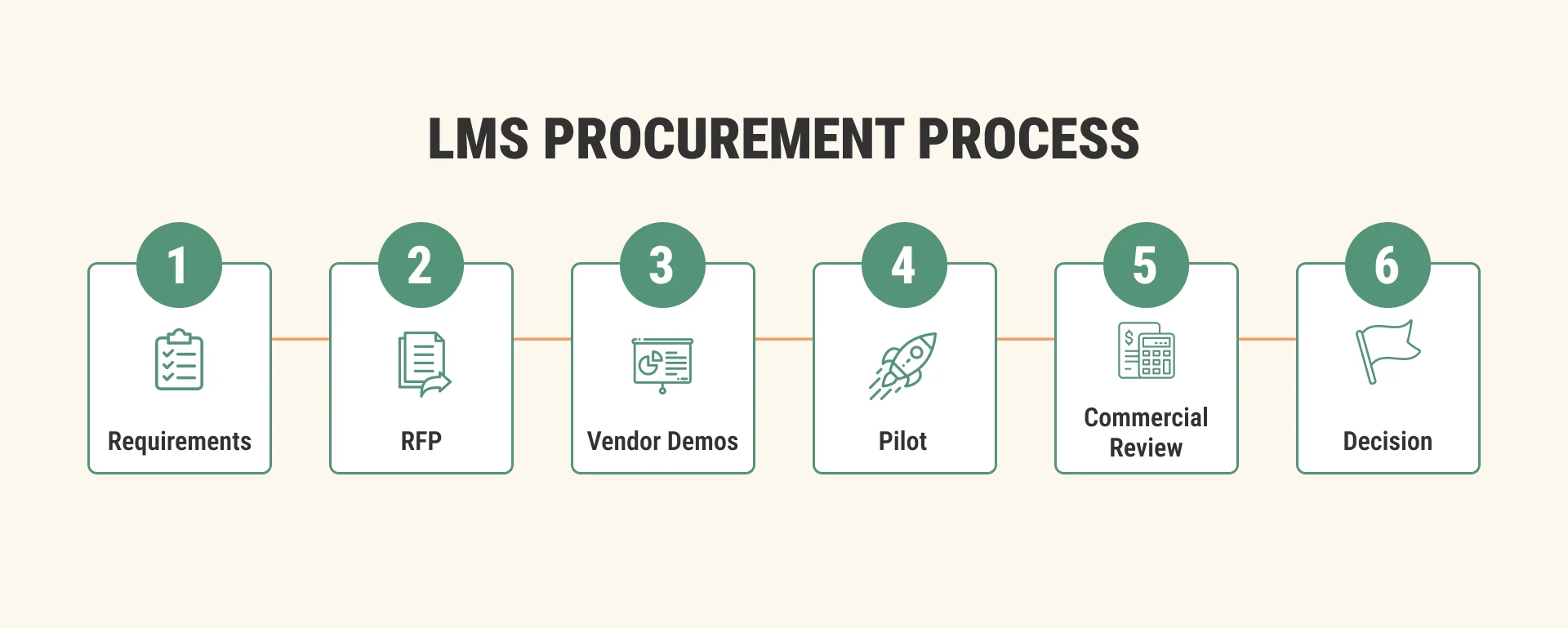
Knowing how to run an LMS selection process is mostly about sequencing: requirements before vendors, evidence before commitment. A well-run corporate LMS selection process moves through seven steps.
- Step 1: Requirements. Consolidate the checklist above into one document signed off by L&D, IT, security, and procurement, and assign weights while everyone is still neutral.
- Step 2: Vendor shortlist. Screen the market to three to five candidates that match your must-haves. Analyst resources from Gartner, Fosway, Brandon Hall, Training Industry, and Talented Learning help, as do direct platform comparisons — see our breakdowns of Moodle vs Canvas, Moodle vs Blackboard, and Canvas vs Blackboard.
- Step 3: RFP. Send a structured request for proposal so responses are comparable (template below).
- Step 4: Demos. Script the demos around your scenarios, not the vendor’s showreel. Useful LMS vendor demo questions include: Can you show our onboarding path built live? What happens when the HRIS deactivates a user? Which parts of this demo are roadmap rather than released?
- Step 5: Pilot. Test one or two finalists with real users, real content, and at least one real integration.
- Step 6: Commercial review. Negotiate licensing, implementation, support tiers, data ownership, and exit terms while you still have alternatives.
- Step 7: Selection. Score everything against the weighted model and document the decision — including why the runners-up lost, so the decision survives stakeholder changes.
Organizations that choose an LMS on demos alone typically compress steps 1, 5, and 6 — the three that catch expensive mistakes.
LMS Vendor Evaluation
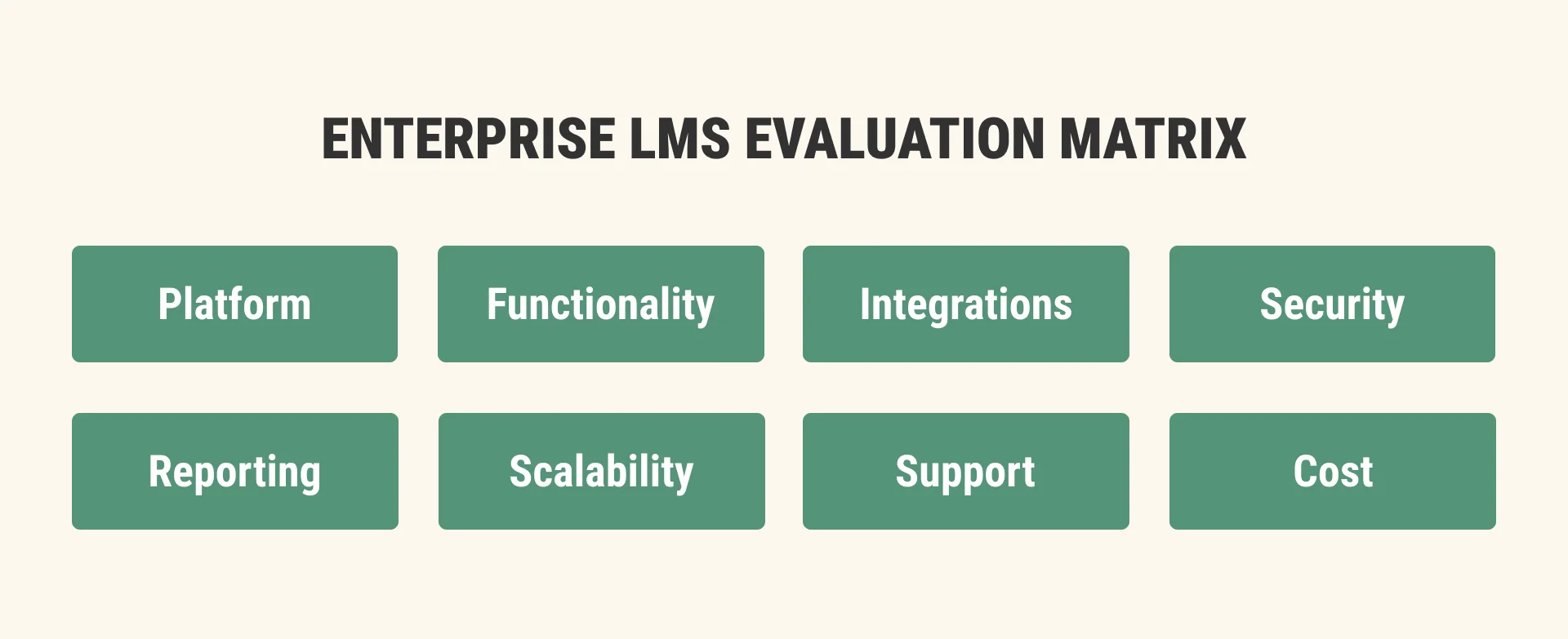
Structured LMS vendor evaluation replaces impressions with evidence. Build a weighted scoring matrix that reflects your priorities; evaluators score independently before comparing notes:
| LMS evaluation criteria | Weight | Vendor A | Vendor B | Vendor C |
| Functionality fit | 25% | |||
| Integrations | 20% | |||
| Security and compliance | 15% | |||
| Reporting and analytics | 10% | |||
| Scalability | 10% | |||
| Support and services | 10% | |||
| Total cost of ownership | 10% |
Beyond the matrix, three checks separate solid vendors from polished ones:
- Reference calls. Speak with customers of similar size and use case — ask what went wrong during implementation, not just what went right.
- Support and roadmap. Review SLA terms, escalation paths, release cadence, and how much of the roadmap is committed versus aspirational.
- Financial stability. An LMS is a five-to-ten-year relationship, so vendor viability, ownership changes, and product sunset history belong in the evaluation.
LMS RFP Template
A working LMS RFP template contains five sections:
- Company context and business requirements. Who you are, your audiences, volumes, goals, and KPIs.
- Functional and technical requirements. Your prioritized checklist, with a response format (supported/configurable/custom/roadmap/not supported).
- Security and compliance. Requested evidence: certifications, audit reports, data residency, and processing terms.
- Implementation and support. Proposed timeline, team, migration approach, training, and SLA tiers.
- Commercial terms. Pricing structure, licensing model, implementation costs, and three-to-five-year total cost of ownership.
Two rules make the LMS RFP process effective: keep the requirements list to what you will actually verify — 300-line RFPs get copy-pasted answers — and finalize your scoring rubric before responses arrive so scoring stays objective.
LMS Pilot Program
An LMS pilot program is the cheapest insurance in the selection process:
- Objectives. Validate the two or three highest-risk assumptions: a critical integration, a complex path, or reporting depth.
- Success metrics. Define pass/fail thresholds up front: task completion, admin time per workflow, integration sync accuracy, learner satisfaction.
- Stakeholders. Include real learners, a manager, an LMS admin, and an IT engineer — skeptics make the best pilot users.
- Duration. Four to eight weeks is usually enough; shorter tests only measure first impressions.
Common mistakes: piloting with demo content instead of your own, skipping integrations “to save time,” and treating the pilot as a formality once the decision has been made.
Enterprise LMS Implementation Timeline
A realistic enterprise LMS implementation timeline runs three to nine months, depending on integrations, migration volume, and customization. Plan it before procurement ends — implementation assumptions affect vendor choice.
| Phase | Typical duration | Focus |
| Discovery | 2–4 weeks | Confirm requirements, architecture, and success criteria |
| Configuration | 4–8 weeks | Tenants, roles, branding, learning structures, integrations |
| Migration | 2–8 weeks | Users, content, and historical records, with validation |
| Testing | 2–4 weeks | Functional, integration, load, and security testing |
| Training | 1–3 weeks | Admins, instructors, managers, and support teams |
| Go-live | 1–2 weeks | Phased rollout, hypercare support |
| Optimization | Ongoing | Analytics review, engagement tuning, quarterly improvements |
Real projects map to these ranges: Raccoon Gang delivered the full custom LMS for the AISL Harrow network in seven months and migrated 20,000 users to a new Open edX platform for TechSoup Romania with learner records preserved — migration scope stretches timelines most, so size it early.
When to Work with LMS Consulting Services
Most organizations run an enterprise LMS selection once every five to ten years. Vendors run their side of it every week. That asymmetry is the case for enterprise LMS consulting services: a vendor-neutral partner who evaluates platforms for a living can pressure-test requirements, flag integration risks, and benchmark commercial terms.
Consulting support is most valuable when:
- internal teams lack time or LMS expertise for a rigorous evaluation;
- the technical architecture spans HRIS, CRM, BI, and multiple learning tools;
- a complex migration threatens data integrity or learner records;
- implementation planning needs to start in parallel with procurement.
The same logic applies after selection: an experienced enterprise LMS implementation partner turns the winning platform into a working system — and a good one will say when a simpler option fits your requirements better than the market leader.
How Raccoon Gang Supports Enterprise LMS Selection
Raccoon Gang has spent a decade helping organizations plan, build, and run learning platforms. As an official Open edX partner with deep Moodle and Canvas expertise, our team supports every stage in this guide:
- Requirements workshops that align L&D, IT, security, and procurement around one weighted model.
- Architecture planning for integrations, hosting, analytics, and scalability targets.
- Vendor evaluation support, from RFP structure to demo scripts and pilot design.
- Custom LMS development, implementation, migration, and long-term support when off-the-shelf platforms fall short.
That mix of consulting and engineering is what customers value. As Andrew Ang from Harvard put it: “Raccoon Gang has been a great partner… experience with hosting Open edX instances, implementing LTI integrations, and developing education applications has been especially valuable.”
Conclusion
Successful enterprise LMS projects begin with structured evaluation, not vendor demos. Requirements matter more than feature lists: features age quickly, while governance, integrations, security, and scalability decide whether the platform still serves you in year five. And implementation planning should begin before procurement ends — organizations that treat selection and implementation as one continuous process end up with an enterprise LMS that works as infrastructure, not the next replacement candidate.
Work the checklist, weight the criteria, run an honest pilot, and document the decision. It is slower than picking the best-known name — and it separates the four in ten who trust their platform from the majority already shopping again.
FAQ
What is an enterprise LMS?
How do you evaluate an enterprise LMS?
What should an LMS RFP include?
What questions should you ask during an LMS demo?
How long does enterprise LMS implementation take?
Should companies use LMS consulting services?



- TL;DR
- What Is an Enterprise LMS?
- Why Enterprise LMS Selection Often Fails
- Enterprise LMS Evaluation Checklist
- LMS Requirements Checklist
- Corporate LMS Selection Process
- LMS Vendor Evaluation
- LMS RFP Template
- LMS Pilot Program
- Enterprise LMS Implementation Timeline
- When to Work with LMS Consulting Services
- How Raccoon Gang Supports Enterprise LMS Selection
- Conclusion