







Moodle vs Blackboard sounds like a simple comparison, but is it really a David vs Goliath story, or a fight between two serious LMS contenders?
Over the past 10 years, our team has often helped universities, training providers, and business teams choose the right LMS. Moodle and Blackboard appear in shortlists again and again. No surprise there.
Universities usually need academic workflows, faculty adoption support, and reliable course administration. Training companies may care more about customization, branded learner portals, and data flow between business systems. Both learning management platforms can cover part of that picture, though in different ways. So, when does Moodle make more sense, and when does Blackboard become the better investment? Let’s figure it out.
TL: DR
- Moodle vs Blackboard is an operating model decision. The right LMS depends on how your team manages costs, integrations, reporting, support, and platform ownership after launch.
- Choose Moodle if you need customization, budget control, data ownership, flexible hosting, and room to adapt workflows around real learning operations.
- Choose Blackboard if your institution needs vendor-managed support, packaged academic workflows, structured administration, and less internal technical ownership.
- Look beyond the first invoice. Moodle can require investment in hosting, setup, and maintenance. Blackboard can become expensive as users, services, or contract scope grow.
- For universities, structure often drives the choice. For learning providers, speed, branding, integrations, and margins matter more. Choose the LMS your team can sustain for the next 12–36 months.
- Choose the LMS your team can sustain for the next 12–36 months.
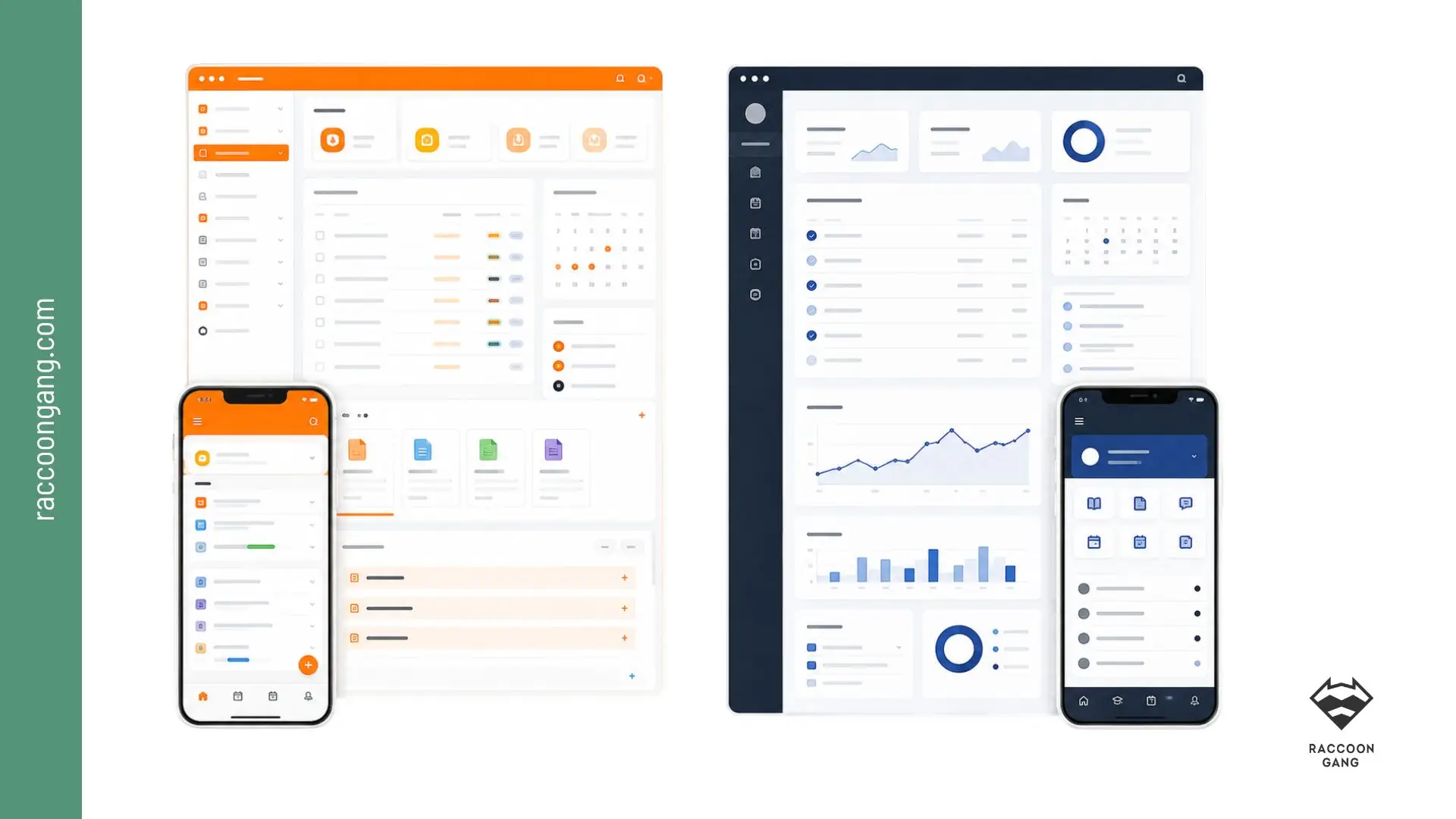
Users often describe Moodle as more intuitive and easier to navigate, while Blackboard is frequently praised for structured course organization and instructor control.
Moodle: Why Teams Choose It for Control and Flexibility
Moodle originally stood for “Modular Object-Oriented Dynamic Learning Environment,” and that early idea still illustrates how teams use Moodle LMS today: as an open-source platform, they can adapt around real learning operations, from course structures and user roles to reports, integrations, hosting, and long-term platform ownership.
Teams often choose Moodle when they need:
- custom learning workflows across departments or audiences
- control over hosting, data, roles, and permissions
- integrate LMS with SIS, HRIS, CRM, SSO, LTI, or analytics
- flexible course formats for academic, corporate, or blended learning
- long-term platform ownership without full vendor lock-in
For many teams, it becomes the LMS they choose when their learning operations no longer fit a fixed vendor template. They need different course formats, custom roles, specific reporting logic, local hosting options, or integrations that match how their academic or corporate systems already work.
All details about Moodle you can find directly in our other material: What Is Moodle LMS?
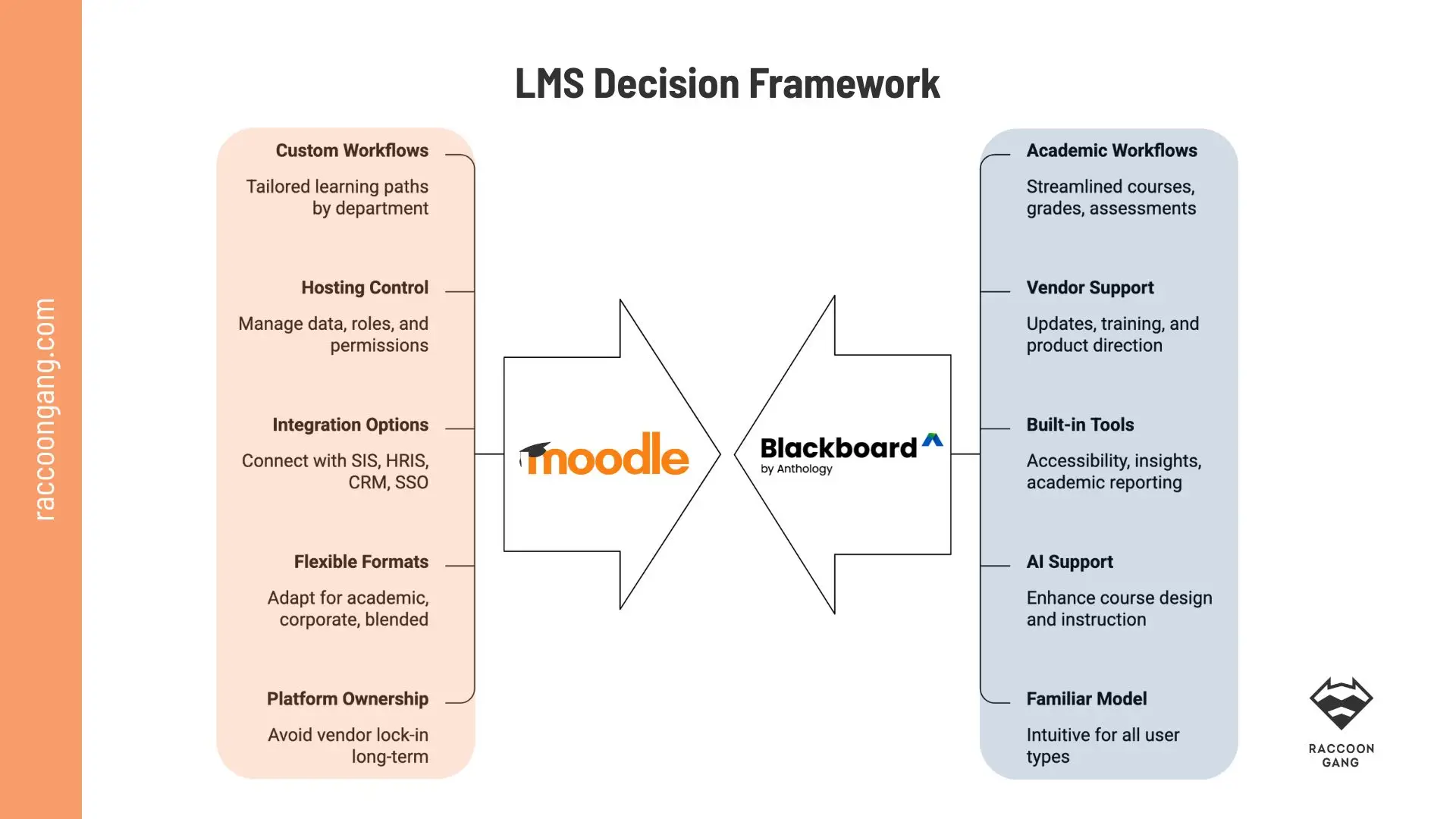
Moodle favors control; Blackboard favors managed academic structure.
Blackboard: Why Institutions Choose It for Structure and Academic Workflows
Blackboard LMS is a commercial learning management platform. Unlike Moodle, Blackboard’s roots are not open source. It is a licensed LMS product with vendor support, updates, training resources, and an ecosystem managed by Anthology.
Institutions often choose Blackboard when they need:
- established academic workflows for courses, grades, and assessments
- vendor-managed updates, support, training, and product direction
- built-in tools for accessibility, learner insights, and academic reporting
- AI-supported course design and instructor workflows
- a familiar LMS model for faculty, administrators, and students
Blackboard works well when an institution wants a structured LMS for everyday academic operations, without designing too many workflows from scratch. The platform gives teams a defined structure for teaching, learning, and administration. The main goal in this scenario is to reduce internal technical ownership.
Moodle vs Blackboard: Core Features and the Real Differences You Can Notice After Launch
Before the comparison table, one useful note: Blackboard vs Moodle should not mean “which platform has more buttons?” It would be better to compare daily operations and long-term investment returns.
| Area | Moodle* | Blackboard** | What you notice after launch |
| User interface | Flexible, theme-driven, and adaptable to different learning models | More standardized and vendor-led | Moodle gives more design freedom.
Blackboard gives more consistency across users and departments. |
| Course management | Broad course formats, activity types, plugins, and workflow options | Strong structure for academic course delivery and administration | Moodle works well when teams need tailored course logic.
Blackboard works well when institutions prefer fixed academic processes. |
| Assessment tools | Strong quiz engine, assignments, rubrics, forums, peer review, and plugins | Strong grading workflows, rubrics, assessments, and gradebook tools | Moodle gives more room to design assessment scenarios.
Blackboard gives faculty a more guided assessment environment. |
| Reporting | Configurable, especially with plugins, custom reports, or analytics integrations | More vendor-managed reporting for academic oversight | Moodle can match specific reporting logic.
Blackboard may reduce custom reporting work for standard higher-ed needs. |
| Mobile support | Moodle App and responsive course themes | Blackboard mobile experience within the vendor ecosystem | Moodle’s mobile quality depends on course design and setup.
Blackboard gives a more controlled mobile experience. |
| Analytics | Can connect with plugins, dashboards, BI tools, and custom analytics layers | Built-in learner insights and academic analytics | Moodle fits teams that want to define analytics around their own data model. Blackboard fits teams that want more ready-made insight tools. |
| Integration capabilities | Strong options through APIs, LTI, plugins, SSO, and custom development | Supports integrations through vendor-supported tools, APIs, and LTI | Moodle gives more integration freedom. Blackboard reduces some internal build work, though teams may work within tighter vendor boundaries. |
| Customization | High. Teams can change code, workflows, plugins, themes, and data logic | Moderate. Teams can configure, brand, and extend within the ecosystem | Moodle suits unusual workflows and branded portals.
Blackboard suits teams that want fewer platform-level decisions. |
| Multi-tenancy | Possible through Moodle Workplace, custom architecture, or partner-led setup | Strong for large institutional structures and enterprise administration | Moodle needs stronger architecture planning for complex multi-audience use. Blackboard fits centralized academic governance more naturally. |
| AI | Depends on selected plugins, integrations, and custom AI workflows | More vendor-led AI support for course design and instructor workflows | Moodle gives more choice over AI setup.
Blackboard gives institutions a clearer vendor roadmap for AI features. |
| Migration | More control over workflows, roles, integrations, and reports. | More vendor-led migration with less internal technical work. | Moodle needs stronger planning.
Blackboard still needs careful QA. |
* Go with Moodle if you want to build the LMS around your operating model.
** Go with Blackboard if you want a ready, vendor-supported structure your team can run with less technical ownership.
Moodle vs Blackboard Pricing: What You Pay for Over Three to Five Years
The first invoice your finance team receives after LMS adoption will not show the full picture. The main differences in the Moodle vs Blackboard pricing comparison usually appear after one to three years. We have prepared the key cost areas in the table below.
| Cost area | Moodle | Blackboard |
| License | Core software is free to download and use. | Commercial LMS with quote-based pricing. |
| Hosting | You pay for MoodleCloud, self-hosting, or managed hosting. | Usually included in the vendor contract. |
| Setup | Depends on configuration, migration, integrations, and design needs. | Usually part of the implementation package. |
| Support | Internal team, Moodle partner, or managed support. | Vendor support is usually included. |
| Customization | Flexible, but budget depends on scope. | More limited, usually handled within vendor rules. |
* The cost of Blackboard is harder to estimate from public information because Blackboard pricing and Blackboard Learn pricing usually require a custom quote.
“In recent LMS migration projects, we see the same question come up again. Do you want to own the platform, or do you want the vendor to manage most of it?”
— Natalia Boikiv, Delivery Director, Raccoon Gang
How to Choose Between Moodle and Blackboard Based on Your Operating Model
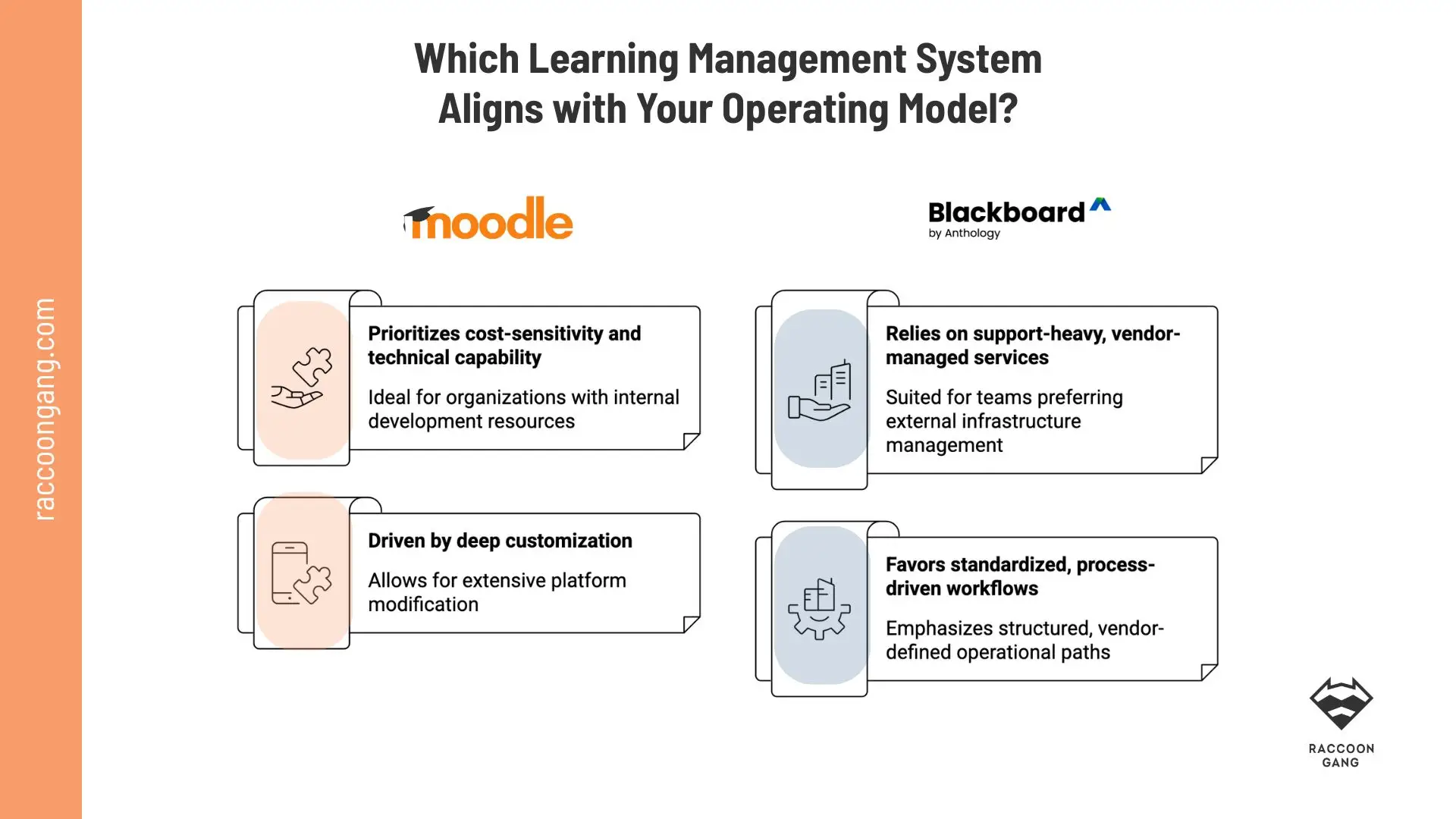
Moodle favors control; Blackboard favors vendor-managed structure.
Public reviews reveal a clear split. Moodle users praise customization, flexible setup, features, community support, and value for money. Yet many also mention a steep learning curve, UI issues, and complex setup. Blackboard reviews often value centralized grading and assignment tracking. Capterra shows a 4.1 rating from 536 reviews, but users still report glitches, failed assignment loads, browser issues, and inconsistent functionality.
Use these pointers to see which LMS fits your operating model.
- Lower software cost and stronger budget control across several years → Moodle
- More ownership over data, hosting, and platform decisions → Moodle
- A vendor-managed LMS with a more packaged implementation model → Blackboard
- Bundled hosting, support, updates, and administration → Blackboard
- Deep customization for branding, workflows, roles, reports, or learner paths → Moodle
- Plugin-level extensibility for assessments, integrations, content formats, and analytics → Moodle
- Less internal IT workload after launch → Blackboard
- A structured academic environment with formal support and established workflows → Blackboard
- Internal or partner-led technical capacity for hosting, setup, maintenance, and QA → Moodle
- A clearer vendor roadmap for product updates, AI features, and enterprise services → Blackboard
When Moodle and Blackboard Are the Wrong Shortlist
Material from E-Learning Industry provides that more than 70 million people use LMS platforms today, and the market includes hundreds of different LMS products. If your choice has narrowed to Moodle vs Blackboard, you have most likely already passed the first stage: how to choose the best LMS. Now it is time to check one last thing. Are these two options really the ones that can justify the investment for your institution?
Consider LMS alternatives if you answer “yes” to several questions:
- Do you need a customer or partner academy more than an academic LMS?
- Do you need to launch basic training in weeks, not months?
- Is a different user experience or simpler admin workflow necessary?
- Do you need stronger integration with HR, CRM, or collaboration tools?
- Would a lower total cost of ownership or more predictable subscription matter?
- Should the platform offer more flexibility for branding, workflows, or custom features?
- Is the main goal employee training, cohort learning, or content delivery rather than traditional LMS administration?
- Could a lighter solution work better because your team does not want to manage a complex enterprise LMS?
If you said yes to most of these, it usually makes sense to compare:
- Canvas for higher education and modern UX
- TalentLMS or similar platforms for corporate training simplicity
- Docebo for enterprise learning and automation
- iSpring Learn for faster setup and corporate use
- Absorb LMS for scalable training programs
- AcademyOcean for branded corporate learning portals
- Open edX for large-scale, highly customizable learning programs
“As LMS consultants, we always look beyond the client’s current situation. We assess what may change over the next one to three years, then prepare options based on that future operating model. We work with Moodle, Open edX, Canvas, so we can say this directly: if Moodle or Blackboard feels too heavy, too expensive, or too rigid, alternatives are worth considering.”
— Natalia Boikiv, Delivery Director, Raccoon Gang
How Raccoon Gang Helps Organizations Make the LMS Choice Less Risky
A risky LMS choice rarely looks risky at the start. The demo works. The feature list looks complete. The pricing seems acceptable.
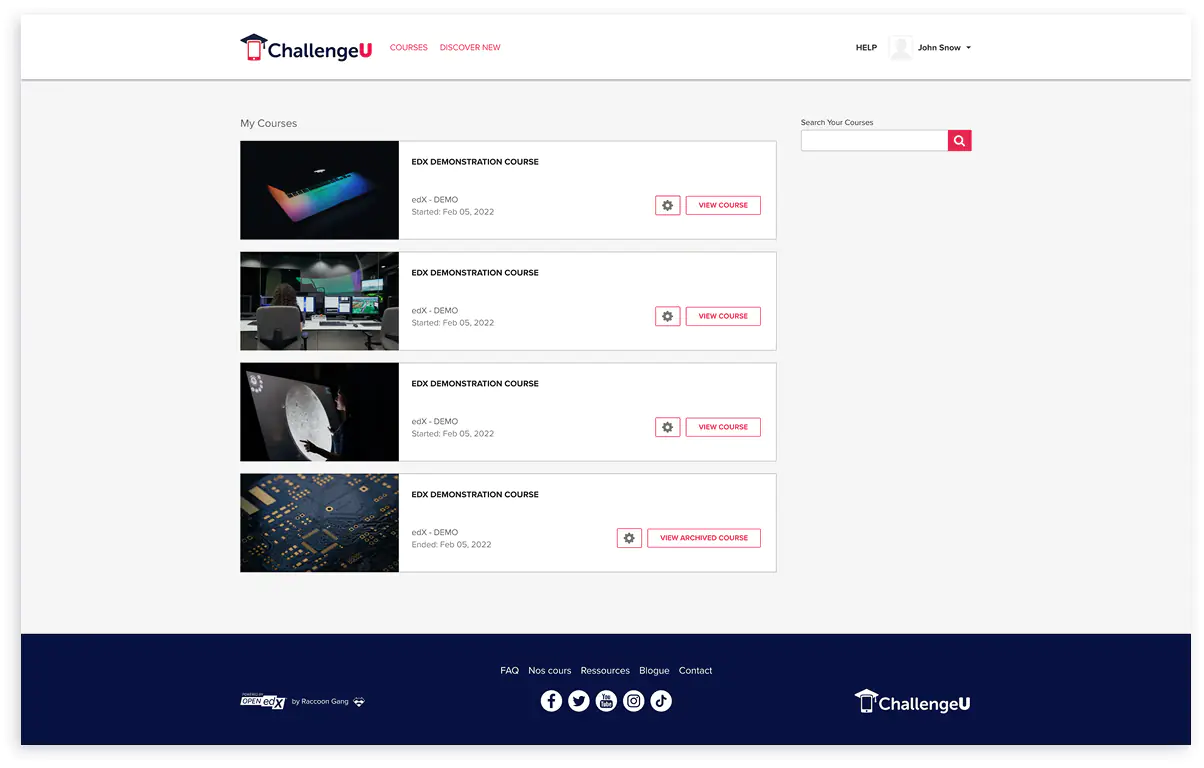
We saw this clearly in the ChallengeU project. ChallengeU helps students aged 16+ complete high school education online, with around 10,000 students enrolled annually. Before migration, their existing LMS created too much maintenance work, and the tech team spent 60–70% of its time on maintenance and manual error correction. That is not a platform issue on paper. That is an operating model problem in real life.
Whether you are choosing between Moodle and Blackboard, or reconsidering both, the decision starts with the same question: what does your team need to run and sustain day to day? So we did not start with “which LMS has more features?” We focused on what the platform had to support every day:
- stable learning delivery for a large student base
- course quality transfer without breaking the learner experience
- custom tools for content creators
- lower maintenance effort
- fewer support requests
- branded UX for students and teachers
- room to improve the platform after launch
That is the same logic we use when organizations compare Moodle, Blackboard, Open edX, Canvas, or another LMS. We look at how the team works now, what already slows them down, and what may become expensive in the next one to three years.
In ChallengeU’s case, our team migrated the platform to Open edX, kept the proven user experience, added custom course flows, supported reusable content, and integrated the platform with the company’s landing page. The result was a flexible foundation the client could continue to refine as learning needs changed.
“Doing an excellent job considering the complexity of our project.”
— ChallengeU project feedback
Conclusion: The Right LMS Is the One Your Team Can Sustain
As the classic line goes, “To be or not to be.” In this case, the question sounds more practical: Moodle or Blackboard, and which direction makes sense for your organization?
- For universities, the decision often depends on how much structure faculty, admins, and IT teams need around courses, grading, accessibility, reporting, and support.
- For learning providers, the pressure is different. Speed to market, branded learner experience, system integrations, and healthy margins often matter more than traditional academic administration.
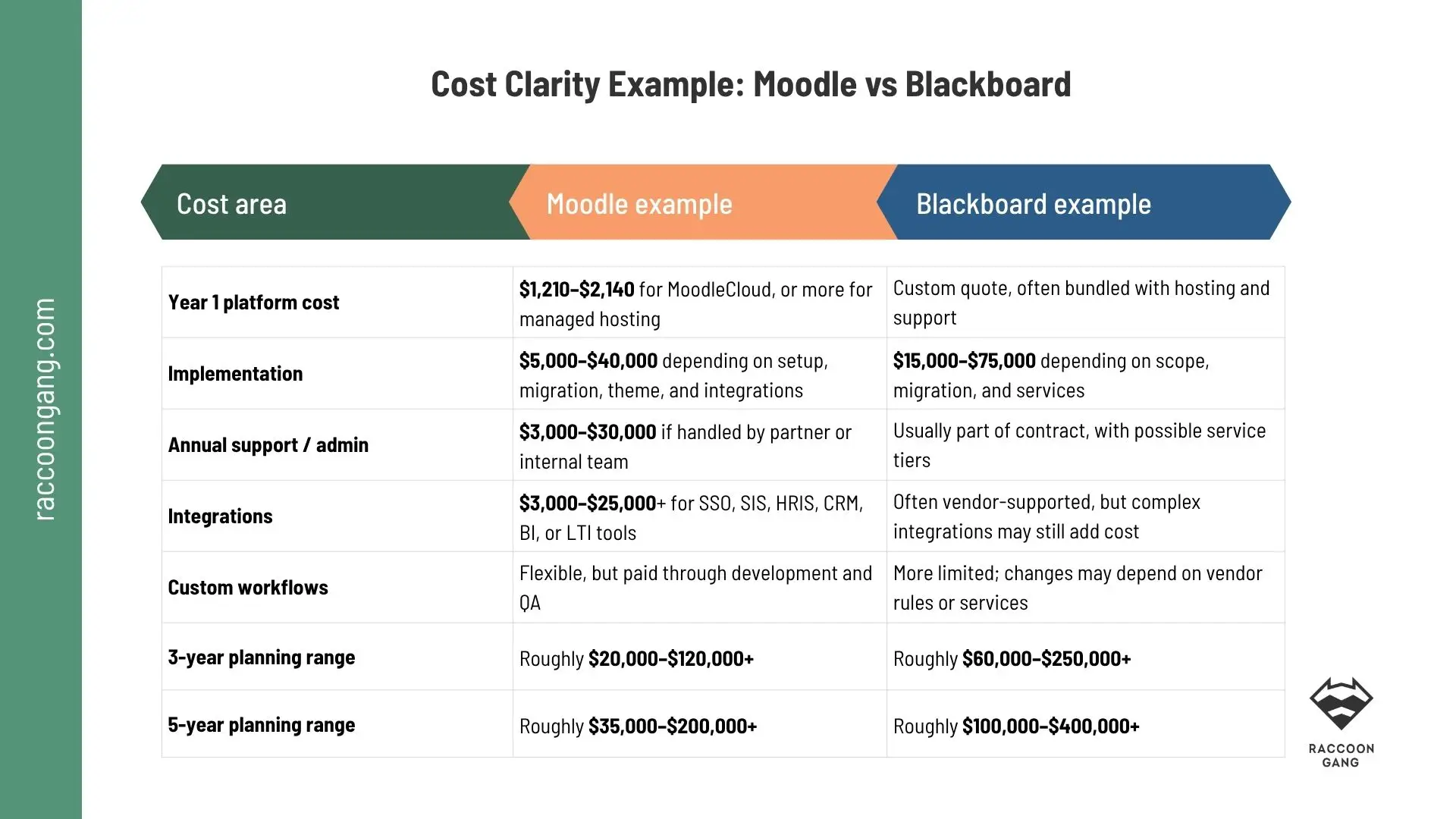
Moodle can lower software costs. Blackboard can lower internal ownership effort. Neither is automatically cheaper.
Throughout this article, we looked at both platforms through real scenarios and operating models, not just feature lists. What can we conclude?
- Moodle usually fits teams that need customization, integrations, hosting flexibility, stronger reporting logic, and more ownership over the platform.
- Blackboard fits institutions that want, need, or have to rely on vendor support, managed operations, and packaged academic workflows.
Last but not least, do not judge LMS cost by the first invoice. Look at the next 12–36 months. An open-source LMS may have no license fee, yet require investment in hosting, setup, support, and maintenance. A commercial LMS may look predictable at first, then become expensive when users, services, or contract scope grow.
FAQ
What is the difference between Moodle and Blackboard?
Moodle is an open-source LMS — free to download, highly customizable, and self-hosted or managed by a partner. Blackboard is a commercial, vendor-managed LMS with quote-based pricing, built-in academic workflows, and managed support. The core difference is the ownership model: Moodle gives you more control and flexibility; Blackboard gives you more managed structure.
Is Moodle better than Blackboard?
It depends on your operating model. Moodle is better for organizations that need customization, budget control, data ownership, and long-term flexibility. Blackboard is better for institutions that prefer vendor-managed support and packaged academic workflows. There is no universal answer — the better platform is the one your team can sustain for 12–36 months.
How much does Blackboard cost?
Blackboard uses custom, quote-based pricing. The final cost depends on institution size, number of users, hosting model, support tier, and contract scope. Unlike Moodle, whose core software is free, Blackboard does not publish standard pricing. Organizations typically receive a custom proposal after a discovery call with the Anthology sales team.
Why do universities use Moodle?
Universities choose Moodle primarily because it is open-source and can be adapted to different teaching models, academic workflows, and reporting requirements. They also control hosting, integrations, and long-term software costs. The global Moodle community and plugin ecosystem make it easier to extend the platform without full dependence on a vendor.
How do you choose the best LMS?
Start with your operating model. Check budget, integrations, support capacity, and customization needs. Then test scalability before you commit.
Can Raccoon Gang help us implement Moodle or migrate from Blackboard?
Yes. Raccoon Gang provides Moodle implementation, customization, and ongoing support, as well as LMS migration services from Blackboard and other platforms. Our team has completed 150+ LMS projects across higher education and corporate training in 30+ countries. Learn about Moodle Services or talk to an LMS consultant


- Moodle: Why Teams Choose It for Control and Flexibility
- Blackboard: Why Institutions Choose It for Structure and Academic Workflows
- Moodle vs Blackboard: Core Features and the Real Differences You Can Notice After Launch
- Moodle vs Blackboard Pricing: What You Pay for Over Three to Five Years
- How to Choose Between Moodle and Blackboard Based on Your Operating Model
- When Moodle and Blackboard Are the Wrong Shortlist
- How Raccoon Gang Helps Organizations Make the LMS Choice Less Risky
- Conclusion: The Right LMS Is the One Your Team Can Sustain
