
Ten years ago, getting used to new tech in the classroom meant weeks of learning, lots of instruction books, and often waiting months to see any good come of it. Now, the top education technology tools are different. With so many new edtech tools available today, you can get Google Classroom ready in fifteen minutes. Students can start using Kahoot! well the first time they try. Open edX® setups that once took half a year now start in a month and a half if you have the right help.
This ease of use has made education tech more available to everyone, but it has also created a new issue: too many choices. With thousands of tools and platforms coming out each month, it takes more thought to tell which ones are truly helpful and which ones are just flashy distractions.
This guide can help you tell the difference by looking at what is working in schools and universities today.
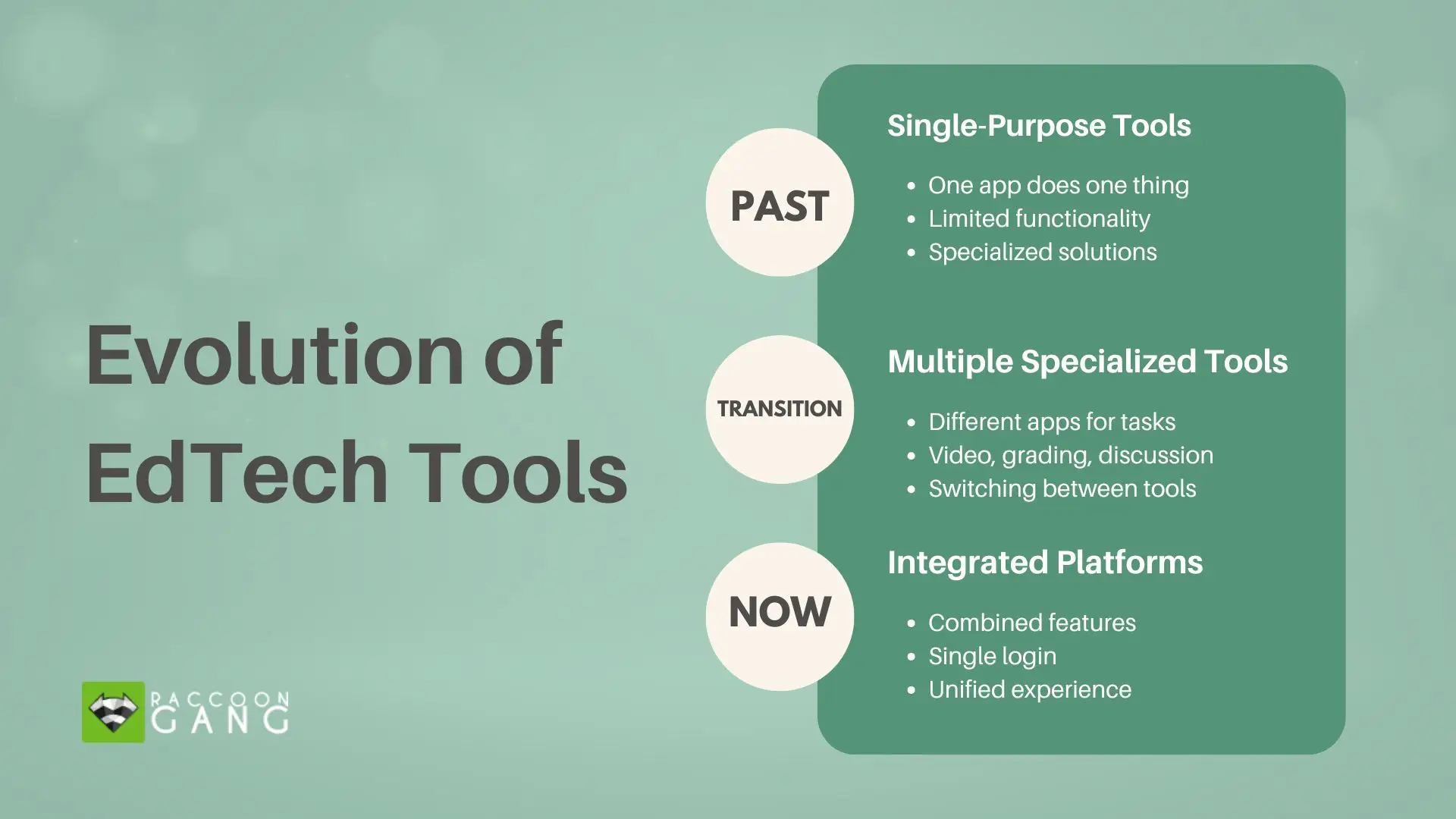
The evolution of EdTech tools: from single-purpose applications, through multiple specialized tools, to integrated platforms that combine features into a unified learning experience.
What Are EdTech Tools?
EdTech tools include the software and platforms that support teaching and learning. The category is broad. You might use a quiz app during class, while a university runs its entire online program through a learning management system. Both are educational technology tools, just at different scales.
These edtech tools solve different problems depending on where you work. If you teach fifth grade, you need something straightforward for tracking homework and communicating with parents. If you run programs at a research university, you need infrastructure that handles 50,000 students taking courses simultaneously across time zones.
Current educational tech tools often combine multiple features. Instead of using different apps for tasks like video calls, grading, and discussions, platforms now offer integrated solutions. This is helpful since handling many logins can be difficult.
Examples of Educational Technology Tools
Knowing what options exist allows users to make better choices. The main categories are divided as follows:
Learning management systems:
- Open edX works as an open-source platform you can customize however you need. MIT and Stanford built their online programs on it because they wanted control over their learning environment.
- Canvas spread through schools because teachers find it easy to use, and students can access it on their phones.
- Moodle has been a player for years and can be customized, assuming you have tech support.
Communication and collaboration:
- Google Classroom is common in many K–12 schools because districts already cover Google Workspace, so adding Classroom doesn’t increase expenses. Its acceptance is driven by existing investment, which lowers the barrier to entry.
- Microsoft Teams combines video meetings and file sharing, making remote and hybrid courses easier to manage.
- Slack keeps study group conversations organized by topic instead of buried in email threads.
Assessment and engagement:
- Kahoot! turns review sessions into competitions that students enjoy.
- Nearpod lets you build questions right into your presentations for feedback during lessons.
- Quizizz works well for self-paced practice, where students move at their own speed.
Content creation:
- Canva for Education gives you design templates so you can make materials without graphic design skills.
- Screencastify makes recording explanatory videos quick and simple.
- Padlet creates spaces where your class can brainstorm together and see everyone’s contributions.
Specialized learning:
- Duolingo applies game mechanics to language learning through short daily lessons.
- Khan Academy offers math instruction that adjusts based on how students perform.
- Turnitin started as a plagiarism detection tool, but evolved into a writing feedback tool.
Most schools apply a mix of tools — for example, teachers can use Google Classroom for homework, Kahoot! for reviews, and Canva for student projects.
EdTech Tools for Teachers
Teachers require tech tools that streamline their workload. When used correctly, educational tech can simplify classroom management and stimulate student participation without making things harder for them.
- ClassDojo has changed behavior management for elementary teachers. This platform lets teachers give points for actions like focus or collaboration, replacing mental notes or charts. Students can then view their progress as it updates, while parents can see a summary of their child’s day. This keeps everyone updated using a single system.
- Edmodo builds a social network for classrooms where teachers can post tasks, students can talk about topics, and resources can stay structured. It keeps talks in one place instead of being spread across email.
- Google Classroom is big in K–12 education, partly since most schools use Google tools. You can send tasks to 100 students fast, comment right on their work, and see who still needs to submit it quickly. Working with Docs, Slides, and Drive means less app switching. For schools looking to build custom K–12 learning environments with more control and flexibility, Open edX–based solutions offer a powerful alternative to off-the-shelf platforms.
- Quizizz has an unusual feature: students request to use it. You create question sets once, then deploy them as live competitions, homework, or practice. The platform grades everything automatically and shows which concepts need more attention.
These educational technology tools for teachers offer tangible time savings. The time spent grading papers or tracking down late assignments can be used to support students who need help with the subject matter. Teacher feedback shows a weekly average time saving of three to five hours.
Higher Education Technology & Tools
Universities face tech challenges different from those of K–12 solutions. The tech they require must serve many students simultaneously, link with campus systems, and produce accreditation reports. Scale is important here.
- Open edX runs online programs at large universities globally. Its open-source nature gives you control over your learning setup. You can change the user interface, link to university databases, and keep student data private. The platform deals with lectures, tests, forums, and analytics, whether you have 100 or 100,000 students.
Universities choose Open edX platforms when they want flexibility. You’re not limited by what a vendor decides to build. If your faculty wants a feature, your developers can create it. If you need unusual integrations with campus systems, you can build those connections.
For instance, when Asociatia TechSoup outgrew its legacy system, Raccoon Gang managed its migration to a modern Open edX environment. We overhauled the platform’s architecture and UX to ensure it could smoothly support thousands of learners. It’s a great example of how technical optimization turns a struggling setup into a scalable educational hub.
- Blackboard stays popular at universities that prefer vendor support and ready-made integrations. The platform connects with student information systems, library databases, and hundreds of other tools. For institutions without large technical teams, this ecosystem provides value.
- Turnitin has quietly outgrown its role as a plagiarism watchdog. In many classrooms, it’s now part of the writing workflow itself, used to give practical feedback and help students see how their work develops from draft to draft.
- Zoom and Microsoft Teams became essential during the pandemic and remain central to higher ed tech. Both added education features like breakout rooms for group work, polling during lectures, automatic recording, and attendance tracking that syncs with grade books.
Raccoon Gang specializes in helping universities implement these higher education tools. Our work with Open edX platforms means we understand both the technical requirements and the teaching considerations. We have helped institutions build everything from single-course sites to degree programs serving thousands of students.
High-End Tools for Effective Learning
Newer high-end tools for effective learning use artificial intelligence and adaptive technology to personalize education in ways traditional software cannot.
Adaptive learning systems track student progress and change difficulty levels as needed. For example, the Carnegie Learning math program spots when a student has problems with fractions. Then, it provides additional practice on fractions before proceeding.
AI tutoring tools can also check written answers, not just multiple-choice questions. Cognii looks at what students write and asks more questions. This pushes them to think harder, like a tutor helping them learn.
Virtual reality applications let students practice skills in simulated environments. Medical students rehearse procedures before working with patients. Architecture students walk through buildings they’ve designed. History classes can visit reconstructed ancient sites.
Data analytics tools can find patterns in student data that give teachers useful teaching insights. They may also show that one specific assignment is a better indicator of final grades than others. The difficulty with high-end analytics is often the fragmentation of data across different regions and systems. We solved this by creating OLGA, a global dashboard that monitors learner dynamics at scale. Through turning raw technical data into a clear visual map, we have given educational leaders a way to see where the industry is moving before they commit to new investments.
Content recommendation systems offer readings and videos based on learning patterns, much like streaming services suggest shows. If students sharing similar backgrounds found a video useful, the system will suggest it to others who may also find it beneficial.
These technologies cost more than basic tools but produce measurable improvements. Students get help targeted to their gaps. You make decisions based on evidence instead of guesswork. The return shows up in completion rates and assessment scores.
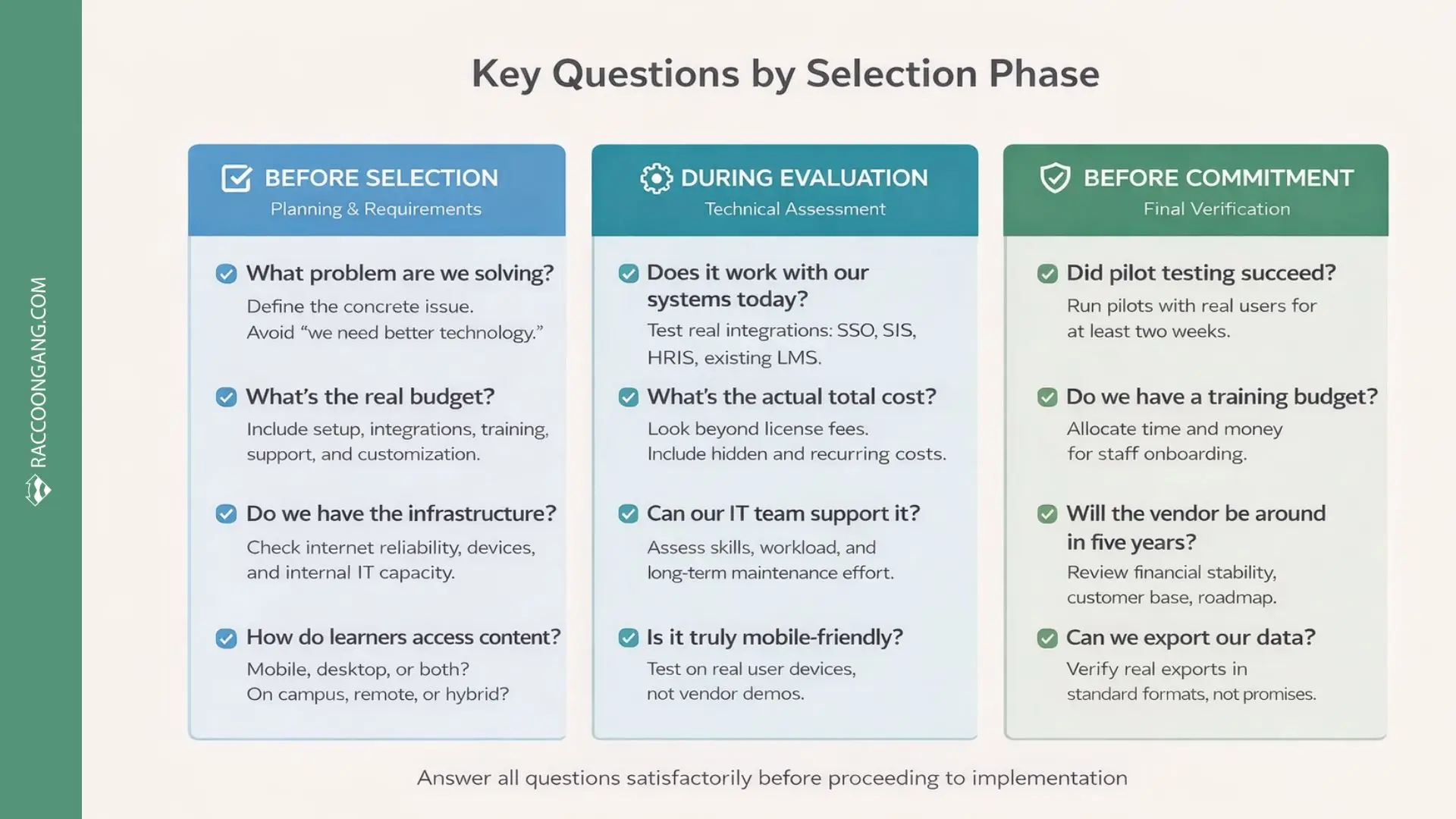
Use these questions to pressure-test your choice before you sign: confirm requirements, validate integrations in a real pilot, and check vendor viability and data export so you don’t get locked in later.
Choosing the Right EdTech Tools
Picking proper educational tech tools from the thousands available needs a systematic way. Our team has guided enough institutions through this to know what makes for success versus costly errors.
What you should consider:
- Identify the problem. Don’t start with “we need better technology.” Start with real issues like “grading takes too long” or “students don’t engage with readings.” Clear problems lead to clear solutions.
- Match tools to your context. Be sure to consider your internet setup, the skills of your tech team, and how students get their materials. Do they mostly use phones? If mobile learning is a priority for your institution, consider dedicated mobile learning solutions that provide seamless experiences across devices.
- Check integrations. An advanced platform will not work if it cannot connect to your current student systems or integrate with your authentication infrastructure. When assessing vendors, focus on current operations rather than promises, and inquire with their current customers about their real integration
- Count all costs. The total cost goes up when you include setup, training, user support, and system changes. Open-source could lower expenses later, but that depends on your team’s tech skills and how much support you end up needing.
- Test with real users. Run pilots before committing; get actual teachers and students using the system. They will find problems that never show up in sales demonstrations. A tool that looks great might have a confusing workflow that frustrates daily use.
- Plan for adoption. Set aside training time, make helpful guides, and get some early adopters on board who can assist their coworkers. Getting help from instructional design experts can ensure your plan lines up with what you want to teach. Keep in mind that it takes months, not weeks, for people to fully adopt new technology.
- Think long-term. Will this vendor exist in five years? Can you export your data if you switch platforms later? What happens when you need to scale from 1,000 students to 10,000? These questions matter more than initial feature lists.
Conclusion
Purchasing educational technology won’t fix your challenges automatically. What creates change is selecting the right tools for problems you can clearly identify and then deploying them carefully. When institutions take this measured approach, they experience real improvements in instruction quality and learning effectiveness.
Raccoon Gang has 10+ years of experience helping schools and universities make these technology decisions. We develop Open edX learning solutions ranging from basic implementations to extensively customized platforms. Our approach centers on understanding what you’re trying to accomplish and building accordingly.
FAQ
What are the most popular EdTech tools in 2026?
In 2026, Google Classroom and Canvas lead in K–12 and higher education for learning management. Zoom and Microsoft Teams handle most video communication. Kahoot! and Quizizz see heavy use for student engagement. Open edX powers online programs at major universities. Popularity varies based on institution type and needs.
How can teachers use educational technology tools effectively?
To get the most out of educational tech, teachers should choose a few tools that fix specific issues and learn them well. It’s best to focus on tools that save time. Teachers should understand the features that make classroom workflows more efficient and ask students whether the technology helps or distracts.
What are the benefits of high-end tools for effective learning?
Modern educational tech supports personalized learning by adapting to different paces and learning styles. The data these tools generate helps teachers plan lessons more precisely. Simulations and interactive elements also increase engagement, making instruction more tailored than before.
How do EdTech tools help higher education institutions?
EdTech tools help universities reach more students through online programs. They reduce costs by automating routine tasks, improve outcomes with early warning systems, support accreditation reporting, and allow institutions to scale instruction while maintaining quality.
Where can schools find the best marketplace for educational tech tools?
Schools should look beyond a single source. Review vendor websites and demos, ask peer institutions what they use, attend education technology conferences, read reviews on platforms like EdSurge, and consult specialists who understand both teaching and technology. For K–12, work with providers familiar with school-specific requirements.