









The right employee training software determines whether your L&D program scales, sticks, and proves ROI — or becomes another abandoned platform that IT supports and employees ignore. Since 2015, Raccoon Gang has built and maintained 200+ LMS platforms for enterprises, universities, and nonprofits serving 1.5M+ learners. This guide reflects what we’ve learned about matching platforms to real organizational needs.
Key takeaways:
- TalentLMS and LearnUpon are the fastest path to live training for teams under 500 — no implementation partner needed.
- Docebo and Cornerstone OnDemand win for global enterprises with multi-brand or extended-enterprise needs.
- Open edX and Moodle are the right call when you need full data ownership, deep customization, or compliance logic that SaaS platforms can’t handle.
- Budget beyond the sticker price: setup, integrations, support, and migration costs often exceed the annual license.
Organizations using staff training software report a 30–50% increase in loyalty scores; when teams engage with online employee training courses tailored to their needs, they feel more valued and motivated. — Volodymyr Chekyrta, Raccoon Gang’s EdTech Engineer
As distributed and hybrid work becomes the norm, an employee training platform that works across devices — with offline access and mobile support — is a baseline requirement.
In the sections ahead, we cover what employee training management software actually does, which features matter in 2026, and how to match the right platform to your organization’s size, goals, and technical setup.
At a Glance
Employee training software — a platform that centralizes course delivery, progress tracking, and certification for an organization’s workforce.
LMS (Learning Management System) — the technology category that employee training software belongs to; covers content hosting, enrollment automation, reporting, and HRIS integration.
Employee training platform — often used interchangeably with LMS; sometimes refers specifically to the learner-facing interface rather than the administrative backend.
Employee development software — a broader category that includes training delivery plus performance management, skills tracking, and career path planning.
Custom LMS — a learning platform built or heavily modified to an organization’s specific workflows, integrations, and compliance requirements, rather than using an off-the-shelf product.
Open edX — the open-source LMS platform used by Harvard, MIT, and large enterprises for scalable, customizable online learning; no per-user licensing fees.
Best Employee Training Software: Shortlist
| Platform | Pricing & Audience | Key Strengths | Standout Edge | AI Features |
| TalentLMS | Free up to 5 users; from $69/mo for 40 users; small-mid teams | Drag-drop builder, SCORM/xAPI, AI quizzes | Rapid launch to live | AI quiz generation |
| Absorb LMS | From ~$800/mo; mid-market teams | Polished UX, strong reporting, SCORM/xAPI | Clean experience out of the box | Limited |
| Docebo | From ~$25,000/year; global multi-brand orgs | AI recommendations, multi-portal, social learning | Personalized learning at scale | AI recommendations |
| LearnUpon | From $599/mo for 50 users; mid-market | Multi-portal hubs, rule-based enrollments | Segmentation without complexity | Limited |
| Cornerstone OnDemand | ~$6–8/user/mo; enterprise | Compliance, talent management, mature reporting | Broad enterprise scope | Yes |
| 360Learning | From $8/user/mo; collaborative teams | SME co-creation, social feeds, AI quizzes | Turns experts into instructors | AI quiz + co-creation |
| Canvas LMS | Custom quote; corporate + ed crossover | Clean UX, 1,000+ LTI integrations, fast adoption | Low friction, familiar to instructors | Limited |
| Moodle | Free to download; hosting extra | Full code access, 1,800+ plugins, no licensing fees | Complete platform ownership | Via plugins |
| Raccoon Gang (Open edX) | From ~$50K/year for 1,000 learners; large enterprises | Fully bespoke workflows, gamification, RG Analytics | Grows seamlessly with your needs | AI personalization, analytics |
What Is Employee Training Software?
An employee training software, often known as learning management software or workplace learning software, centralizes course delivery, progress logging, and certification workflows. Rather than juggling spreadsheets or bulky PDFs, companies rely on a virtual training platform to house video lessons, interactive quizzes, and downloadable resources.
At its core, this software to manage training automates enrollments, tracks completions, and issues badges or certificates. Integrations with single sign-on (SSO) and HR systems ensure that new hires are directed to the correct learning paths. When a manager assigns mandatory modules, notifications are sent via email or Slack. In bigger deployments, an employee training management software suite connects to CRMs and BI tools—feeding performance data into dashboards for real-time insights.
Online training program software spans simple portals for compliance down to full-scale employee development platforms. It supports everything from onboarding training platform setups—guiding new team members through company policies—to advanced skills development platform needs like branching scenarios and simulations. In 2026, a true online training for employees solution will also offer social forums, peer feedback loops, and AI assistants that draft quiz questions from uploaded content.
Put simply, an employee training system is the backbone of modern learning ecosystems, bringing custom learning course creation, delivery, and measurement into a single, accessible hub.
Key Features to Look For in 2026
Competitive training and development software must offer more than basic hosting. Prioritize these essentials:
Course Creation & Content Management
- Native authoring tools or SCORM/xAPI support; bulk import of PPTs, videos, PDFs.
- Version control so modules update without breaking learning paths.
- Microlearning formats (bite-sized lessons, knowledge cards).
Progress Tracking Tools & Reporting
- Dashboards for admins and managers with completion rates, quiz scores, and time-on-task.
- Automated report schedules (CSV or PDF) sent to stakeholders.
- Predictive analytics to spot learners who need a nudge.
Mobile Access & Offline Mode
- Native iOS/Android apps with downloadable content; responsive web portals.
- Push notifications for due dates and new modules.
- Seamless resume-where-you-left-off functionality.
Assessments & Quizzes
- Multiple question types: single/multiple choice, drag-and-drop, simulations.
- Randomized pools and timed exams to ensure integrity.
- Automated grading, instant feedback, plus manual-review options.
Certifications & Compliance
- Auto-issue branded certificates upon completion.
- Expiry tracking with automated re-enrollment for refreshers.
- Integration with credential-verification services (e.g., blockchain badges).
Integrations & API Connectivity
- Out-of-the-box connectors: Workday, BambooHR, Salesforce, Slack, Teams.
- Single sign-on (SAML, OAuth) for frictionless access.
- Webhooks and REST APIs for syncing user profiles, completions, and performance data.
Social & Collaborative Learning
- Discussion forums, peer reviews, and co-authoring workflows.
- User-generated content modules to tap into subject-matter experts.
- Leaderboards, badges, and social feeds for engagement.
AI-Driven Personalization
In 2026, AI is the most significant differentiator between platforms — not a secondary feature. The gap between platforms with mature AI layers and those without is growing quarter by quarter. What to look for:
- Recommendation engines suggest next steps based on skill gaps.
- Auto-generation of quiz questions, summaries, and translations from documents.
- Chatbot “virtual coaches” to answer questions and guide learners.
For organizations evaluating Open edX, Raccoon Gang builds AI personalization and adaptive learning directly into the platform layer through custom feature development and RG Analytics — not as a plugin, but as a core architectural decision.
Best Employee Training Software in 2026
When you survey the corporate training platforms marketplace, a few products stand out. Each delivers online employee training courses and also operates as a full-fledged employee training system, turning scattered materials into coherent learning journeys.
1. TalentLMS
TalentLMS is a straightforward employee training platform suited to small and mid-sized teams. HR teams can configure an onboarding workflow within a day using a drag-and-drop course builder, SCORM/xAPI support, automated certificates, and AI-assisted quiz generation. The platform works across desktop, tablet, and mobile. Pricing starts free for five users, with paid plans from $69/month.
Best for: Small to mid-sized teams that need fast setup with minimal technical overhead.
Limitations: Limited bulk-editing, minimal advanced report customization, and some integrations require extra setup.
2. Absorb LMS
Absorb LMS is a mid-market employee training management software built for organizations that need a well-designed learner experience alongside solid administrative control. It covers course creation, compliance tracking, and detailed reporting without heavy configuration. Supports SCORM, xAPI, and AICC content with a clean mobile app and offline access. Pricing starts from ~$800/month.
Best for: Mid-market teams that want a polished platform without building from scratch.
Limitations: Less flexible than open platforms; advanced customization may require vendor support.
3. Raccoon Gang – Enterprise Open edX Implementation
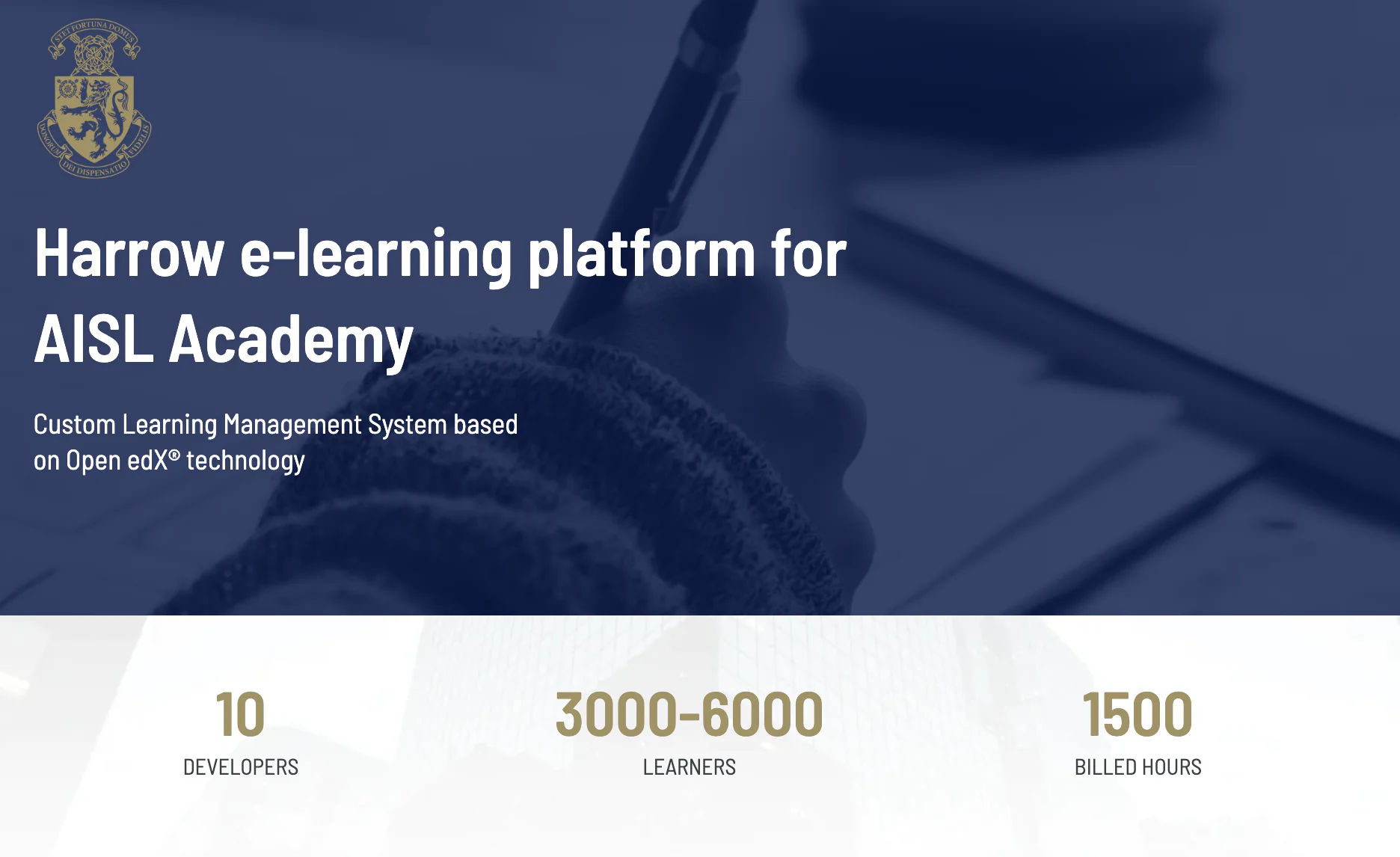
When standard platforms hit their limits, Raccoon Gang builds custom employee training systems on Open edX — hosted on Azure with AES-256 encryption, SSO, and full branding control. Clients deliver video, SCORM, and xAPI content, add gamification layers via RG Gamification, and track results via RG Analytics. One example: Harrow’s AISL Academy — 10 developers, 7 months, 3,000–6,000 learners, adaptive paths, gamified rankings, unified logins across Tencent Cloud and Azure. Outcome: 90% positive learner feedback, 1,500 unified staff training hours. Projects start at ~$50K/year for 1,000 learners.
Best for: Large enterprises that need fully custom workflows, integrations, or compliance logic that off-the-shelf tools cannot handle.
Limitations: Higher upfront investment; requires an implementation partner.
4. Docebo
Docebo is an enterprise employee learning platform with AI-powered recommendations and multi-portal support. The Coach & Share feature turns internal experts into peer instructors. Blockchain-verified badges and integrations with Salesforce and Workday make it suitable for both employees and external partners. Pricing from ~$25,000/year.
Best for: Global organizations with multiple brands or external training audiences.
Limitations: Initial configuration requires dedicated admin resources; feature depth can overwhelm smaller teams.
5. LearnUpon
Mid-sized companies training employees, partners, and customers rely on LearnUpon’s multi-portal architecture. Administrators launch separate hubs, each branded uniquely, sharing a common content library. LearnUpon automates enrollments through rule-based logic and integrates with Slack, Microsoft Teams, and Google Workspace to embed training in daily workflows. As one of the leading online training platforms for employees, it wins praise for its intuitive design and responsive support. Plans start at £799 per month for 100 users, with costs rising for extra portals and seats.
6. Cornerstone OnDemand
Cornerstone OnDemand is an enterprise-grade employee training and development software platform covering learning, performance, recruiting, and succession planning in one suite. It is most relevant for L&D teams operating within broader HR transformation programs. Pricing ~$6–8/user/month at scale.
Best for: Large enterprises with dedicated L&D and HR operations teams running compliance-heavy programs.
Limitations: Complex to implement; smaller teams may find the scope excessive.
7. 360Learning
360Learning is built around collaborative course creation — subject-matter experts across the organization author content directly, turning the platform into an active knowledge network. Social feeds, peer feedback, and AI-assisted quiz generation drive high completion rates. Pricing from $8/user/month.
Best for: Organizations where internal experts drive content and peer learning is central to the culture.
Limitations: Basic compliance reporting; less suitable for heavily regulated industries.
8. Canvas LMS
Canvas is a cloud-based employee training solution that has moved from higher education into corporate L&D. Its module-based structure and clean interface keep the learner experience predictable, with 1,000+ LTI integrations and a REST API for connecting to existing systems. Pricing for corporate use is quote-based.
Best for: Organizations transitioning from an educational environment or working with Canvas-familiar instructors who want low adoption friction.
Limitations: Core platform behavior is controlled by Instructure; customization stays within defined parameters.
| Platform | Offline mobile | SCORM/xAPI | HRIS sync | Custom reporting | Compliance tracking | Gamification | AI features | Open source |
| TalentLMS | ✓ | ✓ | Partial | Limited | ✓ | ✓ | Quiz gen | ✗ |
| Absorb LMS | ✓ | ✓ | ✓ | ✓ | ✓ | Basic | Limited | ✗ |
| RG / Open edX | ✓ | ✓ | ✓ custom | ✓ RG Analytics | ✓ custom | ✓ RG Gamification | AI Assistant | ✓ |
| Docebo | ✓ | ✓ | ✓ | ✓ | ✓ | ✓ | ✓ full AI | ✗ |
| LearnUpon | ✓ | ✓ | ✓ | ✓ | ✓ | Basic | Limited | ✗ |
| Cornerstone | ✓ | ✓ | ✓ | ✓ advanced | ✓ advanced | ✓ | ✓ | ✗ |
| 360Learning | ✓ | ✓ | ✓ | Basic | Limited | ✓ | ✓ quiz gen | ✗ |
| Canvas LMS | ✓ | ✓ | Via API | ✓ | ✓ | Basic | Limited | ✗ |
| Moodle | ✓ | ✓ | Via plugin | ✓ custom | ✓ | ✓ plugins | Via plugin | ✓ |
How to Choose the Right Employee Training Software for Your Business
Not every platform suits every team. Use these guidelines to align choice and needs:
1. Match Company Scale
- Small Teams (≤200 users): Simplicity wins—pick SaaS staff training software like TalentLMS or LearnUpon with clear plans.
- Mid-Market (200–2,000 users): Consider Absorb LMS or 360Learning for a balance of usability and depth.
- Large Enterprises (>2,000 users): Extended-enterprise and analytics matter—Docebo, Cornerstone OnDemand, Canvas, or Raccoon Gang’s custom employee training solutions fit complex landscapesю
2. Clarify Training Goals
- Onboarding & Compliance: Look for automated certificates, expiry tracking, and an onboarding training platform workflow.
- Skill Development & Performance: Opt for training and development software with AI recommendations and performance tracking tools.
- Collaboration & Peer Learning: If you need an employee development platform driven by experts, choose 360Learning or an LXP module.
3. Check Integrations
- Sync user profiles via HRIS (Workday, BambooHR).
- Embed courses in Slack or Teams for just-in-time learning.
- Feed completion data to BI tools through APIs or webhooks—vital for data-driven L&D.
4. Evaluate Support & Ownership
- SaaS vs. self-hosted: If you lack IT resources, favor a cloud LMS with strong vendor support.
- For white-glove service or custom workflows, ensure the vendor provides project management and migration assistance.
5. Budget & Total Cost of Ownership
- Look beyond per-user fees—consider setup, integrations, support, and future upgrades.
- Factor in potential migration costs if you outgrow your first choice. A useful benchmark: open-source platforms (Moodle, Open edX) have no licensing fees but require $20K–$100K+ in implementation and annual hosting depending on scale. SaaS platforms (TalentLMS, Absorb) run $10K–$100K/year depending on user count.
6. Drive Adoption
- Pilot with a cross-section of end users to test ease of use.
- Prioritize platforms that offer mobile apps, push notifications, and offline access—essential for online training platforms that support employees on the move.
Armed with these criteria, you’ll narrow down the field of corporate training platforms to the one that fits your people, processes, and growth trajectory.
Why Companies Choose Raccoon Gang
Not every organization needs a custom build. Canvas and Moodle solve real problems for a wide range of teams — and Raccoon Gang works with both.
Canvas LMS is a strong fit for organizations that want a managed, cloud-based employee training platform with fast adoption and minimal IT overhead. It works well for teams running standard learning workflows — onboarding, compliance, skills development — without needing deep customization.
Moodle suits organizations that want full ownership of their employee training system: the data, the infrastructure, and the codebase. With no licensing fees and 1,800+ plugins, it is one of the most cost-effective options at scale for teams with technical capacity or an implementation partner.
For requirements that go beyond what either platform provides out of the box, Raccoon Gang builds on Open edX. Since 2015, the team has delivered 200+ LMS projects — from single-institution deployments to country-level platforms serving 1.5M+ learners. Clients include Harvard, NASA, EBRD, and the University of Washington. One specific example is Harrow’s AISL Academy — a network of international schools across Asia: 10 developers, 7 months delivery, 3,000–6,000 learners, adaptive learning paths, gamified rankings, RG Analytics dashboards, and unified logins across Tencent Cloud and Azure. Outcome: 90% positive feedback and 1,500 unified staff training hours.
FAQ
What is the best software for employee training in 2026?
How do I choose the right employee training platform for my company?
What are the must-have features in employee training software?
Can Raccoon Gang help develop a custom employee training system?
What is the difference between employee training software and an LMS?
An LMS (Learning Management System) is a type of employee training software — the broadest category. Employee training software also includes authoring tools (for creating content), performance support tools (job aids accessed at the moment of need), and skills tracking platforms. In practice, the terms are often used interchangeably. The meaningful distinction is scope: a standalone authoring tool like Articulate is not an LMS; an LMS like Open edX or Docebo is a full employee training software suite.