






Canvas LMS corporate training got its own product line in July 2025. Instructure launched Canvas Career in beta, aimed squarely at workforce and business learning. General availability lands in January 2026.
Why now? Per Boston Consulting Group research cited by Instructure, the average job skill has a half-life under five years these days. Skills go stale fast. Companies feel it.
Onboarding numbers back this up too. Structured programs report up to 82% higher retention and 70% greater productivity for new hires, per SHRM data. That’s not a small edge.
Let’s start with what Canvas actually is.
What Is Canvas LMS?
Instructure built Canvas as a cloud-based learning management system, launching it in 2011 as an alternative to legacy platforms like Blackboard. For most of its history, it lived almost entirely in higher education, but not a corporate tool at all.
Corporate buyers noticed what students and faculty already liked about it: an intuitive interface, solid mobile access, an open API that connects to other systems without a fight. That’s what got them paying attention. Instructure leaned into that interest with dedicated corporate products: Canvas Career for skills-based learning paths, Impact by Instructure for adoption analytics.
So Canvas LMS for corporate learning is a defined product line now, with its own roadmap and its own customer base. Still, it carries some of its academic origins. That shows up in a few specific places, covered below.
Can Canvas LMS Be Used for Corporate Training?
Yes. Canvas supports employee learning, certification programs, onboarding, and partner or customer education. Plenty of organizations outside higher education already run their training on it.
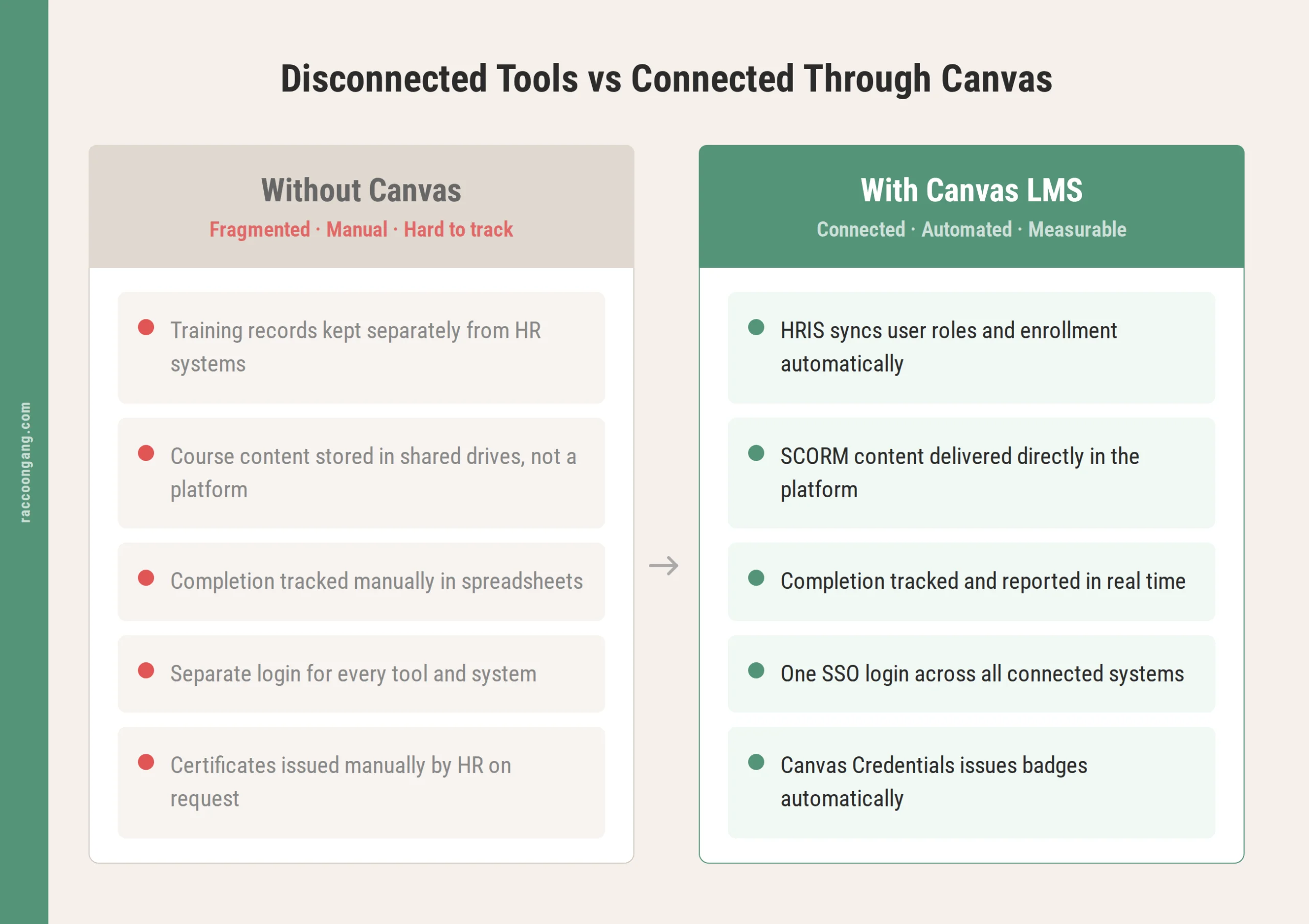
How Canvas LMS connects to the systems organizations already run.
Where it works well: structured, trackable learning aimed at a large or dispersed audience. Onboarding a distributed sales team, running annual compliance refreshers, building a partner certification program, standing up a customer academy — Canvas handles all of these without much friction, using the same course-building and tracking tools for each one.
Where it asks more of an implementation team: anywhere corporate workflows diverge from academic ones. Multi-level approval chains, detailed compliance audit trails, role-based content assignment across many departments — none of that ships by default. We usually flag this in the first scoping call, since organizations coming from a strict corporate LMS tend to assume it’s already there.
Canvas LMS Corporate Training Features
A handful of Canvas capabilities matter most for organizations running corporate training day to day.
- Course management. Modules mix video, documents, SCORM packages, quizzes, and discussions. An onboarding track can combine policy reading, a recorded walkthrough, and a short knowledge check in one place.
- Learning paths. Content unlocks by role, department, or completion of a prerequisite module. New hires get one sequence. Managers get another. A specific product line gets its own.
- Assessments. Multiple question types, randomized question banks, and time limits — enough depth for a genuine certification exam.
- Certifications. Canvas Credentials issues digital badges and certificates automatically. Employees walk away with a record they can point to. HR gets a paper trail without chasing it down manually.
- Mobile learning. The Canvas Student and Teacher apps hold up well for frontline and field employees who rarely sit at a desk — mobile matters more here than most organizations expect going in.
- Reporting. Native analytics cover completion rates and quiz performance at the course level. Organizations with heavier reporting needs tend to connect Canvas Analytics or a BI tool through the API to measure training ROI properly, since course-level data alone rarely answers a CLO’s questions.
- Collaboration tools. Discussion boards, group assignments, and peer review carry over surprisingly well for cohort-based leadership programs and cross-functional onboarding groups.
`
Canvas LMS Employee Training
Employee training on Canvas clusters around a few recurring use cases.
Most companies start with new employee onboarding. It’s self-contained, easy to measure, an easy sell to leadership. Sales training isn’t far behind. Partly because Canvas’s assessment tools handle product knowledge checks and scenario-based quizzes reasonably well.
Product knowledge training for customer-facing teams benefits from that same mobile access. Leadership development programs lean on discussion and cohort features a flat corporate LMS tends to skip entirely.
What actually determines adoption, though? Rarely the platform itself. It comes down to whether the content was built for a business audience or repurposed from an old slide deck.
Canvas LMS Onboarding Programs
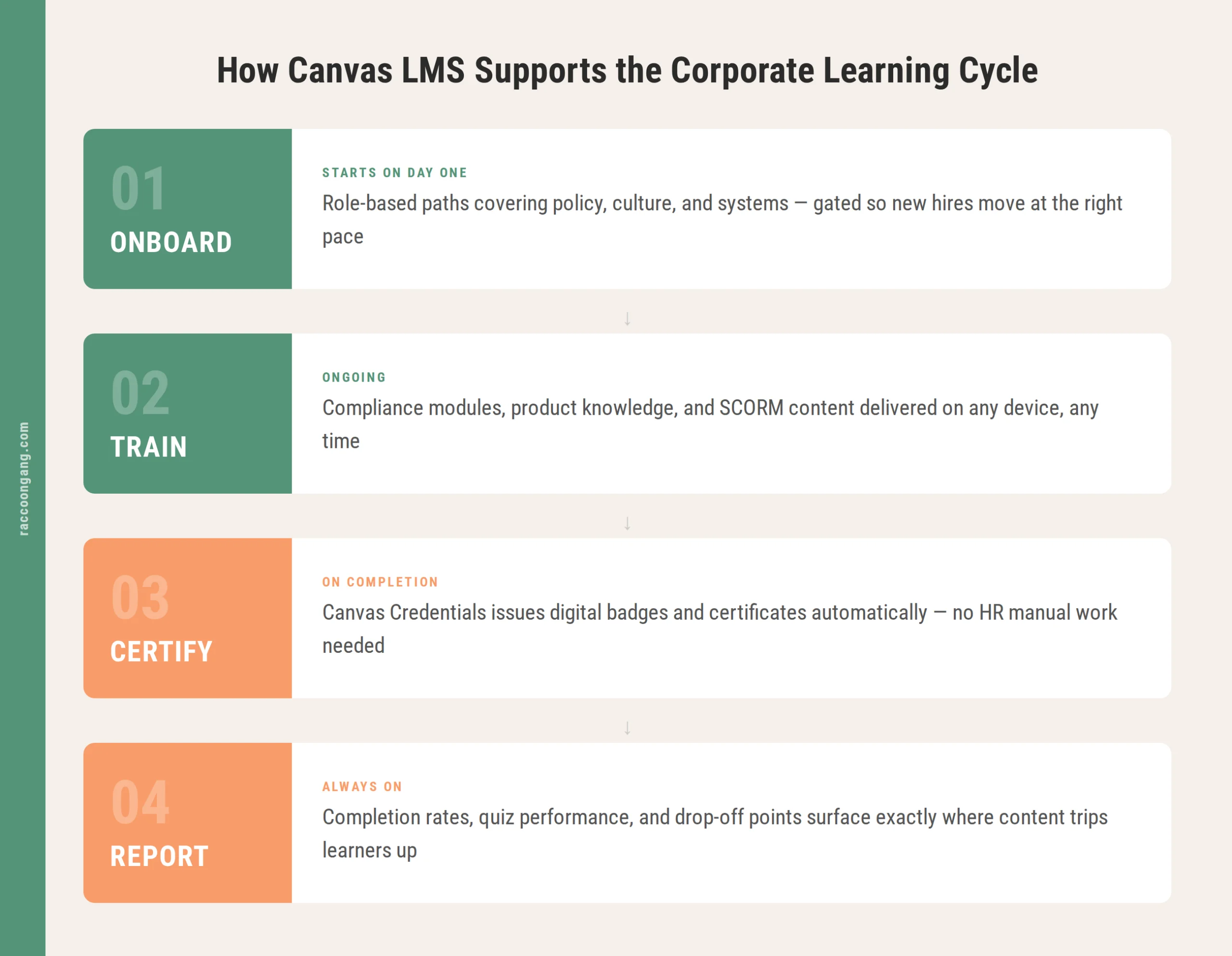
The four stages of corporate learning in Canvas: from onboarding to reporting.
Structured onboarding on Canvas follows a role-based model. A shared foundational track covers company policy, culture, and systems access. Department-specific modules layer on top of that, so a sales rep, a warehouse supervisor, and a finance analyst each see a different path.
Course enrollment ties to a role or group, so a new hire in operations never sees content meant for engineering. Modules can also be gated. That means employees complete the material before reaching the quiz tied to it.
Three metrics are worth tracking from day one: time-to-completion, first-attempt quiz pass rates, and drop-off points within a module. Together, they pinpoint exactly where content trips learners up. In projects we’ve run, the drop-off point is almost never where the client expected it to be. Organizations that watch these numbers early tend to shorten their onboarding cycle within a couple of iterations, which feeds directly into employee retention through training that people actually finish.
Canvas LMS Compliance Training
A missed record in compliance training is a legal exposure. That’s why this category leaves less room for error than most others.
The same completion tracking used everywhere else on the platform applies here too, running against recurring certifications — annual harassment prevention training, safety refreshers, data privacy modules, industry licensing renewals, for example. Canvas can schedule these on a recurring basis and flag employees who miss a deadline.
Where organizations often get caught off guard: audit trail granularity. Proving exactly which version of a module a specific employee saw, timestamped and unchangeable, usually needs configuration work or a connected reporting layer. It’s the single question we get asked most often by compliance-heavy clients. Confirm it during the sales process, well before an audit request forces the issue.
Canvas LMS SCORM and xAPI Support
Canvas LMS SCORM xAPI support trips up a lot of organizations during evaluation. Mostly because it doesn’t behave the same way it did on their previous platform.
There’s no native SCORM upload option. SCORM packages import through a dedicated LTI-based tool, commonly Rustici’s SCORM Engine, and an admin typically needs Instructure’s customer success team to enable it first. Once that’s done, SCORM 1.2 and SCORM 2004 packages track scoring and completion normally. Content built in Articulate Storyline or Captivate carries over without a rebuild.
xAPI is the thinner side of the story. Canvas has no built-in Learning Record Store, so xAPI statements from tools like H5P or Storyline need to route to an external LRS through an LTI connection. This is the part worth checking early in the evaluation. Organizations running a mature xAPI setup should plan for it early, during implementation scoping.
Canvas Workforce Learning at Scale
Multi-location organizations tend to find that Canvas workforce learning holds up well, mainly because the platform already serves institutions with tens of thousands of students spread across campuses and time zones.
Multi-tenant setup. A single Canvas instance can serve different business units, brands, or regions with distinct branding while still rolling up to central reporting.
Localization and mobile access. Language localization and offline-friendly mobile access matter more for manufacturing floors and retail locations than for office staff. Both come built in already.
Extended enterprise learning. A growing use case — training for partners, resellers, or franchisees who aren’t employees. Canvas Catalog can expose specific course catalogs to those external audiences while keeping internal employee data private.
Governance. This is the real planning question at scale, and it comes down to three things:
- Who can create courses
- Who approves content
- How many separate Canvas instances the company ends up running
We’ve walked into more than one project where three departments had already built their own course structures independently. Getting that structure right before rollout saves the cleanup work later.
Canvas vs Corporate LMS Platforms
This is really the comparison organizations care about: Canvas against platforms built for business from day one. Names like Cornerstone, Docebo, SAP SuccessFactors, TalentLMS.
| Area | Canvas | Traditional Corporate LMS |
| UX | Consistently rated among the most intuitive interfaces in the category, for learners and admins alike | Varies widely; older platforms often carry outdated, admin-heavy interfaces |
| Compliance | Solid completion tracking and recurring certification scheduling; deeper audit granularity needs configuration | Frequently purpose-built with audit trails, e-signatures, and regulatory templates included |
| Reporting | Strong at course level; enterprise dashboards usually need Canvas Analytics or an external BI connection | Often ships with built-in enterprise reporting and pre-set compliance dashboards |
| Customization | Flexible content and branding through an open API and LTI ecosystem | Ranges from rigid, template-driven systems to highly configurable workflows |
| Certifications | Canvas Credentials covers badges and certificates for most needs | Some platforms automate certification renewal more fully out of the box |
This pattern holds up across most Canvas evaluations we’ve seen. Canvas wins on usability and openness. Dedicated corporate LMS platforms win on compliance depth and reporting that ships ready to use. The decision comes down to how much of that gap a company is willing to close through integration — a question worth answering against a fuller list of Canvas LMS pros and cons before scoping a project.
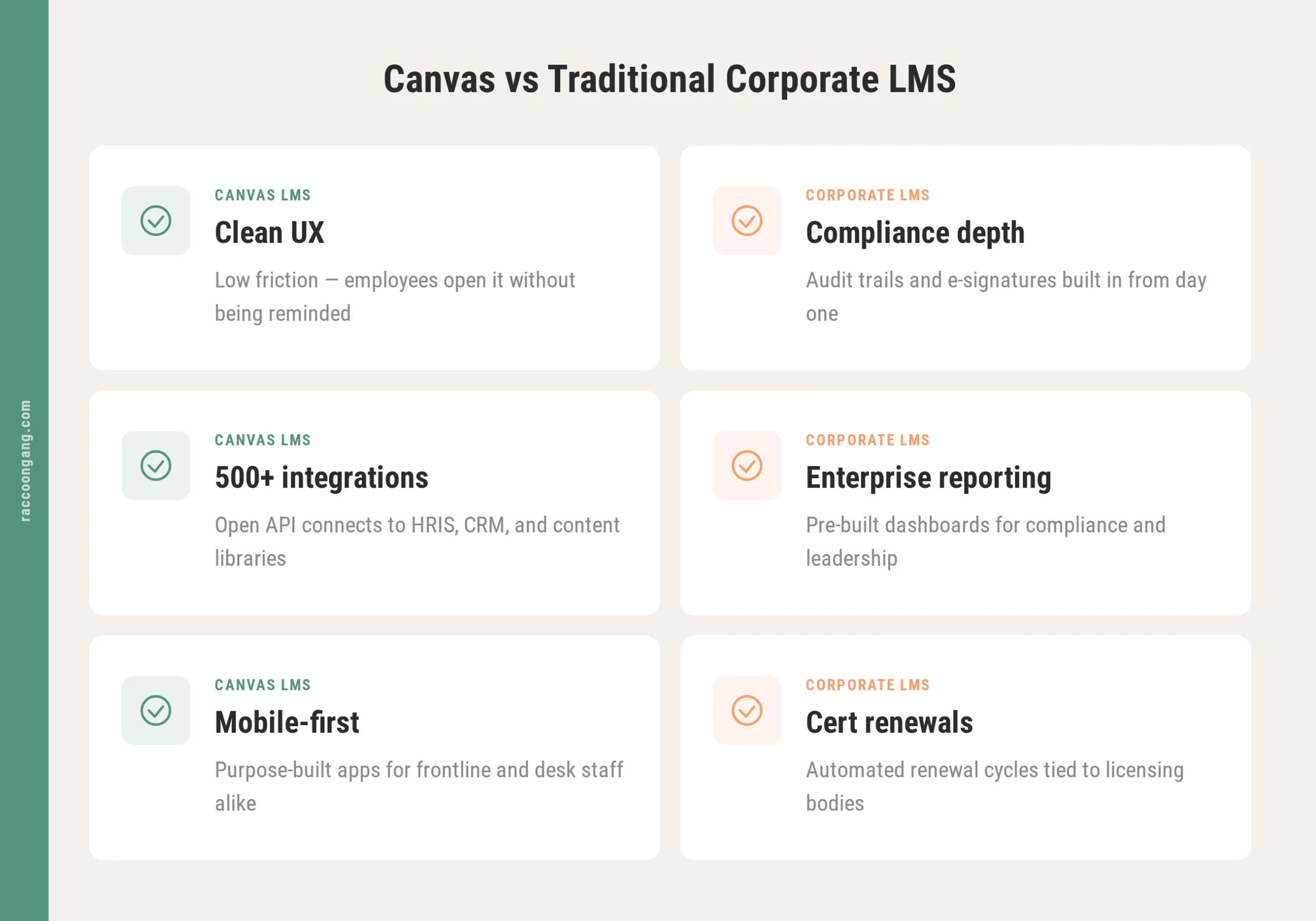
How Canvas LMS and traditional corporate platforms compare across six key areas.
Canvas LMS Use Cases for Business
Canvas LMS use cases for business shift by industry. The underlying platform capabilities stay the same, though.
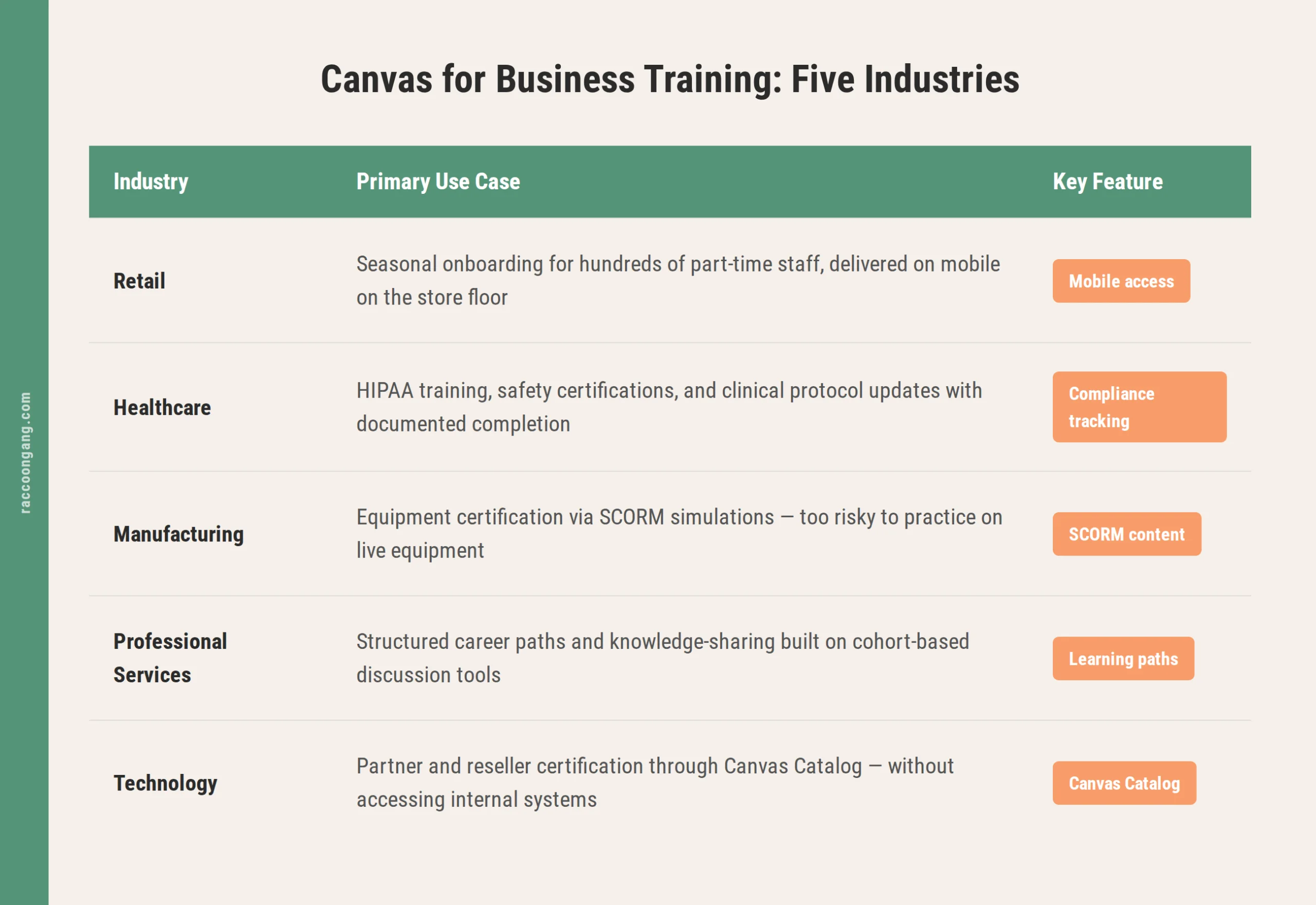
Seasonal hiring surges are where retail gets the most out of Canvas. Compressed onboarding tracks reach hundreds of part-time staff at once, delivered right through mobile devices on the store floor.
Healthcare leans on the compliance side: recurring HIPAA training, safety certifications, clinical protocol updates that need documented completion for accreditation and licensing renewals.
Safety training and equipment certification drive most manufacturing use. Often paired with SCORM-based simulation content for procedures too costly or risky to practice on live equipment.
Structured career paths and internal knowledge-sharing are the draw for professional services firms (consulting, legal, financial), built on the same discussion tools originally designed for academic seminars.
Technology companies, meanwhile, run product training and partner certification through Canvas Catalog. Resellers and integration partners get course access without landing in internal systems or seeing employee data.
Across all five, Canvas for business tends to work best once a company stops treating it as an off-the-shelf tool and starts configuring it around how training actually gets assigned, tracked, and reported internally.
Limitations Organizations Should Consider
Every platform has trade-offs, and pretending otherwise doesn’t serve anyone. Naming Canvas’s before implementation starts saves a lot of time down the road — in our experience, more than almost anything else in the scoping process.
Corporate-specific workflows — multi-step approval chains, budget-linked training requests, org-chart-based assignment rules — fall outside what Canvas was designed to handle natively. Building them means custom LTI tools or API-based integrations. Adds time upfront, but usually stays stable once built.
Advanced certification needs, particularly automated renewal cycles tied to external licensing bodies, sometimes require a connected system beyond Canvas itself. Executive-level reporting often needs Canvas Analytics or a third-party BI tool too. Native dashboards are built for course-level insight, not boardroom summaries.
A realistic Canvas evaluation weighs what ships in the platform against what needs to be built around it. Well before the contract gets signed.
When Canvas Is a Good Fit for Corporate Learning
Canvas for corporate L&D makes the most sense when usability drives adoption. Employees have often been avoiding a clunky legacy LMS, and the company needs something people will actually open without being reminded.
It also fits organizations running blended learning — mixing instructor-led sessions with self-paced modules and discussion-based cohorts — and teams that treat learner experience as a genuine priority in program design.
Canvas LMS pricing scales mainly with how much integration work a rollout needs, beyond the base license cost. Budgeting for that work upfront avoids surprises later. For a broader look at where the platform fits, the reasons to use Canvas LMS cover the decision from a few more angles.
How Raccoon Gang Helps Organizations Implement Canvas LMS
Our team implements Canvas regularly for corporate clients moving beyond its academic roots. That work breaks down into five parts:
- Canvas consulting — mapping a company’s actual training workflows against what Canvas offers natively, and flagging early where custom development will be needed
- LMS implementation — instance architecture, role-based permissions, and content migration from a legacy platform
- Integrations — connecting Canvas to HRIS, SSO, or CRM systems the company already runs
- Instructional design — building onboarding, compliance, and product training content designed specifically for a business audience
- Analytics and reporting — connecting Canvas to the dashboards L&D and HR leadership actually need
Raccoon Gang has delivered more than 200 LMS projects across corporate and education sectors. That range means our company usually spots early where Canvas covers a requirement natively, and where a project needs custom work to get there.
Conclusion
There’s no single verdict on Canvas LMS corporate training. What the platform brings is real: a usable interface, solid mobile access, flexible content structures, an open architecture that connects well with the rest of a company’s tech stack.
It also has areas where dedicated corporate LMS platforms go deeper by default. Mainly around deep compliance audit trails and executive-level reporting. So whether Canvas is the right call really depends on how much of that gap a company wants to close through integration, versus needing it built in from day one.
Teams still mapping out what Canvas LMS is and how it fits their broader learning stack can pair this with a look at general LMS best practices before scoping a rollout.
FAQ
Is Canvas LMS good for corporate training?
For organizations that value usability, mobile access, and flexible content delivery, yes. Onboarding, employee training, and certification programs all run well on Canvas. Heavier compliance or reporting needs are the part that usually calls for extra configuration.
Can Canvas be used for employee onboarding?
Yes — role-based enrollment, gated content sequencing, and completion tracking all suit structured onboarding programs well, including metrics like time-to-completion and quiz performance.
Does Canvas support compliance training?
It covers most basic compliance needs: scheduling recurring certifications, tracking completion, flagging overdue employees. Deep audit trail requirements are where organizations typically add configuration or a connected reporting layer.
Does Canvas support SCORM and xAPI?
SCORM 1.2 and SCORM 2004 work through an LTI-based tool that an admin typically needs to enable. xAPI is thinner — it isn’t captured natively, so it requires routing to an external Learning Record Store.
How does Canvas compare to corporate LMS platforms?
Usability and flexibility are Canvas’s strengths. Dedicated corporate LMS platforms typically ship with deeper compliance workflows and enterprise reporting already built in. Which one fits better depends on which of those two a company’s learning strategy leans on more.



- What Is Canvas LMS?
- Can Canvas LMS Be Used for Corporate Training?
- Canvas LMS Corporate Training Features
- Canvas LMS Employee Training
- Canvas LMS Onboarding Programs
- Canvas LMS Compliance Training
- Canvas LMS SCORM and xAPI Support
- Canvas Workforce Learning at Scale
- Canvas vs Corporate LMS Platforms
- Canvas LMS Use Cases for Business
- Limitations Organizations Should Consider
- When Canvas Is a Good Fit for Corporate Learning
- How Raccoon Gang Helps Organizations Implement Canvas LMS
- Conclusion