






Canvas and Brightspace tend to survive the first round of LMS cuts for similar reasons: both are mature, both are well-supported, and neither requires a long argument to justify the shortlist. If you’re weighing Canvas vs Brightspace, where they diverge is in analytics depth, adaptive learning, and how far each platform bends before hitting its configuration limits.
LMS selection has a long tail. The platform chosen today shapes how content gets delivered and how learning data moves through the organization for years. This guide works through where Canvas and Brightspace actually differ, which use cases favor each, and when both run into limits worth knowing about before a contract gets signed.
TL;DR
- Canvas: SaaS LMS, broad adoption, fast deployment, clean UX, strong integrations.
- Brightspace: stronger analytics, adaptive learning, built for complex enterprise workflows.
- By the time most organizations have narrowed down their LMS options, Canvas and Brightspace are usually still in the running — this guide explains what separates them.
What Is Canvas LMS?
Canvas is a cloud-based LMS developed by Instructure, first released in 2011 and now one of the most widely deployed learning platforms across higher education and corporate training programs. It runs as a SaaS ecosystem — meaning infrastructure, updates, and security are managed on the vendor side, and organizations work within a configured environment rather than a self-hosted one.
The platform’s adoption spread quickly in universities partly because the UX was cleaner than what most institutions were running at the time. Corporate learning programs followed, drawn by the integration breadth — Canvas connects to HRIS platforms, content libraries, video tools, and assessment systems through LTI standards and open APIs.
Raccoon Gang works with Canvas as one of three primary platforms alongside Open edX and Moodle. For a fuller picture of where Canvas fits in the market, see our Canvas LMS pros and cons breakdown.
What Is Brightspace?
Brightspace is the learning management system developed by D2L, a Canadian company that’s been in the LMS space since 1999. The platform is positioned around learning experience design and predictive analytics, with a feature set that goes deeper into learner behavior data than most SaaS competitors.
The enterprise and higher education positioning is deliberate. Brightspace carries tools for adaptive learning paths, early alert systems that flag at-risk learners before they disengage, and reporting dashboards built for administrators who need more than completion rates. It’s a platform that rewards organizations willing to invest time in configuration — the analytics layer in particular takes setup to get right.
Canvas vs Brightspace: Core Feature Comparison
At the surface level, Canvas and Brightspace cover the same ground. The table below maps where they differ.
| Area | Canvas | Brightspace |
| User Experience | Clean, intuitive UI — high adoption rate, minimal training needed | More configuration depth; steeper initial learning curve |
| Course Management | Straightforward course builder, good for standard delivery models | Stronger tools for adaptive paths and competency-based structures |
| Mobile Support | Dedicated mobile app, consistent experience across devices | Responsive web design; Pulse app covers core mobile use cases |
| Analytics | New Analytics covers grades, activity, participation — solid baseline | Predictive analytics, at-risk flagging, absence indicators — deeper by default |
| Assessments | Good quiz and assignment toolset, broad rubric support | More granular assessment data, stronger alignment to learning outcomes |
| Integrations | 500+ LTI integrations, open API, broad HRIS and content library support | Strong integration framework; LTI and API support across enterprise tools |
| Reporting | Institution-wide dashboards, reasonably configurable | More advanced reporting out of the box, especially for intervention workflows |
| Accessibility | WCAG 2.1 compliant, keyboard navigation, screen reader support | Strong accessibility track record; D2L considered a leader in this area |
Neither platform dominates across every row. Canvas moves faster out of the box; Brightspace goes deeper once it’s configured. The sections below unpack the areas where that difference actually matters for the decision.
D2L vs Canvas: User Experience and Interface
- Learner experience. Canvas is built around a clean, predictable navigation model — low barrier for new users, consistent across desktop and mobile. Brightspace offers more flexibility in how courses are structured and how learners move through content, with adaptive release and conditional paths available natively.
- Instructor experience. Canvas course creation is straightforward and fast to learn. Brightspace gives instructors deeper control over learning paths and competency alignment, which is useful for programs that go beyond standard course delivery.
- Admin experience. Canvas is faster to configure day-to-day. Brightspace’s admin toolset is more granular, covering roles, permissions, and reporting structures in more detail — relevant for organizations that need that level of control.
- What Raccoon Gang sees in practice. Organizations that invest in UX configuration early — branded templates, clear navigation, mobile-optimized content — see better engagement than those that deploy with default settings and assume learners will adapt.
Canvas vs Brightspace: Integrations and Ecosystem
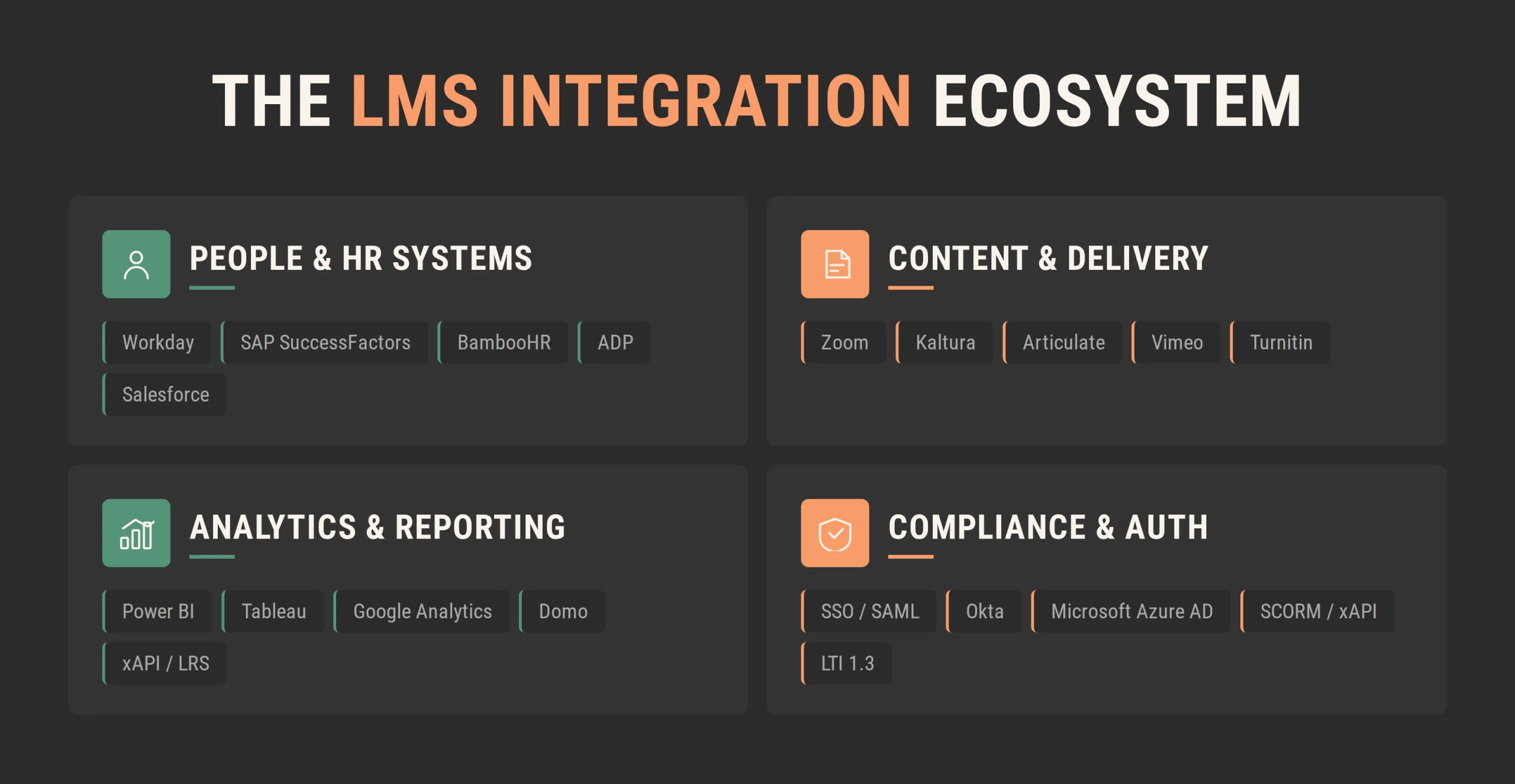
- API and LTI support. Both platforms support LTI 1.3 and LTI Advantage. Canvas has a large integration ecosystem where many third-party vendors document their setup steps explicitly. Brightspace supports LTI Advantage plus SCORM and xAPI package workflows directly in its content layer.
- Breadth vs depth. Brightspace supports all major EdTech integrations — Zoom, Turnitin, Respondus — and LTI Advantage ensures compatibility with most tools. Where the difference shows up is in newer or niche tools, which tend to build Canvas integrations first.
- HRIS and enterprise connections. Brightspace offers D2L Link for no-code integrations with HRIS, CRM, and ERP systems. Canvas connects through open APIs and LTI standards — the configuration typically requires more technical involvement but gives organizations more flexibility in how data flows between systems.
- What this means in practice. For organizations running a standard enterprise stack — HRIS, video conferencing, content libraries — both platforms cover the basics. The integration question gets more specific when the organization needs custom data flows, unusual third-party tools, or deep LMS integration with performance management systems. And that’s where Raccoon Gang’s LMS integration work typically starts — mapping what needs to connect before any platform configuration begins.
Brightspace vs Canvas: Reporting and Analytics
Canvas and Brightspace handle learner data differently, and for many organizations, that difference ends up being the deciding factor.
- Canvas. Course-level data is clean and accessible: grades, activity, participation, submission rates. Instructors get what they need without digging. Early alert and predictive capabilities aren’t built in; they require add-ons or third-party tools.
- Brightspace. Predictive risk indicators, absence tracking, outcome mapping — all native. The absent period indicator alone has practical value: it flags learners who’ve gone quiet before anyone notices a problem. For organizations where compliance documentation or accreditation reporting is central, that extra depth is hard to work around.
- The practical question: how far does your team actually need to go with learner data? If course-level reporting covers it, Canvas works fine. If the analytics need to feed into performance systems, HRIS, or compliance documentation — Brightspace gets there without extra licensing. That’s the question worth answering before the demo.
Canvas vs Brightspace for Different Use Cases
Higher Education
Canvas has broad adoption across U.S. institutions — faculty familiarity is high, and most edtech vendors test integrations against it first. For standard course delivery at scale, that ecosystem has practical value.
Brightspace has a stronger track record for competency-based education. Outcomes mapping, mastery-based progression, and intervention tools are built into the platform. Institutions where accreditation reporting or adaptive learning are central tend to evaluate it seriously.
Enterprise Learning
Canvas works well for onboarding, compliance delivery, and standard role-based training programs. Brightspace fits organizations where learning data needs to feed into performance management systems or where adaptive paths matter for development programs tied to business outcomes.
Compliance and Certification
Both platforms support compliance delivery. Brightspace carries more native depth on audit documentation, anonymous assessments, and outcome tracking — which regulated industries tend to need. Canvas covers the basics and extends through integrations where the requirements go further.
Extended Enterprise Training
Training across partners, customers, or external audiences puts pressure on access management and audience-specific reporting. Both platforms handle standard extended enterprise scenarios. When complexity increases — multiple regions, separated reporting by audience, content sets that vary by partner — organizations sometimes move toward custom LMS development rather than configuring further within either platform.
Brightspace or Canvas: Decision Framework
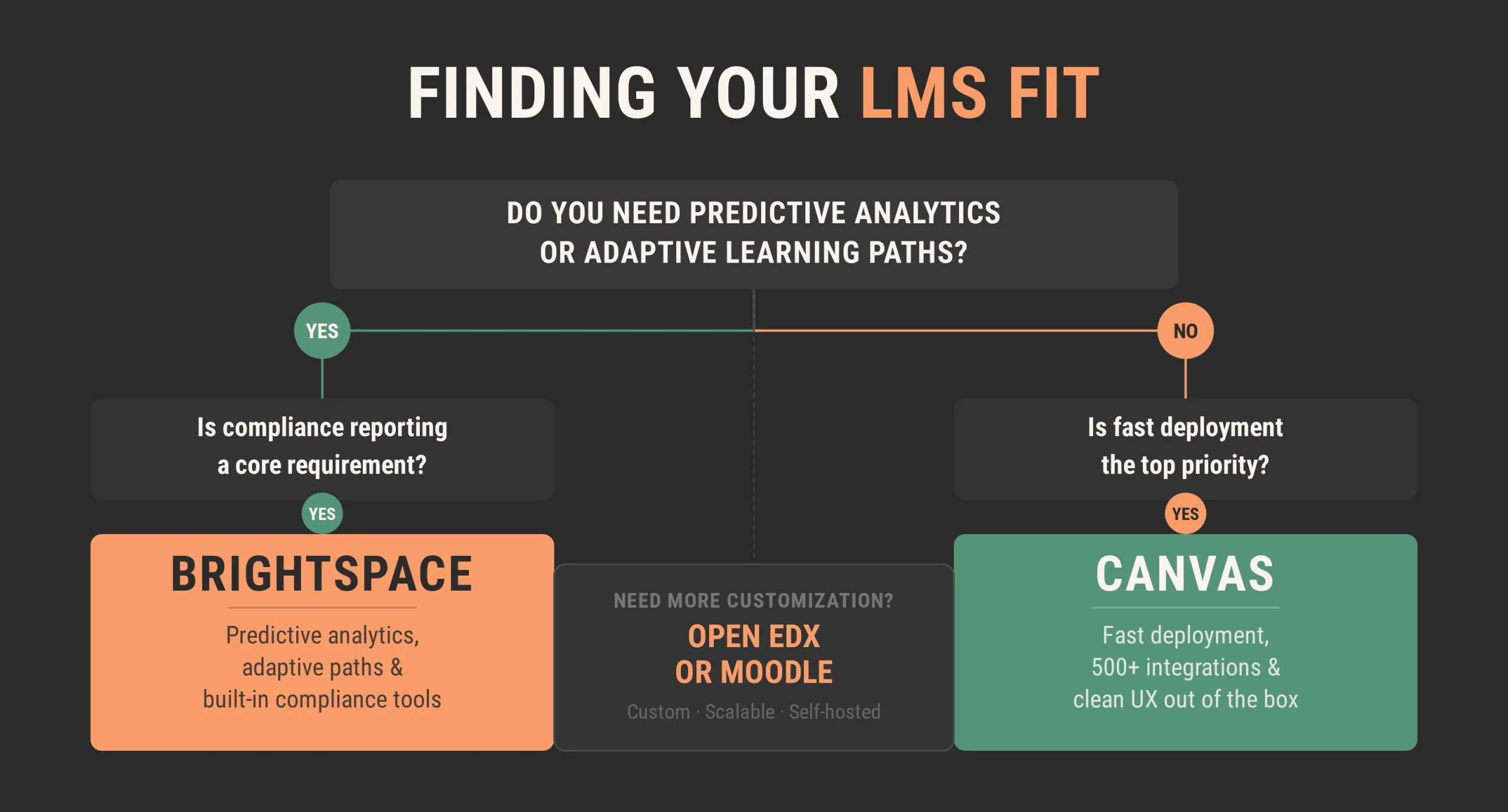
Neither platform is the universal answer — and most organizations that struggle with the decision are asking the wrong question first.
Consider Canvas if:
- Adoption speed matters — teachers and learners need to be productive quickly.
- The existing edtech stack is standard and broad integration support covers it.
- Vendor-managed infrastructure fits the IT model.
- U.S. higher education peer community and resources are relevant to the rollout.
Consider Brightspace if:
- Predictive analytics and early intervention are part of how the program runs.
- The curriculum is competency-based or outcomes-mapped.
- Compliance reporting needs audit-ready documentation without additional licensing.
- Data residency or regulated industry requirements are on the table.
Worth knowing before signing anything: some requirements push past what either platform can configure. Customization limits, data sovereignty, and per-user pricing at scale are the three situations that tend to move organizations toward a different path entirely — covered in the next section.
When Organizations Consider Alternatives
Canvas and Brightspace cover most LMS use cases. Three specific situations tend to change that calculation.
Trigger 1: Customization exceeds SaaS limits
Both platforms are SaaS — they define what can be configured. When requirements deviate from the standard course-based model — complex certification branching, performance-linked learning paths, or training that needs to live outside a standard LMS context — the configuration ceiling becomes visible. When those edge cases are the organization’s core workflow, Open edX addresses this through the XBlock framework — custom course components built at the architecture level that don’t exist in Canvas or Brightspace plugin ecosystems.
Trigger 2: Data sovereignty and GDPR
EU institutions, government agencies, and regulated industries sometimes find that SaaS creates data residency complications: data lives on vendor infrastructure, and audit trails depend on what the vendor exposes. GDPR compliance requirements often favor self-hosted solutions. Open edX can be deployed in any geography, including EU data centers — all user data, completion records, and audit logs stay with the organization.
Trigger 3: Scale and pricing
SaaS LMS contracts scale with enrollment. For organizations training 100,000+ learners across multiple regions, per-user pricing becomes the primary cost driver. Open edX is the primary platform for large-scale public programs — edX, MIT, Harvard — where per-learner economics drives platform choice. Our LMS scalability guide covers how to model that calculation.
How does the Raccoon Gang fit here
The decision isn’t always Canvas or Brightspace. Raccoon Gang implements all three primary platforms — Canvas, Open edX, and Moodle — and the evaluation isn’t biased toward any of them.
When Canvas or Brightspace covers 80%+ of requirements, the remaining gap usually closes through custom integrations and LTI tools — without a platform switch. When fit is below that threshold, the work shifts to Open edX: architecture-level customization, hosting in any region, and long-term support built into the engagement from the start.
How Raccoon Gang Helps Organizations Evaluate LMS Platforms
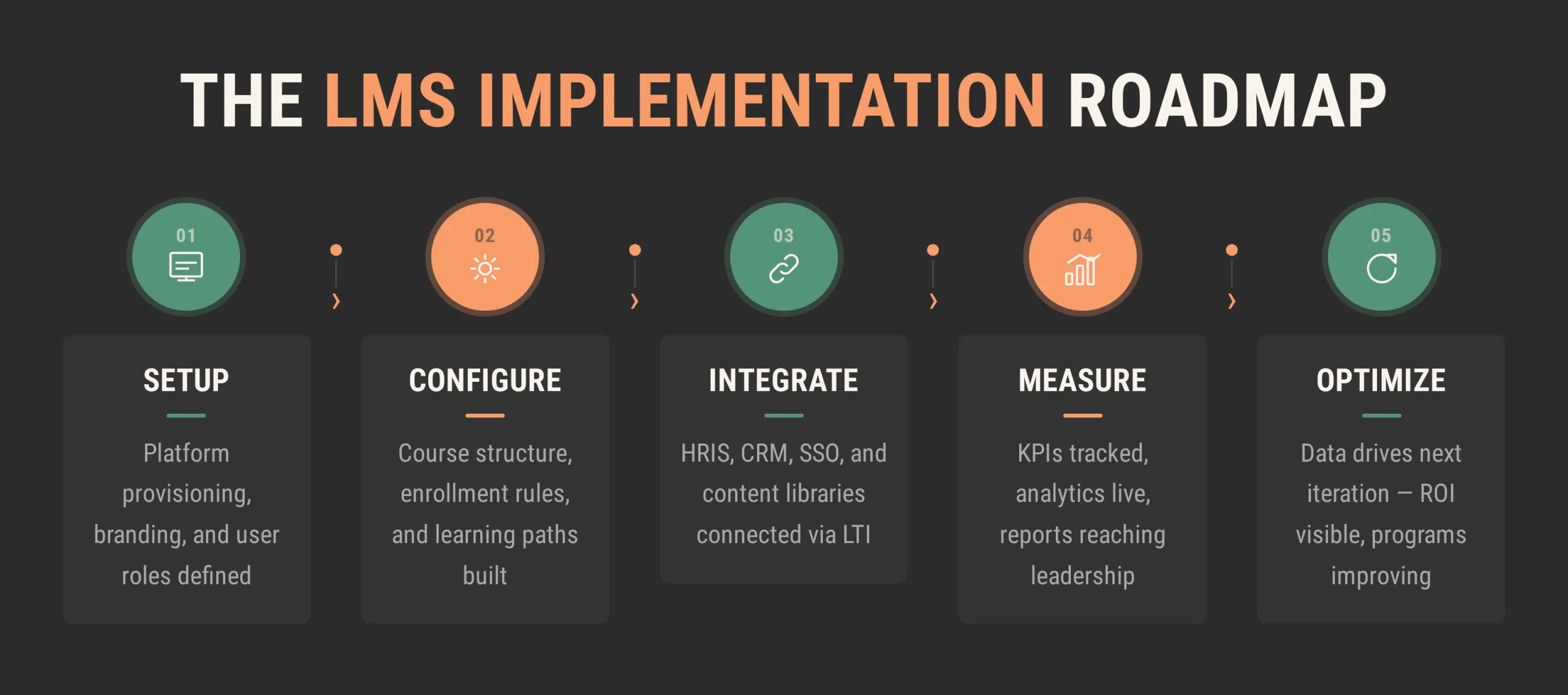
LMS evaluation looks straightforward on paper. In practice, the decisions that matter happen earlier — what the platform needs to support, how it connects to existing systems, what the total cost looks like over three years.
What the work covers:
- Platform comparison — structured against actual requirements, not a feature checklist.
- Migration planning — content audit, integration mapping, and a realistic timeline.
- Implementation architecture — deployment design that accounts for scale, compliance, and existing systems.
Raccoon Gang’s LMS consulting services start from a requirements map. For organizations still in evaluation, that means a structured comparison before any vendor conversation starts. For those in mid-migration, it means an architecture that holds up past go-live.
Conclusion
Canvas vs Brightspace is a context-dependent decision. Both platforms are mature, well-supported, and cover the core LMS requirements. The difference shows up in analytics depth, adaptive learning, and how far each one bends before hitting configuration limits.
The organizations that get the most from either platform define what success looks like before the demos start — and build the measurement framework before the first course goes live.
FAQ
What is the difference between Brightspace and Canvas?
Both Brightspace and Canvas are cloud-based LMS platforms with broad adoption across higher education and enterprise learning. Canvas is known for clean UX, fast deployment, and a large integration ecosystem. Brightspace goes deeper on analytics, adaptive learning, and compliance reporting — particularly relevant for organizations that need predictive learner data or competency-based program structures.
Is D2L better than Canvas?
Each platform has areas where it’s the stronger fit. Brightspace has more depth on analytics and adaptive learning. Canvas has broader U.S. adoption, a larger edtech integration ecosystem, and faster time to deployment. The evaluation comes down to which capabilities matter most for the specific use case.
Which LMS is better for higher education?
Canvas has the larger U.S. higher education footprint and strong faculty familiarity. Brightspace is well-suited for institutions running competency-based education, outcomes mapping, or programs where accreditation reporting is central. Both platforms are serious options, and the decision depends on institutional priorities.
Which LMS is better for enterprise learning?
Canvas handles standard onboarding, compliance delivery, and role-based training well. Brightspace fits organizations where learning data needs to connect to performance management workflows or where adaptive paths are part of the program design. For enterprise use cases that need architecture-level customization, custom LMS development is worth evaluating.
How do you choose between Brightspace and Canvas?
Start with requirements, not features. Map what the platform needs to support — learning model, integrations, reporting, compliance — and model the total cost over three years. If both platforms cover the requirements, the decision usually comes down to analytics depth and deployment speed. Talk to our team before the shortlist becomes a contract.


- TL;DR
- What Is Canvas LMS?
- What Is Brightspace?
- Canvas vs Brightspace: Core Feature Comparison
- D2L vs Canvas: User Experience and Interface
- Canvas vs Brightspace: Integrations and Ecosystem
- Brightspace vs Canvas: Reporting and Analytics
- Canvas vs Brightspace for Different Use Cases
- Brightspace or Canvas: Decision Framework
- When Organizations Consider Alternatives
- How Raccoon Gang Helps Organizations Evaluate LMS Platforms
- Conclusion