






An LMS portal is a login-based, user-facing part of a Learning Management System. It is not the LMS itself, but the front door to it — the interface where users log in, access courses, manage training, and track progress. Every functional LMS has one, and many organizations use an LMS training portal to streamline online education and employee development.
When you enter through these front doors, a login-based LMS training portal controls who logs in, what visitors see first, and how they navigate through courses. The functionality of LMS portals usually involves the presence of such things as user dashboards, personalized learning paths, course progress tracking, and role-based access.
“To make it easier to understand the difference, think of an LMS as an internal system (it stores data and all the logic of your course). A portal is the main screen of your LMS. It is from here that users can further navigate your learning platform within the framework of their assigned roles and permissions.” — Natalia Boikiv, Delivery Director, at Raccoon Gang.
Key takeaways:
- An LMS training portal is the user-facing layer of your LMS — distinct from the backend system that manages data, logic, and reports.
- Corporate and education portals look different: role-based KPIs and compliance deadlines vs. course schedules and grades.
- Custom LMS portals add branded design, admin-level content control, built-in blog, and SEO tools — without requiring developer access for every update.
- Raccoon Gang has built custom Open edX portals for 150+ LMS projects since 2015, including AISL Harrow Academy (3,000–6,000 learners across Asia).
As training demands grow and hybrid work becomes standard, the LMS portal is no longer optional. In this article, we’ll break down the key features of LMS portals, compare business and education use cases, and explain how to build a custom solution that fits your needs in 2025.
Key Features of a Modern LMS Training Portal
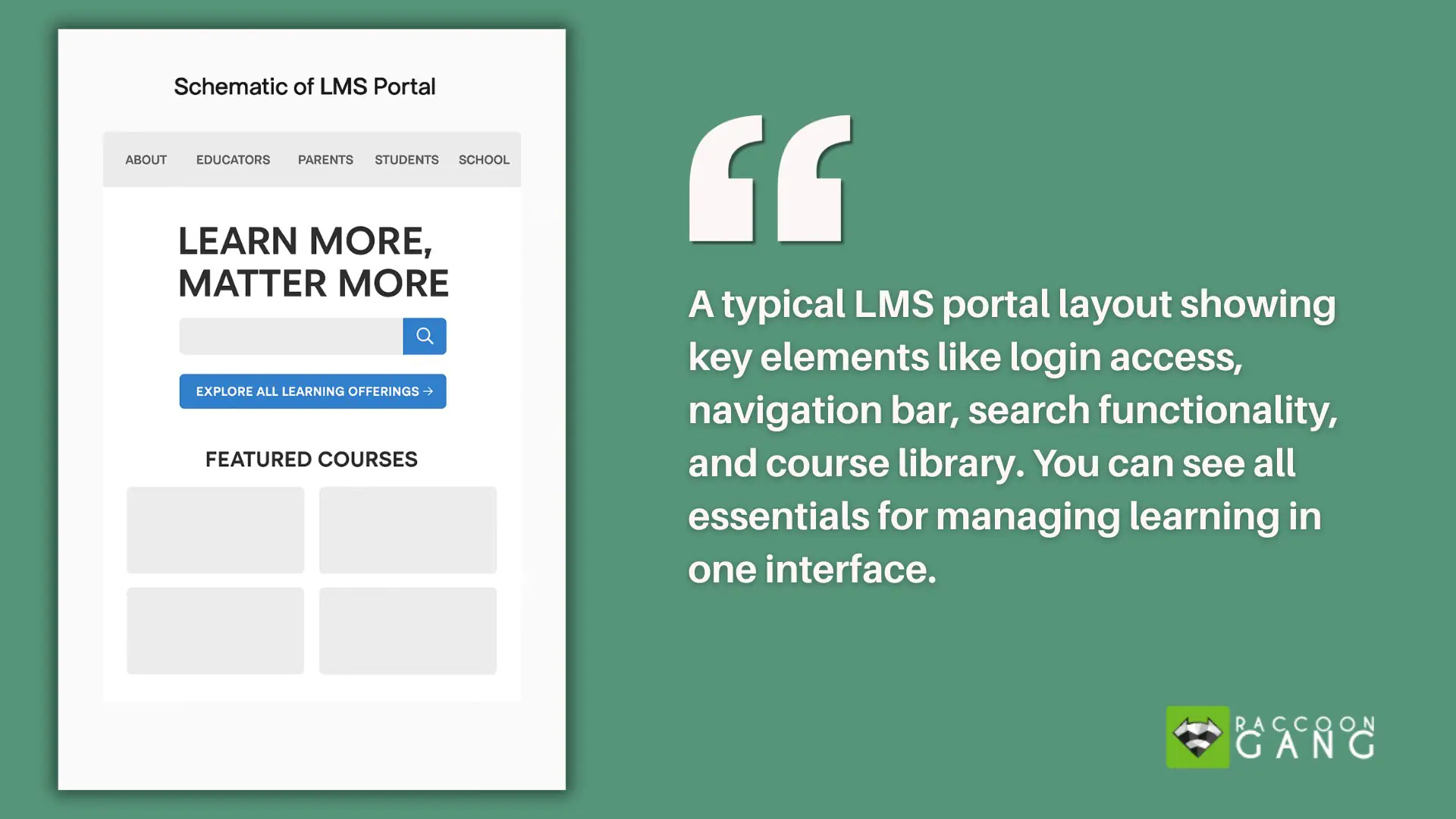
A modern LMS training portal is the user-facing layer of your learning system. It’s where learners log in, access training, and track their progress—and where admins manage content and visibility.
LMS Login: The Entry Point of Every Portal
The LMS login page is the first thing every learner, instructor, and admin sees — and it does more than authenticate users. A well-designed LMS login experience:
- Controls access by role. The same login URL shows a learner their assigned courses, shows an instructor their class roster, and shows an admin the management dashboard — without separate portals.
- Supports SSO (Single Sign-On). Enterprise portals integrate with Azure AD, Okta, Google Workspace, or your HRIS — learners use their existing credentials and never need a separate LMS password.
- Handles shared devices. In retail, manufacturing, and healthcare, multiple staff members share tablets or kiosk devices. A proper LMS login supports quick-switch sessions without data leakage between users.
- Enforces MFA when required. Regulated industries (finance, healthcare, government) may require multi-factor authentication before accessing compliance training content.
- Shows a branded landing page. The LMS login screen is often the first brand impression for new learners — custom logo, colours, and welcome message set the tone before anyone sees a single course.
In Open edX, Raccoon Gang builds custom LMS login experiences — from white-label branded pages to SSO integration with enterprise identity providers. See Third-Party Authentication services →
Login-based access is the foundation. Depending on the role—admin, instructor, or learner—each user signs in with a unique account and sees only what’s relevant to them. Learners view assigned courses and due dates. Instructors monitor progress and manage sessions. Admins handle permissions, reporting, and sometimes even homepage content and banners.
Course progress tracking is built in. Users can pause and resume where they left off. Many portals also include certification tools that issue credentials automatically when training requirements are met.
Some portals go even further—supporting blog posts, instructor profiles, and basic SEO tools to help position the organization as a trusted source of learning.
Together, these features make the LMS training portal a central part of a scalable, flexible, and business-aligned training system.
Types of LMS Portals: Business vs. Education
Before we compare use cases, let’s clear up one common confusion about the difference between an LMS and an LMS portal. Any LMS acts as a backend system through which you can deliver, manage, and track learning content.
Is it possible to have an LMS without a portal? Technically, yes. But in practice, it’s impossible. If we’re talking about an LMS as a system that stores courses, tracks progress, manages users, and generates reports, it can operate independently. However, without a portal as a user interface, neither students, instructors, nor administrators will be able to interact with any of it.
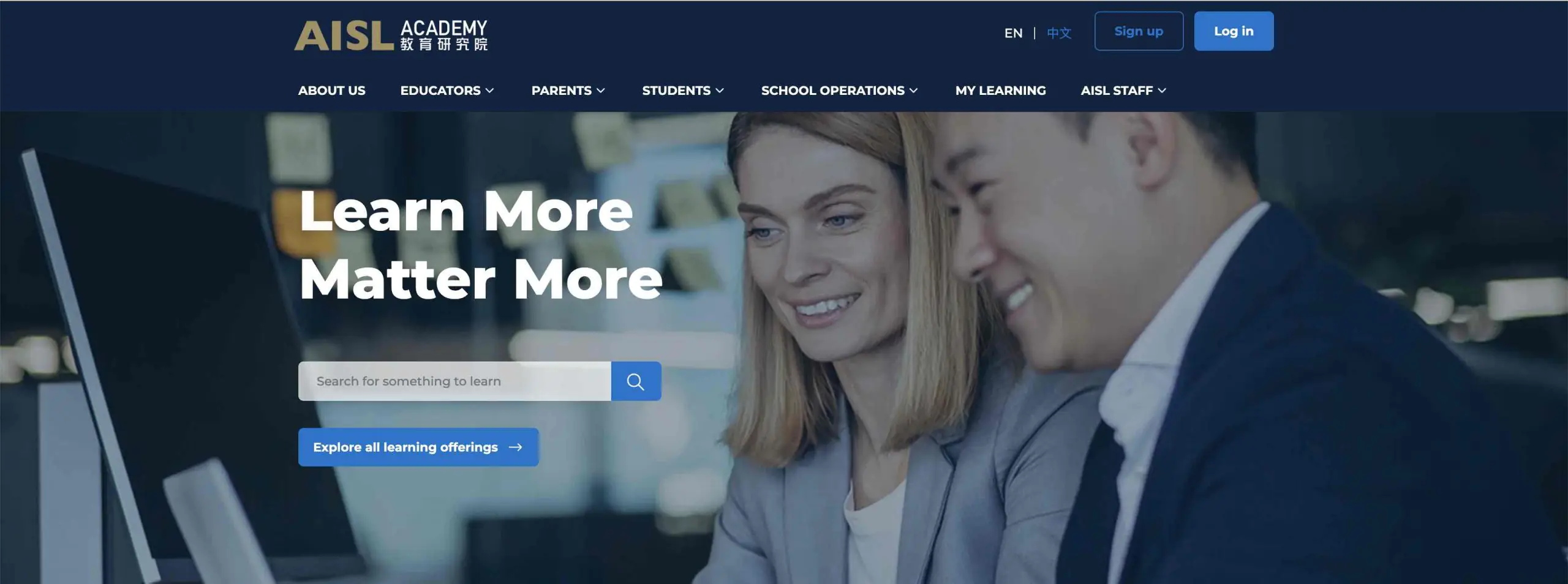
Portal homepage developed by Raccoon Gang for AISL Academy, featuring role-based navigation, search, multilingual support, and direct access to learning content.
How business and education LMS training portals differ
Each corporate LMS learning portal is literally a “portal” through which employees access training. Employees can immediately see their assigned courses, check their progress, and download earned certificates (if they already have them, of course). The portal helps managers assign role-based training, check who completed it, and view overall analytics. It supports everyday learning without requiring access to the system’s backend.
What are the features of an academic education LMS portal? This portal does the same thing, but for students and instructors. Students entering the portal can see course schedules, view materials provided to them, submit homework, and check grades. Instructors currently use the portal to upload content, post updates, manage assignments, and give feedback.
What users see in the LMS portal: business vs. education
| LMS Portal Element | Corporate Training Portal | Education LMS Portal |
| Login Page | Company-branded access with SSO or HRIS integration | Student portal login with campus credentials |
| User Dashboard | Role-based KPIs, assigned training, deadlines | Course list, grades, class schedule |
| Course Access | Job-specific learning paths, microlearning modules | Semester-based courses with syllabus |
| Notifications | Reminders for compliance, expiring certifications | Class announcements, assignment due dates |
| Progress Tracking | Training status, certification levels, team progress | Grades, attendance, module completion |
| Certificates | Auto-generated for completed courses | Issued after final assessments or exams |
Building a Custom LMS Learning Portal: What to Consider
Okay! At this point, we’ve already figured out that an LMS portal gives us a login page. So, does a custom LMS learning portal give us more? What about a branded training environment? What about built-in blogging and SEO features? These components can help your organization.
A custom LMS learning portal goes beyond a standard LMS interface — it gives your organization branded design, admin-level content control, and built-in integrations without requiring developer access for every update. Here’s what to consider before building one:
- Third-party integrations. You’ll definitely need to integrate your portal with tools like CRM systems, HR platforms, Zoom, or other systems you already use. A portal won’t replace them. It will only complement them (or, more importantly, connect them).
- UI/UX design. A well-structured portal guides users without confusion. It makes course navigation easy, keeps key actions visible, and reduces support requests.
- Role-based access. Instructors, administrators, and students should only see what they need to see. Courses, assignments, reports, or user management (each of these tools has its own user).
- Flexibility. Your enterprise LMS platform should work without downtime with 20,000 users as it does with 200. The portal should be ready for this.
- Frontend and backend connection. How much control do you want over the look and feel of your home page? Some teams want complete freedom over layout and content. Others prefer admin-level access to update text, post blog articles, or manage team profiles without developer help.
A well-built LMS learning portal is a practical extension for your LMS.
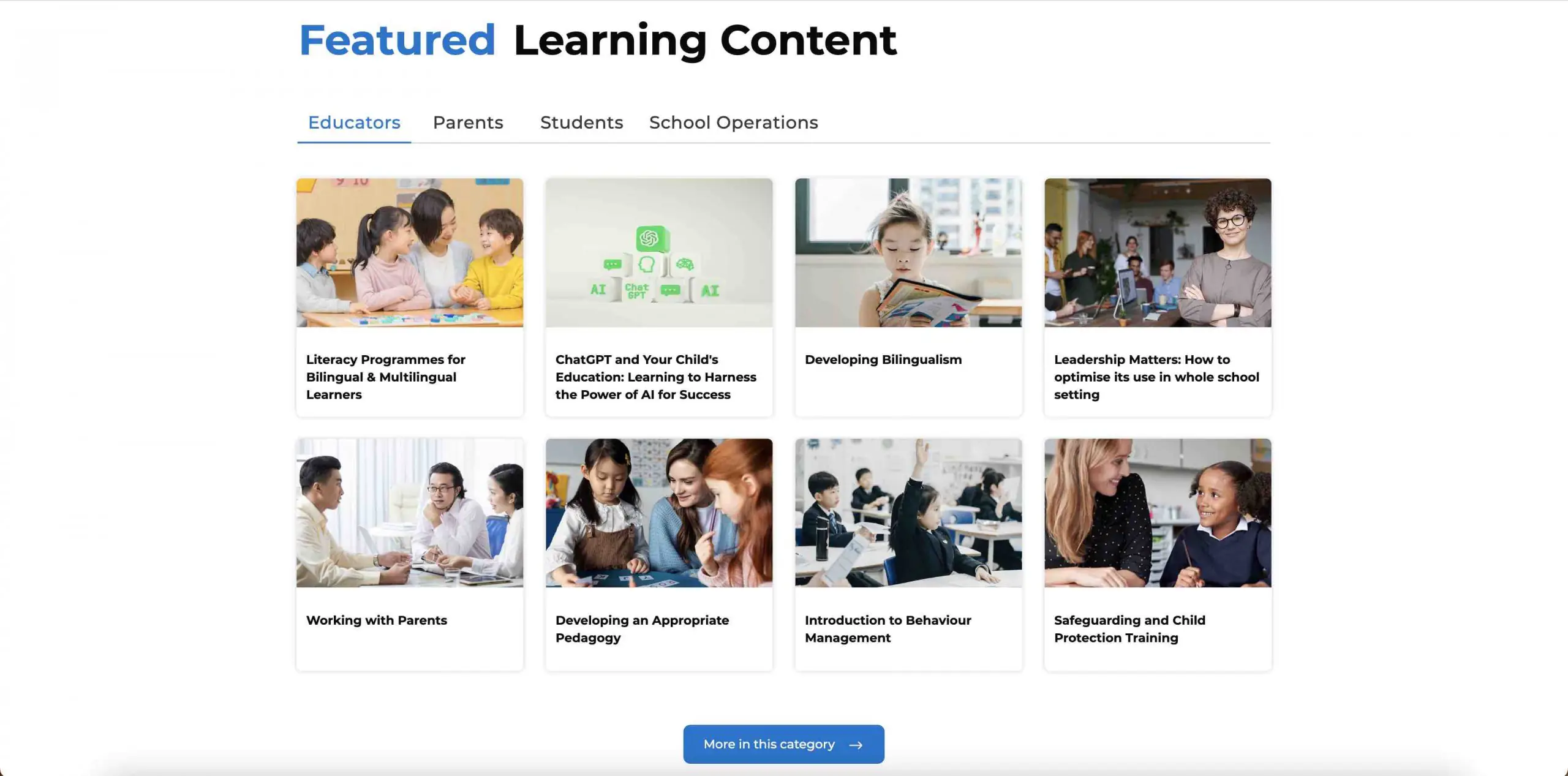
Featured learning content section of the AISL Academy portal, designed by Raccoon Gang. Users can browse courses by role—Educators, Parents, Students, or School Operations—making it easy to access relevant training materials.
Raccoon Gang Experience: LMS Portal Development
While our main service at Raccoon Gang is custom LMS development, we help our customers extend their Open edX® platforms with custom LMS portals. Since 2015, the team has delivered 150+ LMS projects — from single-institution Open edX deployments to country-level platforms serving 1.5M+ learners.
As part of our Open edX services, such as custom feature development, we have been helping to create the Open edX LMS portal for 10 years. We deliver a login-based learning portal that feels like a branded website but works as a native part of the learning system.
One recent example: the AISL Harrow Academy portal — a network of international schools across Asia. 10 developers, 7 months delivery, 3,000–6,000 learners with role-based navigation (Educators / Parents / Students / School Operations), multilingual support, and unified logins across Tencent Cloud and Azure. Outcome: 90% positive learner feedback.
Marketing LMS Portal for Open edX LMS by Raccoon Gang includes:
- A custom admin panel. You take control over homepage and course page layouts without developer input.
- Built-in blog functionality. You become a publisher—able to share updates and boost organic reach with an SEO-friendly tool.
- Integration with the LMS backend. You maintain full learning access control for any user roles.
- Support for self-paced and instructor-led training at the level of your own CMS with different user roles and permissions.
“An LMS training portal is a hybrid between a marketing website and a functional training environment. On one side, it introduces the organization, builds trust through instructor profiles and blog content, and attracts learners through SEO-friendly pages. On the other, it connects directly to the LMS backend, giving users access to training materials, progress tracking, and certification tools. This dual role makes the portal both a public-facing site and a private learning space.” — Volodymyr Chekyrta, Engineering Manager at Raccoon Gang.
Benefits of Using a Custom LMS Training Portal
We would like to once again draw your attention to the benefits that a custom LMS portal can bring to your organization. Here are some of the key benefits:
- Branded learner experience. Your training feels familiar and aligned with your main site.
- Content updates without developer help. The admin panel helps your team manage course page layouts and home banners without technical expertise.
- Built-in blog for content marketing. Share articles, updates, and insights to raise your team’s visibility and improve SEO.
- SEO tools that drive organic traffic. Attract organic traffic without breaking the bank.
- Seamless LMS integration. The portal stays in sync with your LMS backend, ensuring users move between content, tracking, and dashboards without friction.
- Faster go-to-market for new programs. Launch new courses and publish announcements without going through a full development cycle.
Learning Management Portal vs. LMS: Is There a Difference?
The terms “learning management portal” and “LMS portal” are used interchangeably in most contexts — both refer to the user-facing interface of a Learning Management System. However, some organisations use “learning management portal” to describe a broader concept:
| Term | Typical meaning | Who uses it |
| LMS portal | The login-based front end of an LMS where learners access courses, track progress, and download certificates | Corporate L&D, HR teams, eLearning vendors |
| LMS training portal | Same as LMS portal, with emphasis on employee training use case | Corporate training departments, compliance teams |
| Learning management portal | Broader: sometimes includes the LMS itself + the portal + reporting dashboards as a unified “portal” concept | Enterprise procurement, higher ed IT departments |
| LMS learning portal | Emphasises the learning experience layer — design, navigation, personalisation — over the administrative layer | L&D designers, instructional designers |
In practice, all four terms describe the same thing: the interface through which users interact with your LMS. The terminology matters primarily in procurement documents and RFPs — where the right term helps vendors understand the scope of what you’re building.
Conclusion: When the LMS Portal May Be Helpful
An LMS training portal is more than a login screen — it’s the front end of your entire learning ecosystem. A well-built portal brings flexibility, control, and visibility to your training programs: branded entry for learners, admin-level content control without developer dependency, and a direct connection to the LMS backend that keeps everything in sync.
If you’re interested in the technical side of the issue, your LMS portal can be hosted alongside the LMS backend or deployed independently. It all depends on your setup. This flexibility helps you manage the front end of your LMS without hardcoding.
And remember, an LMS without a portal is like a library without doors — there’s a lot of valuable content inside, but no one can access it.
FAQ
What is an LMS training portal?
An LMS training portal is the user-facing layer of a Learning Management System — the interface where learners log in, access assigned courses, track completion, and download certificates. It controls who sees what based on role (admin, instructor, learner) and connects to the LMS backend where data, logic, and reports are stored. Every functional LMS has one; without it, neither learners nor admins can interact with the platform.
What’s the difference between an LMS portal and an LMS platform?
What are the key features of an LMS training portal?
Can I create a custom LMS learning portal for my company?
How do users access content inside an LMS portal?
What is an LMS account, and how is it managed?
Does Raccoon Gang offer LMS portal development?
Can I create a custom LMS training portal for my company?