











When schools, universities, and even training organizations begin their journey with the question “Which market solutions can support our online learning?”, they come up with the Moodle vs Google Classroom comparison time and time again.
At the beginning, this comparison seems logical. But when we start exploring the details, it becomes harder to make the right decision.
With Google Classroom, your faculty, training department, and teachers can manage most day-to-day classroom activities in one place. Materials, assignments, submissions, and communication all stay within the Google ecosystem.
Moodle plays a bigger role. It works as a full learning management system for structured courses, assessments, certifications, reporting, integrations, and long-term program management.
This guide has the answers. Let’s find the real differences between Moodle and Google Classroom and look at the criteria by which a classroom tool should be compared with a full LMS.
TL;DR
- Google Classroom helps teachers manage classes, assignments, and communication.
- Moodle helps organizations manage structured learning programs.
- Google Classroom usually wins on simplicity and quick launch.
- Moodle usually wins on reporting, assessments, integrations, and control.
- The right choice depends on what you need to manage next year.
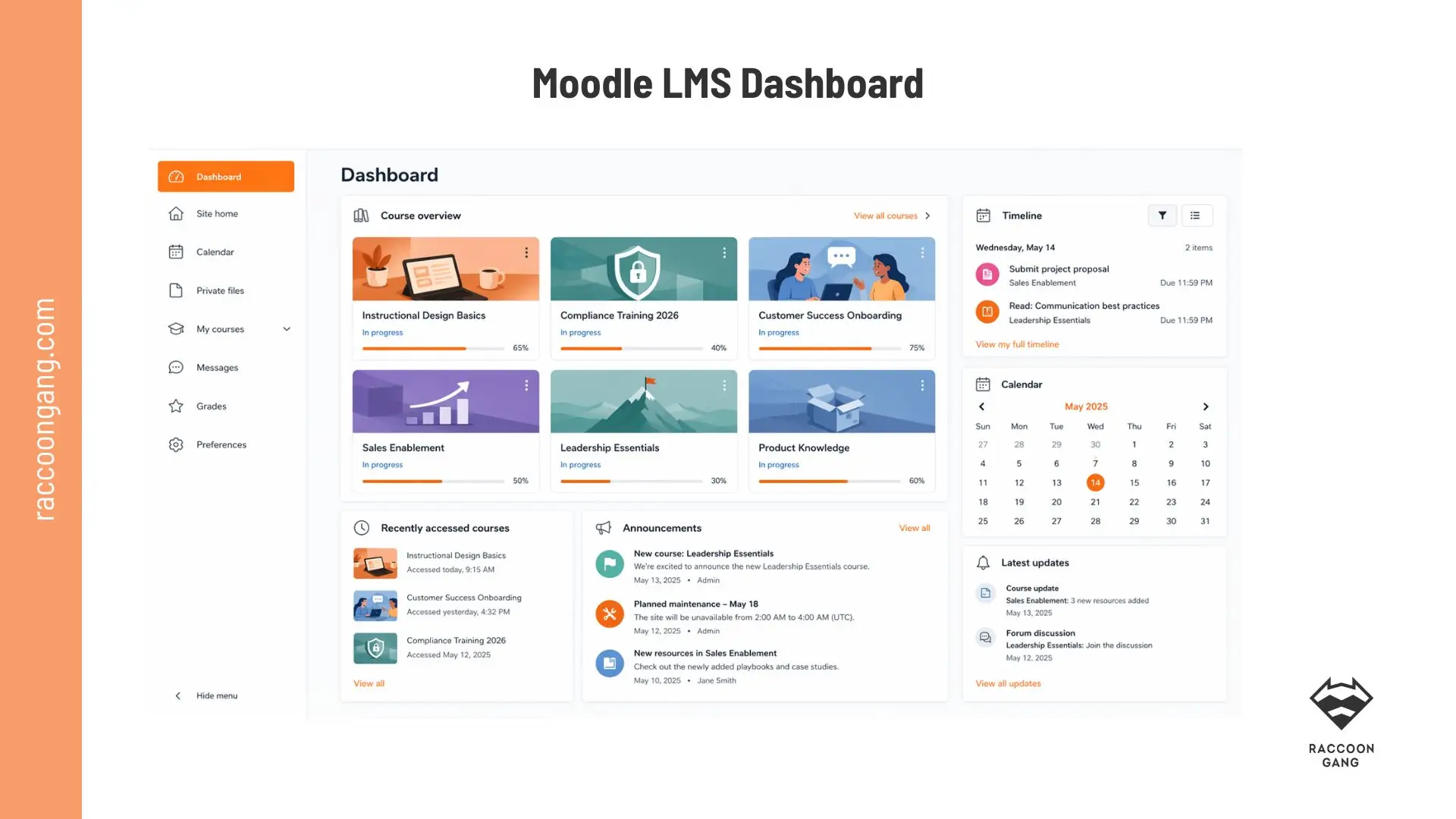
Unlike classroom tools, Moodle gives administrators a single view of courses, learner progress, compliance deadlines, and organizational learning activity.
What Is Moodle and Why Organizations Choose It as Learning Programs Grow
Moodle was designed for organizations that need more than a digital classroom. The platforms based on Moodle software support course delivery, assessments, certifications, learner tracking, and program administration. Google Classroom takes a lighter approach and focuses mainly on classroom workflows.
K–12 education, higher education, professional training, and enterprise learning environments all can rely on Moodle LMS for different reasons.
For a full breakdown of Moodle features and use cases, see our guide: What Is Moodle LMS?
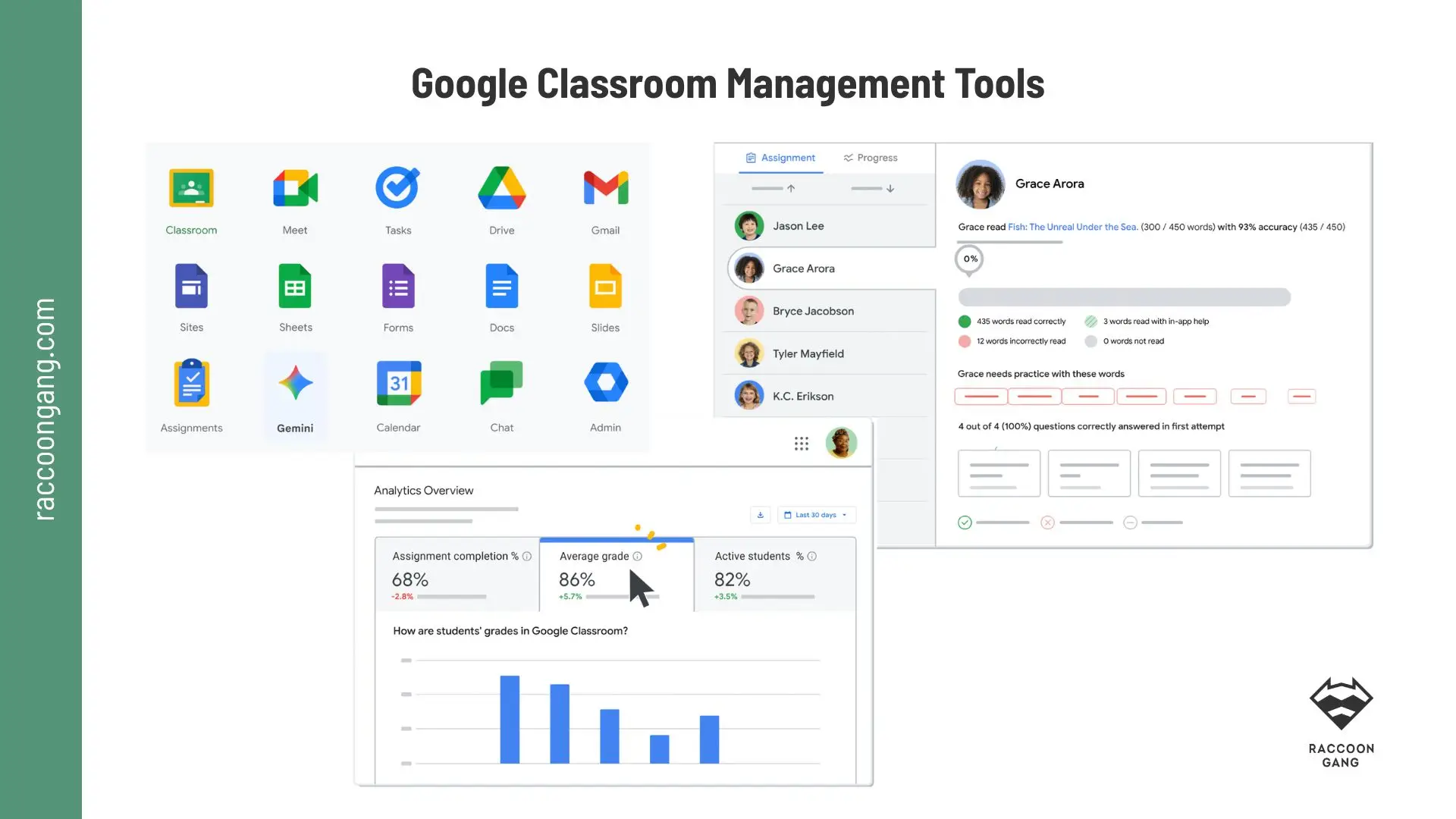
Google Classroom’s biggest advantage is not a single feature — it is how naturally Docs, Drive, Meet, Gmail, and other Workspace tools work together from day one.
What Is Google Classroom? Where It Works Best and Where Teams Outgrow It
On the other side of the scale, we have Google Classroom. By design, it is a lightweight tool for educators who need support with everyday classroom workflows. Its main strength is simple: it fits into the teaching process quickly. Why?
Google Docs, Drive, Meet, Calendar, Gmail, Forms, Slides, and Sheets already work together. They are inside parts of the Google ecosystem. Instructors can organize classes faster because learners are the users of the vast majority of the mentioned tools. They can also share materials, collect assignments, and communicate with learners.
“Google Classroom worked for us while we were managing classes. The challenges appeared when we started managing admissions, records, reporting, and student workflows. That was the point where a classroom tool no longer felt like a complete learning platform.”
— Summary of a Reddit discussion among education administrators and instructors
The limitations usually appear later. Google Classroom does not focus on program administration, certification management, or institution-wide learning operations as Moodle LMS does. Teams often start to notice this gap as their learning operations grow.
Moodle vs Google Classroom: Core Features Compared
A feature comparison only tells part of the story. But without it, we couldn’t explain why the Moodle vs Google Classroom decision often depends on whether you need a classroom workflow tool or a platform for managing learning programs at scale.
| Feature Area | Moodle | Google Classroom |
| Course Structure | Full course builder with activities, resources, quizzes, assignments, forums, workshops, SCORM, LTI tools, and structured learning paths. | Class-centered model built around classes, assignments, materials, questions, and communication. |
| Assessments & Grading | Advanced assessments with quizzes, question banks, rubrics, peer review, competencies, course completion tracking, and learning goals. | Grades, grading periods, assignment management, and originality reports in supported editions. |
| Integrations | Supports LTI, SCORM, IMS Common Cartridge, external databases, web services, and a large plugin ecosystem. | Deep integration with Google Workspace, Classroom API, Reports API, SIS integrations, and Google educational tools. |
| Security & Permissions | Role-based permissions, multi-factor authentication options, and institutional control over hosting and security settings. | Security and administration managed through Google Workspace and the Google Admin Console. |
| Privacy & Data Control | Organizations can control hosting, data storage, privacy settings, and operational practices, especially with self-hosting. | Student and customer data are managed through Google Workspace policies and administrative controls. |
| Mobile Learning | Official Moodle App with online and offline access, depending on site configuration. | Mobile access supports assignment submission, communication, and classroom activities. |
| Analytics & Reporting | Learning analytics, predictive models, completion tracking, learner indicators, and custom reporting options. | Activity reports, class reports, and Workspace analytics focused on classroom usage. |
| Customization | Open-source architecture allows changes to themes, workflows, roles, integrations, and user experiences. | Customization mainly happens through settings, APIs, add-ons, and Workspace configurations. |
| Extensions & Plugins | Large plugin directory with thousands of community and commercial extensions. | Relies on add-ons, APIs, partner integrations, and App Hub applications. |
| Pricing Model | Open-source software with costs tied to hosting, support, customization, maintenance, and infrastructure. | Core version available through Google for Education plans, with additional features available in paid editions. |
| Support | Community forums, Moodle Academy, Moodle HQ services, and Certified Partners. | Help Center, community resources, partners, and support options tied to Workspace plans. |
| Localization | Extensive language support and local language customization. | Language support follows the broader Google ecosystem. |
| Accessibility | Moodle LMS, Moodle Workplace, and Moodle App provide WCAG 2.2 Level AA accessibility support. | Built-in accessibility features are available across Google for Education products. |
*Looking at the Google Classroom vs Moodle feature set, the biggest difference is not the number of tools available. It is the scope. Google Classroom focuses on managing classes. Moodle is designed to manage complete learning programs.
Moodle LMS: The Differences Teams Notice After Launch
The biggest differences usually appear after the first courses go live. At that stage, teams stop comparing Moodle features with Google or something and start comparing workflows.
Moodle stands out in its plugin ecosystem
More than 2,800 plugins are available in the plugins library as of June 2026. Organizations can add assessment tools, analytics, integrations, certificates, attendance tracking, proctoring, and many other capabilities.
Conventional wisdom tells us that Moodle’s flexibility also requires responsibility.
Moodle can be:
- self-hosted
- deployed through MoodleCloud
- managed by a Certified Partner or LMS provider, such as Raccoon Gang
This variety gives your organization more control over integrations, release schedules, plugins, and hosting decisions. But there is always a “but,” right? It also requires a clearer operational model than a fully managed SaaS platform. In this respect, Google Classroom definitely wins.
Moodle adapts more easily to organizational processes
A university can connect several courses into a program with prerequisites and completion rules. A healthcare organization can build mandatory certification training with recertification requirements. It is only one of the hundreds of possible scenarios.
Assessment flexibility also becomes more important over time
Moodle supports quizzes, question banks, rubrics, competency tracking, peer review, grading workflows, and completion tracking. In many Moodle review discussions, institutions value this depth. For example, G2 shows us a 4.1/5 rating for Moodle with over 440 reviews.
Moodle for Schools vs Google Classroom: Which Fits Your Educational Model?
Those who choose Moodle have their reasons. Those who prefer Google Classroom have theirs. Both platforms have earned loyal users over the years. Comparing their perspectives can reveal some unexpected conclusions.
K–12 schools
Schools often choose Google Classroom when they already rely on Google Workspace for Education. It has become a familiar part of their daily teaching environment. The platform launches quickly. Teachers work with tools they already know. Administrators can manage users, permissions, and reports through Google Admin Console.
Google Classroom also defines clear boundaries at the classroom level. In Google Workspace for Education, a class can have up to 50 teachers and up to 1,000 members. For many schools, these limits are more than sufficient.
“Moodle presents a strong and flexible LMS for higher education. Moodle’s features and plugins could be made less cluttered to improve usability in the classroom.”
— Teacher at Junior School, Education Sector, January 2025
Universities
Moodle LMS has enough functionality to support structured academic courses. Universities can use its assessment options, analytics, LTI and SCORM support to manage learning across departments and programs.
Moodle administrators can manage:
- blended and distance learning
- accreditation requirements
- complex assessments
- student information system integrations
Structured learning programs
Additional requirements are often introduced when organizations start running structured learning programs. Certification programs, compliance training, partner education, and multi-department initiatives often demand:
- learner progression rules
- certifications and recertification cycles
- multi-level roles and permissions
- compliance requirements
- program management across multiple courses
In these cases, Moodle often becomes a stronger fit. And even more, some organizations start to evaluate Moodle Workplace.
“Moodle gives educators the freedom to design customized learning environments. The trade-off is that a highly customized platform can become harder to manage without the right administration model.”
— Training Placement Officer, Education Sector
As we can see, the gap between Google Classroom and Moodle becomes more visible when we look at them through the lens of operations. In some cases, Google Classroom will be the better choice. In others, Moodle or even Moodle Workplace may fit better.
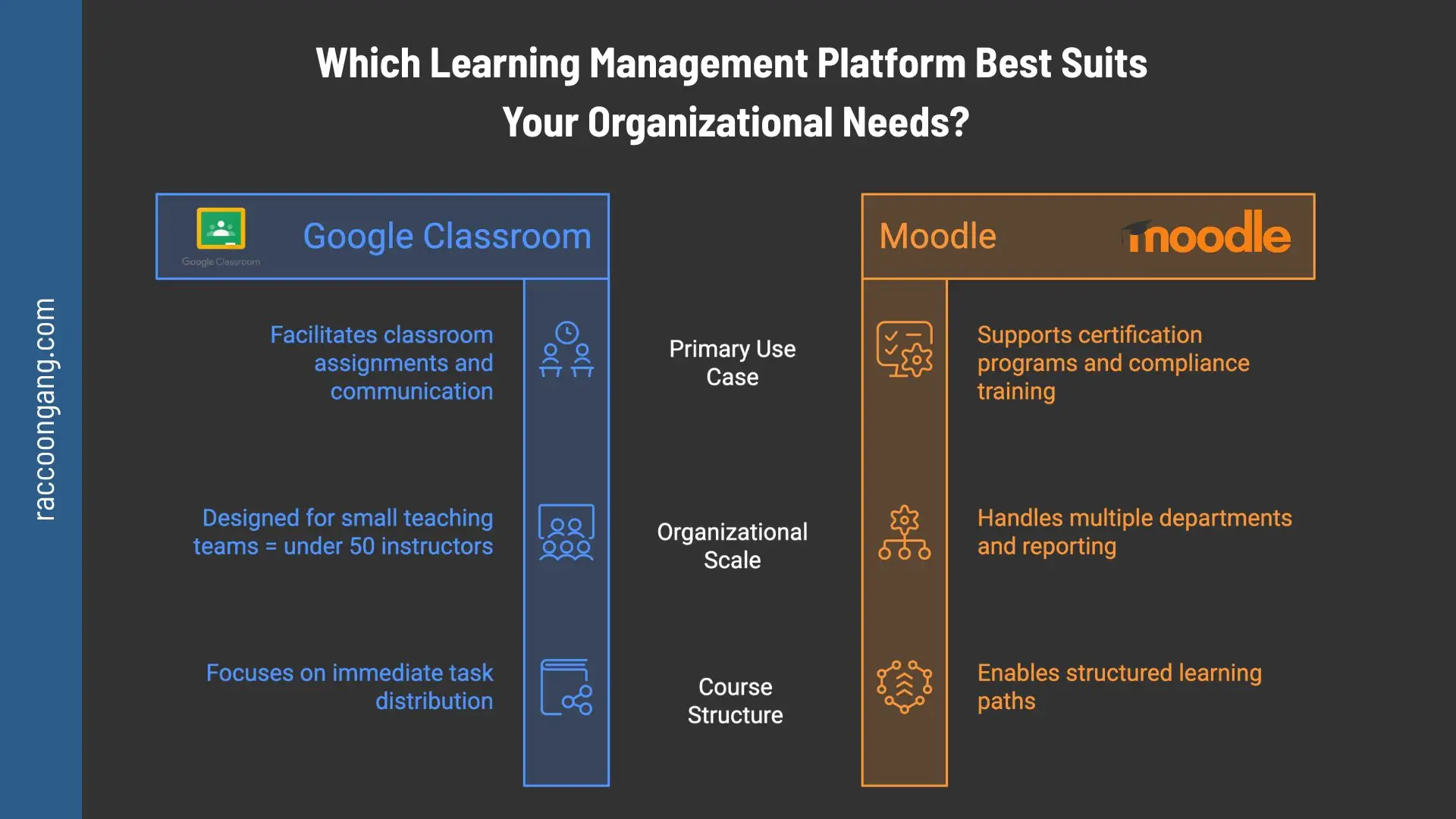
The biggest difference appears as organizations grow: classroom management remains a Google Classroom strength, while certifications, reporting, and multi-department learning often push teams toward Moodle.
Moodle vs Google Classroom Integrations: What Happens Outside the LMS
No LMS works alone for long. At some point, it has to connect with other systems.
Moodle gives teams more integration freedom. It can connect with external tools through:
- plugins
- APIs
- web services
- LTI
- SCORM
Will your organization need to connect the LMS with a student information system or an HR platform? For example, Moodle integration services may help your organization connect your CRM and LMS in a single solution. This is exactly where Moodle stands out.
Google Classroom works differently. Moodle LMS plugins often come from different vendors and community contributors. It may create extra work for your team when you need to check compatibility or install extensions.
Google takes another route. Its ecosystem is built around native tools that already work well together:
- Docs
- Drive
- Meet
- Calendar
- Gmail
- Forms
- Sheets
- Slides
“Google Classroom keeps everyday teaching tasks organized in one place. Features such as assignment management, grading, announcements, and SIS integrations help schools reduce administrative work and simplify classroom communication.”
— Technology Director, Education Management, May 2026
Google Classroom vs Moodle: Choosing Based on Your Stage of Growth
Now it’s time to turn the comparison into a decision. Moodle or Google Classroom? Maybe even Moodle Workplace? What are you trying to manage today, and what will you need to manage next year?
| Criterion | What to check | If the answer is “yes,” consider |
| Low IT resources | No team to manage hosting, updates, plugins, integrations, and backups | Google Classroom |
| Deep customization | You need plugin-based workflows, custom LMS roles, theme changes, or non-standard processes | Moodle |
| Structured programs and certifications | You need multi-course programs, certificates, audience groups, or tenant separation | Moodle, often Moodle Workplace |
| Complex assessment | You need question banks, peer assessment, course completion, competency tracking, or richer analytics | Moodle |
| Google-first ecosystem | Users already work in Drive, Docs, Gmail, and Meet, and you need minimal friction | Google Classroom |
| Data sovereignty or self-hosting | You need strict control over data location and infrastructure lifecycle | Moodle |
| SIS/ERP integration as a core requirement | You need stable two-way integrations, grade export, or custom data flows | Moodle, or Google Classroom if your SIS and edition already support the workflow |
| Speed of launch | You need to launch quickly without a large implementation project | Google Classroom |
*Moodle’s flexibility does not automatically guarantee scalability. At the same time, the platform can support very large deployments. For example, the National Open University of Nigeria (NOUN) has reported peak periods with up to 30,000 concurrent online students during examinations.
How Raccoon Gang Helps Organizations Evaluate LMS Platforms
After working on more than 200 learning platform projects based on Moodle, Open edX, and Canvas, we have noticed one important thing.
During the discovery phase, we should help organizations evaluate how the future platform will support their learning model one year, three years, and five years after launch.
We used this approach with the EBRD when we helped them create and host an online academy on the Open edX platform in Azure. We followed the same logic for the Customized Adaptive LMS project for the University of Southern Denmark and during the LMS migration and customization project for 20,000 users for Asociatia Techsoup.
In each case, we worked with the client to answer practical questions:
- Are you managing classes, courses, certifications, or complete learning programs?
- Who will manage users, permissions, and integrations?
- Will the number of learners, departments, or programs grow over time?
- Does the platform need to connect with SIS, HRIS, CRM, ERP, or custom systems?
- What data do managers, instructors, and compliance teams need?
- Do you want a managed SaaS platform or greater control over infrastructure and data?
“A school with 30 teachers can run comfortably on Google Classroom for years. A healthcare organization that trains 8,000 employees doesn’t. Managers still need completion records. Even more, recertification reminders and role-based access controls are important too. That is why the comparison moves from classroom management to learning management.”
— eLearning Developer, Raccoon Gang
Every organization reaches its decision differently. Some need a lightweight classroom tool. Others need a platform that can support certifications.
Conclusion: Moodle or Google Classroom?
One final observation is worth keeping in mind. The Moodle vs Google Classroom decision is often a choice between two operating models rather than two feature sets.
Google Classroom removes much of the platform management burden. Administrators work through Google Workspace tools, reports, organizational units, and permissions without managing servers, databases, backups, or software updates. Google manages the underlying platform infrastructure.
- Google Classroom is often the better choice when simplicity, a low barrier to entry, minimal upfront costs, and close integration with Google Workspace matter most.
- Moodle is often the stronger choice when an institution is investing in a managed learning infrastructure with a long lifecycle, complex learning rules, deeper analytics, and greater data governance requirements.
The answer will usually tell you whether Google Classroom or Moodle belongs on your shortlist.
What is the difference between Moodle and Google Classroom?
Google Classroom helps teachers manage classes. Moodle helps organizations manage learning programs. Google Classroom focuses on assignments and communication. Moodle covers courses, assessments, certificates, reporting, and learner progress.
Is Moodle better than Google Classroom?
It depends on the job. Choose Google Classroom if you need a simple tool for everyday teaching. Choose Moodle if you need structure, reporting, integrations, and long-term control.
What are the disadvantages of Moodle?
Moodle gives you more control, but that control comes with extra work for your team. Someone needs to manage hosting, updates, plugins, backups, and support unless you work with an LMS partner.
Is Moodle good for schools?
Yes, especially when a school needs more than basic assignment workflows. Moodle fits schools that manage structured courses, advanced assessments, blended learning, or reporting across departments.
Which platform works better for structured learning?
Moodle is the stronger fit here. If you need learning paths, certifications, prerequisites, completion rules, or multi-course programs, Google Classroom will likely feel too limited.
How long does it take to implement Moodle vs Google Classroom?
Google Classroom can often go live in days. Moodle usually takes weeks or months, depending on hosting, integrations, migration, training, and customization.




- What Is Moodle and Why Organizations Choose It as Learning Programs Grow
- What Is Google Classroom? Where It Works Best and Where Teams Outgrow It
- Moodle vs Google Classroom: Core Features Compared
- Moodle LMS: The Differences Teams Notice After Launch
- Moodle for Schools vs Google Classroom: Which Fits Your Educational Model?
- Moodle vs Google Classroom Integrations: What Happens Outside the LMS
- Google Classroom vs Moodle: Choosing Based on Your Stage of Growth
- How Raccoon Gang Helps Organizations Evaluate LMS Platforms
- Conclusion: Moodle or Google Classroom?
