








The hard truth for higher-ed teams is simple: if you are planning a course content refresh in higher education, one question is hard to avoid. How do you modernize online courses across a university without turning every outdated module into a full redesign?
The other side of the problem makes that question even more urgent. Online courses can start aging almost as soon as course teams hit “Publish.” Links break, screenshots stop matching the LMS, policies change, videos date quickly, and accessibility requirements keep moving higher on institutional priority lists.
Why has course content freshness become such a serious operational issue? According to data from just two years ago, 54.7% of students at U.S. degree-granting institutions took at least one distance-education course.
Resources have not expanded at the same pace. 49% of higher-ed CTOs said the current pace of technology-driven change had become unsustainable without additional resources. Digital Learning teams are being asked to improve more courses while having the same academic calendar.
Fortunately, an outdated course does not automatically need rebuilding from the ground up.
Save the full rebuild for courses that actually need one. Your faculty workload and budget will thank you.
At a Glance: Four Terms Behind the Decision
Four terms will appear throughout this article because they define the scope of the work. So let’s just leave this here so we’re on the same page.
- Course Content Refresh is a targeted update that keeps the core course structure intact.
- Full Course Redesign rebuilds major parts of the course, including structure, assessments, or learning strategy.
- WCAG Accessibility Compliance means meeting required accessibility standards for digital course content.
- Course Content Audit is a review that identifies what is outdated, broken, inaccessible, or weak.
TL;DR
A full redesign can take months and require repeated faculty reviews, which quickly becomes a capacity problem across 50, 100, or 500 courses.
A scoped refresh keeps the course structure that still works, then updates stale content, media, LMS issues, accessibility gaps, and selected interactions.
The cost advantage comes from one rule: do not rebuild a working course just because parts of it look old.
Why “Outdated” Courses Are a Real Institutional Risk
Students will notice when course materials no longer match reality. Broken links, outdated screenshots, old videos, or inaccurate instructions may seem minor, yet each one quietly chips away at trust. And student trust and engagement are poor currencies to gamble with.
Three other pressure points about the scalable course refresh process deserve attention.
- Accessibility. DOJ rules set WCAG 2.1 Level AA as the standard for covered public-sector web content, including public universities. Compliance deadlines now fall in April 2027 or April 2028, depending on the entity. Accessibility gaps may also require remediation during a refresh.
- Faculty workload. Instructors will rarely have spare hours to update outdated online courses. If refresh work gets squeezed between teaching, grading, research, and advising, the backlog simply grows each term.
- LMS changes. Canvas, Blackboard, Moodle, D2L, or other top learning management systems can stay. Yet course content still needs to match current LMS features, interfaces, and reusable course structures.
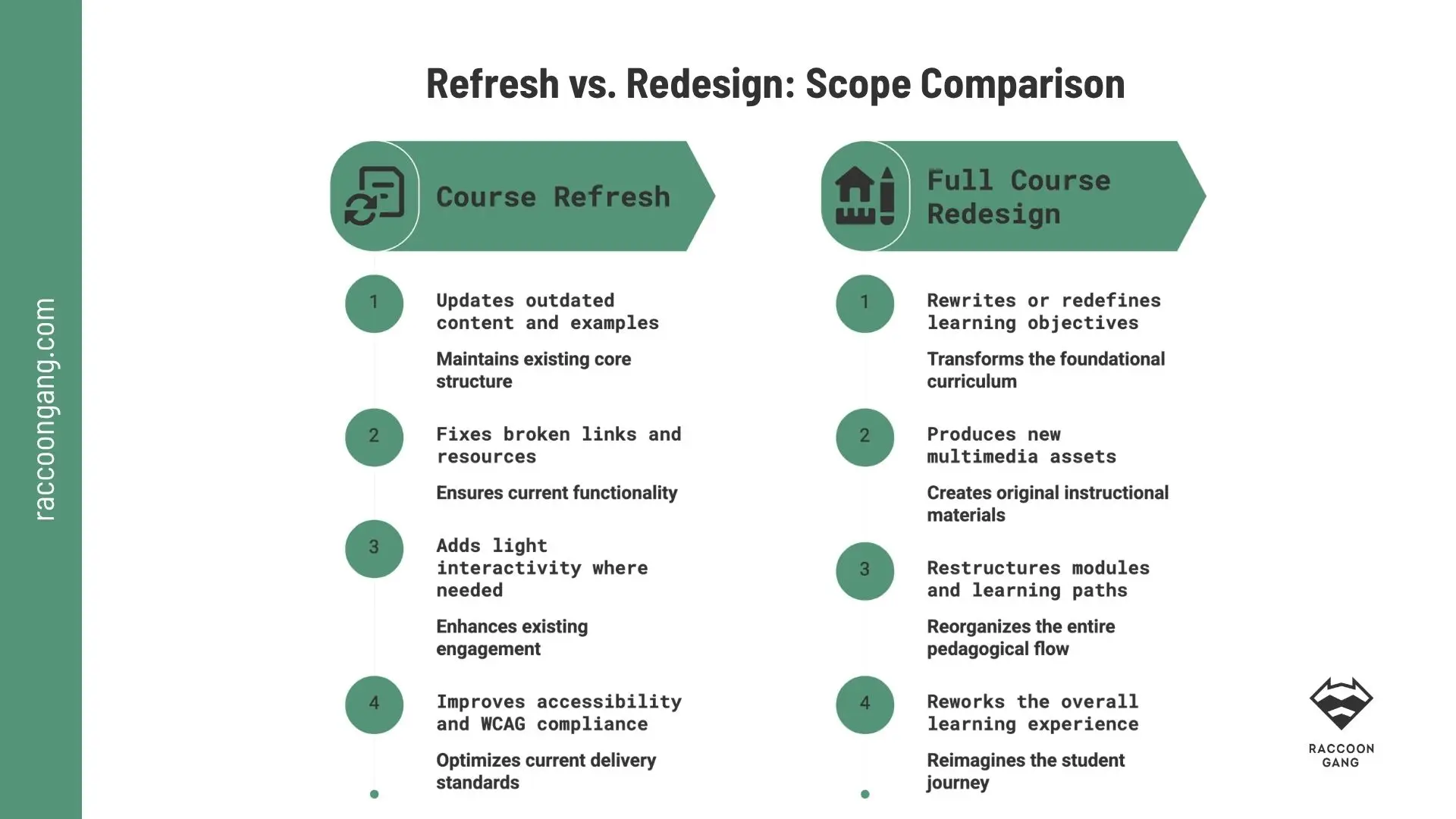
If learning objectives, assessments, and course structure still work, a targeted refresh can solve outdated content issues without the cost and disruption of a full redesign.
Refresh vs. Redesign: What’s Actually Different
The course refresh vs redesign decision starts with one question: does the course still work academically?
What both choices have in common is simple. Whichever path you take, the course still needs to work academically.
A refresh in this sense barely affects the deeper course structure or its academic foundation. Learning objectives, module sequence, and core assessments usually stay unchanged. The team rolls up its sleeves and refreshes only outdated content and accessibility issues.
In a full course redesign in higher education, the academic structure moves to the center of attention. Faculty or subject matter experts may rewrite learning objectives, while instructional designers help restructure modules, even replace assessments or produce new multimedia.
The timeline can easily stretch across several months. UConn, for example, describes a typical design cycle of four to six months, while UTEP recommends about four months for new online course development. The University of Louisiana at Lafayette treats revisions to 20–60% of a course as improvement and 61–100% as redesign.
For a closer look, see our guide to the Principles of Instructional Design.
Course Refresh vs. Full Redesign at a Glance
| Course Refresh | Full Redesign | |
| Scope | Update selected content and course assets | Rework most major course components |
| Typical timeline | 1–4 weeks per course | 3–6+ months |
| Planning budget | ~$2K–$10K | ~$15K–$40K+ |
| Faculty input | Targeted reviews and approvals | Frequent design and content decisions |
| Term disruption | Often completed between or around terms | Usually planned well before launch |
* The University of California Academic Senate estimated that, under one online course development model, a new course could require about $22,000 in instructional design time alone, before faculty release time and other production costs.
Signs a Course Needs Just a Refresh, Not a Redesign
An online course content audit usually points to a refresh when:
- Learning outcomes still fit the course.
- Module sequence still makes sense.
- Examples, readings, or videos feel dated.
- Links, files, or LMS instructions are broken.
- Accessibility gaps need remediation.
- Assessments still measure the right skills.
- Faculty feedback focuses on content freshness.
- Students struggle with outdated materials, not course logic.
“Well-resourced programs, such as the School of Business at UCI, only allow a maximum of 10% of the online content to be updated annually.”
— University of California Academic Senate, Task Force on Online Undergraduate Education
If these signals dominate, you can update outdated online courses without rebuilding the academic structure. Even more, if objectives, assessments, and course architecture still do their job, rebuilding all three usually buys more disruption than value.
Signs a Course Actually Needs a Full Redesign
A full course redesign in higher education makes more sense when:
- Learning outcomes stay weak after content updates.
- Completion problems persist across multiple terms.
- Course structure no longer fits the modality.
- Modules do not support current student needs.
- Assessments measure the wrong knowledge or skills.
- Learning objectives no longer match the program.
- Major content changes require a new course sequence.
- Faculty feedback points to design problems, not freshness.
What a Course Refresh Actually Involves
A course content refresh in higher education focuses on the parts of a course that have aged while keeping the academic structure intact.
- Content and media updates. Replace outdated facts, examples, readings, screenshots, and videos. Small corrections matter here. A five-year-old case study or interface demo can make the whole course feel older than it is.
- LMS fixes. For more than 10 years, Raccoon Gang has worked with course content across Canvas, Blackboard, Moodle, and Open edX. During a refresh, we fix broken links, outdated embeds, missing files, old instructions, and course elements that no longer work as intended.
- Accessibility review. A WCAG accessibility course update can sit inside the refresh scope when existing materials need remediation. We cover the technical requirements and testing process in our dedicated Section 508 Compliance in eLearning guide.
- Light interactivity upgrades. Add interaction where it improves practice or comprehension. A short scenario, knowledge check, or revised activity may solve the problem without rebuilding the entire module.
Once more. Update what has aged, repair what is broken, and leave the working course architecture alone.
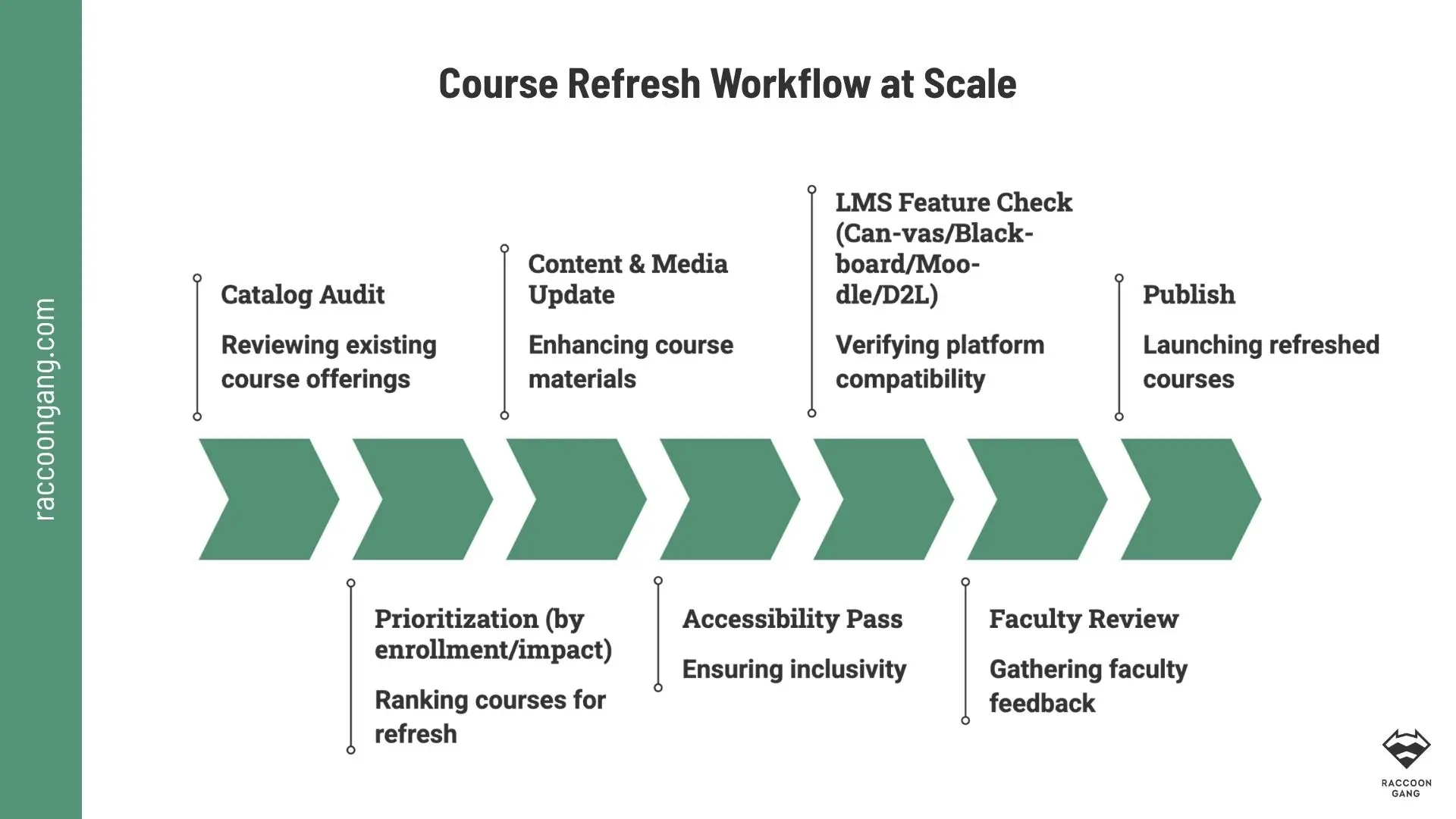
A scalable refresh process separates production work from faculty review, so universities can update more courses without turning every change into a redesign project.
Running a Refresh at Scale Across Canvas, Blackboard, Moodle, or D2L
A scalable course refresh process should start with the first step instead of refreshing the whole catalog at once.
Step 1. Audit and Prioritize
Start with an online course content audit. You can rank courses by enrollment, accessibility exposure, business or academic importance, and the severity of outdated content. For better results, high-enrollment courses with visible issues should be refreshed first.
Step 2. Stay Inside the Existing LMS
We try to refresh LMS content in Canvas, Blackboard, Moodle, or D2L, not migrate to another platform. This matters because teams can update courses in the environment faculty and students already know.
Step 3. Keep Faculty Review Light
Faculty should validate accuracy and academic intent. A structured checklist and final sign-off can keep the refresh process on a strict timeline without turning it into another semester-long project.
Step 4. Work Around the Academic Calendar
It may not sound new, but updating between terms and during planned maintenance windows saves time. Active courses deserve special care. A catalog refresh should reduce disruption, not create another one.
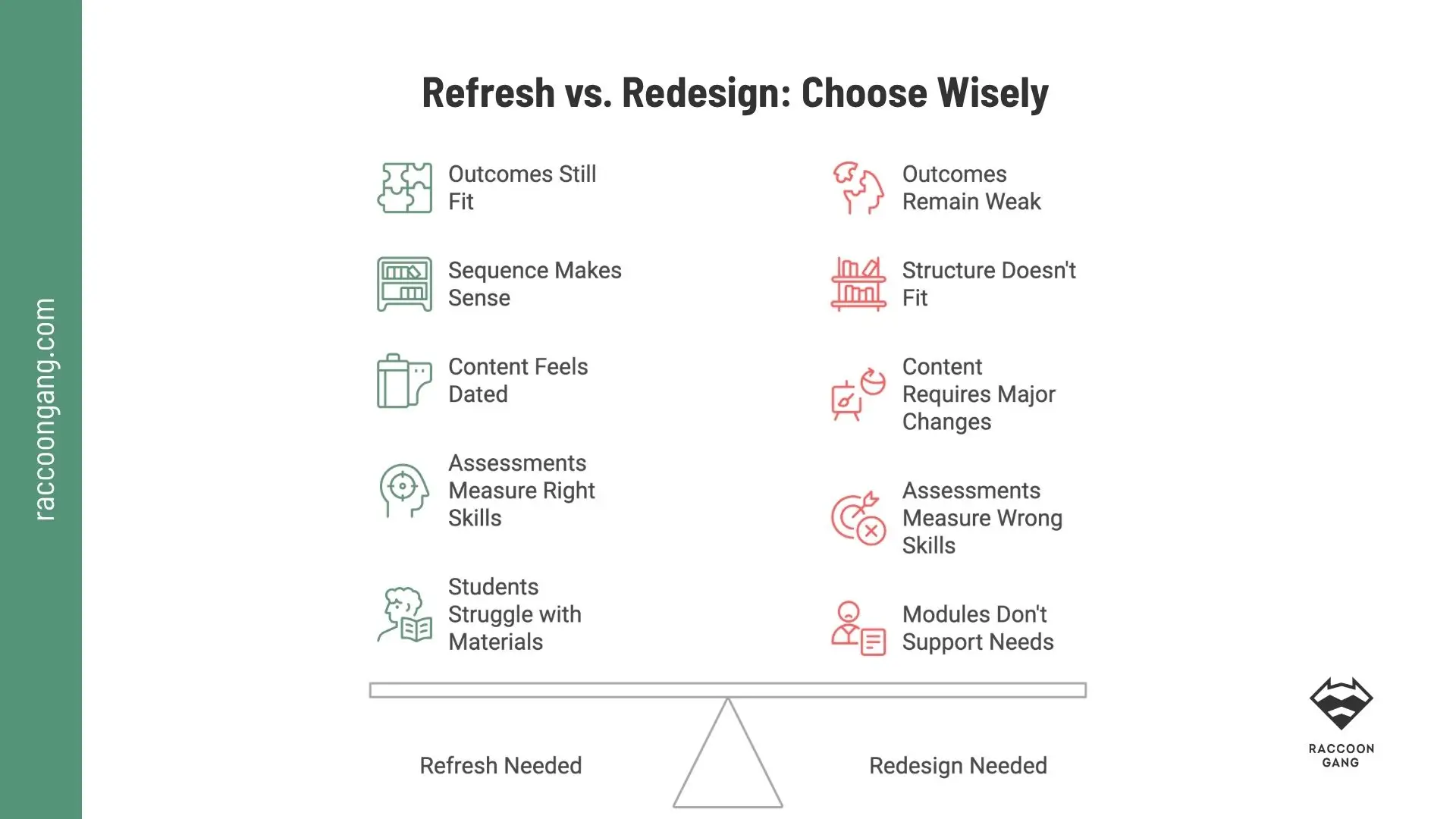
A refresh makes sense when objectives, sequencing, and assessments still work. A redesign becomes necessary when the academic structure no longer supports what students need to learn.
Cost and Timeline: What a Refresh Saves vs. a Full Redesign
There is no honest single price for a course content refresh in higher education. Scope, media production, accessibility work, and faculty involvement change the number quickly. Public university models still give us a useful planning signal.
50-Course Catalog Cost Example
Using the University of Louisiana at Lafayette faculty stipends as a proxy for faculty effort, the calculation looks like this:
| Scenario | Refresh Courses | Redesign Courses | Refresh Cost | Redesign Cost | Total |
| Refresh-first model | 35 | 15 | 35 × $1,000 = $35,000 | 15 × $3,000 = $45,000 | $80,000 |
| Redesign everything | 0 | 50 | $0 | 50 × $3,000 = $150,000 | $150,000 |
| Difference | — | — | — | — | $70,000 saved |
* 47% less in faculty stipends alone for refresh-level courses.
| Timeline Reference | Course Refresh | Full Design / Redesign |
| Published university benchmark | University of Saskatchewan: 2–3 weeks for an online course refresh sprint | UConn: typically 4–6 months for course design and development |
| Best use | Existing academic structure still works | Objectives, assessments, or structure need rebuilding |
These figures come from different institutional models, so they work best as planning references rather than universal price or timeline benchmarks.
How to Refresh Courses at Scale Without Overloading Faculty
To avoid overloading already busy faculty, split the course refresh “factory” into separate production lines. What do we mean by that?
Large-scale updates, and more importantly their regularity, cannot sit on the shoulders of individual instructors, even if they seem capable of carrying everything. Some are teaching right now. Others are grading, advising, conducting research, or serving on committees. We are sure you could extend that list quite easily.
What happens next? Faculty time for course updates usually gets whatever remains.
A better way to align the work is to make refresh activity the responsibility of the Digital Learning team or an external e-learning partner.
In that model, the workflow can look like this.
Instructional designers:
- audit the course
- flag outdated or broken elements
- complete agreed updates
- send faculty only items that require academic judgment
Faculty:
- review accuracy
- approve key changes
- sign off
For a catalog of dozens or hundreds of courses, the same process can run in batches around term dates. Faculty stay involved where their expertise matters most. The production workload sits with the team equipped to handle it.
How Raccoon Gang Helps Universities Refresh Courses at Scale
Raccoon Gang has worked in e-learning for more than 10 years. During that time, our LMS specialists have contributed to the Open edX platform core and supported learning environments across Open edX, Moodle, Blackboard, and other LMS platforms.
Raccoon Gang’s instructional design experts create courses for the same LMS environments our technical teams build and support. For our clients, that means instructional design decisions reflect platform capabilities from the start instead of forcing finished content into the LMS later.
Our portfolio now includes 300+ courses created for organizations including NASA, EBRD, Arizona State University, the University of Southern Denmark, and a separate Harvard project.
Raccoon Gang’s course development experience includes:
- SCORM 2004 and xAPI production
- Enterprise compliance content
- AI-supported development when speed matters
- LMS integration expertise
- Scalable multilingual course structures
- Platform-native course design
For a course content refresh in higher education, that experience translates into a practical service model. We update content inside the institution’s existing LMS, include accessibility remediation within the agreed refresh scope, and start with a catalog audit to separate refresh candidates from courses that truly need redesign.
Modular design also makes future updates easier. In the NASA Open Science project, for example, the course was structured into modules that could be updated without rebuilding the entire learning experience.
For a broader look at how to plan and produce learning content, see our Practical Development Guide. You can also explore our course development case studies for examples from different learning environments.
Conclusion: Start Course Content Refresh Today
A course content refresh in higher education works best as a consistent, repeatable process. Faculty can stay focused on teaching, advising, research, and academic decisions, while a dedicated workflow keeps existing course materials current.
With limited budget, time, and manpower, start small.
- Audit the highest-impact courses.
- Refresh only what is outdated or broken.
- Keep working objectives and assessments intact.
- Move true redesign cases into a separate queue.
Run the work in batches around term dates, keep faculty involvement to review and sign-off, and let Digital Learning teams or an external partner handle production.
That way, you improve more courses with the resources you already have instead of spending them rebuilding courses that still work.
Think of your course catalog as a campus under continuous maintenance. You can repair what has worn out or refresh what has aged. Rebuild only when the course structure, assessments, or learning objectives no longer help students achieve the knowledge, skills, or competencies the course is supposed to teach.
FAQ
What’s the difference between a course content refresh and a full course redesign?
How do you know if a course needs a refresh or a redesign?
How much does a course refresh typically cost compared to a full redesign?
Can a course refresh be done without migrating off Canvas, Blackboard, Moodle, or D2L?
Does a course refresh include WCAG accessibility updates?
How can universities refresh course content without adding to faculty workload?



- Why "Outdated" Courses Are a Real Institutional Risk
- Refresh vs. Redesign: What's Actually Different
- Signs a Course Needs Just a Refresh, Not a Redesign
- Signs a Course Actually Needs a Full Redesign
- What a Course Refresh Actually Involves
- Running a Refresh at Scale Across Canvas, Blackboard, Moodle, or D2L
- Cost and Timeline: What a Refresh Saves vs. a Full Redesign
- How to Refresh Courses at Scale Without Overloading Faculty
- How Raccoon Gang Helps Universities Refresh Courses at Scale
- Conclusion: Start Course Content Refresh Today