









If lately you keep hearing, “We needed this course yesterday,” while the next open slot in your course development team is a month away, one thing is clear: it is time to speed up the course development process.
And no, we are not going to discuss carrots and sticks. We will look deeper at what actually slows production down and what can shorten the course production timeline without creating new quality problems.
A survey of 400+ learning design professionals revealed an interesting number: 66% of their time goes to creating new courses. Still, bottlenecks remain. Why? AI tools can already cut some production tasks from weeks to hours.
Another data point gives us a clue. The median learning designer handles three projects at once, while only 14% of projects finish in under 10 days. The problem, then, might be less about how fast one person can build a module and more about how the whole production system handles capacity, reviews, dependencies, and competing priorities.
Let’s talk about this in detail in the article below!
TL;DR
- Fix course development bottlenecks before adding more production capacity.
- Reuse templates, components, and proven course patterns instead of starting from zero.
- Run independent production stages in parallel when it’s possible.
- Set clear SME deadlines and approval rules to avoid traffic jams in the content production process.
- Partner when roadmap demand exceeds internal capacity or skillset.
At a Glance: Key Terms for Faster Course Development
Four terms will appear throughout this article because they directly affect course development speed and launch decisions.
- Course Development Bottleneck is a constraint that slows the course development cycle.
- Rapid Instructional Design (RID) is an iterative approach that speeds validation and production.
- Modular Content is reusable learning content designed for multiple courses.
- Build-vs-Partner Decision is a choice between internal production and external support.
Why Course Development Speed Has Become a Business Priority
The Olympic principle of faster, higher, stronger fits course development surprisingly well. And right now, “faster” carries particular weight for teams trying to speed up the course development process and reduce time to launch an online course.
Just consider the pressure. In 2025, 9 out of 10 surveyed organizations planned to expand their learning programs.
For Product and Program leaders, that usually means more courses, more content, more stakeholder requests, and less time between the first draft and launch. To reach the speed your roadmap requires, watch these four signals.
More content competes for the same capacity
The course queue you expect for tomorrow will always grow faster than your team can keep up with. Learning platforms and authoring tools help design learning material, but designers, developers, SMEs, video specialists, and QA are still important, and their capacity is limited.
Launch dates have business dependencies
One course may support a product release. Another may belong to a signed customer program. A certification course might need to go live before enrollment opens.
A missed launch date therefore creates problems outside the course team. Sales waits. Partners wait. Marketing may already have a campaign running.
Slow production reduces the selling window
Imagine a course scheduled for January that finally reaches learners in March. The team did more than spend two additional months in production.
The business also lost two months of enrollments, subscription value, partner delivery, or customer education activity. Multiply that delay across ten courses and the commercial impact becomes much harder to ignore.
Faster launches also depend on how content moves from concept to production. Our e-learning content development guide breaks down that process.
The real constraint is often the production system
Authoring tools keep getting faster. AI can already shorten research, scripting, first drafts, translation, and parts of media production.
Yet only 14% of instructional design projects in one survey finished within ten days. Limited SME availability also remained a recurring collaboration problem.
As a leader, you should therefore track course development cycle time alongside cost and quality. A team might save four hours in Articulate Rise and then lose twelve days waiting for SME feedback, missing assets, or stakeholder approval.
That is not a lack of working hands. It is a production system that cannot yet support the launch speed your roadmap requires.
So, how do you fix it?
Keep reading. By the end of this article, you will know where course production usually slows down, which workflow changes remove those delays, and when extra capacity can get a course surprisingly close to that “one-click launch” feeling.
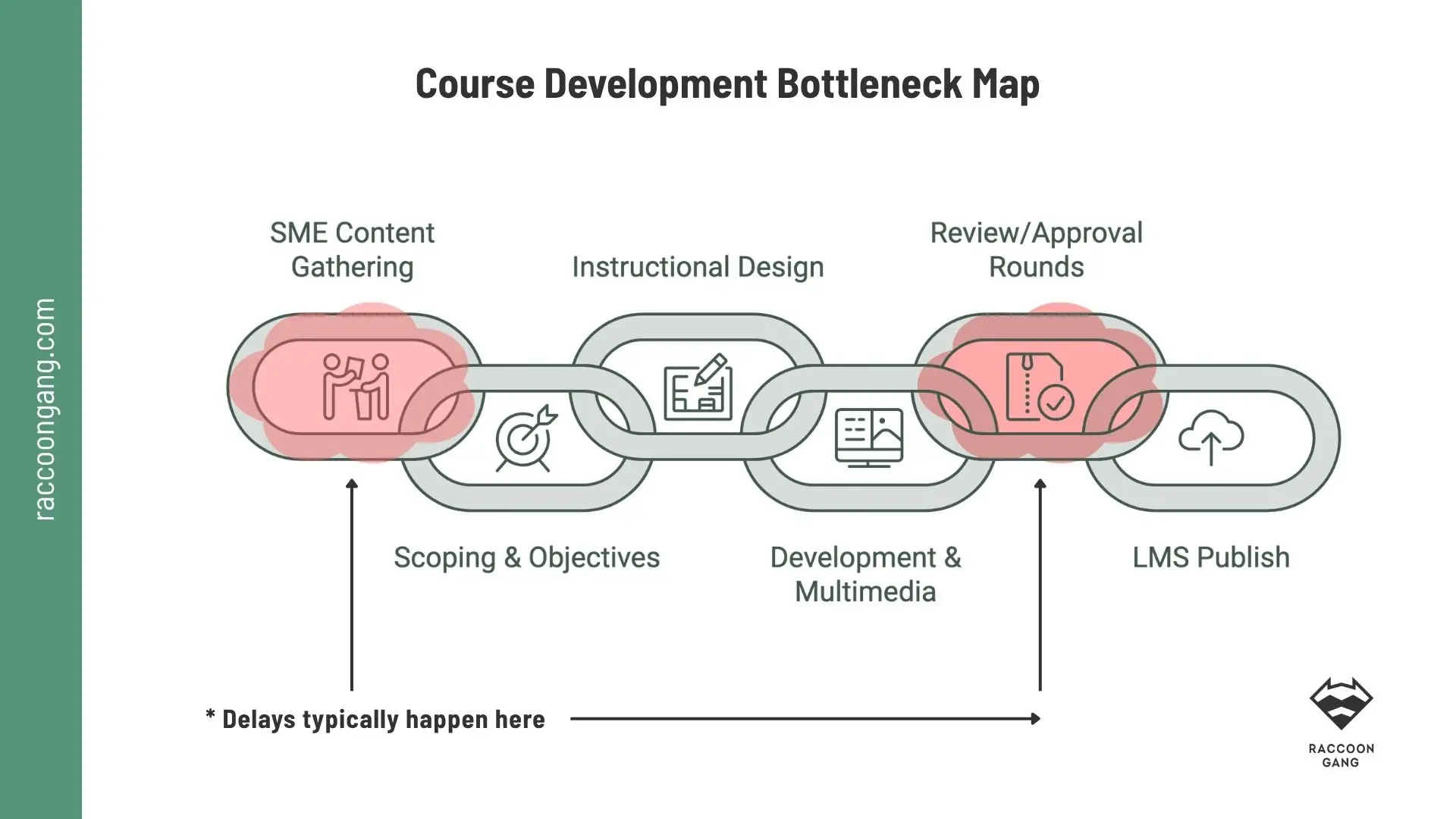
Course timelines often stretch because work waits for SME input or approval, rather than because production itself takes longer. Tracking these waiting periods can reveal where workflow changes will reduce cycle time fastest.
Where Course Development Actually Slows Down (Bottleneck Map)
Course development often behaves like city traffic. The road may look clear at first, yet one blocked intersection can slow everything behind it.
The same happens inside a course development workflow. A designer may work fast, but the launch can still slip because the real delay sits elsewhere in the production chain.
To find your course development bottlenecks, look at these six points first.
SMEs become a waiting queue
Subject matter experts usually hold the knowledge the course needs. They also have meetings, deadlines, customers, and their actual jobs.
A designer can prepare the structure in two days and then wait a week for source materials. Another week disappears while the SME reviews terminology or confirms one technical detail.
The team starts before scope is clear
“Let’s start building and figure out the details later” sounds fast. It doesn’t work in real life.
Unclear learning objectives, audience assumptions, course length, assessment requirements, or media expectations create only rework later. A 30-minute course becomes 60 minutes. A simple knowledge check turns into scenario-based assessment after production has already started.
Speed at kickoff can become delay at revision.
Production runs in a straight line
Some teams still work like this:
- Content → storyboard → review → design → development → QA → LMS setup → launch.
Each stage waits for the previous one to finish. One delay therefore moves the entire timeline.
A better course development workflow allows work to overlap where dependencies permit. While one module goes through SME review, developers can build approved modules, QA can test completed screens, and LMS specialists can prepare the course shell.
Parallel work reduces idle time.
Every stakeholder gets another review round
One review round becomes two. Then Legal joins. Then Product wants another look. Finally, someone who missed the kickoff changes the direction. Sound familiar?
Review itself protects quality. Uncontrolled review cycles consume calendar time.
Define who reviews what, when they review it, and which decisions they can reopen. Otherwise, “final review” can become a recurring event.
Every course starts from an empty screen
If every new course needs a new visual structure, interaction pattern, quiz layout, navigation logic, and certificate design, the team keeps solving the same production problems.
Reusable templates change that equation.
A course library might include approved lesson structures, assessment patterns, video layouts, accessibility-ready components, feedback screens, and LMS page templates.
Tools create handoffs instead of removing them
Content lives in one document. Feedback arrives through email. Assets sit in another drive. Designers build in Articulate 360 Rise. QA tracks defects somewhere else. Then somebody manually copies course information into the LMS.
Each handoff creates another place for context to disappear.
Map waiting time, not just working time
A course might require 80 hours of actual work and still spend six weeks in production. The missing time usually sits between those hours: waiting for content, feedback, approval, assets, access, or another team.
So when you map your course development workflow, track two numbers separately:
- Work time: hours actively spent producing the course.
- Wait time: calendar time when progress stops because of a dependency.
“When a course has to launch fast, the first instinct is often to push production harder. In practice, we gain more time by fixing the workflow: lock the scope early, give SMEs clear review windows, reuse approved components, and run independent tasks in parallel. Speed comes from removing waiting and rework.”
— Olha Turutova, Raccoon Gang Instructional Design Expert
If wait time dominates the timeline, adding another designer will only solve part of the problem.
Rapid Instructional Design Practices That Cut Development Time
Rapid Instructional Design can help teams accelerate course development, but the methodology itself is not the focus here. For the full rapid instructional design process, see our complete RID guide.
To launch courses faster, borrow only the practices that reduce cycle time:
- Run work in parallel.
- Prototype early.
- Reuse production components.
- Control scope tightly.
- Test in smaller loops.
The goal is simple: reduce waiting, rework, and repeated decisions. That is where RID supports faster course production at the team level.
If your team still relies on a more structured development sequence, our ADDIE model guide explains where each stage fits.
Building a Course Development Workflow That Scales
Now is the time to think one step ahead. Some decisions may seem to speed up production today, such as skipping intake, starting development before SME alignment, or building every course from scratch. In practice, they often create more rework later.
To avoid running in circles, build your course development workflow around repeatable rules.
Scalability depends less on following one specific agile course development process and more on how well you streamline course creation across the whole team. Five questions can help you move faster on the next course and the one after that.
What can we reuse?
Not every course needs to start from zero. Create a shared library of approved course shells, lesson templates, assessment patterns, UI components, accessibility-ready layouts, and media formats. New course production should start there.
What must the sme provide, and by when?
Some structure is unavoidable. Define what SMEs must deliver, which materials they need to review, and how quickly they should respond. If feedback is expected within three business days, make that rule clear before kickoff.
What can happen at the same time?
Do not force the entire course through one linear pipeline. Module 1 can move into development while Module 2 remains under SME review. At the same time, the LMS team can prepare the course shell, enrollment settings, certificates, or tracking configuration.
Production moves faster when independent tasks stop waiting for each other.
When is work ready to move forward?
For example, a storyboard may move into development only after SME approval and asset confirmation. QA may finish only after accessibility, links, scoring, mobile behavior, and LMS tracking pass agreed checks.
Which checks should happen automatically?
Templates can support more than content production. Use version controls, automated accessibility checks, link validation, publishing rules, QA templates, and repeatable LMS setup wherever your toolchain supports them. Let automation catch predictable issues so specialists can spend their time on content accuracy, assessment logic, and learner experience.
A scalable workflow does not simply help one course launch faster. It makes the next course easier to launch too.
Tooling and Team Structure for Faster Course Launches
Tools can remove hours from production. Team structure can remove weeks. For scalable course production, it means a lot.
| Tool or Role | How It Speeds Production |
| Authoring tools | Tools such as Articulate Rise help teams build, duplicate, review, and update course content quickly. |
| Component library | Approved lesson templates, quiz patterns, UI blocks, and media formats reduce repeated design decisions. |
| Project management tools | Shared boards make ownership, dependencies, deadlines, and parallel production visible. |
| Collaboration tools | Centralized comments and version history shorten review cycles and reduce conflicting feedback. |
| LMS publishing pipeline | Repeatable SCORM or xAPI packaging, QA, upload, and publishing rules reduce manual release work. |
| Instructional Designer | Owns learning objectives, structure, assessments, and production decisions. |
| SME | Provides source knowledge and validates technical accuracy within agreed review windows. |
| Developer | Builds custom interactions, integrations, and technical components where they add value. |
| QA Specialist | Tests accessibility, functionality, scoring, responsiveness, links, and LMS behavior against a checklist. |
* Different production constraints call for different frameworks. Compare the main instructional design models for e-learning in the relevant material.
Team structure changes the timeline
A strong course development team structure makes ownership explicit.
The instructional designer should not chase every SME comment. Developers should not wait for an entire course before starting approved work. QA should not discover a repeated accessibility issue across 40 finished screens.
The faster model separates responsibilities while keeping work connected:
- SME → owns accuracy
- Instructional Designer → owns learning design
- Developer → owns technical execution
- QA → owns release checks
Let us underline one obvious, yet important point: more tools will not automatically make course development twice as fast.
Unlike the chicken-or-egg debate, the order here is much clearer. Build the right team structure first, then choose tools that remove handoffs and repeat work from that system.
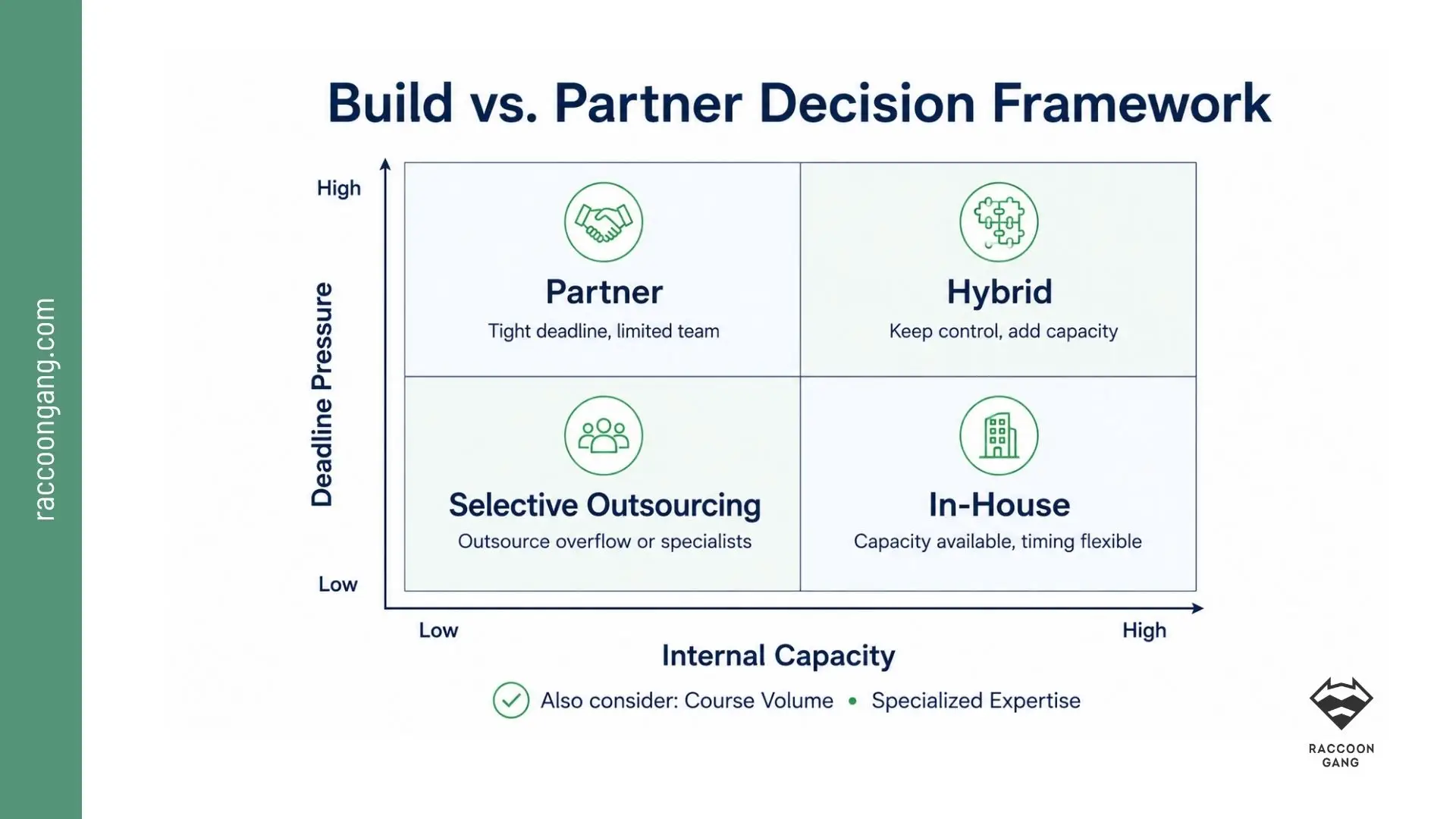
Low capacity and tight deadlines strengthen the case for external support, while predictable demand and available expertise usually favor in-house production.
In-House Speed vs. Partnering with an Instructional Design Team
Relying only on your internal team to build every course is not always justified by the deadline, budget, or business goal.
Keep development in-house when
- Your team can handle the workload and produce the required course volume. It may sound idealistic, but it is realistic when demand stays moderate.
- SMEs can respond within agreed review deadlines.
- The course uses familiar formats and technologies.
- Course volume stays predictable.
- Required skills already exist inside the team.
If all five conditions hold, in-house development is usually the most practical path. Adding an external partner may create more coordination than speed. Please remember that.
When internal capacity becomes the main constraint, explore how Raccoon Gang supports instructional design and course development.
Consider a partner when
- The logic changes when your roadmap asks for six courses and your internal team can realistically produce three.
- The same applies when a course requires animation, accessibility expertise, assessment design, localization, or LMS development your team does not have the capacity or experience to cover.
At that point, outsourcing course development becomes a capacity decision rather than a sourcing preference.
When does outsourcing become the better option? We cover the full decision logic in our guide, When to Outsource Instructional Design: A Decision Guide for L&D Teams.
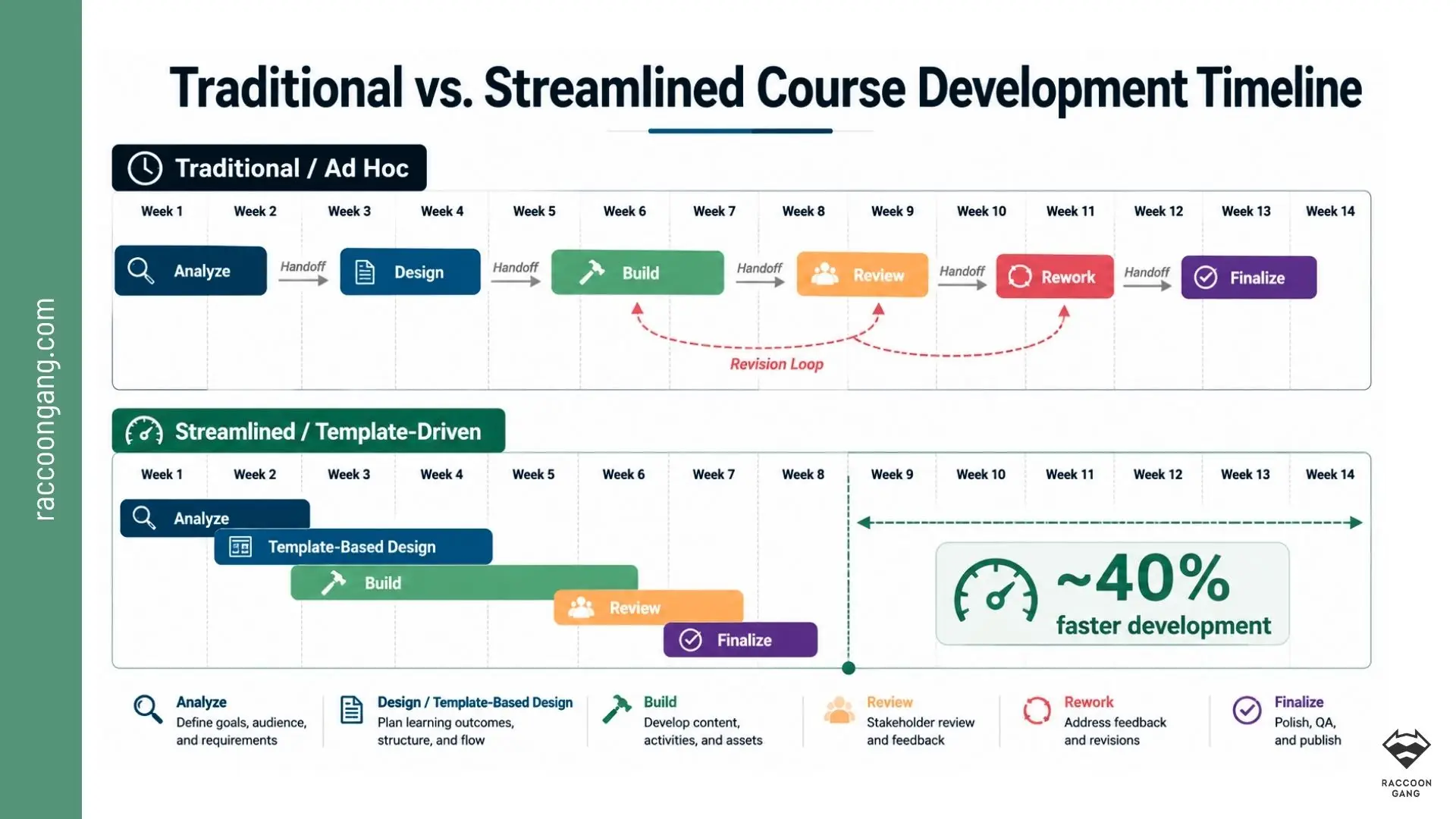
The largest time savings often come from overlapping independent tasks, reusing approved templates, and reducing revision loops rather than simply asking the team to build faster.
Common Mistakes That Slow Down Course Launches
- Lock scope early. Define objectives, audience, assessment needs, and media expectations before production starts.
- Do not custom-build everything. Use templates and reusable patterns unless the learning need truly requires custom work.
- Keep the review chain short. Give approval rights only to people who own a specific decision.
- Reuse proven components. Build a shared library of layouts, quiz formats, and content blocks your team can start from.
- Test with learners before launch. Even one short pilot can catch issues that become expensive after release.
- Fix the workflow before adding people. More headcount will not solve slow approvals or unclear ownership.
- Price every scope change in time. Show stakeholders how each addition affects the launch date.
- Match process to complexity. Give simple updates a lighter workflow than scenario-heavy or certification courses.
How Raccoon Gang Helps Launch Courses Faster
With 200+ LMS and learning platform projects, 150+ professionals, and 10+ years of e-learning delivery experience, Raccoon Gang has worked across the same constraints this guide addresses: fixed launch dates, stretched internal teams, complex content, and LMS dependencies.
Raccoon Gang experts have knowledge and experience in the following areas:
- Instructional Design — learning objectives, course structure, assessments, storyboards, and production-ready design.
- eLearning Content Development — complete course production for self-paced learning programs.
- Rapid Course Development — shorter production cycles built around reusable components, early review, and tighter scope.
- Articulate 360 Development — production in Rise and Storyline for teams that need faster authoring and review.
- Course Templates and Component Libraries — reusable lesson structures, assessment patterns, UI elements, and content blocks.
- Assessment Design — knowledge checks, scenario-based questions, quiz banks, and evaluation logic.
- Video and Media Production — scripts, editing, animation, graphics, and supporting course assets.
- Accessibility Support — WCAG-aligned content reviews and accessibility-ready course components.
- Localization — course adaptation for additional languages and learner markets.
- LMS Course Deployment — publishing and configuration across Open edX, Moodle, and Canvas.
- SCORM and LMS Integration — packaging, testing, tracking setup, and course delivery workflows.
- QA and Pre-Launch Testing — content, functionality, scoring, responsiveness, accessibility, and LMS checks.
- Dedicated Course Development Teams — additional instructional designers, developers, and QA specialists for larger course pipelines.
- Course Development Consulting — workflow audits, bottleneck diagnosis, production planning, and build-vs-partner decisions.
For a real delivery example, see how Raccoon Gang developed NASA Open Science 101, including five modules, 25 lessons, assessments, and credentialing.
Conclusion: Speed Up the Course Development Process by Fixing the Workflow
To speed up course development, we strongly recommend starting with the production system. Of course, authoring tools may help, but unclear scope, SME delays, review loops, fragmented tools, and overloaded teams are more often the reasons course development slows down.
A stronger course development workflow standardizes what can be reused, runs independent tasks in parallel, sets clear approval rules, and gives every role a defined responsibility.
Only after that does the capacity question come in. If your internal team can keep pace, improve the workflow and keep production in-house. If the roadmap keeps growing faster than available capacity, adding an instructional design partner may be the shorter path to launch.
Faster course development should come from clearing traffic jams, not removing the guardrails that protect quality.
FAQ
What does it mean to speed up the course development process?
How can e-learning platforms launch courses faster without losing quality?
What is the difference between rapid instructional design and traditional course development?
How long does it typically take to develop an online course?
When should a company outsource course development instead of building in-house?
What tools help speed up course production?




- Why Course Development Speed Has Become a Business Priority
- Where Course Development Actually Slows Down (Bottleneck Map)
- Rapid Instructional Design Practices That Cut Development Time
- Building a Course Development Workflow That Scales
- Tooling and Team Structure for Faster Course Launches
- In-House Speed vs. Partnering with an Instructional Design Team
- Common Mistakes That Slow Down Course Launches
- How Raccoon Gang Helps Launch Courses Faster
- Conclusion: Speed Up the Course Development Process by Fixing the Workflow