







Instructional design for microlearning can turn complex, boring, and lengthy content into short learning units. Sounds simple, right? But… There is always a but. Shorter does not always mean easier to learn. Each unit must reduce cognitive load, prompt recall, and reinforce knowledge over time. Strong microlearning best practices go far beyond video length.
If your team spent last week cutting a 60-minute course into six videos, we have bad news. Learners may still miss the point of microlearning. Believe it or not, a dense four-minute module can overwhelm them.
But there is good news too. This article will help you put things in their place and leave common microlearning mistakes in the rearview mirror.
TL;DR
- Microlearning starts with one observable workplace action, rather than an arbitrary module length.
- Convert existing courses by separating what learners must remember, do, and reference later.
- Use microlearning for focused tasks, updates, refreshers, onboarding, compliance, and customer education.
- Build realistic practice, explanatory feedback, retrieval activities, and reinforcement into every learning path.
- Use LMS capabilities to sequence units, schedule reminders, adapt assignments, and track recurring errors.
- Measure success through workplace application, including accuracy, response time, quality, and error reduction.
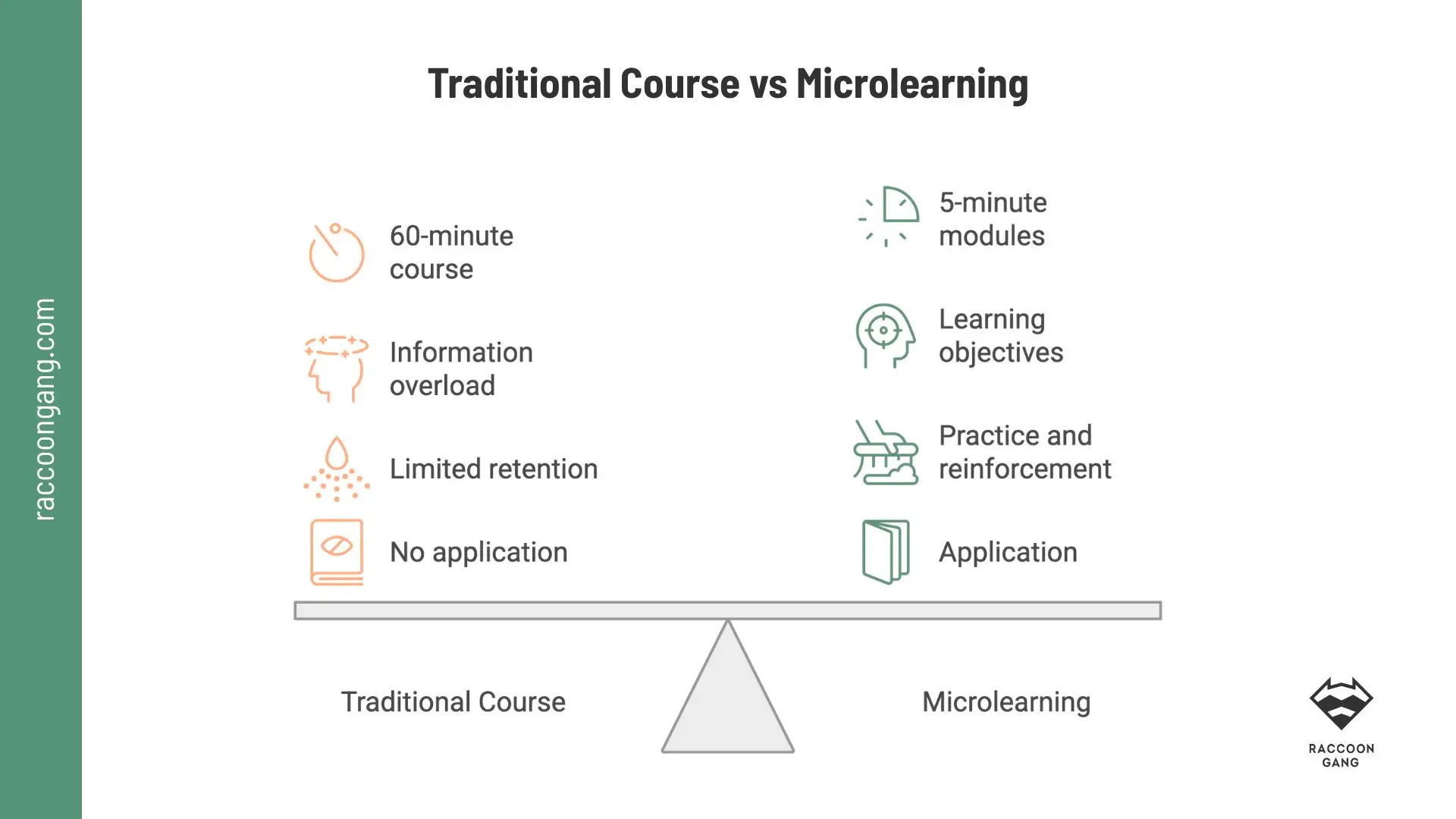
Short duration sets the format. Learning transfer depends on focused objectives, meaningful practice, feedback, and reinforcement across the learning path.
What Is Microlearning in Instructional Design?
So, if microlearning means more than splitting a one-hour lecture into six 10-minute units, what is micro-learning in instructional design, exactly?
As a design model, it organizes a course or lesson around one action, decision, or knowledge need. Instructional design turns a random short video or a bulk of slides into a useful step within a larger learning path.
Think of learning a language by opening random textbook pages. You may pick up a few words, yet your knowledge stays fragmented. Microlearning faces the same risk. To prevent it, instructional designers rely on three elements:
- Microlearning gives each unit one objective.
- Instructional design principles connect content, practice, feedback, and assessment.
- Performance-focused learning links the unit to an observable action.
A review of 40 studies reported positive cognitive, behavioral, and affective outcomes. The authors also found gaps in definitions and instructional methods. A separate trial with 60 ICU nurses found that mobile microlearning reduced stress and anxiety. The results look promising.
One unit = one performance target + essential context + learner action + feedback.
When Microlearning Works — and When to Choose Another Format
Consider a customer support team that routes unusual refund requests to the wrong department. A microlearning unit could present one realistic case, ask the learner to select an escalation route, and explain the result. A linked job aid would cover the full policy.
Now compare the customer support case with a classic webinar. Even when separated into ten clips, the webinar may still feel disconnected from the learner’s work. Engagement and completion rates may remain low.
The first microlearning example addresses one clear performance gap. The second simply divides existing material, whether it is an hour-long video or a stack of slides. The matrix below will help you see when microlearning best practices can improve your course and when a longer, more traditional format will work better.
Microlearning Decision Matrix: Match the Format to the Learning Need
| Learning need | Microlearning fit | Why | Example |
| Procedural skills | Strong | Learners can follow one clear sequence | Submit an incident report |
| Product updates | Strong | Each unit can explain one change | Apply a new product feature |
| Software training | Strong | Learners can copy one screen-based task | Build a CRM report |
| Compliance refreshers | Strong | Short scenarios revisit high-risk decisions | Recognize a conflict of interest |
| Onboarding reinforcement | Strong | Follow-ups revisit tasks after initial training | Prepare for a 30-day review |
| Sales enablement | Strong | Reps can rehearse one message or response | Handle a pricing objection |
| Customer education | Strong | Each unit solves one product need | Add account administrators |
| Complex conceptual learning | Supporting role | Learners must connect several ideas | Review terminology before a course |
| Strategic thinking | Supporting role | Decisions involve ambiguity and trade-offs | Revisit a framework after a workshop |
| Collaborative problem-solving | Limited alone | Progress depends on discussion and shared decisions | Prepare teams for a group exercise |
| Deep certification programs | Supporting role | Certification requires broad knowledge and cumulative assessment | Run revision quizzes between modules |
“Microlearning techniques should not be viewed as a replacement for other types of learning delivery. It is part of a larger learning ecosystem.”
— Karl M. Kapp, Professor of Instructional Technology and author of the book Microlearning
The Microlearning Design Model: Performance, Practice, and Reinforcement
A microlearning design model identifies the smallest complete performance moment learners can practice. An important detail, the learners don’t lose essential context. Instructional designers divide content at task and decision boundaries instead of arbitrary timestamps, then connect each unit. Here you can find the main distinction between designed microlearning and an ordinary course cut into smaller pieces.
Typical framework groups seven design steps into three phases.
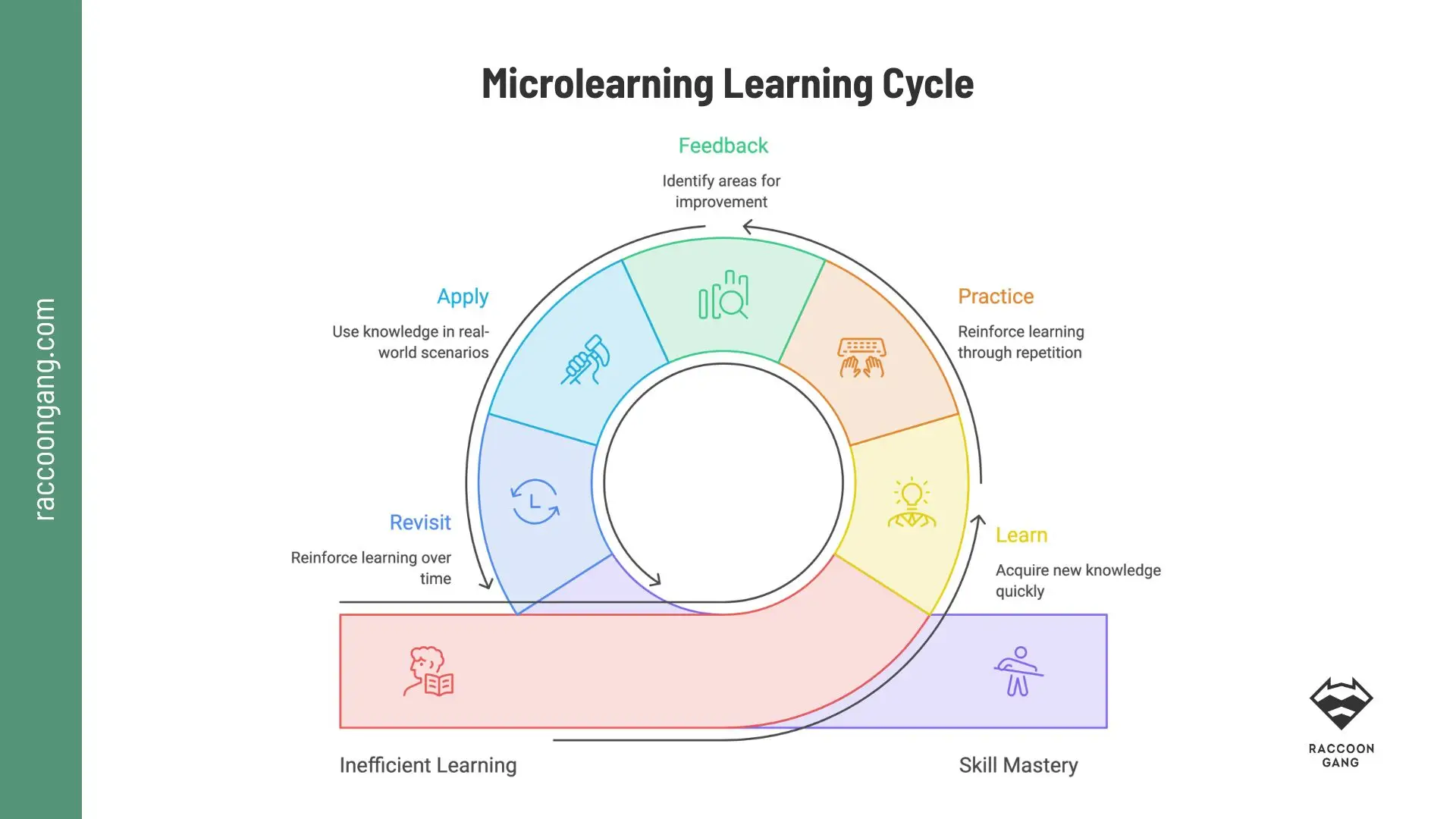
Repetition adds value when learners make the decision again in a new context. Replaying the same asset rarely tests learning transfer.
1. Performance: Define What Must Change
Define the performance outcome. Start with an observable result. “Understand the refund policy” gives the designer little direction. “Route an unusual refund request to the correct team” defines an action that you can teach and measure.
Analyze learner tasks. Break that action into its triggers, decisions, steps, and common errors. Review support tickets, quality reports, incident records, or manager feedback. What do experienced employees notice that new hires miss?
Chunk content logically. Build each unit around one task or decision. Keep required context inside the lesson. Move detailed policies, reference tables, and rare exceptions into job aids. Chunk by workflow, rather than slide count.
“‘Micro learning’ is learning from content accessed in short bursts, content which is relevant to the individual, and repeated over time to ensure retention and build conceptual understanding.”
— Donald H. Taylor, recognized thinker in the fields of workplace learning and supporting technologies
2. Practice: Make Learners Respond
Design practice. Watching content without practice will not bring success in resolving your support tickets. Avoid courses or modules where learners simply consume content. Only practice asks learners to apply information they acquire.
Always provide useful feedback. “Incorrect” tells learners very little. Explain which cue they missed and why their choice could cause a problem.
During eLearning content development, feedback should identify the missed cue and explain the next action. For example: You selected “Reply to sender.” The email contains an unfamiliar link and an urgent payment request. Report it through the security channel instead.
3. Reinforcement: Continue After Completion
Reinforce learning. In one habit formation study, simple behaviors took a median of 66 days to become automatic. Habit formation and skill development are different processes. Still, one short module is rarely enough to apply a new skill in daily work. For better retention, use follow-up scenarios, retrieval questions, job aids, or LMS reminders. Experienced instructional designers plan these activities during the reinforcement step.
Measure application. Completion confirms that someone finished the unit. Workplace data shows whether the design worked. Track the metric connected to the original performance gap, such as:
- Misrouted support requests
- Time to complete a software task
- Compliance reporting errors
- Repeat support tickets
- Product feature adoption
- Time to proficiency
In the phishing example, instructional design for microlearning connects every decision to one measurable behavior: reporting suspicious emails through the correct security channel. The team reviews common warning signs, builds short email scenarios, explains missed cues, schedules follow-up practice, and tracks reporting accuracy during phishing simulations. One security risk guides the full sequence.
How to Convert an Existing Course into Microlearning
By now, you probably have plenty of learning materials, right? Courses, policies, presentations, and PDFs full of training content. Some teams use and update them. Others have been collecting digital dust in a forgotten folder.
To understand how to create microlearning from these materials, keep two things in mind. First, existing assets can bring more value when you review and reorganize them around short, focused learner tasks. Second, separate what learners must remember, what they must do, and what they can look up later.
Follow these five steps to convert existing courses or separate materials into microlearning modules.
1. Identify the Learning Objectives
List every course objective. Then rewrite vague goals such as “understand data security” as observable actions:
- Identify a suspicious email.
- Report it through the correct channel.
- Avoid sharing sensitive information.
If an objective contains several actions, split it.
2. Remove or Relocate Content
Keep essential context inside the lesson. Move detailed policies, reference tables, background history, and rare exceptions into job aids. Removal sometimes means relocation.
3. Create Independent Modules
Each module needs:
- One objective
- Enough context
- One practice activity
- Useful feedback
- A task-based title
Independent modules should make sense when learners open them during work. It would be better to avoid references such as “as we covered in the previous lesson.”
4. Design Clear Transitions
Independent modules still need connections. Briefly explain what learners completed, what comes next, and why the next unit matters. Add prerequisites only when one skill genuinely depends on another.
For example: You can now identify a suspicious email. Next, practice reporting it through the correct security channel.
5. Sequence the Learning Path
The original course may follow the SME’s content order. The new path should follow the learner’s workflow.
Start with required knowledge. Then add role-specific modules, practice scenarios, job aids, and spaced follow-ups. Diagnostics can help experienced learners skip familiar content.
A 45-minute security course might become:
- A suspicious-email scenario
- A reporting walkthrough
- A downloadable response checklist
- A follow-up scenario
- A role-specific refresher
Teams deciding how to develop microlearning at scale should document this sequence before moving on to production. At this step, you finally connect modules and prevent the future learning path from becoming a folder of unrelated assets.
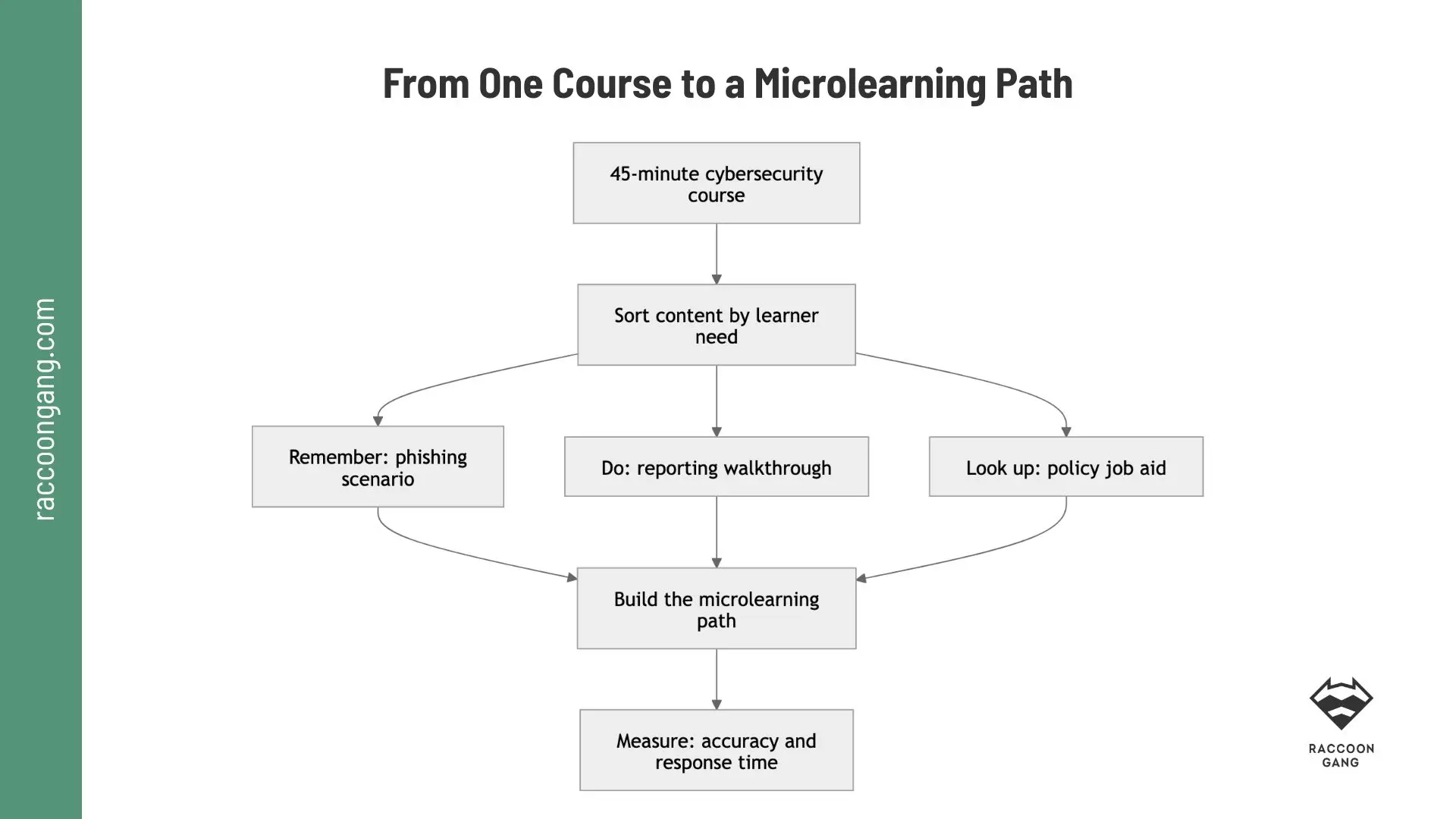
Cybersecurity example showing how instructional designers sort existing course content into recall practice, procedural guidance, performance support, and measurable workplace outcomes.
Microlearning Best Practices: How Learning Science Helps
Within microlearning best practices, learning science acts as a design principle for every element: define the required behavior, reduce unnecessary cognitive load, create opportunities to recall and apply knowledge, and then check whether it transfers to work.
A 2025 paper on organizational learning, citing earlier research, notes that only 10–15% of learned content transfers to the workplace. Transfer — the application of acquired knowledge and skills at work — therefore remains a key measure of corporate learning success.
Microlearning Best Practices by Design Area
| Category | Recommended approach | What it looks like |
| Content Design | Build each unit around one task, decision, or concept. Keep essential context and move reference-heavy details into job aids. | A module teaches employees how to report a suspicious email. A linked policy covers every security rule. |
| Interaction Design | Ask learners to perform an action that reflects their work. Avoid interactions that only reveal more text. | Learners inspect an email, select warning signs, and choose a reporting action. |
| Assessment | Measure application through realistic decisions. Explain missed cues and allow another attempt. | Feedback shows why an email looks suspicious and which reporting step comes next. |
| Visual Design | Use visuals to direct attention. Annotate screenshots, highlight relevant details, and remove decorative media. | An arrow points to a misleading sender address instead of adding an unrelated stock photo. |
| Reinforcement | Bring the skill back through retrieval questions, varied scenarios, and job aids. Set the timing around task frequency and risk. | The LMS assigns another phishing scenario after the first module or after a repeated error. |
| Accessibility | Plan captions, transcripts, keyboard access, alt text, readable contrast, and plain language from the start. | Learners can complete the same activity with audio, text, keyboard, or assistive technology. |
| Mobile Experience | Test the module on the devices learners use. Keep text readable, controls easy to tap, and media light enough for slower connections. | A learner can review the reporting steps on a phone without zooming or precise dragging. |
* If removing an element changes neither understanding nor practice, remove it.
How to Reinforce Microlearning Through Your LMS
An LMS creates the right conditions for microlearning. The platform can control timing, sequencing, feedback, and repeated practice. Leading learning systems such as Open edX, Moodle, and Canvas support most of these workflows through native settings, extensions, plugins, or integrations.
- Learning paths connect modules in a logical sequence. The LMS displays units in a set order, records progress, and opens each next step.
- Prerequisites keep dependent skills in the correct order. The platform checks completion or assessment scores before granting access to the next unit.
- Role-based assignments give each audience relevant content. The LMS assigns units automatically based on a learner’s role, group, department, or cohort.
- Scheduled release distributes learning across several touchpoints. The platform publishes content on set dates or at defined intervals after enrollment.
- Automated reminders bring learners back at planned intervals. The LMS sends email or in-platform notifications based on due dates, inactivity, or certification expiry.
- Adaptive sequencing assign the next unit based on performance. The platform uses scores and responses to open, skip, or assign the next activity.
- Question banks provide varied retrieval practice. The LMS draws questions from a configured pool and generates a different combination for each attempt.
- Search and mobile access support learners during work. The platform indexes titles and tags, returns relevant resources, and displays them on mobile devices.
- Analytics dashboards uncover errors, attempts, and weak points. The LMS collects learner activity and assessment data, then displays patterns in reports and dashboards.
- HRIS or CRM integrations trigger learning from workplace events. The LMS receives role or event data through an integration and automatically enrolls the right learner.
Microlearning Strategies for Enterprise Learning
An enterprise microlearning strategy defines four key elements: the target audience for each unit, the event that triggers delivery, the LMS mechanisms that reinforce learning, and the performance signal the team will monitor.
| Strategy | Main use case | Enterprise example |
| Role-based learning paths | Onboarding across departments | All employees complete core security units. Sales, support, and managers then receive role-specific scenarios. |
| Trigger-based learning | Software or process updates | A short walkthrough appears when employees first use a new CRM workflow. |
| Spaced refreshers | Compliance and safety training | Learners receive short decision scenarios after the main course. Repeated errors trigger extra practice. |
| Adaptive remediation | Mixed knowledge levels | A diagnostic identifies gaps. The LMS assigns only the units each learner needs. |
| Scenario series | Sales, support, and manager training | Each unit presents one customer objection, escalation case, or coaching conversation. |
| Manager-led reinforcement | Applying skills during work | Managers receive observation prompts and discussion questions after employees complete a unit. |
| Customer education sequences | Product onboarding and adoption | Customers receive short lessons based on their role, account stage, or product activity. |
| Release-based updates | Product and policy changes | Employees receive a focused update, practice task, and linked reference guide before the change takes effect. |
* How to keep the course focused: Role + trigger + required action + reinforcement + metric
** For example: Employee + suspicious email + report it correctly + follow-up scenario + reporting rate.
Common Microlearning Mistakes
Use this checklist to review a microlearning module before launch.
Learning objective
- The module targets one specific learning objective.
- The objective describes an observable action, not a vague concept.
- The expected performance is relevant to the learner’s role.
- The module does not attempt to cover several unrelated skills.
- Success can be measured through a practical task or assessment.
Content scope
- The module focuses on one task, decision, or concept.
- Unnecessary background information has been removed.
- Required context remains inside the lesson.
- Detailed policies and rare exceptions are available as job aids.
- The content is chunked by workflow rather than by slide count.
- The module is short because it is focused—not because important information was omitted.
Learner relevance
- The content addresses a real workplace need.
- Learners can apply the information immediately.
- Examples reflect realistic situations.
- The module uses the learner’s terminology and processes.
- The content answers the question: “What should I do differently after this?”
Interaction and practice
- The module includes a meaningful interaction or decision.
- Learners practice the same type of action they must perform at work.
- Scenarios reflect common mistakes or difficult decisions.
- Feedback explains why an answer is correct or incorrect.
- The assessment measures application, not simple recall.
- Learners receive another opportunity to practice after an incorrect response.
Content design
- The module does not simply divide a long course into shorter sections.
- Each screen or activity has a clear purpose.
- The module avoids excessive text, decorative media, and unnecessary animation.
- Visuals clarify the task or decision.
- Audio and video are used only when they improve understanding.
- The content supports retrieval and spaced repetition where appropriate.
Performance support
- Learners can quickly find the module when they need it.
- The title clearly describes the task or problem it addresses.
- Key steps are easy to scan.
- Checklists, decision trees, templates, or reference tables are available where useful.
- The module links to relevant policies, systems, or support resources.
- Learners do not need to remember information that could be provided as a job aid.
Accessibility and usability
- The module works on the devices used by the target audience.
- Text is readable on small screens.
- Captions or transcripts are available for audio and video.
- Color is not the only way to communicate meaning.
- Interactive elements are usable with a keyboard or assistive technology where required.
- The module has been tested with representative users.
- The learning experience does not depend on a high-speed connection.
Assessment and measurement
- Completion is not the only success metric.
- The assessment reflects the target performance.
- Knowledge checks do not reward guessing.
- Results can be connected to workplace indicators where possible.
- The team has defined what will be measured: accuracy, speed, escalation rate, quality, or error reduction.
- Learner feedback is collected without replacing performance data.
Governance and maintenance
- The content owner is clearly identified.
- The review date is documented.
- Policies, screenshots, links, and workflows have been verified.
- The module has a version number.
- Outdated content can be updated without rebuilding the entire learning path.
- Localization requirements have been considered.
- Analytics are configured before launch.
Red flags
The module probably needs revision if:
- “Understand” is the main learning objective.
- The module is short but still contains several unrelated topics.
- Learners only watch a video and answer recall questions.
- Completion is treated as proof of behavior change.
- Important exceptions were removed only to keep the module short.
- The content cannot be found at the moment of need.
- The module has no owner or review date.
- A long course was merely split into smaller files.

How Raccoon Gang Designs Microlearning Programs
Raccoon Gang connects instructional design with learning technology across more than 200 projects. Each specialist in the Instructional Department owns a clear part of the program:
- Learning architecture
- Instructional design
- Scenario-based learning
- LMS delivery
- Adaptive learning
- Analytics
- Gamification
In 2023, Raccoon Gang led instructional design and curriculum development for five modules and 25 lessons, totaling 12.5 hours for NASA’s Open Science 101.
The team built the content in Articulate Rise 360 and delivered it as SCORM through Open edX. The project illustrates how modular content, platform delivery, learner tracking, and credentials can work within one learning architecture.
Conclusion: From Short Modules to Better Performance
Instructional design for microlearning adds another layer of purpose. Unlike simply dividing a course into shorter modules, the instructional design component keeps better performance as the goal.
By applying microlearning best practices, you can connect each unit to one workplace action. Your learners, in turn, receive meaningful practice and reinforce their knowledge over time.
When you use LMS capabilities to deliver the intended microlearning approach, features such as sequencing, reminders, adaptive assignments, and analytics support the learning process.
Technology in the form of an LMS and learning science in the form of instructional design work together to create a structured course or training program, rather than giving learners a fragmented set of knowledge.
As a final note, consider whether to keep development in-house or outsource part of the work — or the entire course. Our guide, When to Outsource Instructional Design: A Decision Guide for L&D Teams, explains when external support makes sense for your scope and internal capacity.
FAQ
What is microlearning in instructional design?
How do you develop effective microlearning?
What is a microlearning design model?
What are the best microlearning techniques?
When should organizations use microlearning?
Can an LMS support microlearning programs?



- What Is Microlearning in Instructional Design?
- When Microlearning Works — and When to Choose Another Format
- The Microlearning Design Model: Performance, Practice, and Reinforcement
- How to Convert an Existing Course into Microlearning
- Microlearning Best Practices: How Learning Science Helps
- How to Reinforce Microlearning Through Your LMS
- Microlearning Strategies for Enterprise Learning
- Common Microlearning Mistakes
- How Raccoon Gang Designs Microlearning Programs
- Conclusion: From Short Modules to Better Performance